
xterm3
pub.dev/packages/xterm3 · API reference · Changelog · Source
xterm3 is a terminal emulator for Flutter applications, on mobile and desktop. It ships a headless emulation core with no Flutter dependency and a renderer on top of it, so the terminal can be driven — and tested — without a widget tree.
It continues the line that started with
xterm from
TerminalStudio/xterm.dart and
was kept alive as xterm2. The original
package is unmaintained, and xterm2 has since diverged far enough —
rewritten renderer, reworked buffer and reflow, new input and search paths —
that it continues here under its own name. xterm2 users migrate by changing
the dependency and the package in imports; the public API is unchanged.
Requires Flutter >= 3.19.0
Performance
Same workloads, same harness, three packages. Every number below is
reproducible from script/cross_bench/, which depends on all three at once and
drives each through its headless core.dart — so nothing per-package sits in
the measured path.
xterm 4.0.0 · xterm2 5.2.0 · xterm3 6.3.0. Grid 170x50, 10000 lines of
scrollback, 32 MiB per workload in 8 KiB chunks, AOT-compiled, one package per
process, three interleaved rounds. Apple M1 Pro, macOS 26.5.1, Dart 3.12.2.
Write throughput, MiB/s — higher is better:
| workload | xterm |
xterm2 |
xterm3 |
vs xterm |
|---|---|---|---|---|
| plain ASCII output | 15.8 | 86.6 | 113.4 | 7.2x |
| lines wider than the window | 16.6 | 117.8 | 135.5 | 8.2x |
| SGR-heavy (coloured) output | 18.8 | 60.8 | 57.4 | 3.1x |
| UTF-8 (Turkish) | 15.4 | 14.2 | 63.5 | 4.1x |
| Cyrillic | 14.8 | 5.5 | 90.4 | 6.1x |
| alt-screen TUI redraw | 19.2 | 133.2 | 139.1 | 7.2x |
Scrollback residency, MiB — 10000 lines of ls -l-shaped output retained
at a 170-column window; lower is better:
xterm |
xterm2 |
xterm3 |
|
|---|---|---|---|
| resident scrollback | 85.8 | 79.3 | 52.8 |
Resize reflow, ms — one 170 → 80 → 170 column pair with the scrollback full, rewrapping all 10000 retained lines twice; lower is better:
xterm |
xterm2 |
xterm3 |
|
|---|---|---|---|
| per resize | 10.6 | 4.7 | 4.6 |
Two rows are worth reading honestly rather than as a scoreboard. SGR output
is 6% slower than xterm2 — a known price of sizing line storage from what a
line actually writes, which is what buys the scrollback row; the alternatives
were measured at -22% and -14% elsewhere. And reflow is level with xterm2;
the 2.3x there is against xterm, not against the immediate predecessor.
The large gaps are on non-ASCII text, and they are structural: both older
packages leave the batched write path at the first accented letter, so a
language not written in ASCII never batches at all. xterm2 is slower than
xterm on Cyrillic for that reason — the rest of its write path got faster
around a per-code-point loop that did not.
Renderer frame times, the workloads behind them, and every change that was measured and rejected are in BENCHMARKS.md. Nothing in this package is accepted on the argument that it ought to be faster.
Screenshots
Every image below is a real frame painted by TerminalView, produced by
example/lib/screenshot.dart from PTY recordings in
example/assets/screenshots/ — so they can be regenerated rather than
retouched. Grid 100x30, Cascadia Mono at 13pt.
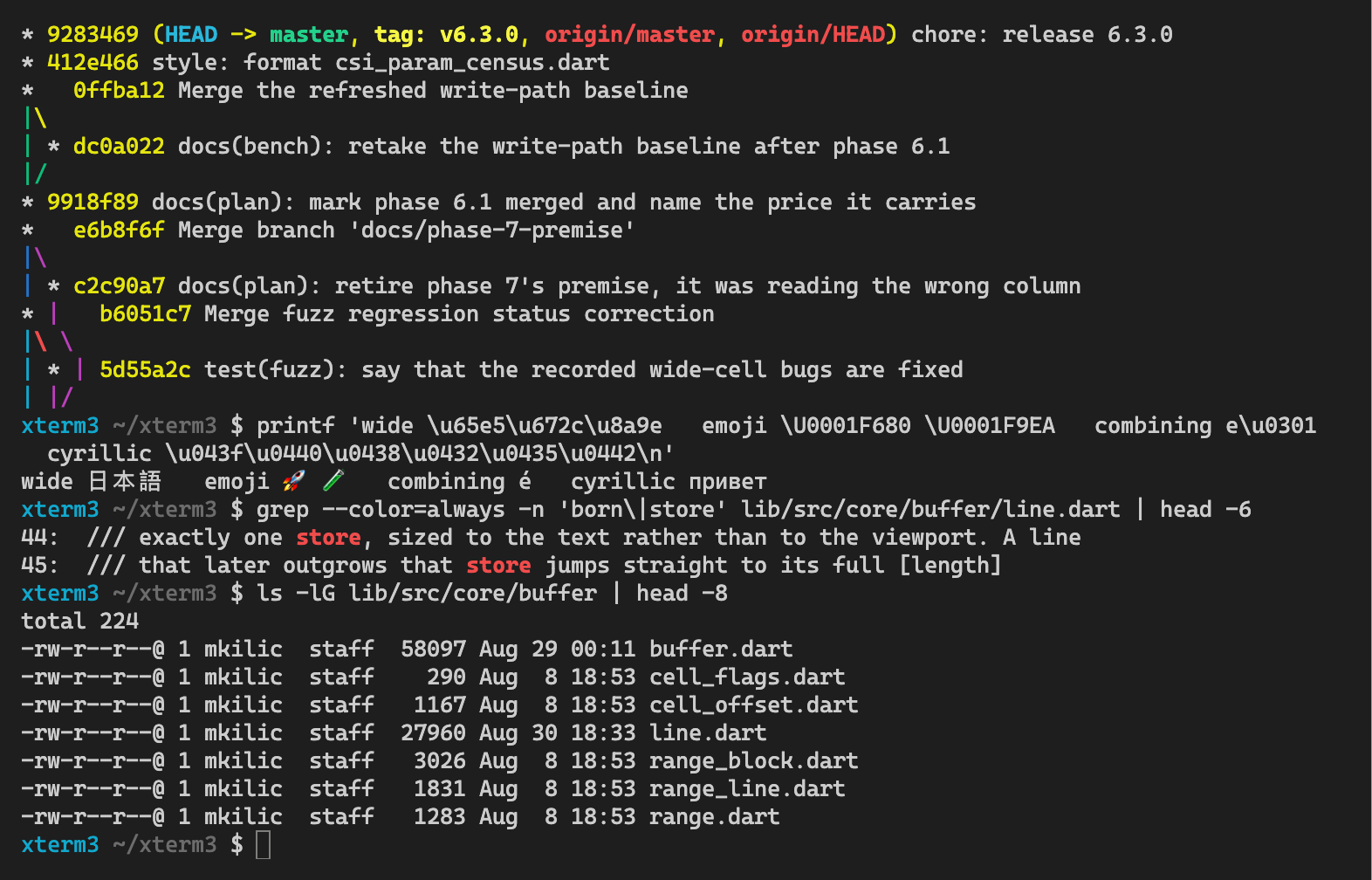
Shell — SGR colour, CJK, emoji, combining marks, Cyrillic |
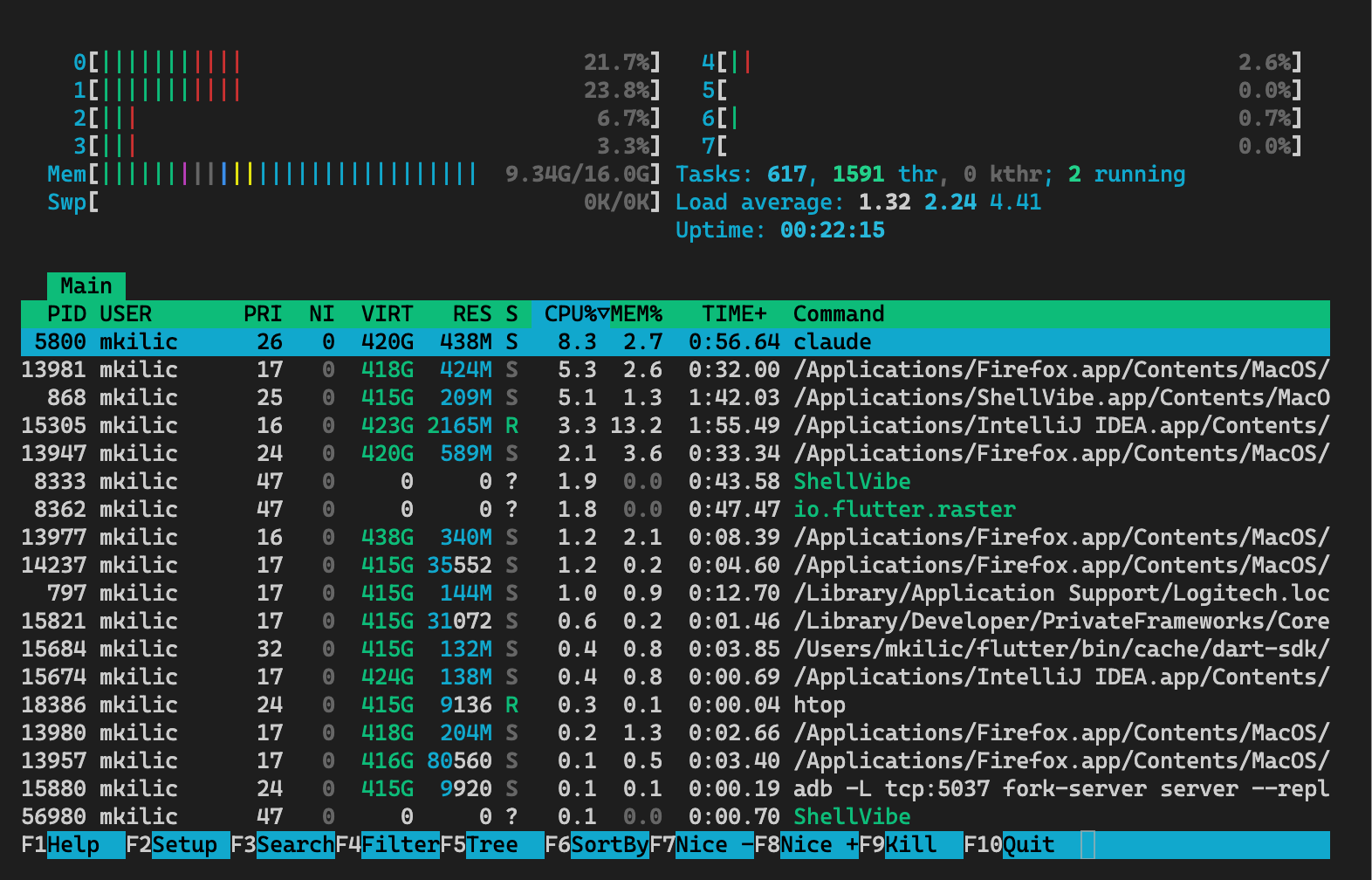
htop — block elements and meters, drawn procedurally |
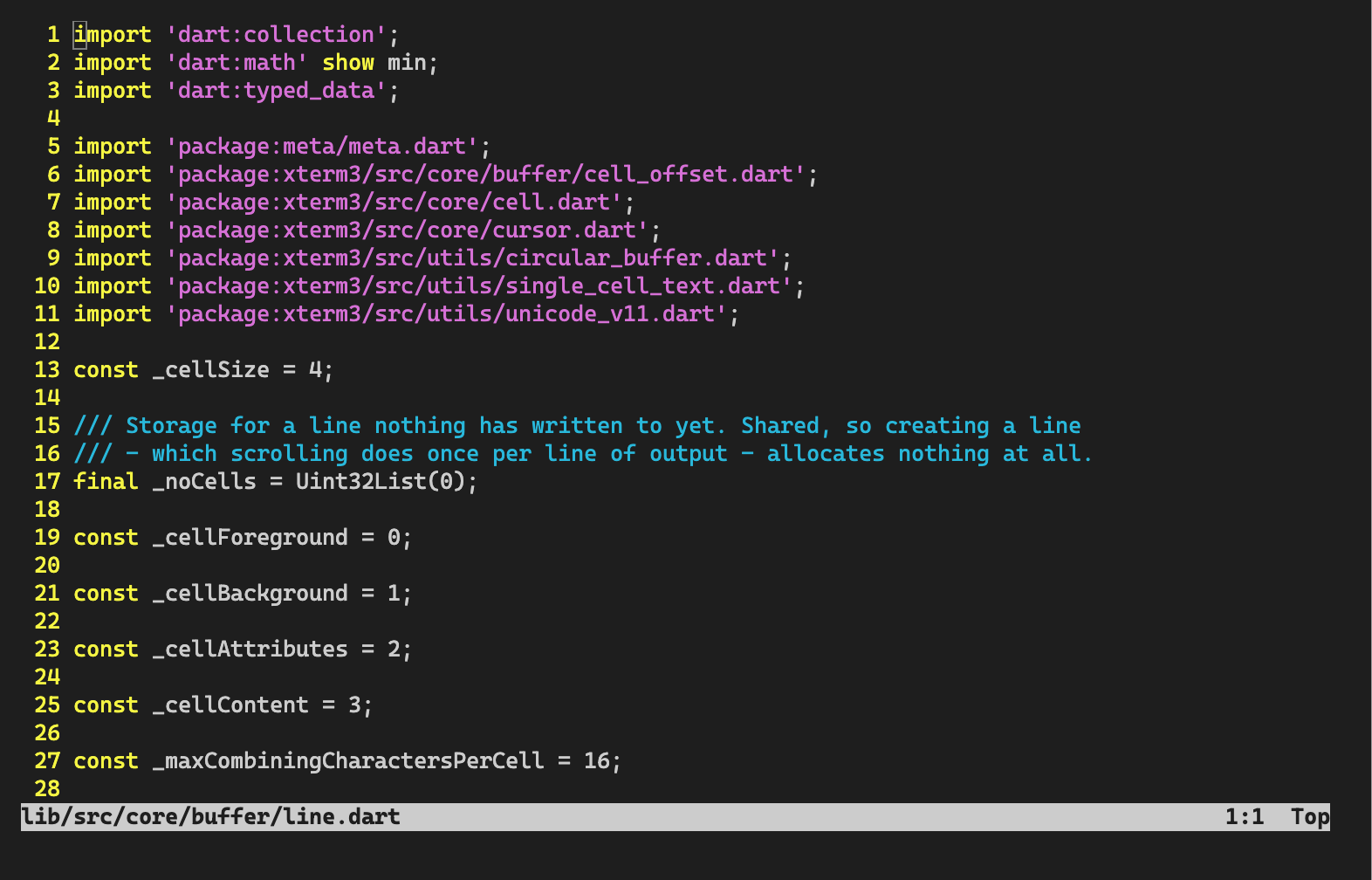
vim — full-screen redraw on the alternate screen |
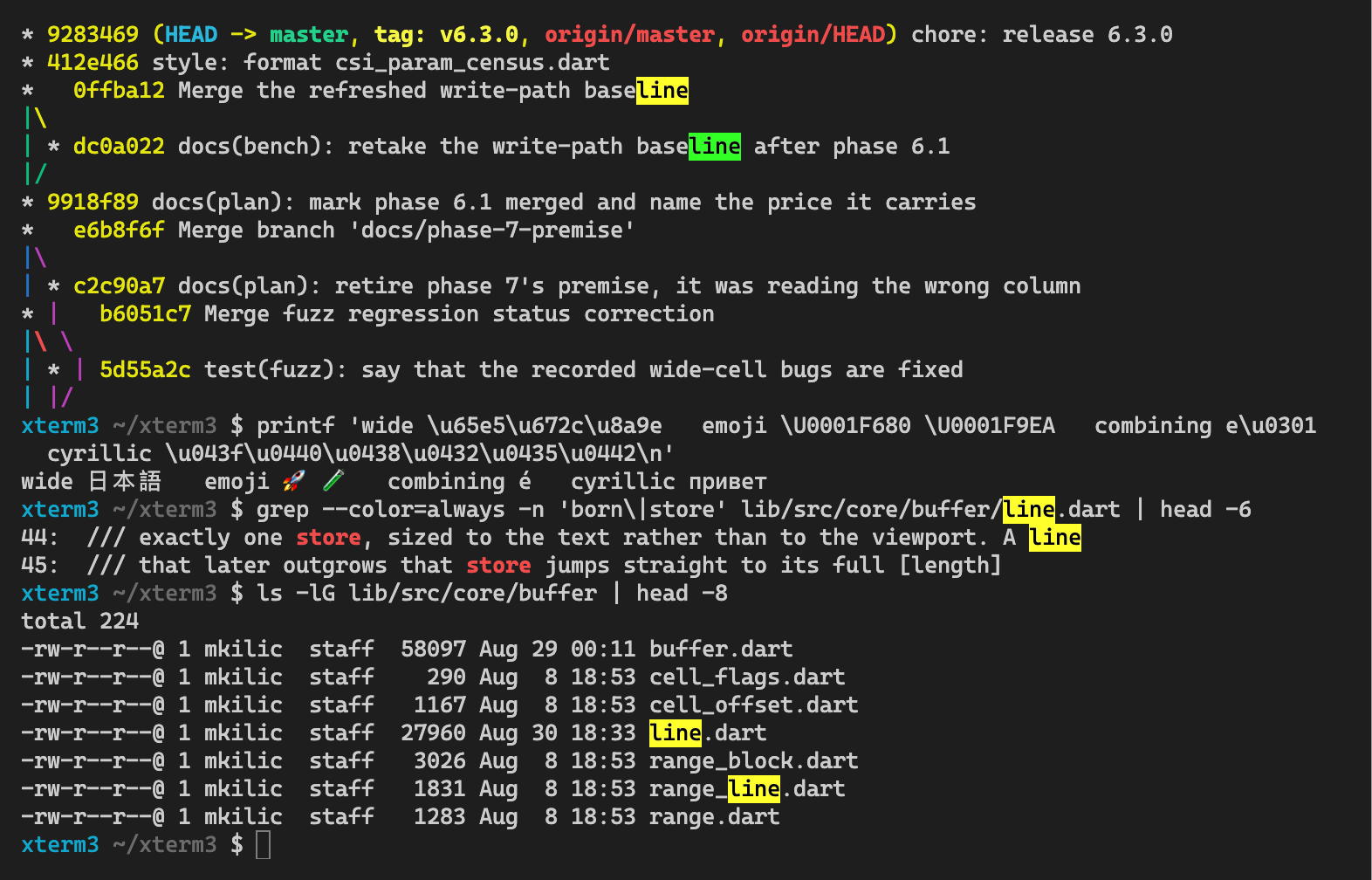
Search — every match in the scrollback, one of them active |
Features
- 📦 Works out of the box. No special configuration required.
- ✔ Frontend independent. The emulation core runs without Flutter —
package:xterm3/core.darthas nodart:uion any path. - 😀 Unicode 17. Wide characters, grapheme clusters, emoji sequences, and a batched write path that covers Latin, Greek, Cyrillic and Armenian rather than ASCII alone.
- 🔍 Search. Bounded, Unicode-aware, across soft wraps, with a distinct
active match —
Terminal.search. - 🔗 Hyperlinks. OSC 8, plus plain
http(s)://andwww.text detected in the buffer. Modifier-click on desktop, tap on touch. - 🎨 Procedural glyphs. Box drawing, blocks, mosaics, Braille and Powerline drawn directly, so they tile without font seams at any cell size.
- 🔤 Ligatures. Opt-in via
TerminalStyle(enableLigatures: true)with a ligature-capable font such as Fira Code, JetBrains Mono or Iosevka. A ligature is drawn only where it fills exactly the cells it covers, so the grid never shifts; anything else falls back to per-cell painting. - 🖱 Mouse reporting. DEC modes 1000/1002/1003 with normal, UTF-8, SGR, SGR-pixel and urxvt encodings; extended buttons, horizontal wheel, and Shift+wheel scrollback that survives an application grabbing the mouse.
- ⌨️ Modern key encoding. Kitty keyboard protocol, fixterms chords, and correct modified arrows, function keys, Enter and Escape.
- 🈂️ IME-aware. Composition is held back until the keyboard commits it, in both delete-detection modes — Turkish and CJK text arrives once, correctly.
- 🧭 Semantic prompts. OSC 133/633 anchors tracked across scrollback and reflow, with shortcuts to jump between them.
- ⏱ Paced writing.
PacedTerminalWriterfeeds PTY output a frame's worth at a time: a burst drains ~50% slower and stays at 75fps instead of 37. - 🎛 Runtime theming, synchronized output (DEC 2026), DECSCUSR cursor shapes, focus reporting, and OSC 7 working-directory updates.
Getting Started
1. Add the package from pub.dev:
flutter pub add xterm3
or add it to your package's pubspec.yaml file by hand:
dependencies:
  ...
  xterm3: ^6.3.0
2. Create the terminal:
import 'package:xterm3/xterm.dart';
...
terminal = Terminal();
Listen to user interaction with the terminal by simply adding a onOutput callback:
terminal = Terminal();

terminal.onOutput = (output) {
  print('output: $output');
}
3. Create the view, attach the terminal to the view:
import 'package:xterm3/flutter.dart';
...
child: TerminalView(terminal),
4. Write something to the terminal:
terminal.write('Hello, world!');
Done!
More examples
-
Write a simple terminal in ~100 lines of code: https://github.com/klc/xterm3/blob/master/example/lib/main.dart
-
Write a SSH client in ~100 lines of code with dartssh2: https://github.com/klc/xterm3/blob/master/example/lib/ssh.dart
-
Regenerate the screenshots above:
python3 script/screenshots/record.py, thencd example && flutter run --release -d macos -t lib/screenshot.dart
For the original package history, see TerminalStudio/xterm.dart.
Migrating from xterm2
The public API is unchanged. Three mechanical edits:
xterm2: ^5.3.0becomesxterm3: ^6.3.0inpubspec.yaml.package:xterm2/...becomespackage:xterm3/...in imports. The entry point keeps its name:import 'package:xterm3/xterm.dart';.XTERM2_FUZZ_ROUNDSbecomesXTERM3_FUZZ_ROUNDS.
Note the licence change below: xterm2 5.3.0 and earlier are MIT, xterm3
6.0.0 and later are AGPL.
Features and bugs
Please file feature requests and bugs at the issue tracker.
Contributions are always welcome!
License
xterm3 is licensed under the GNU Affero General Public License v3.0 or
later (AGPL-3.0-or-later). Linking it into an application makes that
application a work covered by the AGPL: if you distribute it, or let users
interact with it over a network, you must offer them its complete corresponding
source under the same license.
The xterm and xterm2 work this package is derived from is MIT licensed and
stays available under those terms; that notice is kept in LICENSE.MIT
and NOTICE. Versions up to xterm2 5.3.0 are unaffected by this
change — the AGPL applies from xterm3 6.0.0 onward.
Libraries
- core
- Terminal emulation core: escape-sequence parsing, the buffer/cell model, and the headless terminal engine. No Flutter dependency.
- flutter
- Alias for
ui.dart, named to match Flutter'spackage:flutter/...import convention. - suggestion
- ui
- Flutter rendering for xterm3: the terminal view widget, controller, themes, cursor/selection styling, and keyboard shortcuts.
- utils
- xterm
- The full xterm3 package: terminal emulation core, the Flutter view widget, and ZModem file-transfer support. This is the package's main entry point.
- zmodem