
unified_esc_pos_printer
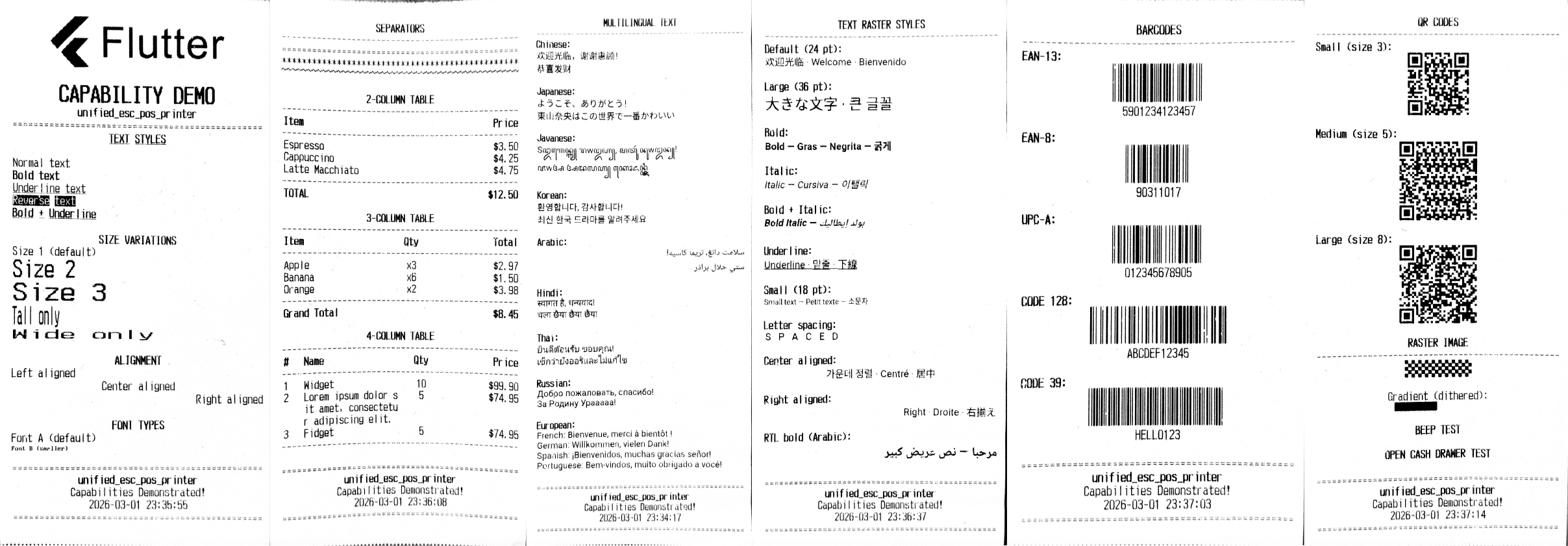
A unified ESC/POS thermal printer package for Flutter. Supports USB, Bluetooth Classic, BLE, and Network connections through a single PrinterManager API. Includes a full ESC/POS command generator with text formatting, images, barcodes, QR codes, table layouts, cash drawer control, and multilingual text rasterization.
Features
- Unified API — Network (TCP/IP), Bluetooth Classic (SPP), BLE, and USB through a single
PrinterManager - Device discovery — Scan for printers across all connection types simultaneously or filter by type
- Text formatting — Bold, underline, reverse, alignment, 8 size multipliers, Font A/B
- Table layouts — Flex-based multi-column rows with per-column styling and text wrapping
- Raster table layouts — Flutter
TextStyle-powered columns for any font, script, or style - Image printing — Column format (ESC*) and raster formats (GS v 0 / GS(L) with auto-resizing
- Barcodes — UPC-A, UPC-E, EAN-13, EAN-8, CODE39, ITF, CODABAR, CODE128
- QR codes — Native printer QR generation with 8 sizes and 4 error correction levels
- Text rasterization — Print any script (Chinese, Japanese, Korean, Arabic RTL, etc.) as Flutter-rendered images
- Cash drawer — Pin 2 and Pin 5 kick commands
- Beep — Configurable buzzer count and duration
- Capability profiles — 200+ built-in printer model profiles with code page mappings
- Connection state tracking — Validated state transitions with broadcast streams
- Typed exceptions — Granular exception hierarchy for connection, permission, write, and scan errors
Print Results
Platform Support
| Connection | Android | iOS | Windows | Linux | macOS |
|---|---|---|---|---|---|
| Network (TCP/IP) | Yes | Yes | Yes | Yes | Yes |
| Bluetooth Classic | Yes | — | Yes | — | — |
| BLE | Yes | Yes | Yes | — | — |
| USB | Yes (OTG) | — | Yes (Print Spooler) | Yes (serial) | Yes (serial) |
Tested Devices
| Device | BLE | Bluetooth Classic | USB |
|---|---|---|---|
| RPP02N | Yes | Yes | Yes |
Getting Started
Installation
Add to your pubspec.yaml:
dependencies:
  unified_esc_pos_printer: any
Android Setup
Add the following permissions to android/app/src/main/AndroidManifest.xml:
<!-- Network -->
<uses-permission android:name="android.permission.INTERNET" />
<uses-permission android:name="android.permission.ACCESS_WIFI_STATE" />
<uses-permission android:name="android.permission.ACCESS_NETWORK_STATE" />

<!-- Bluetooth -->
<uses-permission android:name="android.permission.BLUETOOTH" />
<uses-permission android:name="android.permission.BLUETOOTH_ADMIN" />
<uses-permission android:name="android.permission.BLUETOOTH_CONNECT" />
<uses-permission android:name="android.permission.BLUETOOTH_SCAN" />
<uses-permission android:name="android.permission.ACCESS_FINE_LOCATION" />

<!-- USB -->
<uses-feature android:name="android.hardware.usb.host" android:required="false" />
iOS Setup
Add to ios/Runner/Info.plist:
<key>NSBluetoothAlwaysUsageDescription</key>
<string>Required to discover and connect to BLE printers.</string>
<key>NSLocalNetworkUsageDescription</key>
<string>Required to discover network printers.</string>
Windows / Linux / macOS
No additional configuration required for network printers. USB serial ports work out of the box via flutter_libserialport. On Windows, USB printers are accessed through the Print Spooler API.
Quick Start
import 'package:unified_esc_pos_printer/unified_esc_pos_printer.dart';

final manager = PrinterManager();

// Scan for printers (all connection types, 5-second timeout)
final printers = await manager.scanPrinters(
  timeout: const Duration(seconds: 5),
);

// Connect to the first discovered printer
await manager.connect(printers.first);

// Build a ticket
final ticket = await Ticket.create(PaperSize.mm80);
ticket.text(
  'Hello, Printer!',
  align: PrintAlign.center,
  style: const PrintTextStyle(
    bold: true,
    height: TextSize.size2,
    width: TextSize.size2,
  ),
);
ticket.cut();

// Print and clean up
await manager.printTicket(ticket);
await manager.disconnect();
manager.dispose();
Usage
Text Formatting
ticket.text('Normal text');
ticket.text('Bold text', style: const PrintTextStyle(bold: true));
ticket.text('Underline', style: const PrintTextStyle(underline: true));
ticket.text('Reverse', style: const PrintTextStyle(reverse: true));
ticket.text('Bold + Underline', style: const PrintTextStyle(bold: true, underline: true));

// Size multipliers (1x–8x)
ticket.text('Large', style: const PrintTextStyle(height: TextSize.size3, width: TextSize.size3));
ticket.text('Tall only', style: const PrintTextStyle(height: TextSize.size3, width: TextSize.size1));

// Alignment
ticket.text('Left', align: PrintAlign.left);
ticket.text('Center', align: PrintAlign.center);
ticket.text('Right', align: PrintAlign.right);

// Font selection
ticket.text('Font A', style: const PrintTextStyle(fontType: FontType.fontA));
ticket.text('Font B', style: const PrintTextStyle(fontType: FontType.fontB));

// Per-line code table override (must exist in the loaded capability profile)
ticket.text('Café coûté 12,50 €', style: const PrintTextStyle(codeTable: 'CP1252'));
Table Layouts
Use row() with PrintColumn for multi-column layouts. Columns use flex-based proportional sizing:
// 2-column receipt layout
ticket.row([
  PrintColumn(text: 'Espresso', flex: 2),
  PrintColumn(
    text: '\$3.50',
    flex: 1,
    align: PrintAlign.right,
  ),
]);

// 3-column layout with header
ticket.row([
  PrintColumn(text: 'Item', flex: 5, style: const PrintTextStyle(bold: true)),
  PrintColumn(
    text: 'Qty',
    flex: 3,
    align: PrintAlign.center,
    style: const PrintTextStyle(bold: true),
  ),
  PrintColumn(
    text: 'Total',
    flex: 4,
    align: PrintAlign.right,
    style: const PrintTextStyle(bold: true),
  ),
]);
Raster Table Layouts
Use rowRaster() with PrintRasterColumn for multi-column layouts rendered using Flutter's text engine. This supports any font, script, or TextStyle that Flutter can render — ideal for CJK, Arabic, or custom-styled columns:
// 2-column receipt layout with Flutter TextStyle
await ticket.rowRaster([
  PrintRasterColumn(text: 'Cappuccino', flex: 2),
  PrintRasterColumn(text: '\$4.50', flex: 1, align: PrintAlign.right),
]);

// Styled columns
await ticket.rowRaster([
  PrintRasterColumn(
    text: 'Bold Title',
    flex: 1,
    style: const TextStyle(fontSize: 28, fontWeight: FontWeight.bold),
  ),
  PrintRasterColumn(text: 'Normal', flex: 1, align: PrintAlign.right),
]);

// Multilingual columns
await ticket.rowRaster([
  PrintRasterColumn(text: '商品名', flex: 2),
  PrintRasterColumn(text: '数量', flex: 1, align: PrintAlign.center),
  PrintRasterColumn(text: '价格', flex: 1, align: PrintAlign.right),
]);

// RTL column
await ticket.rowRaster([
  PrintRasterColumn(
    text: 'السعر',
    flex: 1,
    textDirection: TextDirection.rtl,
    align: PrintAlign.right,
  ),
  PrintRasterColumn(text: 'Item', flex: 2),
]);
Separators
ticket.separator();            // ------------------------------------------------
ticket.separator(char: '=');   // ================================================
ticket.separator(char: '*');   // ************************************************
Images
import 'package:image/image.dart' as img;

// Load and print an image (raster mode)
final bytes = await rootBundle.load('assets/logo.png');
final image = img.decodeImage(bytes.buffer.asUint8List())!;

ticket.imageRaster(
  image,
  align: PrintAlign.center,
  maxWidth: 400,
  maxHeight: 200,
);

// Column format (ESC*)
ticket.image(image, align: PrintAlign.center);
Barcodes
Supported types: UPC-A, UPC-E, EAN-13, EAN-8, CODE39, ITF, CODABAR, CODE128.
ticket.barcode(
  '590123412345',
  type: BarcodeType.ean13,
  textPosition: BarcodeTextPosition.below,
);

ticket.barcode(
  '{BABCDEF12345',
  type: BarcodeType.code128,
  textPosition: BarcodeTextPosition.below,
);
QR Codes
Native printer QR generation with sizes 1–8 and error correction levels L/M/Q/H:
ticket.qrcode('https://example.com', size: QRSize.size5);

ticket.qrcode(
  'https://example.com',
  size: QRSize.size8,
  cor: QRCorrection.H,  // 30% error recovery
);
Text Rasterization
For scripts not supported by the printer's built-in character tables (CJK, Arabic, Devanagari, Thai, etc.), use textRaster() which renders text using Flutter's text engine and prints it as an image:
await ticket.textRaster('欢迎光临,谢谢惠顾!');       // Chinese
await ticket.textRaster('ようこそ、ありがとう!');     // Japanese
await ticket.textRaster('환영합니다, 감사합니다!');    // Korean
await ticket.textRaster('स्वागत है, धन्यवाद!');          // Hindi

// RTL support
await ticket.textRaster(
  'مرحبا — نص عريض كبير',
  textDirection: TextDirection.rtl,
  align: PrintAlign.right,
);

// Custom styling
await ticket.textRaster(
  'Large Bold Text',
  style: const TextStyle(fontSize: 36, fontWeight: FontWeight.bold),
  align: PrintAlign.center,
);
Cash Drawer & Beep
// Open cash drawer
ticket.openCashDrawer();                      // Pin 2 (default)
ticket.openCashDrawer(pin: CashDrawer.pin5);  // Pin 5

// Beep
ticket.beep(n: 3, duration: BeepDuration.beep100ms);
Scanning by Connection Type
// Scan all connection types
final all = await manager.scanPrinters();

// Scan specific types only
final networkOnly = await manager.scanPrinters(
  types: {PrinterConnectionType.network},
);

// Stream-based scanning for progressive results
manager.scanAll(timeout: const Duration(seconds: 5)).listen((devices) {
  print('Found ${devices.length} printers so far');
});
Connecting to Known Devices
// Network printer by IP
await manager.connect(NetworkPrinterDevice(
  name: 'Kitchen Printer',
  host: '192.168.1.100',
  port: 9100,
));

// BLE printer
await manager.connect(BlePrinterDevice(
  name: 'BLE Printer',
  deviceId: 'AA:BB:CC:DD:EE:FF',
));

// Bluetooth Classic printer
await manager.connect(BluetoothPrinterDevice(
  name: 'BT Printer',
  address: '11:22:33:44:55:66',
));
Connection State Management
PrinterManager exposes a broadcast stream of connection states:
manager.stateStream.listen((state) {
  switch (state) {
    case PrinterConnectionState.disconnected:
      print('Disconnected');
    case PrinterConnectionState.scanning:
      print('Scanning...');
    case PrinterConnectionState.connecting:
      print('Connecting...');
    case PrinterConnectionState.connected:
      print('Connected');
    case PrinterConnectionState.printing:
      print('Printing...');
    case PrinterConnectionState.disconnecting:
      print('Disconnecting...');
    case PrinterConnectionState.error:
      print('Error');
  }
});

// Quick checks
if (manager.isConnected) { ... }
final device = manager.connectedDevice;
Error Handling
The package provides a typed exception hierarchy:
try {
  await manager.connect(device);
  await manager.printTicket(ticket);
} on PrinterConnectionException catch (e) {
  print('Connection failed: ${e.message}');
} on PrinterWriteException catch (e) {
  print('Write failed: ${e.message}');
} on PrinterPermissionException catch (e) {
  print('Permission denied: ${e.message}');
} on PrinterNotFoundException catch (e) {
  print('Device not found: ${e.message}');
} on PrinterScanException catch (e) {
  print('Scan failed: ${e.message}');
} on PrinterStateException catch (e) {
  print('Invalid state: ${e.currentState} → ${e.requiredState}');
} on PrinterException catch (e) {
  print('Printer error: ${e.message}');
}
Raw Bytes
For advanced use cases, send raw ESC/POS command bytes:
// Via Ticket
ticket.rawBytes([0x1B, 0x40]); // ESC @ (initialize)

// Directly to printer
await manager.printBytes([0x1B, 0x40]);
API Reference
| Class | Description |
|---|---|
PrinterManager |
Unified facade for scanning, connecting, printing, and cash drawer control |
Ticket |
High-level ticket builder — text, images, barcodes, QR codes, tables |
Generator |
Low-level ESC/POS command generator returning raw byte sequences |
PrintTextStyle |
Immutable text style configuration (bold, underline, size, font) |
PrintColumn |
Column definition for table rows with flex-based sizing |
PrintRasterColumn |
Column definition for raster table rows with Flutter TextStyle support |
CapabilityProfile |
Printer capability and code page profile loader |
PrinterDevice |
Abstract base for NetworkPrinterDevice, BlePrinterDevice, BluetoothPrinterDevice, UsbPrinterDevice |
PrinterConnectionState |
Connection state enum with validated transitions |
PrinterException |
Base exception with subclasses for connection, write, permission, scan, state errors |
PrinterConnector |
Abstract connector interface (Network, BLE, Bluetooth, USB implementations) |
Paper Sizes
| Size | Width (pixels) | Font A (chars/line) | Font B (chars/line) |
|---|---|---|---|
| 58 mm | 384 | 32 | 42 |
| 72 mm | 512 | 42 | 56 |
| 80 mm | 576 | 48 | 64 |
Capability Profiles
The package bundles capability profiles for 200+ thermal printer models, each defining supported ESC/POS code pages. Profiles are loaded automatically when creating a ticket:
// Auto-loads the default bundled profile
final ticket = await Ticket.create(PaperSize.mm80);

// Or load a specific profile
final profile = await CapabilityProfile.load(
  'Generic',
  jsonString: '{"profiles":{"default":{"vendor":"Generic","name":"Generic",'
              '"description":"Generic ESC/POS","codePages":{"0":"CP437"}}}}',
);

final ticket = Ticket(PaperSize.mm80, additionalProfile: profile);
Example App
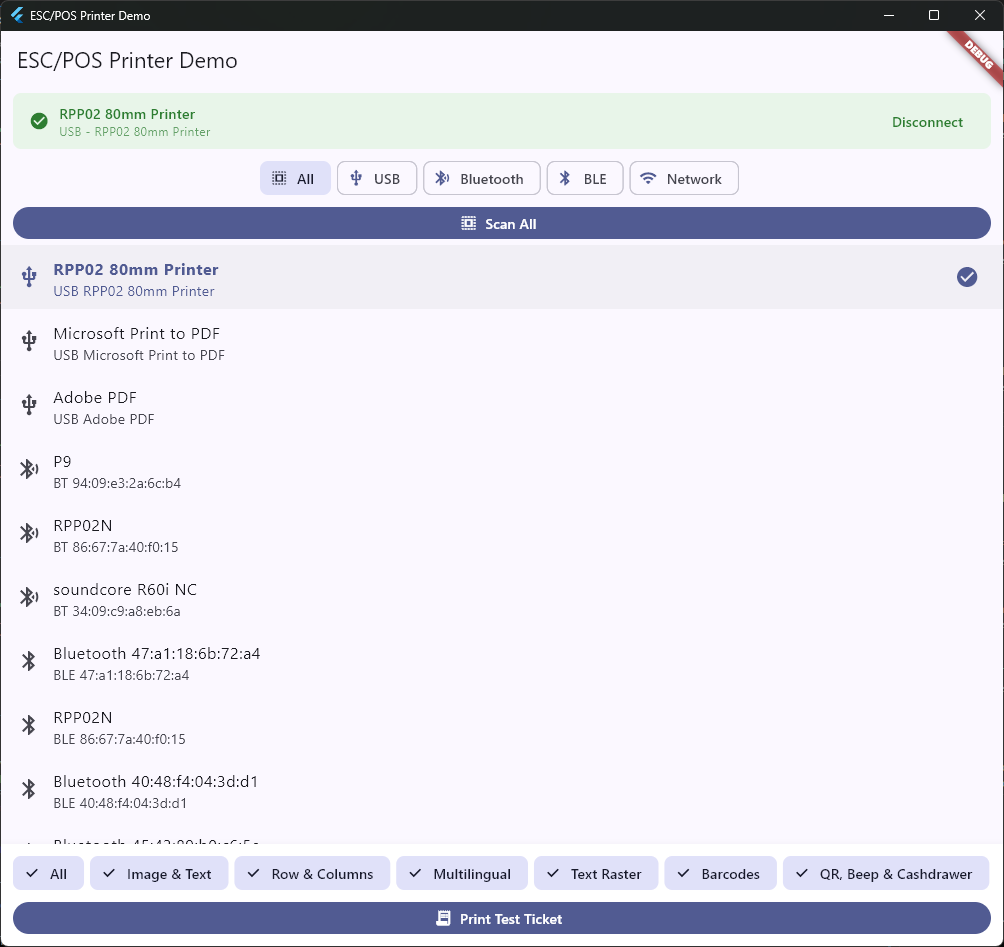
A full-featured demo app is included in the example/ directory. It demonstrates:
- Scanning and filtering by connection type
- Connecting/disconnecting with state feedback
- Printing text styles, sizes, alignment, and fonts
- Multi-column table layouts (2, 3, and 4 columns)
- Raster row & columns with Flutter TextStyle (multilingual, custom fonts)
- Text rasterization for CJK, Arabic, Hindi, Thai, Russian, and European scripts
- Barcode and QR code generation
- Image printing (assets and programmatic)
- Cash drawer and beep commands
Run the example:
cd example
flutter run
License
BSD 3-Clause License. Copyright (c) 2026, Elriz Technology.
See LICENSE for details.
Libraries
- unified_esc_pos_printer
- Unified ESC/POS thermal printer package.