

Tracelet


Production-grade background geolocation for Flutter — fully open-source.
Battery-conscious motion-detection intelligence, geofencing, SQLite persistence, HTTP sync, and headless Dart execution for iOS & Android.
Features
- Background location tracking — continuous GPS with configurable
distanceFilteranddesiredAccuracy - Motion-detection intelligence — accelerometer + activity recognition automatically toggle GPS to save battery
- Geofencing — circular and polygon geofences with enter/exit/dwell events. Unlimited geofences via proximity-based auto-load/unload
- SQLite persistence — all locations stored locally, queryable, with configurable retention limits
- HTTP auto-sync — batch upload with retry, exponential backoff, offline queue, Wi-Fi-only option. 401-aware retry with headless JWT refresh via
registerHeadlessHeadersCallback() - Headless execution — run Dart code in response to background events
- Scheduling — time-based tracking windows (e.g., "Mon–Fri 9am–5pm") with optional AlarmManager (Android)
- Start on boot — resume after device reboot
- Dart-controlled permissions — no native dialogs, full Dart-side customization
- Foreground service toggle — run with or without a persistent notification (Android)
- Debug sounds — audible feedback during development
- Elasticity control — speed-based distance filter scaling with disable/multiplier overrides
- Location filtering — reject GPS spikes, low-accuracy readings, and speed jumps via
LocationFilter - Kalman filter — optional GPS coordinate smoothing via Extended Kalman Filter (
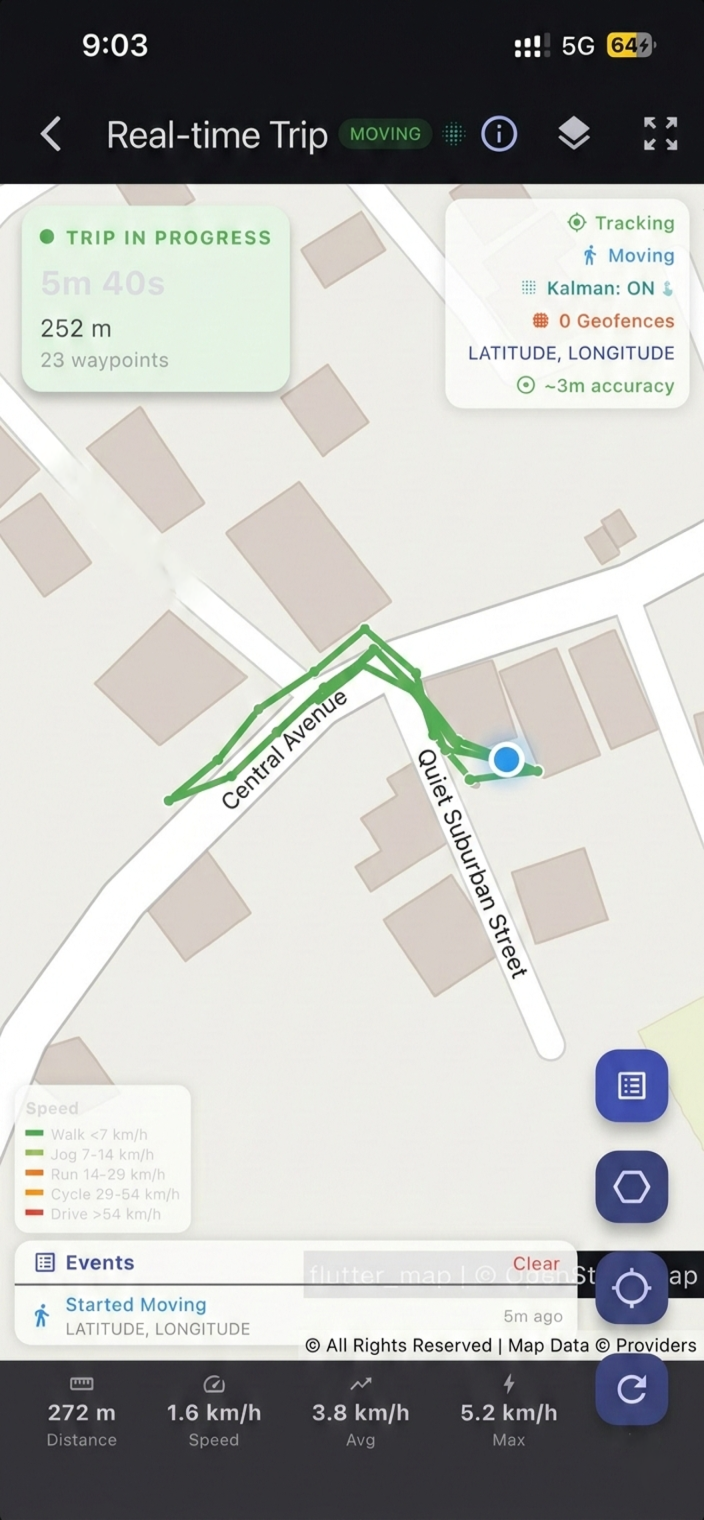
useKalmanFilter: true) - Trip detection — automatic trip start/stop events with distance, duration, and waypoints
- Polygon geofences — define geofences with arbitrary polygon vertices for non-circular regions
- Auto-stop — automatically stop tracking after N minutes via
stopAfterElapsedMinutes - Activity recognition tuning — confidence thresholds, stop-detection delays, stationary behavior
- Timestamp metadata — optional extra timing fields on each location record
- Geofence high-accuracy mode — full GPS pipeline in geofence-only mode (Android)
- Prevent suspend (iOS) — silent audio keep-alive for continuous background execution
- Unlimited geofences — monitor thousands of geofences despite platform limits (100 Android / 20 iOS). Only the closest geofences within
geofenceProximityRadiusare registered with the OS. As the device moves, geofences are automatically swapped in/out, withonGeofencesChangeevents for each activation/deactivation. - Shared Dart algorithms — location filtering, geofence proximity, schedule parsing, and persistence logic run in shared Dart for cross-platform consistency
- Battery budget engine — adaptive feedback control adjusts
distanceFilter,desiredAccuracy, and periodic interval to maintain a configurablebatteryBudgetPerHourtarget (1.0–5.0 %/hr). Subscribe viaonBudgetAdjustment(). - Carbon footprint estimator — per-trip and cumulative CO₂ calculator using EU EEA 2024 emission factors (gCO₂/km) per transport mode. Returns
TripCarbonSummarywith breakdown by mode. - Delta encoding — 60–80% HTTP batch payload reduction via delta compression. Dart + Kotlin + Swift implementations for native encoding during sync.
- R-tree spatial index — O(log n) geofence queries supporting 10,000+ geofences with sub-ms lookup.
queryCircle()andqueryBBox()APIs. - GDPR/CCPA compliance reports —
generateComplianceReport()returns structured data processing inventory (JSON & Markdown export). - Sparse updates — app-level deduplication drops locations within
sparseDistanceThresholdof last recorded position. - Dead reckoning — inertial navigation (accel + gyro + compass) when GPS lost, with configurable activation delay and max duration.
- Wi-Fi-only sync —
disableAutoSyncOnCellulardefers HTTP sync to Wi-Fi connections. - Periodic mode — configurable one-shot fixes (60 sec–12 hrs), with Android foreground service and exact alarm support.
- Mock location detection — detect and reject spoofed GPS with configurable detection levels (basic platform flags + advanced heuristics). Learn more →
- OEM compatibility — automatic mitigations for aggressive OEM power management (Huawei, Xiaomi, OnePlus, Samsung, Oppo, Vivo) with Settings Health API. Learn more →
- iOS background hardening — all critical native operations wrapped in
beginBackgroundTask, with iOS 17+CLBackgroundActivitySessionand iOS 18+CLServiceSessionfor extended background runtime. Learn more → - Adaptive sampling — auto-adjusts
distanceFilterbased on detected activity, battery level, and speed for optimal battery/accuracy trade-off. Learn more → - Health check API —
getHealth()returns a comprehensive diagnostic snapshot covering permissions, battery, sensors, database, and geofence state with actionable warnings. Learn more → - HTTP sync retry engine — configurable retry with exponential backoff for transient server failures (5xx, 429, timeout). Learn more →
- Configurable motion sensitivity — tune accelerometer thresholds (
shakeThreshold,stillThreshold,stillSampleCount) for Low/Medium/High preset profiles or custom values
Quick Start
import 'package:tracelet/tracelet.dart' as tl;

// 1. Subscribe to events
tl.Tracelet.onLocation((tl.Location location) {
  print('${location.coords.latitude}, ${location.coords.longitude}');
});

tl.Tracelet.onMotionChange((tl.Location location) {
  print('Moving: ${location.isMoving}');
});

// 2. Initialize
final state = await tl.Tracelet.ready(tl.Config(
  geo: tl.GeoConfig(
    desiredAccuracy: tl.DesiredAccuracy.high,
    distanceFilter: 10.0,
    filter: tl.LocationFilter(
      trackingAccuracyThreshold: 100,
      maxImpliedSpeed: 80,
      useKalmanFilter: true, // smooth GPS coordinates
    ),
  ),
  app: tl.AppConfig(
    stopOnTerminate: false,
    startOnBoot: true,
  ),
  persistence: tl.PersistenceConfig(
    maxDaysToPersist: 7,
    maxRecordsToPersist: 5000,
  ),
  logger: tl.LoggerConfig(
    debug: true,
    logLevel: tl.LogLevel.verbose,
  ),
));

// 3. Start tracking
await tl.Tracelet.start();
Removing Permissions
Tracelet declares all permissions it can use in its AndroidManifest.xml. If your app doesn't need a specific feature, you can remove the corresponding permission using Android's manifest merger tools:node="remove" directive in your app-level AndroidManifest.xml (android/app/src/main/AndroidManifest.xml).
Tracelet will not crash. All native code guards permissions with checkSelfPermission() and catches SecurityException. Missing permissions trigger graceful fallbacks, not crashes.
Safe to remove
| Permission | tools:node="remove" |
Effect when removed |
|---|---|---|
ACCESS_BACKGROUND_LOCATION |
Yes | requestPermission() stops at whenInUse (code 2). Background tracking will not receive updates on Android 10+. |
ACTIVITY_RECOGNITION |
Yes | Falls back to accelerometer-only motion detection. No activity classification (onActivityChange won't fire). |
POST_NOTIFICATIONS |
Yes | Foreground service notification hidden on Android 13+. Service still runs. |
SCHEDULE_EXACT_ALARM |
Yes | Periodic mode uses inexact alarms. Timing becomes approximate. |
REQUEST_IGNORE_BATTERY_OPTIMIZATIONS |
Yes | Cannot request battery optimization exemption. |
Not safe to remove
| Permission | Why |
|---|---|
ACCESS_FINE_LOCATION / ACCESS_COARSE_LOCATION |
Without any location permission, Tracelet can't obtain positions. |
FOREGROUND_SERVICE / FOREGROUND_SERVICE_LOCATION |
Required for background tracking. Removing these causes an OS-level crash when starting the foreground service. |
Example: Remove background location
<manifest xmlns:android="http://schemas.android.com/apk/res/android"
    xmlns:tools="http://schemas.android.com/tools">

    <uses-permission
        android:name="android.permission.ACCESS_BACKGROUND_LOCATION"
        tools:node="remove" />
</manifest>
Example: Remove activity recognition
<manifest xmlns:android="http://schemas.android.com/apk/res/android"
    xmlns:tools="http://schemas.android.com/tools">

    <uses-permission
        android:name="android.permission.ACTIVITY_RECOGNITION"
        tools:node="remove" />
</manifest>
When removing ACTIVITY_RECOGNITION, set disableMotionActivityUpdates: true in your config so the motion permission API returns 3 (granted) immediately instead of trying to prompt:
final state = await tl.Tracelet.ready(tl.Config(
  motion: tl.MotionConfig(
    disableMotionActivityUpdates: true, // Accelerometer-only, no permission needed
  ),
));
Verify your merged manifest
# Check the merged manifest after build
cat android/app/build/intermediates/merged_manifests/release/AndroidManifest.xml \
  | grep "BACKGROUND_LOCATION\|ACTIVITY_RECOGNITION"

# Or inspect the APK directly
aapt dump permissions build/app/outputs/flutter-apk/app-release.apk
See the Permissions Guide and Play Store Declaration Guide for more details.
iOS: Removing Optional Info.plist Keys
iOS permissions are declared in Info.plist, not merged from plugin manifests. You control exactly what's included. Here's what's optional:
| Info.plist Key / Mode | Required? | Effect when removed |
|---|---|---|
NSMotionUsageDescription |
No | Motion & Fitness permission dialog never shown. Use disableMotionActivityUpdates: true for accelerometer-only fallback. |
NSLocationTemporaryUsageDescriptionDictionary |
No | requestTemporaryFullAccuracy() becomes a no-op. Reduced accuracy stays active on iOS 14+. |
UIBackgroundModes → fetch |
No | Background fetch disabled. Headless Dart execution won't fire from fetch events. |
UIBackgroundModes → processing |
No | BGTaskScheduler tasks won't run. Periodic mode and scheduled tracking unavailable. |
BGTaskSchedulerPermittedIdentifiers |
No | Same as removing processing — periodic/scheduled features disabled. |
Not safe to remove:
| Key | Why |
|---|---|
NSLocationWhenInUseUsageDescription |
iOS rejects the app without it. |
NSLocationAlwaysAndWhenInUseUsageDescription |
Required for background location. Without it, the OS won't show the "Always" option. |
UIBackgroundModes → location |
Without this, iOS suspends location updates immediately when backgrounded. |
Documentation
Kalman Filter GPS Smoothing
Enable the Extended Kalman Filter to smooth GPS coordinates, eliminate jitter, and produce cleaner tracks:
final state = await tl.Tracelet.ready(tl.Config(
  geo: tl.GeoConfig(
    filter: tl.LocationFilter(
      useKalmanFilter: true, // Enable Kalman smoothing
    ),
  ),
));
The filter uses a constant-velocity model with GPS accuracy as measurement noise. It runs natively on both Android and iOS for zero-overhead smoothing. See the Kalman Filter Guide for details.
Trip Detection
Subscribe to trip events that fire automatically when the device transitions from moving to stationary. See the Trip Detection Guide for full details.
tl.Tracelet.onTrip((tl.TripEvent trip) {
  print('Trip ended: ${trip.distance}m in ${trip.duration}s');
  print('From: ${trip.startLocation}');
  print('To: ${trip.stopLocation}');
  print('Avg speed: ${trip.averageSpeed} m/s');
  print('Waypoints: ${trip.waypoints.length}');
});
Polygon Geofences
Define geofences with arbitrary polygon vertices instead of circular regions:
await tl.Tracelet.addGeofence(tl.Geofence(
  identifier: 'campus',
  latitude: 37.422,    // centroid for proximity sorting
  longitude: -122.084,
  radius: 0,           // ignored for polygon geofences
  vertices: [
    [37.423, -122.086],
    [37.424, -122.082],
    [37.421, -122.081],
    [37.420, -122.085],
  ],
));
Polygon containment uses the ray-casting algorithm for efficient point-in-polygon checks. Requires geofenceModeHighAccuracy: true. See the Polygon Geofences Guide for full details.
| Guide | Description |
|---|---|
| Android Setup | Gradle, permissions, and manifest configuration |
| iOS Setup | Info.plist, capabilities, and entitlements |
| Permissions | Permission flow, status codes, Dart dialog examples |
| Background Tracking | Foreground service, silent mode, runtime switching |
| API Reference | All methods, events, and return types |
| Configuration | All config groups with property tables |
| Kalman Filter | GPS smoothing — how it works, when to use it |
| Trip Detection | Automatic trip events — setup, API, edge cases |
| Polygon Geofences | Polygon geofences — vertices, ray-casting, examples |
| Web Support | Web platform capabilities, limitations, and browser APIs |
| Mock Detection | Detect & reject spoofed GPS — detection levels, heuristics, platform details |
| OEM Compatibility | Huawei/Xiaomi/OnePlus/Samsung/Oppo/Vivo mitigations, Settings Health API |
| Adaptive Sampling | Auto-adjust distanceFilter by activity, battery, and speed |
| Health Check | Diagnostic API — permissions, battery, sensors, database |
| HTTP Sync | Retry engine, exponential backoff, offline queue |
| iOS Background Hardening | Background task protection, session APIs, prevent suspend |
| Privacy Zones | Location exclusion zones for sensitive areas |
| Audit Trail | Cryptographic hash-chain audit trail for compliance |
| Battery Budget | Feedback loop — auto-tune tracking to stay within battery drain target |
| Delta Encoding | 60–80% HTTP payload compression via differential location encoding |
| Carbon Estimator | Real-time CO₂ estimation by transport mode (EU EEA 2024 factors) |
| Compliance Report | Auto-generated GDPR Article 30 / CCPA compliance reports |
| Dead Reckoning | IMU-based inertial navigation during GPS signal loss |
| Sparse Updates | App-level location deduplication — reduce DB writes and sync volume |
| Periodic Mode | Timed one-shot GPS fixes — WorkManager, foreground service, exact alarms |
Architecture
This is the app-facing package in a federated plugin:
| Package | Description |
|---|---|
tracelet (this package) |
Dart API — the only package apps depend on |
tracelet_platform_interface |
Abstract platform interface |
tracelet_android |
Kotlin Android implementation |
tracelet_ios |
Swift iOS implementation |
tracelet_web |
Web implementation (experimental) |
Support
If you find Tracelet useful, consider buying me a coffee:

License
Apache 2.0 — see LICENSE for details.
Libraries
- tracelet
- Tracelet — Production-grade background geolocation for Flutter.