








English | 简体中文 | 日本語 | 한국어 | Español | Português (Brasil) | Русский | Deutsch | Français | Italiano | Türkçe
Quick Navigation
- Getting Started: Why ToStore | Key Features | Installation Guide | KV Mode | Table Mode | Memory Mode
- Architecture & Model: Schema Definition | Distributed Architecture | Cascading Foreign Keys | Mobile/Desktop | Server/Agent | Primary Key Algorithms
- Advanced Queries: Advanced Queries (JOIN) | Aggregation & Statistics | Complex Logic (QueryCondition) | Reactive Query (watch) | Streaming Query
- Advanced & Performance: Vector Search | Table-level TTL | Efficient Pagination | Query Cache | Atomic Expressions | Transactions
- Operations & Security: Administration | Security Configuration | Error Handling | Performance & Diagnostics | More Resources
Why Choose ToStore?
ToStore is a modern data engine designed for the AGI era and edge intelligence scenarios. It natively supports distributed systems, multi-modal fusion, relational structured data, high-dimensional vectors, and unstructured data storage. Built on a Self-Routing node architecture and a neural-network-inspired engine, it gives nodes high autonomy and elastic horizontal scalability while logically decoupling performance from data scale. It includes ACID transactions, complex relational queries (JOINs and cascading foreign keys), table-level TTL, and aggregations, along with multiple distributed primary key algorithms, atomic expressions, schema change recognition, encryption, multi-space data isolation, resource-aware intelligent load scheduling, and disaster/crash self-healing recovery.
As computing continues shifting toward edge intelligence, agents, sensors, and other devices are no longer just "content displays". They are intelligent nodes responsible for local generation, environmental awareness, real-time decision-making, and coordinated data flows. Traditional database solutions are limited by their underlying architecture and stitched-on extensions, making it increasingly difficult to satisfy the low-latency and stability requirements of edge-cloud intelligent applications under high-concurrency writes, massive datasets, vector retrieval, and collaborative generation.
ToStore gives the edge distributed capabilities strong enough for massive datasets, complex local AI generation, and large-scale data movement. Deep intelligent collaboration between edge and cloud nodes provides a reliable data foundation for immersive mixed reality, multi-modal interaction, semantic vectors, spatial modeling, and similar scenarios.
Key Features
-
🌐 Unified Cross-Platform Data Engine
- Unified API across mobile, desktop, web, and server environments
- Supports relational structured data, high-dimensional vectors, and unstructured data storage
- Builds a data pipeline from local storage to edge-cloud collaboration
-
🧠 Neural-Network-Style Distributed Architecture
- Self-routing node architecture that decouples physical addressing from scale
- Highly autonomous nodes collaborate to build a flexible data topology
- Supports node cooperation and elastic horizontal scaling
- Deep interconnection between edge-intelligent nodes and the cloud
-
⚡ Parallel Execution & Resource Scheduling
- Resource-aware intelligent load scheduling with high availability
- Multi-node parallel collaboration and task decomposition
- Time-slicing keeps UI animations smooth even under heavy load
-
🔍 Structured Queries & Vector Retrieval
- Supports complex predicates, JOINs, aggregations, and table-level TTL
- Supports vector fields, vector indexes, and nearest-neighbor retrieval
- Structured and vector data can work together inside the same engine
-
🔑 Primary Keys, Indexes & Schema Evolution
- Built-in primary key algorithms including sequential, timestamp, date-prefixed, and short-code strategies
- Supports unique indexes, composite indexes, vector indexes, and foreign key constraints
- Automatically detects schema changes and completes migration work
-
🛡️ Transactions, Security & Recovery
- Provides ACID transactions, atomic expression updates, and cascading foreign keys
- Supports crash recovery, durable commits, and consistency guarantees
- Supports ChaCha20-Poly1305 and AES-256-GCM encryption
-
🔄 Multi-Space & Data Workflows
- Supports isolated spaces with optional globally shared data
- Supports real-time query listeners, multi-level intelligent caching, and cursor pagination
- Fits multi-user, local-first, and offline-collaborative applications
Installation
Important
Upgrading from v2.x? Please read the v3.x Upgrade Guide for critical migration steps and breaking changes.
Add tostore to your pubspec.yaml:
dependencies:
  tostore: any # Please use the latest version
Quick Start
Tip
How should you choose a storage mode?
- Key-Value Mode (KV): Best for configuration access, scattered state management, or JSON data storage. It is the fastest way to get started.
- Structured Table Mode: Best for core business data that needs complex queries, constraint validation, or large-scale data governance. By pushing integrity logic into the engine, you can significantly reduce application-layer development and maintenance costs.
- Memory Mode: Best for temporary computation, unit tests, or ultra-fast global state management. With global queries and
watchlisteners, you can reshape application interaction without maintaining a pile of global variables.
Key-Value Storage (KV)
This mode is suitable when you do not need predefined structured tables. It is simple, practical, and backed by a high-performance storage engine. Its efficient indexing architecture keeps query performance highly stable and extremely responsive even on ordinary mobile devices at very large data scales. Data in different Spaces is naturally isolated, while global sharing is also supported.
// Initialize the database
final db = await ToStore.open();

// Set key-value pairs (supports String, int, bool, double, Map, List, Json, and more)
await db.setValue('user_profile', {
  'name': 'John',
  'age': 25,
});

// Switch space - isolate data for different users
await db.switchSpace(spaceName: 'user_123');

// Set a globally shared variable (isGlobal: true enables cross-space sharing, such as login state)
await db.setValue('current_user', 'John', isGlobal: true);

// Automatic expiration cleanup (TTL)
// Supports either a relative lifetime (ttl) or an absolute expiration time (expiresAt)
await db.setValue('temp_config', 'value', ttl: Duration(hours: 2));
await db.setValue('session_token', 'abc', expiresAt: DateTime(2026, 2, 31));

// Read data
final profile = await db.getValue('user_profile'); // Map<String, dynamic>

// Listen for real-time value changes (useful for refreshing local UI without extra state frameworks)
db.watchValue('current_user', isGlobal: true).listen((value) {
  print('Logged-in user changed to: $value');
});

// Listen to multiple keys at once
db.watchValues(['current_user', 'login_status']).listen((map) {
  print('Multiple config values were updated: $map');
});

// Remove data
await db.removeValue('current_user');
Flutter UI Auto-Refresh Example
In Flutter, StreamBuilder plus watchValue gives you a very concise reactive refresh flow:
StreamBuilder(
  // When listening to a global variable, remember to set isGlobal: true
  stream: db.watchValue('current_user', isGlobal: true),
  builder: (context, snapshot) {
    // snapshot.data is the latest value of 'current_user' in KV storage
    final user = snapshot.data ?? 'Not logged in';
    return Text('Current user: $user');
  },
)
Structured Table Mode
CRUD on structured tables requires the schema to be created in advance (see Schema Definition). Recommended integration approaches for different scenarios:
- Mobile/Desktop: For frequent startup scenarios, it is recommended to pass
schemasduring initialization. - Server/Agent: For long-running scenarios, it is recommended to create tables dynamically through
createTables.
// 1. Initialize the database
final db = await ToStore.open();

// 2. Insert data (prepare some base records)
final result = await db.insert('users', {
  'username': 'John',
  'email': 'john@example.com',
  'age': 25,
});

// Unified operation result model: DbResult
// It is recommended to always check isSuccess
if (result.isSuccess) {
  print('Insert succeeded, generated primary key ID: ${result.successKeys.first}');
} else {
  print('Insert failed: ${result.message}');
}

// Chained query (see [Query Operators](#query-operators); supports =, !=, >, <, LIKE, IN, and more)
final users = await db.query('users')
    .where('age', '>', 20)
    .where('username', 'like', '%John%')
    .orderByDesc('age')
    .limit(20);

// Update and delete
await db.update('users', {'age': 26}).where('username', '=', 'John');
await db.delete('users').where('username', '=', 'John');

// Real-time listening (see [Reactive Query](#reactive-query) for more details)
db.query('users').where('age', '>', 18).watch().listen((users) {
  print('Users matching the condition have changed: $users');
});

// Pair with Flutter StreamBuilder for automatic local UI refresh
StreamBuilder(
  stream: db.query('users').where('age', '>', 18).watch(),
  builder: (context, snapshot) {
    final users = snapshot.data ?? [];
    return ListView.builder(
      itemCount: users.length,
      itemBuilder: (context, index) => Text(users[index]['username']),
    );
  },
);
Memory Mode
For scenarios such as caching, temporary computation, or workloads that do not need persistence to disk, you can initialize a pure in-memory database via ToStore.memory(). In this mode, all data, including schemas, indexes, and key-value pairs, lives entirely in memory for maximum read/write performance.
💡 Also Works as Global State Management
You do not need a pile of global variables or a heavyweight state-management framework. By combining memory mode with watchValue or watch(), you can achieve fully automatic UI refresh across widgets and pages. It keeps the powerful retrieval abilities of a database while giving you a reactive experience far beyond ordinary variables, making it ideal for login state, live configuration, or global message counters.
Caution
Note: Data created in pure memory mode is completely lost after the app is closed or restarted. Do not use it for core business data.
// Initialize a pure in-memory database
final memDb = await ToStore.memory();

// Set a global state value (for example: unread message count)
await memDb.setValue('unread_count', 5, isGlobal: true);

// Listen from anywhere in the UI without passing parameters around
memDb.watchValue<int>('unread_count', isGlobal: true).listen((count) {
  print('UI automatically sensed the message count change: $count');
});

// All CRUD, KV access, and vector search run at in-memory speed
await memDb.insert('active_users', {'name': 'Marley', 'status': 'online'});
Schema Definition
Define once, and let the engine handle end-to-end automated governance so your application no longer carries heavy validation maintenance.
The following mobile, server-side, and agent examples all reuse appSchemas defined here.
TableSchema Overview
const userSchema = TableSchema(
  name: 'users', // Table name, required
  tableId: 'users', // Unique identifier of the table, optional
  primaryKeyConfig: PrimaryKeyConfig(
    name: 'id', // Primary key field name, defaults to id
    type: PrimaryKeyType.sequential, // Primary key auto-generation strategy
    sequentialConfig: SequentialIdConfig(
      initialValue: 1000, // Initial value for sequential IDs
      increment: 1, // Step size
      useRandomIncrement: false, // Whether to use random step sizes
    ),
  ),
  fields: [
    FieldSchema(
      name: 'username', // Field name, required
      type: DataType.text, // Field data type, required
      nullable: false, // Whether null is allowed
      minLength: 3, // Minimum length
      maxLength: 32, // Maximum length
      unique: true, // Whether it must be unique
      fieldId: 'username', // Stable field identifier, optional, used to detect field renames
      comment: 'Login name', // Optional comment
    ),
    FieldSchema(
      name: 'status',
      type: DataType.integer,
      minValue: 0, // Minimum numeric value
      maxValue: 150, // Maximum numeric value
      defaultValue: 0, // Static default value
      createIndex: true, // Shortcut for creating an index
    ),
    FieldSchema(
      name: 'created_at',
      type: DataType.datetime,
      nullable: false,
      defaultValueType: DefaultValueType.currentTimestamp, // Automatically fill with current time
      createIndex: true,
    ),
  ],
  indexes: const [
    IndexSchema(
      indexName: 'idx_users_status_created_at', // Optional index name
      fields: ['status', 'created_at'], // Composite index fields
      unique: false, // Whether it is a unique index
      type: IndexType.btree, // Index type: btree/hash/bitmap/vector
    ),
  ],
  foreignKeys: const [], // Optional foreign-key constraints; see "Foreign Keys & Cascading"
  isGlobal: false, // Whether this is a global table; true means it can be shared across spaces
  ttlConfig: null, // Optional table-level TTL; see "Table-level TTL"
);

const appSchemas = [userSchema];
-
Common
DataTypemappings:Type Corresponding Dart Type Description integerintStandard integer, suitable for IDs, counters, and similar data bigIntBigInt/StringLarge integers; recommended when numbers exceed 18 digits to avoid precision loss doubledoubleFloating-point number, suitable for prices, coordinates, and similar data textStringText string with optional length constraints blobUint8ListRaw binary data booleanboolBoolean value datetimeDateTime/StringDate/time; stored internally as ISO8601 arrayListList or array type jsonMap<String, dynamic>JSON object, suitable for dynamic structured data vectorVectorData/List<num>High-dimensional vector data for AI semantic retrieval (embeddings) -
PrimaryKeyTypeauto-generation strategies:Strategy Description Characteristics noneNo automatic generation You must manually provide the primary key during insertion sequentialSequential increment Good for human-friendly IDs, but less suitable for distributed performance timestampBasedTimestamp-based Recommended for distributed environments datePrefixedDate-prefixed Useful when date readability is important to the business shortCodeShort-code primary key Compact and suitable for external display All primary keys are stored as
text(String) by default.
Constraints & Auto-Validation
You can write common validation rules directly into FieldSchema, avoiding duplicated logic in application code:
nullable: false: non-null constraintminLength/maxLength: text length constraintsminValue/maxValue: integer or floating-point range constraintsdefaultValue/defaultValueType: static default values and dynamic default valuesunique: unique constraintcreateIndex: create indexes for high-frequency filtering, sorting, or relationshipsfieldId/tableId: assist rename detection for fields and tables during migration
In addition, unique: true automatically creates a single-field unique index. createIndex: true and foreign keys automatically create single-field normal indexes. Use indexes when you need composite indexes, named indexes, or vector indexes.
Choosing an Integration Method
- Mobile/Desktop: Best when passing
appSchemasdirectly intoToStore.open(...) - Server/Agent: Best when dynamically creating schemas at runtime via
createTables(appSchemas)
Integration for Mobile, Desktop, and Other Frequent Startup Scenarios
📱 Example: mobile_quickstart.dart
import 'package:path/path.dart' as p;
import 'package:path_provider/path_provider.dart';

// On Android/iOS, resolve the app's writable directory first, then pass dbPath explicitly
final docDir = await getApplicationDocumentsDirectory();
final dbRoot = p.join(docDir.path, 'common');

// Reuse the appSchemas defined above
final db = await ToStore.open(
  dbPath: dbRoot,
  schemas: appSchemas,
);

// Multi-space architecture - isolate data for different users
await db.switchSpace(spaceName: 'user_123');
Schema Evolution
During ToStore.open(), the engine automatically detects structural changes in schemas, such as adding, removing, renaming, or changing tables and fields, as well as index changes, and then completes the necessary migration work. You do not need to manually maintain database version numbers or write migration scripts.
Keeping Login State & Logout (Active Space)
Multi-space is ideal for isolating user data: one space per user, switched on login. With Active Space and close options, you can keep the current user across app restarts and support clean logout behavior.
- Keep login state: After switching a user into their own space, mark that space as active. Next launch can enter that space directly when opening the default instance, without a "default first, then switch" step.
- Logout: When the user logs out, close the database with
keepActiveSpace: false. The next launch will not automatically enter the previous user's space.
// After login: switch to the user's space and mark it active
await db.switchSpace(spaceName: 'user_$userId', keepActive: true);

// Optional: strictly stay in default when needed (for example, login screen only)
// final db = await ToStore.open(..., applyActiveSpaceOnDefault: false);

// On logout: close and clear the active space so the next launch starts from default
await db.close(keepActiveSpace: false);
Server-side / Agent Integration (Long-Running Scenarios)
🖥️ Example: server_quickstart.dart
final db = await ToStore.open();

// Create table structures while the process is running
await db.createTables(appSchemas);

// Online schema updates
final taskId = await db.updateSchema('users')
  .renameTable('users_new')                // Rename table
  .modifyField(
    'username',
    minLength: 5,
    maxLength: 20,
    unique: true
  )                                        // Modify field attributes
  .renameField('old_name', 'new_name')     // Rename field
  .removeField('deprecated_field')         // Remove field
  .addField('created_at', type: DataType.datetime)  // Add field
  .removeIndex(fields: ['age'])            // Remove index
  .setPrimaryKeyConfig(                    // Change PK type; existing data must be empty or a warning will be issued
    const PrimaryKeyConfig(type: PrimaryKeyType.shortCode)
  );

// Monitor migration progress
final status = await db.queryMigrationTaskStatus(taskId);
print('Migration progress: ${status?.progressPercentage}%');


// Optional performance tuning for pure server workloads
// yieldDurationMs controls how often long-running work yields time slices.
// The default is tuned to 8ms to keep frontend UI animations smooth.
// In environments without UI, 50ms is recommended for higher throughput.
final dbServer = await ToStore.open(
  config: DataStoreConfig(yieldDurationMs: 50),
);
Advanced Usage
ToStore provides a rich set of advanced capabilities for complex business scenarios:
Vector Fields, Vector Indexes & Vector Search
await db.createTables([
  const TableSchema(
    name: 'embeddings',
    primaryKeyConfig: PrimaryKeyConfig(
      name: 'id',
      type: PrimaryKeyType.timestampBased,
    ),
    fields: [
      FieldSchema(
        name: 'document_title',
        type: DataType.text,
        nullable: false,
      ),
      FieldSchema(
        name: 'embedding',
        type: DataType.vector, // Declare a vector field
        nullable: false,
        vectorConfig: VectorFieldConfig(
          dimensions: 128, // Written and queried vectors must match this width
          precision: VectorPrecision.float32, // float32 usually balances precision and storage well
        ),
      ),
    ],
    indexes: [
      IndexSchema(
        fields: ['embedding'], // Field to index
        type: IndexType.vector, // Build a vector index
        vectorConfig: VectorIndexConfig(
          indexType: VectorIndexType.ngh, // Built-in vector index type
          distanceMetric: VectorDistanceMetric.cosine, // Good for normalized embeddings
          maxDegree: 32, // More neighbors usually improve recall at higher memory cost
          efSearch: 64, // Higher recall but slower queries
          constructionEf: 128, // Higher-quality index but slower build time
        ),
      ),
    ],
  ),
]);

final queryVector =
    VectorData.fromList(List.generate(128, (i) => i * 0.01)); // Must match dimensions

// Vector search
final results = await db.vectorSearch(
  'embeddings',
  fieldName: 'embedding',
  queryVector: queryVector,
  topK: 5, // Return the top 5 nearest records
  efSearch: 64, // Override the search expansion factor for this request
);

for (final r in results) {
  print('pk=${r.primaryKey}, score=${r.score}, distance=${r.distance}');
}
Parameter notes:
dimensions: must match the actual embedding width you writeprecision: common choices includefloat64,float32, andint8; higher precision usually costs more storagedistanceMetric:cosineis common for semantic embeddings,l2suits Euclidean distance, andinnerProductsuits dot-product searchmaxDegree: upper bound of neighbors retained per node in the NGH graph; higher values usually improve recall at the cost of more memory and build timeefSearch: search-time expansion width; increasing it usually improves recall but increases latencyconstructionEf: build-time expansion width; increasing it usually improves index quality but increases build timetopK: number of results to return
Result notes:
score: normalized similarity score, typically in the0 ~ 1range; larger means more similardistance: distance value; forl2andcosine, smaller usually means more similar
Table-level TTL (Automatic Time-Based Expiration)
For logs, telemetry, events, and other data that should expire over time, you can define table-level TTL through ttlConfig. The engine will clean up expired records in the background automatically:
const TableSchema(
  name: 'event_logs',
  fields: [
    FieldSchema(
      name: 'created_at',
      type: DataType.datetime,
      nullable: false,
      createIndex: true,
      defaultValueType: DefaultValueType.currentTimestamp,
    ),
  ],
  ttlConfig: TableTtlConfig(
    ttlMs: 7 * 24 * 60 * 60 * 1000, // Keep for 7 days
    // When sourceField is omitted, the engine creates the needed index automatically.
    // Optional custom sourceField requirements:
    // 1) type must be DataType.datetime
    // 2) nullable must be false
    // 3) defaultValueType must be DefaultValueType.currentTimestamp
    // sourceField: 'created_at',
  ),
);
Intelligent Storage (Upsert)
ToStore decides whether to update or insert based on the primary key or unique key included in data. where is not supported here; the conflict target is determined by the data itself.
// By primary key
final result = await db.upsert('users', {
  'id': 1,
  'username': 'john',
  'email': 'john@example.com',
});

// By unique key (the record must contain all fields from a unique index plus required fields)
await db.upsert('users', {
  'username': 'john',
  'email': 'john@example.com',
  'age': 26,
});

// Batch upsert (supports atomic mode or partial-success mode)
// allowPartialErrors: true means some rows may fail while others still succeed
final batchResult = await db.batchUpsert('users', [
  {'username': 'a', 'email': 'a@example.com'},
  {'username': 'b', 'email': 'b@example.com'},
], allowPartialErrors: true);
Advanced Queries
ToStore provides a declarative chainable query API with flexible field handling and complex multi-table relationships.
1. Field Selection (select)
The select method specifies which fields are returned. If you do not call it, all fields are returned by default.
- Aliases: supports
field as aliassyntax (case-insensitive) to rename keys in the result set - Table-qualified fields: in multi-table joins,
table.fieldavoids naming conflicts - Aggregation mixing:
Aggobjects can be placed directly inside theselectlist
final results = await db.query('orders')
    .select([
      'orders.id',
      'users.name as customer_name',
      'orders.amount',
      Agg.count('id', alias: 'total_items')
    ])
    .join('users', 'orders.user_id', '=', 'users.id')
    .where('orders.amount', '>', 1000)
    .limit(20);
2. Joins (join)
Supports standard join (inner join), leftJoin, and rightJoin.
3. Smart Foreign-Key-Based Joins (Recommended)
If foreignKeys are defined correctly in TableSchema, you do not need to handwrite join conditions. The engine can resolve reference relationships and generate the optimal JOIN path automatically.
joinReferencedTable(tableName): automatically joins the parent table referenced by the current tablejoinReferencingTable(tableName): automatically joins child tables that reference the current table
// Assume posts defines a foreign key to users
final posts = await db.query('posts')
    .joinReferencedTable('users') // Automatically resolves to ON posts.user_id = users.id
    .select(['posts.title', 'users.username'])
    .limit(20);
Aggregation, Grouping & Statistics (Agg & GroupBy)
1. Aggregation (Agg factory)
Aggregate functions compute statistics over a dataset. With the alias parameter, you can customize result field names.
| Method | Purpose | Example |
|---|---|---|
Agg.count(field) |
Count non-null records | Agg.count('id', alias: 'total') |
Agg.sum(field) |
Sum values | Agg.sum('amount', alias: 'total_price') |
Agg.avg(field) |
Average value | Agg.avg('score', alias: 'average_score') |
Agg.max(field) |
Maximum value | Agg.max('age') |
Agg.min(field) |
Minimum value | Agg.min('price') |
Tip
Two common aggregation styles
- Shortcut methods (recommended for single metrics): call directly on the chain and get the computed value back immediately.
num? totalAge = await db.query('users').sum('age'); - Embedded in
select(for multiple metrics or grouping): passAggobjects into theselectlist.final stats = await db.query('orders').select(['status', Agg.sum('amount')]).groupBy(['status']);
2. Grouping & Filtering (groupBy / having)
Use groupBy to categorize records, then having to filter aggregated results, similar to SQL's HAVING behavior.
final stats = await db.query('orders')
    .select([
      'status',
      Agg.sum('amount', alias: 'sum_amount'),
      Agg.count('id', alias: 'order_count')
    ])
    .groupBy(['status'])
    // having accepts a QueryCondition used to filter aggregated results
    .having(QueryCondition().where(Agg.sum('amount'), '>', 5000))
    .limit(10);
3. Helper Query Methods
exists()(high-performance): checks whether any record matches. Unlikecount() > 0, it short-circuits as soon as one match is found, which is excellent for very large datasets.count(): efficiently returns the number of matching records.first(): a convenience method equivalent tolimit(1)and returning the first row directly as aMap.distinct([fields]): deduplicates results. Iffieldsare provided, uniqueness is calculated based on those fields.
// Efficient existence check
if (await db.query('users').whereEqual('email', 'test@test.com').exists()) {
  print('Email is already registered');
}

// Get a deduplicated city list
final cities = await db.query('users').distinct(['city']);
4. Complex Logic with QueryCondition
QueryCondition is ToStore's core tool for nested logic and parenthesized query construction. When simple chained where calls are not enough for expressions like (A AND B) OR (C AND D), this is the tool to use.
condition(QueryCondition sub): opens anANDnested grouporCondition(QueryCondition sub): opens anORnested groupor(): changes the next connector toOR(default isAND)
Example 1: Mixed OR Conditions
Equivalent SQL: WHERE is_active = true AND (role = 'admin' OR fans >= 1000)
final subGroup = QueryCondition()
    .whereEqual('role', 'admin')
    .or()
    .whereGreaterThanOrEqualTo('fans', 1000);

final results = await db.query('users')
    .whereEqual('is_active', true)
    .condition(subGroup);
Example 2: Reusable Condition Fragments
You can define reusable business logic fragments once and combine them in different queries:
final hotUser = QueryCondition().whereGreaterThan('fans', 5000);
final recentLogin = QueryCondition().whereGreaterThan('last_login', '2024-01-01');

final targetUsers = await db.query('users')
    .condition(hotUser)
    .condition(recentLogin);
5. Streaming Query
Suitable for very large datasets when you do not want to load everything into memory at once. Results can be processed as they are read.
db.streamQuery('users').listen((data) {
  print('Processing one record: $data');
});
6. Reactive Query
The watch() method lets you monitor query results in real time. It returns a Stream and automatically re-runs the query whenever matching data changes in the target table.
- Automatic debounce: built-in intelligent debouncing avoids redundant bursts of queries
- UI sync: works naturally with Flutter
StreamBuilderfor live-updating lists
// Simple listener
db.query('users').whereEqual('is_online', true).watch().listen((users) {
  print('Online user count changed: ${users.length}');
});

// Flutter StreamBuilder integration example
// Local UI refreshes automatically when data changes
StreamBuilder<List<Map<String, dynamic>>>(
  stream: db.query('messages').orderByDesc('id').limit(50).watch(),
  builder: (context, snapshot) {
    if (snapshot.hasData) {
      return ListView.builder(
        itemCount: snapshot.data!.length,
        itemBuilder: (context, index) => MessageTile(snapshot.data![index]),
      );
    }
    return CircularProgressIndicator();
  },
)
Manual Query Result Caching (Optional)
Important
ToStore already includes an efficient multi-level intelligent LRU cache internally. Routine manual cache management is not recommended. Consider it only in special cases:
- Expensive full scans on unindexed data that rarely changes
- Persistent ultra-low-latency requirements even for non-hot queries
useQueryCache([Duration? expiry]): enable cache and optionally set an expirationnoQueryCache(): explicitly disable cache for this queryclearQueryCache(): manually invalidate the cache for this query pattern
final results = await db.query('heavy_table')
    .where('non_indexed_field', '=', 'value')
    .useQueryCache(const Duration(minutes: 10)); // Manual acceleration for a heavy query only
Query & Efficient Pagination
Tip
Always specify limit for best performance: it is strongly recommended to explicitly provide limit in every query. If omitted, the engine defaults to 1000 rows. The core query engine is fast, but serializing very large result sets in the application layer can still add unnecessary overhead.
ToStore provides two pagination modes so you can choose based on scale and performance needs:
1. Basic Pagination (Offset Mode)
Suitable for relatively small datasets or cases where you need precise page jumps.
final result = await db.query('users')
    .orderByDesc('created_at')
    .offset(40) // Skip the first 40 rows
    .limit(20); // Take 20 rows
Tip
When offset becomes very large, the database must scan and discard many rows, so performance drops linearly. For deep pagination, prefer Cursor Mode.
2. Cursor Pagination (Cursor Mode)
Ideal for massive datasets and infinite scrolling. By using nextCursor, the engine continues from the current position and avoids the extra scan cost that comes with deep offsets.
Important
For some complex queries or sorts on non-indexed fields, the engine may fall back to a full scan and return a null cursor, which means pagination is not currently supported for that specific query.
// First page
final page1 = await db.query('users')
    .orderByDesc('id')
    .limit(20);

// Use the returned cursor to fetch the next page
if (page1.nextCursor != null) {
  final page2 = await db.query('users')
      .orderByDesc('id')
      .limit(20)
      .cursor(page1.nextCursor); // Seek directly to the next position
}

// Likewise, prevCursor enables efficient backward paging
final prevPage = await db.query('users')
    .limit(20)
    .cursor(page2.prevCursor);
| Feature | Offset Mode | Cursor Mode |
|---|---|---|
| Query performance | Degrades as pages deepen | Stable for deep paging |
| Best for | Smaller datasets, exact page jumps | Massive datasets, infinite scrolling |
| Consistency under changes | Data changes can cause skipped rows | Avoids duplicates and omissions caused by data changes |
Foreign Keys & Cascading
Foreign keys guarantee referential integrity and allow you to configure cascading updates and deletes. Relationships are validated on write and update. If cascade policies are enabled, related data is updated automatically, reducing consistency work in application code.
await db.createTables([
  const TableSchema(
    name: 'users',
    primaryKeyConfig: PrimaryKeyConfig(name: 'id'),
    fields: [
      FieldSchema(name: 'username', type: DataType.text, nullable: false),
    ],
  ),
  TableSchema(
    name: 'posts',
    primaryKeyConfig: const PrimaryKeyConfig(name: 'id'),
    fields: [
      const FieldSchema(name: 'title', type: DataType.text, nullable: false),
      const FieldSchema(name: 'user_id', type: DataType.integer, nullable: false),
      const FieldSchema(name: 'content', type: DataType.text),
    ],
    foreignKeys: [
        ForeignKeySchema(
          name: 'fk_posts_user',
          fields: ['user_id'],              // Field in the current table
          referencedTable: 'users',         // Referenced table
          referencedFields: ['id'],         // Referenced field
          onDelete: ForeignKeyCascadeAction.cascade,  // Delete posts automatically when the user is deleted
          onUpdate: ForeignKeyCascadeAction.cascade,  // Cascade updates
        ),
    ],
  ),
]);
Query Operators
All where(field, operator, value) conditions support the following operators (case-insensitive):
| Operator | Description | Example / Performance |
|---|---|---|
= |
Equal | where('status', '=', 'val') — Recommended Index Seek |
!=, <> |
Not equal | where('role', '!=', 'val') — Caution Full Table Scan |
> , >=, <, <= |
Comparison | where('age', '>', 18) — Recommended Index Scan |
IN |
In list | where('id', 'IN', [...]) — Recommended Index Seek |
NOT IN |
Not in list | where('status', 'NOT IN', [...]) — Caution Full Table Scan |
BETWEEN |
Range | where('age', 'BETWEEN', [18, 65]) — Recommended Index Scan |
LIKE |
Pattern match (% = any chars, _ = single char) |
where('name', 'LIKE', 'John%') — Caution See note below |
NOT LIKE |
Pattern mismatch | where('email', 'NOT LIKE', '...') — Caution Full Table Scan |
IS |
Is null | where('deleted_at', 'IS', null) — Recommended Index Seek |
IS NOT |
Is not null | where('email', 'IS NOT', null) — Caution Full Table Scan |
Semantic Query Methods (Recommended)
Recommended for avoiding hand-written operator strings and for getting better IDE assistance.
1. Comparison
Used for direct numeric or string comparisons.
db.query('users').whereEqual('username', 'John');           // Equal
db.query('users').whereNotEqual('role', 'guest');          // Not equal
db.query('users').whereGreaterThan('age', 18);             // Greater than
db.query('users').whereGreaterThanOrEqualTo('score', 60);  // Greater than or equal
db.query('users').whereLessThan('price', 100);             // Less than
db.query('users').whereLessThanOrEqualTo('quantity', 10);  // Less than or equal
db.query('users').whereTrue('is_active');                  // Is true
db.query('users').whereFalse('is_banned');                 // Is false
2. Collection & Range
Used to test whether a field falls inside a set or a range.
db.query('users').whereIn('id', ['id1', 'id2']);                 // In list
db.query('users').whereNotIn('status', ['banned', 'pending']);   // Not in list
db.query('users').whereBetween('age', 18, 65);                   // In range (inclusive)
3. Null Check
Used to test whether a field has a value.
db.query('users').whereNull('deleted_at');    // Is null
db.query('users').whereNotNull('email');      // Is not null
db.query('users').whereEmpty('nickname');     // Is null or empty string
db.query('users').whereNotEmpty('bio');       // Is not null and not empty
4. Pattern Matching
Supports SQL-style wildcard search (% matches any number of characters, _ matches a single character).
db.query('users').whereLike('name', 'John%');                        // SQL-style pattern match
db.query('users').whereContains('bio', 'flutter');                   // Contains match (LIKE '%value%')
db.query('users').whereStartsWith('name', 'Admin');                  // Prefix match (LIKE 'value%')
db.query('users').whereEndsWith('email', '.com');                    // Suffix match (LIKE '%value')
db.query('users').whereContainsAny('tags', ['dart', 'flutter']);     // Fuzzy match against any item in the list
// Equivalent to: .where('age', '>', 18).where('name', 'like', '%John%')
final users = await db.query('users')
    .whereGreaterThan('age', 18)
    .whereLike('username', '%John%')
    .orderByDesc('age')
    .limit(20);
Caution
Query Performance Guide (Index vs Full-Scan)
In large-scale data scenarios (millions of rows or more), please follow these principles to avoid main thread lag and query timeouts:
- Index Optimized -
Recommended:
- Semantic Methods:
whereEqual,whereGreaterThan,whereLessThan,whereIn,whereBetween,whereNull,whereTrue,whereFalse, andwhereStartsWith(prefix match). - Operators:
=,>,<,>=,<=,IN,BETWEEN,IS null,LIKE 'prefix%'. - Explanation: These operations achieve ultra-fast positioning via indexes. For
whereStartsWith/LIKE 'abc%', the index can still perform a prefix range scan.
- Full-Scan Risks -
Caution:
- Fuzzy Matching:
whereContains(LIKE '%val%'),whereEndsWith(LIKE '%val'),whereContainsAny. - Negation Queries:
whereNotEqual(!=,<>),whereNotIn(NOT IN),whereNotNull(IS NOT null/whereNotEmpty). - Pattern Mismatch:
NOT LIKE. - Explanation: The above operations usually require traversing the entire data storage area even if an index is built. While the impact is minimal on mobile or small datasets, in distributed or ultra-large data analysis scenarios, they should be used cautiously, combined with other index conditions (e.g., narrow down data by ID or time range) and the
limitclause.
Distributed Architecture
// Configure distributed nodes
final db = await ToStore.open(
  config: DataStoreConfig(
    distributedNodeConfig: const DistributedNodeConfig(
      enableDistributed: true,            // Enable distributed mode
      clusterId: 1,                       // Cluster ID
      centralServerUrl: 'https://127.0.0.1:8080',
      accessToken: 'b7628a4f9b4d269b98649129'
    )
  )
);

// Batch insert
await db.batchInsert('vector_data', [
  {'vector_name': 'face_2365', 'timestamp': DateTime.now()},
  {'vector_name': 'face_2366', 'timestamp': DateTime.now()},
  // ... efficient one-shot insertion of vector records
]);

// Stream and process large datasets
await for (final record in db.streamQuery('vector_data')
  .where('vector_name', '=', 'face_2366')
  .where('timestamp', '>=', DateTime.now().subtract(Duration(days: 30)))
  .stream) {
  // Process each result incrementally to avoid loading everything at once
  print(record);
}
Primary Key Examples
ToStore provides multiple distributed primary key algorithms for different business scenarios:
- Sequential primary key (
PrimaryKeyType.sequential):238978991 - Timestamp-based primary key (
PrimaryKeyType.timestampBased):1306866018836946 - Date-prefixed primary key (
PrimaryKeyType.datePrefixed):20250530182215887631 - Short-code primary key (
PrimaryKeyType.shortCode):9eXrF0qeXZ
// Sequential primary key configuration example
await db.createTables([
  const TableSchema(
    name: 'users',
    primaryKeyConfig: PrimaryKeyConfig(
      type: PrimaryKeyType.sequential,
      sequentialConfig: SequentialIdConfig(
        initialValue: 10000,      // Starting value
        increment: 50,            // Step size
        useRandomIncrement: true, // Random step size to hide business volume
      ),
    ),
    fields: [/* field definitions */]
  ),
]);
Atomic Expressions
The expression system provides type-safe atomic field updates. All calculations are executed atomically at the database layer, avoiding concurrent conflicts:
// Simple increment: balance = balance + 100
await db.update('accounts', {
  'balance': Expr.field('balance') + Expr.value(100),
}).where('id', '=', accountId);

// Complex calculation: total = price * quantity + tax
await db.update('orders', {
  'total': Expr.field('price') * Expr.field('quantity') + Expr.field('tax'),
}).where('id', '=', orderId);

// Multi-layer parentheses: finalPrice = ((price * quantity) + tax) * (1 - discount)
await db.update('orders', {
  'finalPrice': ((Expr.field('price') * Expr.field('quantity')) + Expr.field('tax')) *
                 (Expr.value(1) - Expr.field('discount')),
}).where('id', '=', orderId);

// Use functions: price = min(price, maxPrice)
await db.update('products', {
  'price': Expr.min(Expr.field('price'), Expr.field('maxPrice')),
}).where('id', '=', productId);

// Timestamp: updatedAt = now()
await db.update('users', {
  'updatedAt': Expr.now(),
}).where('id', '=', userId);
Conditional expressions (for example, differentiating update vs insert in an upsert): use Expr.isUpdate() / Expr.isInsert() together with Expr.ifElse or Expr.when so the expression is evaluated only on update or only on insert.
// Upsert: increment on update, set to 1 on insert
// The insert branch can use a plain literal; expressions are only evaluated on the update path
await db.upsert('counters', {
  'key': 'visits',
  'count': Expr.ifElse(
    Expr.isUpdate(),
    Expr.field('count') + Expr.value(1),
    1,
  ),
});

// Use Expr.when (single branch, otherwise null)
await db.upsert('orders', {
  'id': orderId,
  'updatedAt': Expr.when(Expr.isUpdate(), Expr.now(), otherwise: Expr.now()),
});
Transactions
Transactions ensure atomicity across multiple operations: either everything succeeds or everything is rolled back, preserving data consistency.
Transaction characteristics
- multiple operations either all succeed or all roll back
- unfinished work is automatically recovered after crashes
- successful operations are safely persisted
// Basic transaction - atomically commit multiple operations
final txResult = await db.transaction(() async {
  // Insert a user
  await db.insert('users', {
    'username': 'john',
    'email': 'john@example.com',
    'fans': 100,
  });

  // Atomic update using an expression
  await db.update('users', {
    'fans': Expr.field('fans') + Expr.value(50),
  }).where('username', '=', 'john');

  // If any operation fails, all changes are rolled back automatically
});

if (txResult.isSuccess) {
  print('Transaction committed successfully');
} else {
  print('Transaction rolled back: ${txResult.error?.message}');
}

// Automatic rollback on error
final txResult2 = await db.transaction(() async {
  await db.insert('users', {
    'username': 'jane',
    'email': 'jane@example.com',
  });
  throw Exception('Business logic error'); // Trigger rollback
}, rollbackOnError: true);
Administration & Maintenance
The following APIs cover database administration, diagnostics, and maintenance for plugin-style development, admin panels, and operational scenarios:
- Table Management
createTable(schema): create a single table manually; useful for module loading or on-demand runtime table creationgetTableSchema(tableName): retrieve the defined schema information; useful for automated validation or UI model generationgetTableInfo(tableName): retrieve runtime table statistics, including record count, index count, data file size, creation time, and whether the table is globalclear(tableName): clear all table data while safely retaining schema, indexes, and internal/external key constraintsdropTable(tableName): completely destroy a table and its schema; not reversible
- Space Management
currentSpaceName: get the current active space in real timelistSpaces(): list all allocated spaces in the current database instancegetSpaceInfo(useCache: true): audit the current space; useuseCache: falseto bypass cache and read real-time statedeleteSpace(spaceName): delete a specific space and all of its data, exceptdefaultand the current active space
- Instance Discovery
config: inspect the final effectiveDataStoreConfigsnapshot for the instanceinstancePath: locate the physical storage directory preciselygetVersion()/setVersion(version): business-defined version control for application-level migration decisions (not the engine version)
- Maintenance
flush(flushStorage: true): force pending data to disk; ifflushStorage: true, the system is also asked to flush lower-level storage buffersdeleteDatabase(): remove all physical files and metadata for the current instance; use with care
- Diagnostics
db.status.memory(): inspect cache hit ratios, index-page usage, and overall heap allocationdb.status.space()/db.status.table(tableName): inspect live statistics and health information for spaces and tablesdb.status.config(): inspect the current runtime configuration snapshotdb.status.migration(taskId): track asynchronous migration progress in real time
final spaces = await db.listSpaces();
final spaceInfo = await db.getSpaceInfo(useCache: false);
final tableSchema = await db.getTableSchema('users');
final tableInfo = await db.getTableInfo('users');

print('spaces: $spaces');
print(spaceInfo.toJson());
print(tableSchema?.toJson());
print(tableInfo?.toJson());

await db.flush();

final memoryInfo = await db.status.memory();
final configInfo = await db.status.config();
print(memoryInfo.toJson());
print(configInfo.toJson());
Backup & Restore
Especially useful for single-user local import/export, large offline data migration, and system rollback after failure:
- Backup (
backup)compress: whether to enable compression; recommended and enabled by defaultscope: controls the backup rangeBackupScope.database: backs up the entire database instance, including all spaces and global tablesBackupScope.currentSpace: backs up only the current active space, excluding global tablesBackupScope.currentSpaceWithGlobal: backs up the current space plus its related global tables, ideal for single-tenant or single-user migration
- Restore (
restore)backupPath: physical path to the backup packagecleanupBeforeRestore: whether to silently wipe related current data before restore;trueis recommended to avoid mixed logical statesdeleteAfterRestore: automatically delete the backup source file after successful restore
// Example: export the full data package for the current user
final backupPath = await db.backup(
  compress: true,
  scope: BackupScope.currentSpaceWithGlobal,
);

// Example: restore from a backup package and clean up the source file automatically
final restored = await db.restore(
  backupPath,
  cleanupBeforeRestore: true,
  deleteAfterRestore: true,
);
Status Codes & Error Handling
ToStore uses a unified response model for data operations:
ResultType: the unified status enum used for branching logicresult.code: a stable numeric code corresponding toResultTyperesult.message: a readable message describing the current errorsuccessKeys/failedKeys: lists of successful and failed primary keys in bulk operations
final result = await db.insert('users', {
  'username': 'john',
  'email': 'john@example.com',
});

if (!result.isSuccess) {
  switch (result.type) {
    case ResultType.notFound:
      print('Target resource does not exist: ${result.message}');
      break;
    case ResultType.notNullViolation:
    case ResultType.validationFailed:
      print('Data validation failed: ${result.message}');
      break;
    case ResultType.primaryKeyViolation:
    case ResultType.uniqueViolation:
      print('Unique constraint conflict: ${result.message}');
      break;
    case ResultType.foreignKeyViolation:
      print('Foreign key constraint failed: ${result.message}');
      break;
    case ResultType.resourceExhausted:
    case ResultType.timeout:
      print('System is busy. Please retry later: ${result.message}');
      break;
    case ResultType.ioError:
    case ResultType.dbError:
      print('Underlying storage error. Please record the logs: ${result.message}');
      break;
    default:
      print('Error type: ${result.type}, code: ${result.code}, message: ${result.message}');
  }
}
Common status code examples:
Success returns 0; negative numbers indicate errors.
ResultType.success(0): operation succeededResultType.partialSuccess(1): bulk operation partially succeededResultType.unknown(-1): unknown errorResultType.uniqueViolation(-2): unique index conflictResultType.primaryKeyViolation(-3): primary key conflictResultType.foreignKeyViolation(-4): foreign key reference does not satisfy constraintsResultType.notNullViolation(-5): a required field is missing or a disallowednullwas passedResultType.validationFailed(-6): length, range, format, or other validation failedResultType.notFound(-11): target table, space, or resource does not existResultType.resourceExhausted(-15): insufficient system resources; reduce load or retryResultType.dbError(-91): database errorResultType.ioError(-90): filesystem errorResultType.timeout(-92): timeout
Transaction Result Handling
final txResult = await db.transaction(() async {
  await db.insert('users', {
    'username': 'john',
    'email': 'john@example.com',
  });
});

// txResult.isFailed: transaction failed; txResult.isSuccess: transaction succeeded
if (txResult.isFailed) {
  print('Transaction error type: ${txResult.error?.type}');
  print('Transaction error message: ${txResult.error?.message}');
}
Transaction error types:
TransactionErrorType.operationError: a regular operation failed inside the transaction, such as field validation failure, invalid resource state, or another business-level errorTransactionErrorType.integrityViolation: integrity or constraint conflict, such as primary key, unique key, foreign key, or non-null failureTransactionErrorType.timeout: timeoutTransactionErrorType.io: underlying storage or filesystem I/O errorTransactionErrorType.conflict: a conflict caused the transaction to failTransactionErrorType.userAbort: user-initiated abort (throw-based manual abort is not currently supported)TransactionErrorType.unknown: any other error
Log Callback and Database Diagnostics
ToStore can route startup, recovery, automatic migration, and runtime constraint-conflict logs back to the business layer through LogConfig.setConfig(...).
onLogHandlerreceives all logs that pass the currentenableLogandlogLevelfilters.- Call
LogConfig.setConfig(...)before initialization so logs generated during initialization and automatic migration are also captured.
  // Configure log parameters or callback
  LogConfig.setConfig(
    enableLog: true,
    logLevel: debugMode ? LogLevel.debug : LogLevel.warn,
    publicLabel: 'my_app_db',
    onLogHandler: (message, type, label) {
      // In production, warn/error can be reported to your backend or logging platform
      if (!debugMode && (type == LogType.warn || type == LogType.error)) {
        developer.log(message, name: label);
      }
    },
  );

  final db = await ToStore.open();
Security Configuration
Warning
Key management: encodingKey can be changed freely, and the engine will migrate data automatically, so data remains recoverable. encryptionKey must not be changed casually. Once changed, old data cannot be decrypted unless you explicitly migrate it. Never hardcode sensitive keys; fetching them from a secure service is recommended.
final db = await ToStore.open(
  config: DataStoreConfig(
    encryptionConfig: EncryptionConfig(
      // Supported encryption algorithms: none, xorObfuscation, chacha20Poly1305, aes256Gcm
      encryptionType: EncryptionType.chacha20Poly1305,

      // Encoding key (can be changed; data will be migrated automatically)
      encodingKey: 'Your-32-Byte-Long-Encoding-Key...',

      // Encryption key for critical data (do not change casually unless you are migrating data)
      encryptionKey: 'Your-Secure-Encryption-Key...',

      // Device binding (path-based binding)
      // When enabled, the key is deeply bound to the database path and device characteristics.
      // Data cannot be decrypted when moved to a different physical path.
      // Advantage: better protection if database files are copied directly.
      // Drawback: if the install path or device characteristics change, data may become unrecoverable.
      deviceBinding: false,
    ),
    // Enable crash recovery logging (Write-Ahead Logging), enabled by default
    enableJournal: true,
    // Whether transactions force data to disk on commit; set false to reduce sync overhead
    persistRecoveryOnCommit: true,
  ),
);
Value-Level Encryption (ToCrypto)
Full-database encryption secures all table and index data, but may affect overall performance. If you only need to protect a few sensitive values, use ToCrypto instead. It is decoupled from the database, requires no db instance, and lets your application encode/decode values before write or after read. Output is Base64, which fits naturally in JSON or TEXT columns.
key(required):StringorUint8List. If it is not 32 bytes, SHA-256 is used to derive a 32-byte key.type(optional): encryption type fromToCryptoType, such asToCryptoType.chacha20Poly1305orToCryptoType.aes256Gcm. Defaults toToCryptoType.chacha20Poly1305.aad(optional): additional authenticated data of typeUint8List. If provided during encoding, the exact same bytes must be provided during decoding as well.
const key = 'my-secret-key';
// Encode: plaintext -> Base64 ciphertext (can be stored in DB or JSON)
final cipher = ToCrypto.encode('sensitive data', key: key);
// Decode when reading
final plain = ToCrypto.decode(cipher, key: key);

// Optional: bind contextual data with aad (must match during decode)
final aad = Uint8List.fromList(utf8.encode('users:id_number'));
final cipher2 = ToCrypto.encode('secret', key: key, aad: aad);
final plain2 = ToCrypto.decode(cipher2, key: key, aad: aad);
Advanced Configuration Explained (DataStoreConfig)
Tip
Zero Config intelligence
ToStore automatically senses the platform, performance characteristics, available memory, and I/O behavior to optimize parameters such as concurrency, shard size, and cache budget. In 99% of common business scenarios, you do not need to fine-tune DataStoreConfig manually. The defaults already provide excellent performance for the current platform.
| Parameter | Default | Purpose & Recommendation |
|---|---|---|
yieldDurationMs |
8ms | Core recommendation. The time slice used when long tasks yield. 8ms aligns well with 120fps/60fps rendering and helps keep UI smooth during large queries or migrations. |
maxQueryOffset |
10000 | Query protection. When offset exceeds this threshold, an error is raised. This prevents pathological I/O from deep offset pagination. |
defaultQueryLimit |
1000 | Resource guardrail. Applied when a query does not specify limit, preventing accidental loading of massive result sets and potential OOM issues. |
cacheMemoryBudgetMB |
(auto) | Fine-grained memory management. Total cache memory budget. The engine uses it to drive LRU reclamation automatically. |
enableJournal |
true | Crash self-healing. When enabled, the engine can recover automatically after crashes or power failures. |
persistRecoveryOnCommit |
true | Strong durability guarantee. When true, committed transactions are synced to physical storage. When false, flushing is done asynchronously in the background for better speed, with a small risk of losing a tiny amount of data in extreme crashes. |
ttlCleanupIntervalMs |
300000 | Global TTL polling. The background interval for scanning expired data when the engine is not idle. Lower values delete expired data sooner but cost more overhead. |
maxConcurrency |
(auto) | Compute concurrency control. Sets the maximum parallel worker count for intensive tasks such as vector computation and encryption/decryption. Keeping it automatic is usually best. |
final db = await ToStore.open(
  config: DataStoreConfig(
    yieldDurationMs: 8, // Excellent for frontend UI smoothness; for servers, 50ms is often better
    defaultQueryLimit: 50, // Force a maximum result-set size
    enableJournal: true, // Ensure crash self-healing
  ),
);
Performance & Experience
Benchmarks
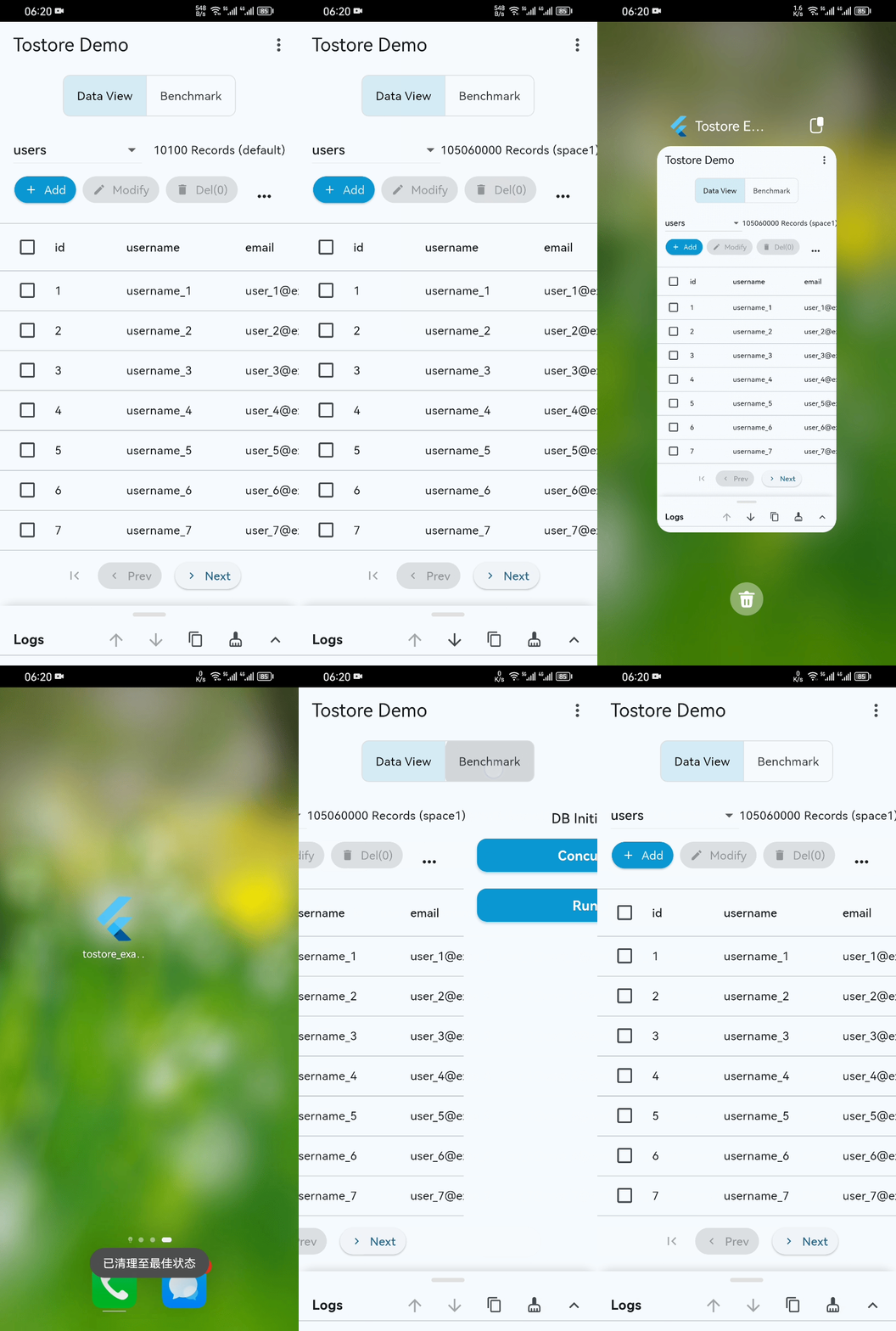
- Basic performance demo (basic-demo.mp4): the GIF preview may not show everything. Please open the video for the complete demonstration. Even on ordinary mobile devices, startup, paging, and retrieval remain stable and smooth even when the dataset exceeds 100 million records.
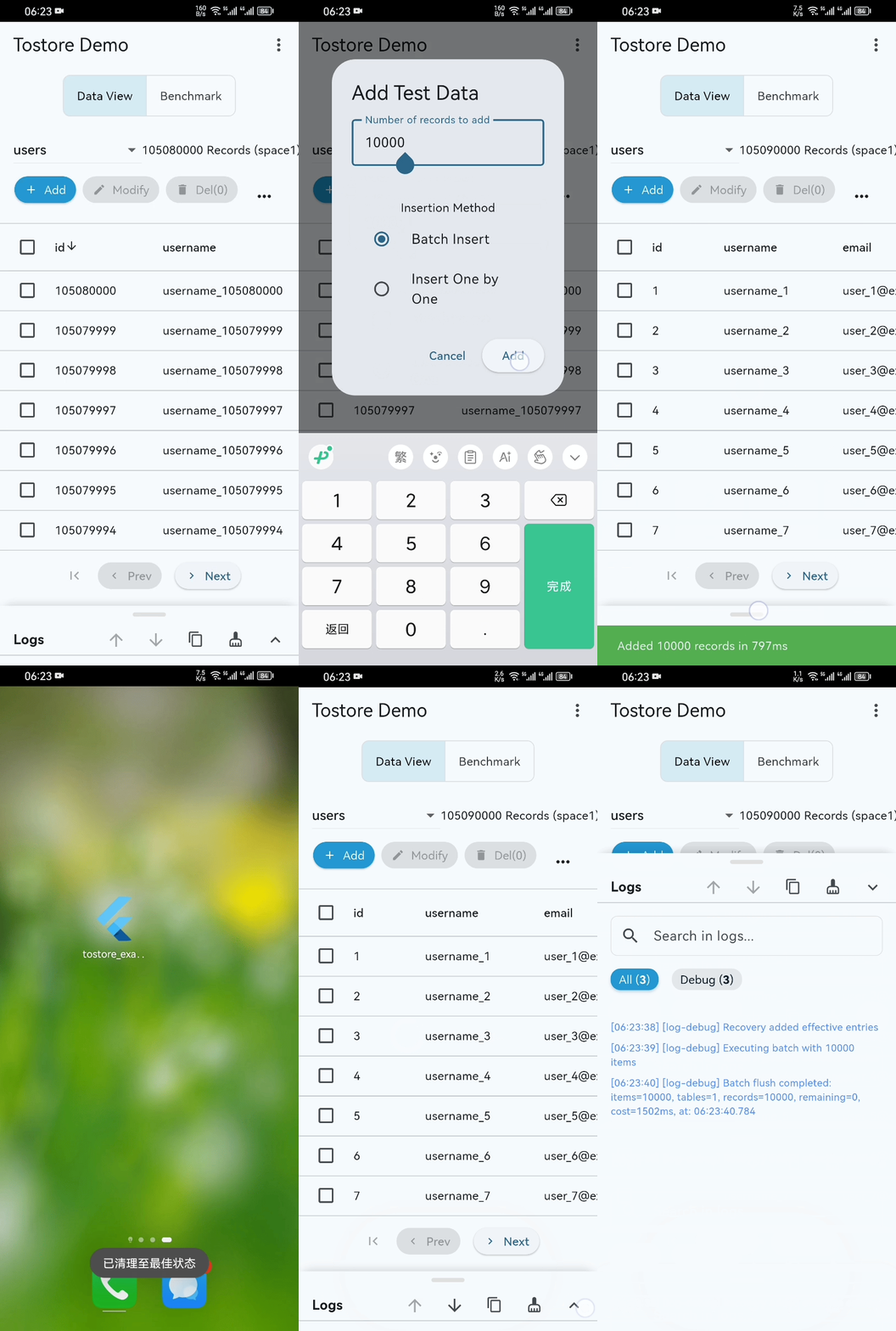
- Disaster recovery stress test (disaster-recovery.mp4): during high-frequency writes, the process is intentionally interrupted again and again to simulate crashes and power failures. ToStore is able to recover quickly.
Experience Tips
- 📱 Example project: the
exampledirectory includes a complete Flutter application - 🚀 Production builds: package and test in release mode; release performance is far beyond debug mode
- ✅ Standard tests: core capabilities are covered by standardized tests
If ToStore helps you, please give us a ⭐️ It is one of the best ways to support the project. Thank you very much.
Recommendation: For frontend app development, consider the ToApp framework, which provides a full-stack solution that automates and unifies data requests, loading, storage, caching, and presentation.
More Resources
- 📖 Documentation: Wiki
- 📢 Issue Reporting: GitHub Issues
- 💬 Technical Discussion: GitHub Discussions
Libraries
- tostore
- ToStore is a high-performance distributed data storage engine that builds intelligent data networks using multi-partition parallel mechanisms and interconnected topologies.