








English | 简体中文 | 日本語 | 한국어 | Español | Português (Brasil) | Русский | Deutsch | Français | Italiano | Türkçe
Quick Navigation
- Why ToStore? | Features | Installation | Quick Start
- Schema Definition | Mobile/Desktop Integration | Server-side Integration
- Vectors & ANN Search | Table-level TTL | Query & Pagination | Foreign Keys | Query Operators
- Distributed Architecture | Primary Keys | Atomic Expressions | Transactions | Error Handling | Log Callback and Database Diagnostics
- Security Config | Performance | More Resources
Why Choose ToStore?
ToStore is a modern data engine designed for the AGI era and edge intelligence scenarios. It natively supports distributed systems, multi-modal fusion, relational structured data, high-dimensional vectors, and unstructured data storage. Based on a neural-network-like underlying architecture, nodes possess high autonomy and elastic horizontal scalability, building a flexible data topology network for seamless edge-cloud cross-platform collaboration. It features ACID transactions, complex relational queries (JOIN, cascading foreign keys), table-level TTL, and aggregate computations. It includes multiple distributed primary key algorithms, atomic expressions, schema change identification, encryption protection, multi-space data isolation, resource-aware intelligent load scheduling, and disaster/crash self-healing recovery.
As computing continues to shift toward edge intelligence, various terminals such as agents and sensors are no longer mere "content displays" but intelligent nodes responsible for local generation, environmental perception, real-time decision-making, and data collaboration. Traditional database solutions, limited by their underlying architecture and "plug-in" extensions, struggle to meet the low-latency and stability requirements of edge-cloud intelligent applications when facing high-concurrency writes, massive data, vector retrieval, and collaborative generation.
ToStore empowers the edge with distributed capabilities sufficient to support massive data, complex local AI generation, and large-scale data flow. Deep intelligent collaboration between edge and cloud nodes provides a reliable data foundation for scenarios such as immersive AR/VR fusion, multi-modal interaction, semantic vectors, and spatial modeling.
Key Features
-
🌐 Unified Cross-Platform Data Engine
- Unified API for Mobile, Desktop, Web, and Server.
- Supports relational structured data, high-dimensional vectors, and unstructured data storage.
- Ideal for data lifecycles from local storage to edge-cloud collaboration.
-
🧠 Neural-Network-Like Distributed Architecture
- High node autonomy; interconnected collaboration builds flexible data topologies.
- Supports node collaboration and elastic horizontal scalability.
- Deep interconnection between edge intelligent nodes and the cloud.
-
⚡ Parallel Execution & Resource Scheduling
- Resource-aware intelligent load scheduling with high availability.
- Multi-node parallel collaborative computing and task decomposition.
-
🔍 Structured Query & Vector Retrieval
- Supports complex condition queries, JOINs, aggregate computations, and table-level TTL.
- Supports vector fields, vector indexes, and Approximate Nearest Neighbor (ANN) search.
- Structured and vector data can be used collaboratively within the same engine.
-
🔑 Primary Keys, Indexing & Schema Evolution
- Built-in Sequential Increment, Timestamp, Date-Prefix, and Short Code PK algorithms.
- Supports unique indexes, composite indexes, vector indexes, and foreign key constraints.
- Intelligently identifies schema changes and automates data migration.
-
🛡️ Transactions, Security & Recovery
- Provides ACID transactions, atomic expression updates, and cascading foreign keys.
- Supports crash recovery, persistent flush, and data consistency guarantees.
- Supports ChaCha20-Poly1305 and AES-256-GCM encryption.
-
🔄 Multi-Space & Data Workflow
- Supports data isolation via Spaces with configurable global sharing.
- Real-time query listeners, multi-level intelligent caching, and cursor pagination.
- Perfect for multi-user, local-first, and offline-collaborative applications.
Installation
Important
Upgrading from v2.x? Please read the v3.x Upgrade Guide for critical migration steps and breaking changes.
Add tostore as a dependency in your pubspec.yaml:
dependencies:
  tostore: any # Please use the latest version
Quick Start
Important
Defining table schema is the first step: You must define the table schema before performing CRUD operations (unless using only KV storage). The specific definition method depends on your scenario:
- See Schema Definition for details on definitions and constraints.
- Mobile/Desktop: Pass
schemaswhen initializing the instance; see Frequent Startup Integration. - Server-side: Use
createTablesat runtime; see Server-side Integration.
// 1. Initialize the database
final db = await ToStore.open();

// 2. Insert data
await db.insert('users', {
  'username': 'John',
  'email': 'john@example.com',
  'age': 25,
});

// 3. Chained queries (see [Query Operators](#query-operators); supports =, !=, >, <, LIKE, IN, etc.)
final users = await db.query('users')
    .where('age', '>', 20)
    .where('username', 'like', '%John%')
    .orderByDesc('age')
    .limit(20);

// 4. Update and Delete
await db.update('users', {'age': 26}).where('username', '=', 'John');
await db.delete('users').where('username', '=', 'John');

// 5. Real-time Listening (UI updates automatically when data changes)
db.query('users').where('age', '>', 18).watch().listen((users) {
  print('Matching users updated: $users');
});
Key-Value Storage (KV)
Suitable for scenarios that do not require structured tables. Simple and practical, featuring a built-in high-performance KV store for configuration, status, and other scattered data. Data in different Spaces is isolated by default but can be set for global sharing.
// Initialize the database
final db = await ToStore.open();

// Set key-value pairs (supports String, int, bool, double, Map, List, etc.)
await db.setValue('theme', 'dark');
await db.setValue('login_attempts', 3);

// Get data
final theme = await db.getValue('theme'); // 'dark'

// Remove data
await db.removeValue('theme');

// Global key-value (shared across Spaces)
// Default KV data becomes inactive after switching spaces. Use isGlobal: true for global sharing.
await db.setValue('app_version', '1.0.0', isGlobal: true);
final version = await db.getValue('app_version', isGlobal: true);
Schema Definition
The following mobile and server-side examples reuse appSchemas defined here.
TableSchema Overview
const userSchema = TableSchema(
  name: 'users', // Table name, required
  tableId: 'users', // Unique identifier, optional; used for 100% accurate rename detection
  primaryKeyConfig: PrimaryKeyConfig(
    name: 'id', // PK field name, defaults to 'id'
    type: PrimaryKeyType.sequential, // Auto-generation type
    sequentialConfig: SequentialIdConfig(
      initialValue: 1000, // Starting value
      increment: 1, // Step size
      useRandomIncrement: false, // Whether to use random increments
    ),
  ),
  fields: [
    FieldSchema(
      name: 'username', // Field name, required
      type: DataType.text, // Data type, required
      nullable: false, // Whether null is allowed
      minLength: 3, // Min length
      maxLength: 32, // Max length
      unique: true, // Unique constraint
      fieldId: 'username', // Field unique identifier, optional; for identify renames
      comment: 'Login name', // Optional comment
    ),
    FieldSchema(
      name: 'status',
      type: DataType.integer,
      minValue: 0, // Lower bound
      maxValue: 150, // Upper bound
      defaultValue: 0, // Static default value
      createIndex: true,  // Shortcut for creating an index to boost performance
    ),
    FieldSchema(
      name: 'created_at',
      type: DataType.datetime,
      nullable: false,
      defaultValueType: DefaultValueType.currentTimestamp, // Auto-fill with current time
      createIndex: true,
    ),
  ],
  indexes: const [
    IndexSchema(
      indexName: 'idx_users_status_created_at', // Optional index name
      fields: ['status', 'created_at'], // Composite index fields
      unique: false, // Whether it's a unique index
      type: IndexType.btree, // Index type: btree/hash/bitmap/vector
    ),
  ],
  foreignKeys: const [], // Optional foreign key constraints; see "Foreign Keys" for example
  isGlobal: false, // Whether it's a global table; accessible across all Spaces
  ttlConfig: null, // Table-level TTL; see "Table-level TTL" for example
);

const appSchemas = [userSchema];
DataType supports integer, bigInt, double, text, blob, boolean, datetime, array, json, vector. PrimaryKeyType supports none, sequential, timestampBased, datePrefixed, shortCode.
Constraints & Auto-Validation
You can write common validation rules directly into the schema using FieldSchema, avoiding duplicate logic in UI or service layers:
nullable: false: Non-null constraint.minLength/maxLength: Text length constraints.minValue/maxValue: Numeric range constraints.defaultValue/defaultValueType: Static and dynamic default values.unique: Unique constraint.createIndex: Creates an index for high-frequency filtering, sorting, or joining.fieldId/tableId: Assists in identifying renamed fields or tables during migration.
These constraints are validated along the data write path, reducing the need for manual checks. unique: true automatically generates a unique index. createIndex: true and foreign keys automatically generate standard indexes. Use indexes for composite or vector indexes.
Choosing an Integration Method
- Mobile/Desktop: Best for passing
appSchemasdirectly toToStore.open(...). - Server-side: Best for dynamically creating schemas at runtime via
createTables(appSchemas).
Mobile/Desktop Integration
📱 Example: mobile_quickstart.dart
import 'package:path/path.dart' as p;
import 'package:path_provider/path_provider.dart';

// Android/iOS: Resolve the writable directory first, then pass dbPath
final docDir = await getApplicationDocumentsDirectory();
final dbRoot = p.join(docDir.path, 'common');

// Reuse appSchemas defined above
final db = await ToStore.open(
  dbPath: dbRoot,
  schemas: appSchemas,
);

// Multi-space architecture - Isolating data for different users
await db.switchSpace(spaceName: 'user_123');
Keeping Login State & Logout (Active Space)
Multi-space is ideal for isolating user data: one space per user, switched upon login. Using Active Space and Close options, you can persist the current user across app restarts and support clean logouts.
- Persist Login State: When a user switches to their space, mark it as active. The next launch will directly enter that space via default opening, avoiding a "default then switch" sequence.
- Logout: When a user logs out, close the database with
keepActiveSpace: false. The next launch will not auto-enter the previous user's space.
// After Login: Switch to the user space and mark as active (persist login)
await db.switchSpace(spaceName: 'user_$userId', keepActive: true);

// Optional: Strictly use the default space (e.g., login screen only)
// final db = await ToStore.open(..., applyActiveSpaceOnDefault: false);

// On Logout: Close and clear the active space to use the default space next launch
await db.close(keepActiveSpace: false);
Server-side Integration
🖥️ Example: server_quickstart.dart
final db = await ToStore.open();

// Create or validate table structure on service startup
await db.createTables(appSchemas);

// Online Schema Updates
final taskId = await db.updateSchema('users')
  .renameTable('users_new')                // Rename table
  .modifyField(
    'username',
    minLength: 5,
    maxLength: 20,
    unique: true
  )                                        // Modify field attributes
  .renameField('old_name', 'new_name')     // Rename field
  .removeField('deprecated_field')         // Delete field
  .addField('created_at', type: DataType.datetime)  // Add field
  .removeIndex(fields: ['age'])            // Remove index
  .setPrimaryKeyConfig(                    // Change PK type; data must be empty or will warn
    const PrimaryKeyConfig(type: PrimaryKeyType.shortCode)
  );

// Monitor migration progress
final status = await db.queryMigrationTaskStatus(taskId);
print('Migration Progress: ${status?.progressPercentage}%');


// Manual Query Cache Management (Server-side)
// Equality or IN queries on PKs or indexed fields are extremely fast; manual cache management is rarely needed.

// Manually cache a query result for 5 minutes. No expiration if duration is not provided.
final activeUsers = await db.query('users')
    .where('is_active', '=', true)
    .useQueryCache(const Duration(minutes: 5));

// Invalidate specific cache when data changes to ensure consistency.
await db.query('users')
    .where('is_active', '=', true)
    .clearQueryCache();

// Explicitly disable cache for queries requiring real-time data.
final freshUserData = await db.query('users')
    .where('is_active', '=', true)
    .noQueryCache();
Advanced Usage
ToStore provides a rich set of advanced features for complex business requirements:
Vectors & ANN Search
await db.createTables([
  const TableSchema(
    name: 'embeddings',
    primaryKeyConfig: PrimaryKeyConfig(
      name: 'id',
      type: PrimaryKeyType.timestampBased,
    ),
    fields: [
      FieldSchema(
        name: 'document_title',
        type: DataType.text,
        nullable: false,
      ),
      FieldSchema(
        name: 'embedding',
        type: DataType.vector,  // Declare vector type
        nullable: false,
        vectorConfig: VectorFieldConfig(
          dimensions: 128, // Vector dimensions; must match during write and query
          precision: VectorPrecision.float32, // Precision; float32 balances accuracy and space
        ),
      ),
    ],
    indexes: [
      IndexSchema(
        fields: ['embedding'], // Field to index
        type: IndexType.vector,  // Build vector index
        vectorConfig: VectorIndexConfig(
          indexType: VectorIndexType.ngh,  // Index algorithm; built-in NGH
          distanceMetric: VectorDistanceMetric.cosine, // Metric; ideal for normalized embeddings
          maxDegree: 32, // Max neighbors per node; larger increases recall but uses more memory
          efSearch: 64, // Search expansion factor; larger is more accurate but slower
          constructionEf: 128, // Index quality factor; larger is better but slower to build
        ),
      ),
    ],
  ),
]);

final queryVector =
    VectorData.fromList(List.generate(128, (i) => i * 0.01)); // Must match dimensions

// Vector Search
final results = await db.vectorSearch(
  'embeddings',
  fieldName: 'embedding',
  queryVector: queryVector,
  topK: 5, // Return top 5 matches
  efSearch: 64, // Override default search expansion factor
);

for (final r in results) {
  print('pk=${r.primaryKey}, score=${r.score}, distance=${r.distance}');
}
Parameter Descriptions:
dimensions: Must match the width of input embeddings.precision: Optionalfloat64,float32,int8; higher precision increases storage cost.distanceMetric:cosinefor semantic similarity,l2for Euclidean distance,innerProductfor dot product.maxDegree: Max neighbors in the NGH graph; higher values improve recall.efSearch: Expansion factor during search; higher values improve recall but add latency.topK: Number of results to return.
Result Descriptions:
score: Normalized similarity score (0 to 1); larger means more similar.distance: Larger distance means less similarity forl2andcosine.
Table-level TTL (Automatic Expiration)
For time-series data like logs or events, define ttlConfig in the schema. Expired data is cleaned up automatically in the background:
const TableSchema(
  name: 'event_logs',
  fields: [
    FieldSchema(
      name: 'created_at',
      type: DataType.datetime,
      nullable: false,
      createIndex: true,
      defaultValueType: DefaultValueType.currentTimestamp,
    ),
  ],
  ttlConfig: TableTtlConfig(
    ttlMs: 7 * 24 * 60 * 60 * 1000, // Keep for 7 days
    // sourceField: defaults to an auto-created index if omitted.
    // Custom sourceField must be:
    // 1) DataType.datetime
    // 2) non-nullable (nullable: false)
    // 3) DefaultValueType.currentTimestamp
    // sourceField: 'created_at',
  ),
);
Nested Queries & Custom Filtering
Supports infinite nesting and flexible custom functions.
// Condition nesting: (type = 'app' OR (id >= 123 OR fans >= 200))
final idCondition = QueryCondition().where('id', '>=', 123).or().where('fans', '>=', 200);

final result = await db.query('users')
    .condition(
        QueryCondition().whereEqual('type', 'app').or().condition(idCondition)
    )
    .limit(20);

// Custom condition function
final customResult = await db.query('users')
    .whereCustom((record) => record['tags']?.contains('recommend') ?? false);
Intelligent Storage (Upsert)
Update if the PK or unique key exists, otherwise insert. Does not support where; conflict target is determined by data.
// By primary key
final result = await db.upsert('users', {
  'id': 1,
  'username': 'john',
  'email': 'john@example.com',
});

// By unique key (record must contain all fields of a unique index plus required fields)
await db.upsert('users', {
  'username': 'john',
  'email': 'john@example.com',
  'age': 26,
});

// Batch upsert
final batchResult = await db.batchUpsert('users', [
  {'username': 'a', 'email': 'a@example.com'},
  {'username': 'b', 'email': 'b@example.com'},
], allowPartialErrors: true);
JOINs & Field Selection
final orders = await db.query('orders')
    .select(['orders.id', 'users.name as user_name'])
    .join('users', 'orders.user_id', '=', 'users.id')
    .where('orders.amount', '>', 1000)
    .limit(20);
Streaming & Aggregation
// Count records
final count = await db.query('users').count();

// Check if a table exists (space-agnostic)
final usersTableDefined = await db.tableExists('users');

// Efficient non-loading existence check
final emailExists = await db.query('users')
    .where('email', '=', 'test@example.com')
    .exists();

// Aggregate functions
final totalAge = await db.query('users').where('age', '>', 18).sum('age');
final avgAge = await db.query('users').avg('age');
final maxAge = await db.query('users').max('age');
final minAge = await db.query('users').min('age');

// Grouping & Filtering
final result = await db.query('orders')
    .select(['status', Agg.sum('amount', alias: 'total')])
    .groupBy(['status'])
    .having(Agg.sum('amount'), '>', 1000)
    .limit(20);

// Distinct query
final uniqueCities = await db.query('users').distinct(['city']);

// Streaming (ideal for massive data)
db.streamQuery('users').listen((data) => print(data));
Query & Efficient Pagination
Tip
Explicitly specify limit for best performance: Always specifying a limit is highly recommended. If omitted, the engine defaults to 1000 records. While the core is fast, serializing large batches in the app layer can cause unnecessary latency.
ToStore provides dual-mode pagination to suit your data scale:
1. Offset Mode
Ideal for small datasets (<10k records) or when specific page jumping is required.
final result = await db.query('users')
    .orderByDesc('created_at')
    .offset(40) // Skip first 40
    .limit(20); // Take 20
Tip
Performance drops linearly as offset grows because the DB must scan and discard records. Use Cursor Mode for deep paging.
2. Cursor Mode
Recommended for massive data and infinite scroll. Uses nextCursor to resume reading from the current position, avoiding the overhead of large offsets.
Important
For complex queries or sorting on unindexed fields, the engine may fallback to full table scans and return a null cursor (indicating pagination is not supported for that specific query).
// Page 1
final page1 = await db.query('users')
    .orderByDesc('id')
    .limit(20);

// Fetch next page via cursor
if (page1.nextCursor != null) {
  final page2 = await db.query('users')
      .orderByDesc('id')
      .limit(20)
      .cursor(page1.nextCursor); // Seek directly to the position
}

// Rewind efficiently with prevCursor
final prevPage = await db.query('users')
    .limit(20)
    .cursor(page2.prevCursor);
| Feature | Offset Mode | Cursor Mode |
|---|---|---|
| Performance | Drops as page increases | Always Constant (O(1)) |
| Use Case | Small data, page jumping | Massive data, infinite scroll |
| Consistency | Changes may cause skips | Avoids duplicates/omissions |
Foreign Keys & Cascading
Enforce referential integrity and configure cascading updates or deletions. Constraints are checked upon writing; cascading policies handle related data automatically, reducing consistent logic in your app.
await db.createTables([
  const TableSchema(
    name: 'users',
    primaryKeyConfig: PrimaryKeyConfig(name: 'id'),
    fields: [
      FieldSchema(name: 'username', type: DataType.text, nullable: false),
    ],
  ),
  TableSchema(
    name: 'posts',
    primaryKeyConfig: const PrimaryKeyConfig(name: 'id'),
    fields: [
      const FieldSchema(name: 'title', type: DataType.text, nullable: false),
      const FieldSchema(name: 'user_id', type: DataType.integer, nullable: false),
      const FieldSchema(name: 'content', type: DataType.text),
    ],
    foreignKeys: [
        ForeignKeySchema(
          name: 'fk_posts_user',
          fields: ['user_id'],              // Current table field
          referencedTable: 'users',         // Referenced table
          referencedFields: ['id'],         // Referenced field
          onDelete: ForeignKeyCascadeAction.cascade,  // Cascade delete
          onUpdate: ForeignKeyCascadeAction.cascade,  // Cascade update
        ),
    ],
  ),
]);
Query Operators
All where(field, operator, value) conditions support these operators (case-insensitive):
| Operator | Description | Example / Value Type |
|---|---|---|
= |
Equal | where('status', '=', 'active') |
!=, <> |
Not equal | where('role', '!=', 'guest') |
> |
Greater than | where('age', '>', 18) |
>= |
Greater than or equal | where('score', '>=', 60) |
< |
Less than | where('price', '<', 100) |
<= |
Less than or equal | where('quantity', '<=', 10) |
IN |
In list | where('id', 'IN', ['a','b','c']) — value: List |
NOT IN |
Not in list | where('status', 'NOT IN', ['banned']) — value: List |
BETWEEN |
Between range (inclusive) | where('age', 'BETWEEN', [18, 65]) — value: [start, end] |
LIKE |
Pattern match (% any, _ single) |
where('name', 'LIKE', '%John%') — value: String |
NOT LIKE |
Pattern mismatch | where('email', 'NOT LIKE', '%@test.com') — value: String |
IS |
Is null | where('deleted_at', 'IS', null) — value: null |
IS NOT |
Is not null | where('email', 'IS NOT', null) — value: null |
Semantic Query Methods (Recommended)
Semantic methods avoid manual operator strings and provide better IDE support:
// Comparison
db.query('users').whereEqual('username', 'John');
db.query('users').whereNotEqual('role', 'guest');
db.query('users').whereGreaterThan('age', 18);
db.query('users').whereGreaterThanOrEqualTo('score', 60);
db.query('users').whereLessThan('price', 100);
db.query('users').whereLessThanOrEqualTo('quantity', 10);

// Sets & Ranges
db.query('users').whereIn('id', ['id1', 'id2']);
db.query('users').whereNotIn('status', ['banned', 'pending']);
db.query('users').whereBetween('age', 18, 65);

// Null checks
db.query('users').whereNull('deleted_at');
db.query('users').whereNotNull('email');

// Pattern matching
db.query('users').whereLike('name', '%John%');
db.query('users').whereNotLike('email', '%@temp.');
db.query('users').whereContains('bio', 'flutter');   // LIKE '%flutter%'
db.query('users').whereNotContains('title', 'draft');

// Equivalent to: .where('age', '>', 18).where('name', 'like', '%John%')
final users = await db.query('users')
    .whereGreaterThan('age', 18)
    .whereLike('username', '%John%')
    .orderByDesc('age')
    .limit(20);
Distributed Architecture
// Configure Distributed Nodes
final db = await ToStore.open(
  config: DataStoreConfig(
    distributedNodeConfig: const DistributedNodeConfig(
      enableDistributed: true,            // Enable distributed mode
      clusterId: 1,                       // Cluster ID
      centralServerUrl: 'https://127.0.0.1:8080',
      accessToken: 'b7628a4f9b4d269b98649129'
    )
  )
);

// High-Performance Batch Insertion
await db.batchInsert('vector_data', [
  {'vector_name': 'face_2365', 'timestamp': DateTime.now()},
  {'vector_name': 'face_2366', 'timestamp': DateTime.now()},
  // ... efficient bulk insertion
]);

// Stream Large Datasets
await for (final record in db.streamQuery('vector_data')
  .where('vector_name', '=', 'face_2366')
  .where('timestamp', '>=', DateTime.now().subtract(Duration(days: 30)))
  .stream) {
  // Process records sequentially to avoid memory spikes
  print(record);
}
Primary Keys
ToStore offers various distributed PK algorithms for diverse scenarios:
- Sequential (PrimaryKeyType.sequential): 238978991
- Timestamp-Based (PrimaryKeyType.timestampBased): 1306866018836946
- Date-Prefix (PrimaryKeyType.datePrefixed): 20250530182215887631
- Short Code (PrimaryKeyType.shortCode): 9eXrF0qeXZ
// Sequential PK Configuration Example
await db.createTables([
  const TableSchema(
    name: 'users',
    primaryKeyConfig: PrimaryKeyConfig(
      type: PrimaryKeyType.sequential,
      sequentialConfig: SequentialIdConfig(
        initialValue: 10000,
        increment: 50,
        useRandomIncrement: true, // Hide business volume
      ),
    ),
    fields: [/* field definitions */]
  ),
]);
Atomic Expressions
The expression system provides type-safe atomic field updates. All calculations are executed at the database level to prevent concurrency conflicts:
// Simple Increment: balance = balance + 100
await db.update('accounts', {
  'balance': Expr.field('balance') + Expr.value(100),
}).where('id', '=', accountId);

// Complex Calculation: total = price * quantity + tax
await db.update('orders', {
  'total': (Expr.field('price') * Expr.field('quantity')) + Expr.field('tax'),
}).where('id', '=', orderId);

// Nested Parentheses
await db.update('orders', {
  'finalPrice': ((Expr.field('price') * Expr.field('quantity')) + Expr.field('tax')) *
                 (Expr.value(1) - Expr.field('discount')),
}).where('id', '=', orderId);

// Functions: price = min(price, maxPrice)
await db.update('products', {
  'price': Expr.min(Expr.field('price'), Expr.field('maxPrice')),
}).where('id', '=', productId);

// Timestamp
await db.update('users', {
  'updatedAt': Expr.now(),
}).where('id', '=', userId);
Conditional Expressions (e.g., for Upserts): Use Expr.isUpdate() / Expr.isInsert() with Expr.ifElse or Expr.when to execution logic only during update or insert:
// Upsert: Increment on update, set to 1 on insert
await db.upsert('counters', {
  'key': 'visits',
  'count': Expr.ifElse(
    Expr.isUpdate(),
    Expr.field('count') + Expr.value(1),
    1, // insert branch: literal value, ignored by evaluation
  ),
});

// Using Expr.when
await db.upsert('orders', {
  'id': orderId,
  'updatedAt': Expr.when(Expr.isUpdate(), Expr.now(), otherwise: Expr.now()),
});
Transactions
Transactions ensure atomicity—either all operations succeed or all roll back, maintaining absolute consistency.
Transaction Features:
- Atomic commit of multi-step operations.
- Automatic recovery of unfinished tasks after a crash.
- Data is safely persisted upon successful commit.
// Basic Transaction
final txResult = await db.transaction(() async {
  // Insert user
  await db.insert('users', {
    'username': 'john',
    'email': 'john@example.com',
    'fans': 100,
  });

  // Atomic update via expression
  await db.update('users', {
    'fans': Expr.field('fans') + Expr.value(50),
  }).where('username', '=', 'john');

  // Any failure here triggers an automatic rollback of all changes.
});

if (txResult.isSuccess) {
  print('Transaction committed');
} else {
  print('Transaction rolled back: ${txResult.error?.message}');
}

// Auto-rollback on exception
final txResult2 = await db.transaction(() async {
  await db.insert('users', {
    'username': 'jane',
    'email': 'jane@example.com',
  });
  throw Exception('Business Failure');
}, rollbackOnError: true);
Error Handling
ToStore uses a unified response model for data operations:
ResultType: A stable status enum for branch logic.result.code: Numeric code corresponding to theResultType.result.message: Readable description of the error.successKeys/failedKeys: Lists of primary keys for bulk operations.
final result = await db.insert('users', {
  'username': 'john',
  'email': 'john@example.com',
});

if (!result.isSuccess) {
  switch (result.type) {
    case ResultType.notFound:
      print('Resource not found: ${result.message}');
      break;
    case ResultType.notNullViolation:
    case ResultType.validationFailed:
      print('Validation failed: ${result.message}');
      break;
    case ResultType.uniqueViolation:
      print('Conflict: ${result.message}');
      break;
    default:
      print('Code: ${result.code}, Message: ${result.message}');
  }
}
Common Status Codes: Success is 0; negative values represent errors.
ResultType.success(0)ResultType.partialSuccess(1)ResultType.uniqueViolation(-2)ResultType.primaryKeyViolation(-3)ResultType.foreignKeyViolation(-4)ResultType.notNullViolation(-5)ResultType.validationFailed(-6)ResultType.notFound(-11)ResultType.resourceExhausted(-15)
Log Callback and Database Diagnostics
ToStore can use LogConfig.setConfig(...) to route startup, recovery, automatic migration, and runtime constraint-conflict logs back to the application layer.
onLogHandlerreceives all logs filtered by the currentenableLogandlogLevel.- Call
LogConfig.setConfig(...)before initialization so logs from initialization and automatic migration can also be captured.
  // Configure log parameters or callback
  LogConfig.setConfig(
    enableLog: true,
    logLevel: debugMode ? LogLevel.debug : LogLevel.warn,
    publicLabel: 'my_app_db',
    onLogHandler: (message, type, label) {
      // In production, warn/error can be reported to your backend or logging platform
      if (!debugMode && (type == LogType.warn || type == LogType.error)) {
        developer.log(message, name: label);
      }
    },
  );

  final db = await ToStore.open();
Pure Memory Mode
For data caching or diskless environments, use ToStore.memory(). All data (schemas, indexes, KV) is kept strictly in RAM.
Note: Data is lost upon application closure or restart.
// Initialize in-memory database
final db = await ToStore.memory(schemas: []);

// All operations are near-instant
await db.insert('temp_cache', {'key': 'session_1', 'value': 'admin'});
Security Config
Warning
Key Management: encodingKey can be changed; the engine will auto-migrate data. encryptionKey is critical; changing it makes old data unreadable without migration. Never hardcode sensitive keys.
final db = await ToStore.open(
  config: DataStoreConfig(
    encryptionConfig: EncryptionConfig(
      // Supported: none, xorObfuscation, chacha20Poly1305, aes256Gcm
      encryptionType: EncryptionType.chacha20Poly1305,

      // Encoding Key (flexible; auto-migrates data)
      encodingKey: 'Your-32-Byte-Long-Encoding-Key...',

      // Encryption Key (Critical; do not change without migration)
      encryptionKey: 'Your-Secure-Encryption-Key...',

      // Device Binding (Path-based)
      // Binds keys to the DB path and device characteristics.
      // Prevents decryption if the DB file is moved.
      deviceBinding: false,
    ),
    enableJournal: true, // Write-Ahead Logging (WAL)
    persistRecoveryOnCommit: true, // Force flush on commit
  ),
);
Field-level Encryption (ToCrypto)
Full database encryption can impact performance. For specific sensitive fields, use ToCrypto: a standalone utility (no DB instance required) to encode/decode values with Base64 output, ideal for JSON or TEXT columns.
const key = 'my-secret-key';
// Encode: Plain text -> Base64 ciphertext
final cipher = ToCrypto.encode('sensitive data', key: key);
// Decode
final plain = ToCrypto.decode(cipher, key: key);

// Optional: Bind context with AAD (must match during decode)
final aad = Uint8List.fromList(utf8.encode('users:id_number'));
final cipher2 = ToCrypto.encode('secret', key: key, aad: aad);
final plain2 = ToCrypto.decode(cipher2, key: key, aad: aad);
Performance
Best Practices
- 📱 Example Project: See the
exampledirectory for a full Flutter app. - 🚀 Production: Performance in Release mode significantly outperforms Debug mode.
- ✅ Standardized: All core features are covered by comprehensive testing suites.
Benchmarks
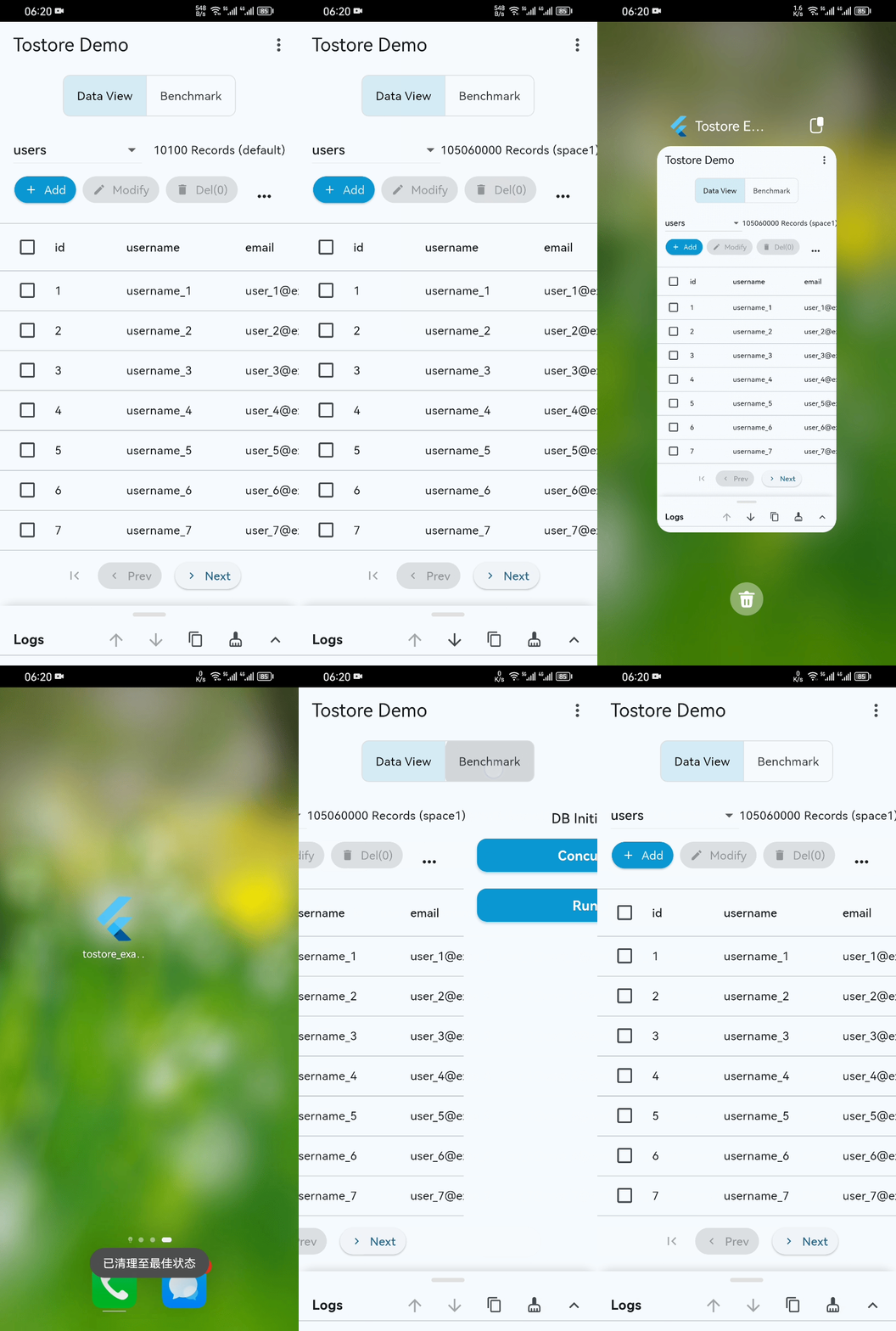
- Performance Showcase: Even with 100M+ records, startup, scrolling, and retrieval remain smooth on standard mobile devices. (See Video)
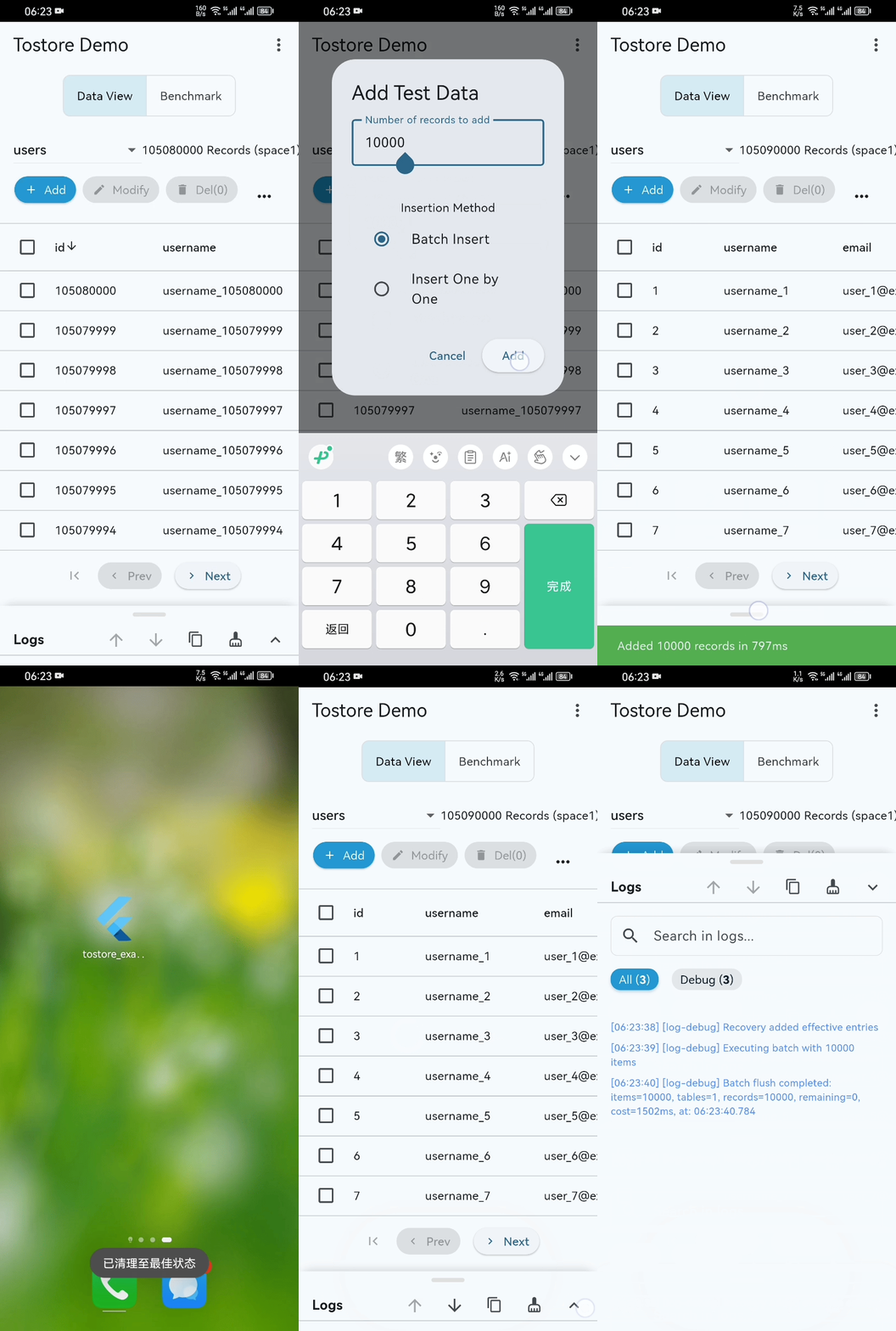
- Disaster Recovery: ToStore quickly self-recovers even if power is cut or the process is killed during high-frequency writes. (See Video)
If ToStore helps you, please give us a ⭐️! It is the greatest support for open source.
Recommendation: Consider using the ToApp Framework for frontend development. It provides a full-stack solution that automates data requests, loading, storage, caching, and state management.
More Resources
- 📖 Documentation: Wiki
- 📢 Feedback: GitHub Issues
- 💬 Discussion: GitHub Discussions
Libraries
- tostore
- ToStore is a high-performance distributed data storage engine that builds intelligent data networks using multi-partition parallel mechanisms and interconnected topologies.