
Sports Ground
A comprehensive Flutter package for creating beautiful, customizable sports grounds and animations.


✨ Features
- 🎨 Fully Customizable: Colors, styles, dimensions, and animations
- 📱 Cross-Platform: Works on iOS, Android, Web, Windows, macOS, and Linux
- 🚀 Performance Optimized: Efficient rendering with no external dependencies
- ♿ Accessibility: Built-in accessibility support
🚀 Getting Started
Installation
Add this to your package's pubspec.yaml file:
dependencies:
  sports_ground: ^1.0.0
Then run:
flutter pub get
Import
import 'package:sports_ground/sports_ground.dart';
📊 Quick Start Guide
Usage - Rugby Ground
import 'package:sports_ground/sports_ground.dart';

// Create rugby players
List<RugbyPlayer> homeTeam = [
  RugbyPlayer(
    id: 'h1',
    name: 'John Smith',
    position: 'Fullback',
    jerseyNumber: 15,
    fieldPosition: const Offset(200, 100),
    isHomeTeam: true,
    stats: {'Tries': 3, 'Tackles': 12, 'Passes': 45},
  ),
  // Add more players...
];

// Use the rugby ground
RugbyGround(
  homeTeam: homeTeam,
  awayTeam: awayTeam,
  homeTeamName: 'Lions',
  awayTeamName: 'Eagles',
  homeTeamColor: Colors.blue,
  awayTeamColor: Colors.red,
  homeScore: 15,
  awayScore: 12,
  onPlayerTap: (player) {
    // Handle player tap
  },
  onPlayerDrag: (player, position) {
    // Handle player drag
  },
)
Usage - Tennis Court
import 'package:sports_ground/sports_ground.dart';

// Create tennis players
List<TennisPlayer> homePlayers = [
  TennisPlayer(
    id: 'h1',
    name: 'Rafael Nadal',
    fieldPosition: const Offset(200, 150),
    isHomeTeam: true,
    stats: {
      'Aces': 12,
      'Winners': 28,
      'Unforced Errors': 15,
    },
  ),
];

// Create tennis score
TennisScore score = TennisScore(
  homeGames: 6,
  awayGames: 4,
  homeSets: 2,
  awaySets: 1,
  homePoints: '30',
  awayPoints: '15',
  currentSet: 4,
);

// Use the tennis court
TennisGround(
  homePlayers: homePlayers,
  awayPlayers: awayPlayers,
  homeTeamName: 'Nadal',
  awayTeamName: 'Djokovic',
  score: score,
  courtSurface: TennisCourtSurface.clay,
  viewAngle: TennisViewAngle.top,
  onSurfaceChange: (surface) {
    // Handle surface change
  },
  onViewAngleChange: (angle) {
    // Handle view angle change
  },
)
Interactive Features
- Player Management: Drag and drop players to change positions
- Team Panels: Left/right side panels showing team rosters
- Player Details: Tap players to view stats and information
- Touch Interactions: Interactive field areas and controls
- Real-time Updates: Dynamic score and team management
Responsive Design
- Adaptive Sizing: Ground automatically adjust to screen size (preferably Tablet or landscape view)
- Cross-Platform: Consistent appearance across all platforms
📱 Platform Support
| Platform | Supported | Version |
|---|---|---|
| Android | ✅ | API 21+ |
| iOS | ✅ | iOS 12+ |
| Web | ✅ | All |
| Windows | ✅ | All |
| macOS | ✅ | 10.14+ |
| Linux | ✅ | All |
🔧 Requirements
- Flutter 2.0.0 or higher
- Dart 2.17.0 or higher
- Android: API level 21+
- iOS: iOS 12.0+
📚 Complete Examples
Explore our comprehensive example app featuring:
📊 Sports Categories
- Rugby: Complete rugby ground with player positions, team management, and interactive features
- Tennis: Professional tennis court with realistic surfaces (Clay, Hard, Grass) and multiple viewing angles
- Coming Soon: Football, Basketball, Cricket with full customization
🎯 Interactive Features
- Drag & Drop: Move players around the field
- Team Management: Side panels with complete rosters
- Player Details: Tap for stats and information
- Top Team Lists: Horizontal scrollable player lists
- Responsive Design: Perfect for all screen sizes and orientations
- Professional UI: Stadium-quality appearance
💡 Use Cases
- Sports Apps: Team management and strategy planning
- Educational: Teaching rugby positions and rules
- Gaming: Interactive sports simulations
- Analytics: Player positioning and movement tracking
📸 Screenshots
Rugby Ground Features
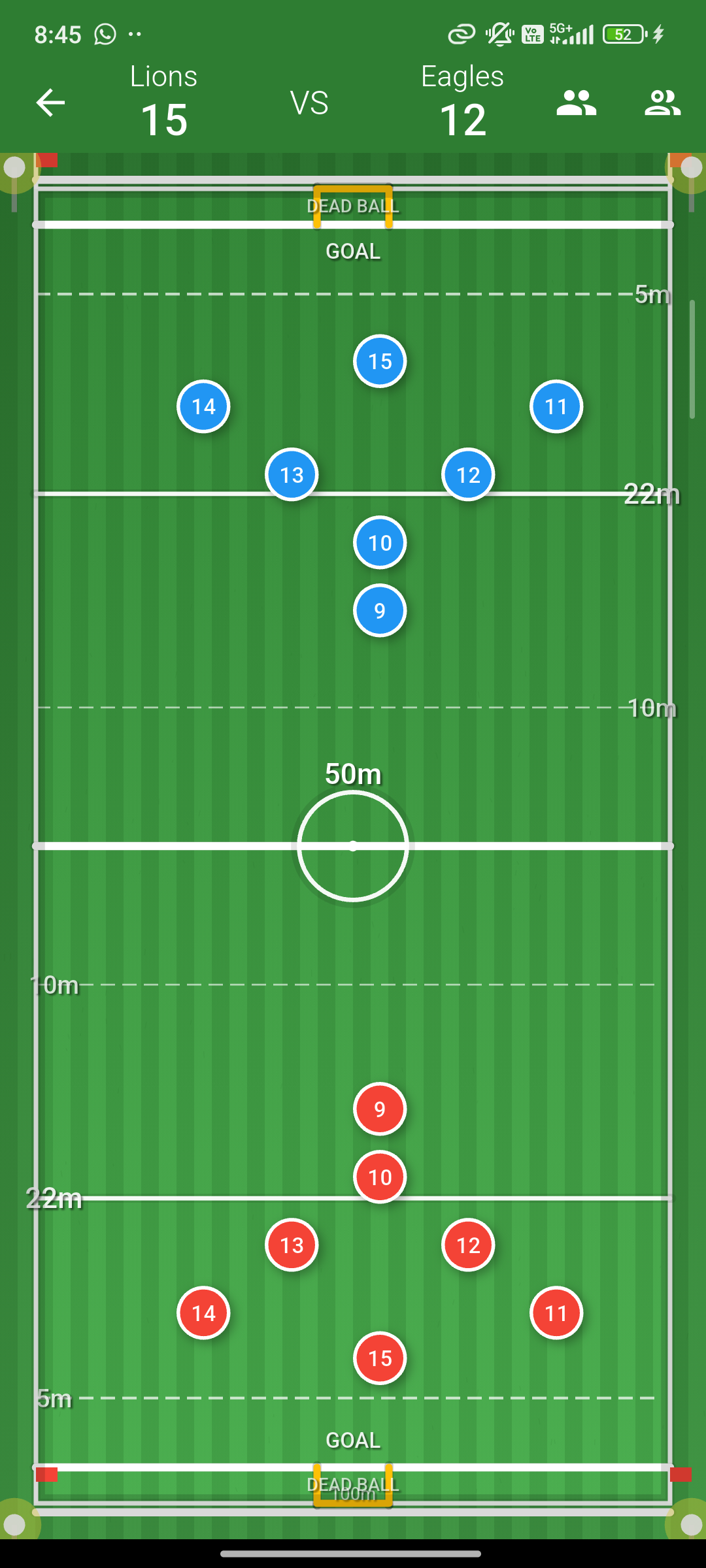 Interactive rugby ground in portrait mode with team panels
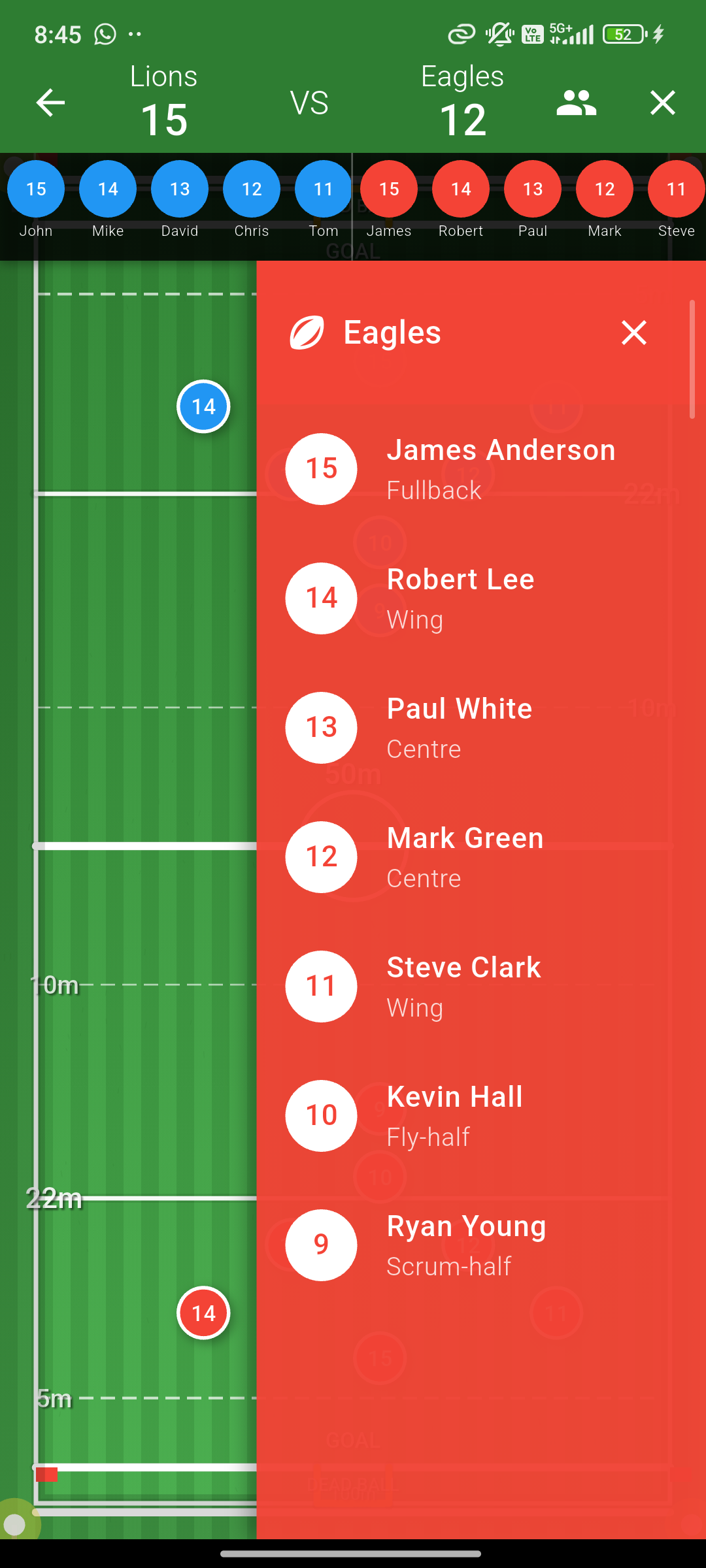 Player information card with statistics
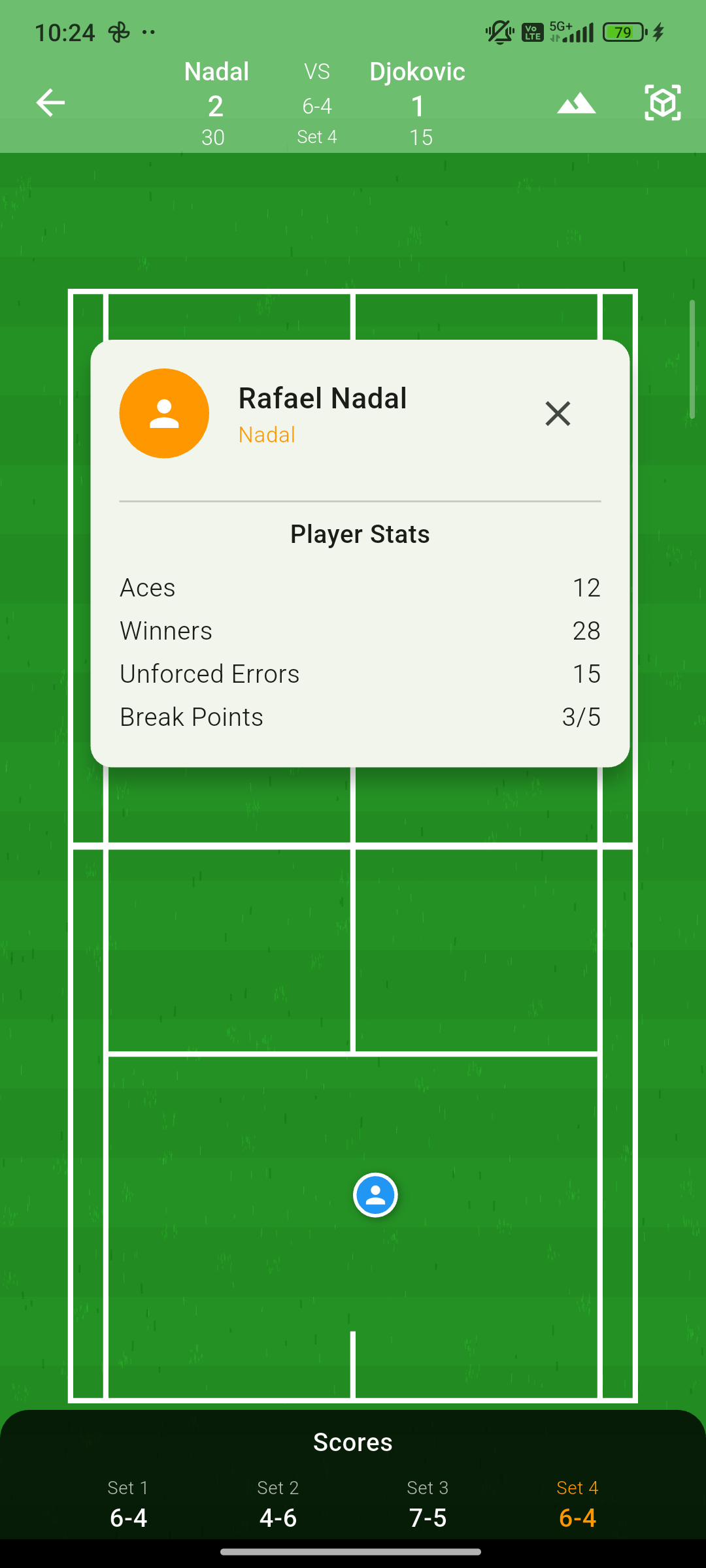 Player information card with statistics
📖 Documentation & Resources
📋 Documentation
- 📚 API Documentation - Complete API reference
- 💡 Examples - Live examples and demos
- 🚀 Publishing Guide - For contributors
🎓 Learning Resources
- Quick Start: Get up and running in minutes
- Ground Gallery: Visual examples of all ground types
- Best Practices: Guidelines for optimal ground usage
- Performance Tips: Optimize for large datasets
- Customization Guide: Advanced styling and theming
🛠️ Development
- Contributing: Guidelines for contributors
- Testing: Unit and integration test examples
- Architecture: Package structure and design patterns
- Roadmap: Planned features and improvements
🤝 Contributing
Contributions are welcome! Please read our Contributing Guide for details.
📄 License
This project is licensed under the MIT License - see the LICENSE file for details.
🔗 Links
💡 Support & Community
🤝 Getting Help
- 🐛 Bug Reports: GitHub Issues
- 💬 Questions: GitHub Discussions
- 📧 Direct Contact: Email Support
- 📖 Documentation: Complete Guide
🌟 Show Your Support
If you find this package helpful:
- ⭐ Star the repository on GitHub
- 👍 Like the package on pub.dev
- 🐦 Share on social media
- 💝 Contribute to the project
🚀 Contributing
We welcome contributions! See our Contributing Guide for:
- Code contributions
- Documentation improvements
- Bug reports and feature requests
- Community support
📊 Package Stats

