
Slider Button v3.0.0

This package provides an easy implementation of a Slider Button to cancel current transaction or screen. Highly customizable iphone alike looking widget.
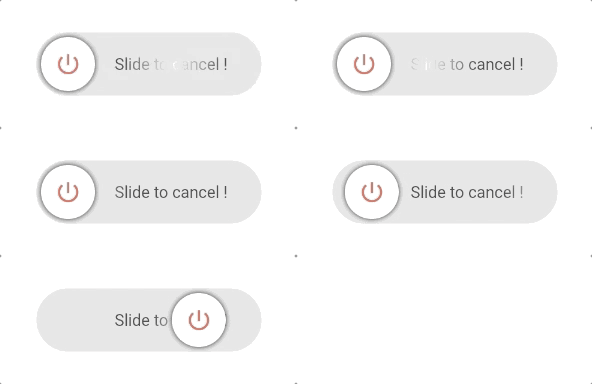
Null safety supported
Features
- Circle or rectangle — Use
radiusto switch between circular and rectangular slider. - Shimmer label — Optional shimmer effect on the label (customizable colors).
- Vibration — Optional haptic feedback on successful slide (
vibrationFlag). - Customizable size —
buttonSize,buttonWidth,height,widthfor full control. - Disabled state — Use
disable: trueto grey out and prevent sliding (with tooltip). - RTL support — Use
rightToLeftLocale: truefor right-to-left slide direction. - Dismiss threshold — Control how far the user must slide to confirm (
dismissThresholds).
How to use
Type 1
This is a Circle type widget. You just need to define the border radius to swap between rectangle and circle type widget.
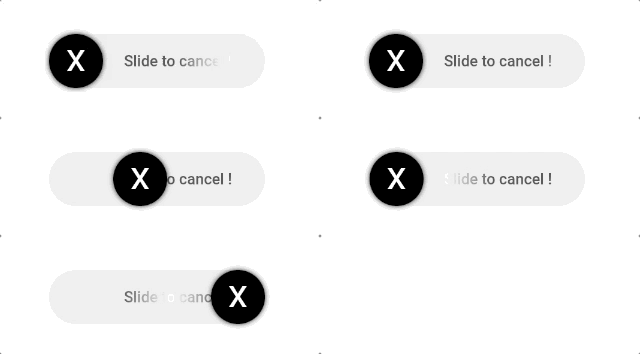
import 'package:slider_button/slider_button.dart';
Center(child: SliderButton(
      action: () async{
    ///Do something here OnSlide
    return true; //return false if you want to avoid dismissing the widget in the tree.
        },
       label: Text(
          "Slide to cancel Event",
          style: TextStyle(
              color: Color(0xff4a4a4a), fontWeight: FontWeight.w500, fontSize: 17),
        ),
      icon: Text(
        "x",
        style: TextStyle(
          color: Colors.white,
          fontWeight: FontWeight.w400,
          fontSize: 44,
        ),
      ),


    ));
Type 2
This is a Rectangle type widget.
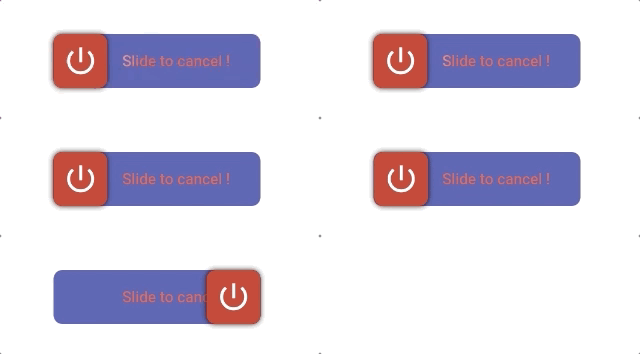
import 'package:slider_button/slider_button.dart';
SliderButton(
      action: () async{
        ///Do something here OnSlide
        return true; //return false if you want to avoid dismissing the widget in the tree.
      },

      ///Put label over here
      label: Text(
        "Slide to cancel !",
        style: TextStyle(
            color: Color(0xff4a4a4a),
            fontWeight: FontWeight.w500,
            fontSize: 17),
      ),
      icon: Center(
          child: Icon(
        Icons.power_settings_new,
        color: Colors.white,
        size: 40.0,
        semanticLabel: 'Text to announce in accessibility modes',
      )),

      ///Change All the color and size from here.
      width: 230,
      radius: 10,
      buttonColor: Color(0xffd60000),
      backgroundColor: Color(0xff534bae),
      highlightedColor: Colors.white,
      baseColor: Colors.red,
    );
Custom Usage
There are several options that allow for more control:
| Properties | Default | Description |
|---|---|---|
action |
— | (required) Define an action after sliding; return true to dismiss, false to keep. |
buttonKey |
null | Custom key for the button. Useful for dynamic labels. |
child |
null | Your own widget for a fully customizable slider button. |
vibrationFlag |
false | Enable haptic vibration on successful slide. |
height |
70 | Height of the widget. |
width |
270 | Width of the widget. |
buttonSize |
null (→ 60) | Size of the sliding button (square). Must be ≤ height. |
buttonWidth |
null | Width of the button when not squared (e.g. wide sliders). |
backgroundColor |
Color(0xffe0e0e0) | Background color of the track. |
baseColor |
Colors.black87 | Shimmer base color for the label. |
highlightedColor |
Colors.white | Shimmer highlight color for the label. |
buttonColor |
Colors.white | Color of the sliding button. |
label |
null | Widget used as the label (e.g. Text). |
alignLabel |
Alignment(0.6, 0) | Alignment of the label. |
boxShadow |
null | Shadow for the sliding button. |
icon |
null | Widget shown on the sliding button (e.g. icon or text). |
shimmer |
true | Enable or disable shimmer effect on the label. |
dismissThresholds |
0.75 | Drag threshold (0.0–1.0); e.g. 0.75 = 75% of width to dismiss. |
disable |
false | When true, disables sliding and shows disabled state with tooltip. |
rightToLeftLocale |
false | When true, slide direction is right-to-left (for RTL locales). |
👍 Contribution
- Fork it
- Create your feature branch (git checkout -b my-new-feature)
- Commit your changes (git commit -m 'Add some feature')
- Push to the branch (git push origin my-new-feature)
- Create new Pull Request