
shelf_asset_router
A multi-route asset handler for Shelf that serves Flutter bundled assets with flexible routing configuration, perfect for WebView integration.


Overview
shelf_asset_router enables you to serve static files from Flutter's bundled assets through a Shelf HTTP server. Unlike traditional file-system-based servers, this package uses rootBundle.load() to access assets, making it ideal for serving web content within Flutter applications via WebView.
Key Features
- ✅ Multi-route support - Configure multiple asset directories with independent routing rules
- ✅ Automatic MIME type detection - Intelligently detects content types based on file extensions and headers
- ✅ Flexible path resolution - Supports custom default documents (e.g.,
index.html) - ✅ Built-in caching - Includes cache headers for optimal performance
- ✅ Zero file system dependencies - Works entirely with Flutter's asset bundle system
- ✅ Shelf middleware compatible - Integrate seamlessly with existing Shelf pipelines
Use Cases
- WebView integration - Serve bundled web applications in mobile apps
- Hybrid apps - Bridge native Flutter UI with web-based content
- Offline-first PWAs - Deliver web content without network dependencies
- Documentation viewers - Display HTML documentation within your app
- Chart libraries - Integrate web-based charting solutions
Demo
| Android | iOS |
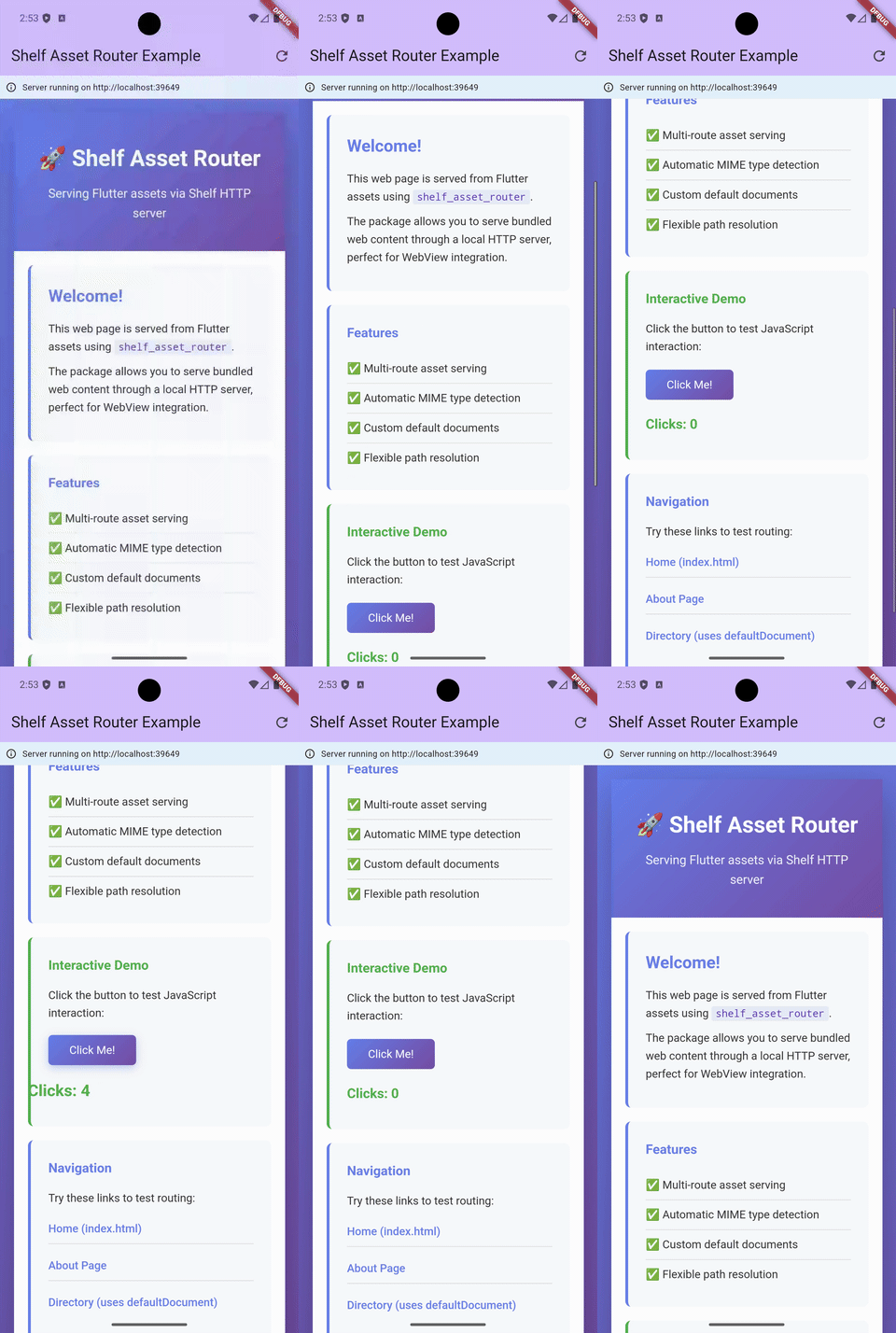 |
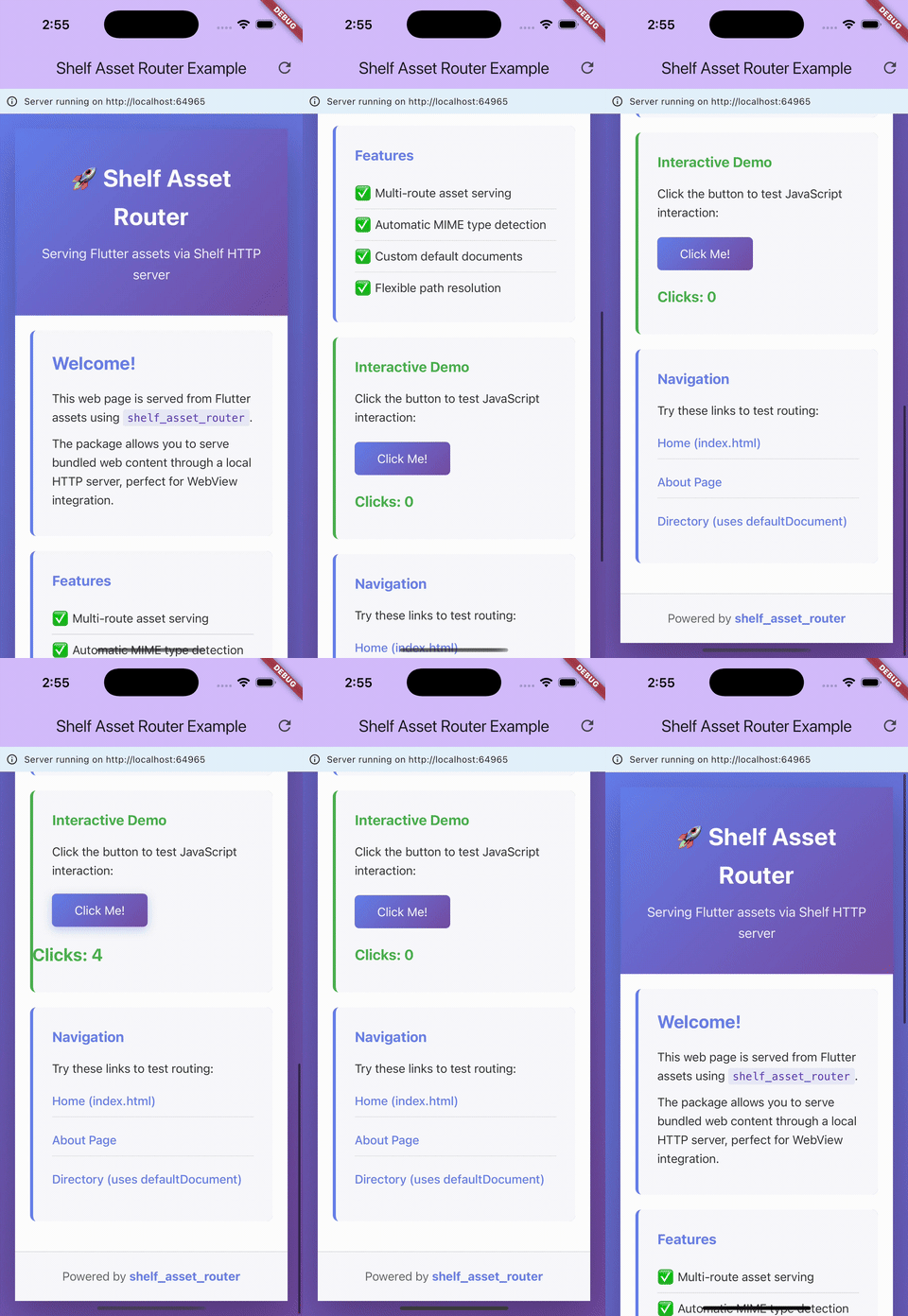 |
Installation
Add this to your package's pubspec.yaml file:
dependencies:
  shelf_asset_router: ^0.0.1
  shelf: ^1.4.2
Then run:
flutter pub get
Quick Start
1. Declare Your Assets
In your pubspec.yaml:
flutter:
  assets:
    - assets/webapp/index.html
    - assets/webapp/styles.css
    - assets/webapp/script.js
2. Create the Server
import 'package:shelf/shelf_io.dart' as shelf_io;
import 'package:shelf_asset_router/asset_handler.dart';
import 'package:shelf_asset_router/asset_route.dart';

// Configure routes
final assetHandler = AssetHandler.create([
  AssetRoute(
    basePath: 'assets/webapp',
    defaultDocument: 'index.html',
  ),
]);

final handler = const Pipeline().addMiddleware(logRequests()).addHandler(assetHandler);

// Start server
final server = await shelf_io.serve(
  handler,
  'localhost',
  8080,
);

print('Server running on http://localhost:${server.port}');
3. Load in WebView
import 'package:webview_flutter/webview_flutter.dart';

final controller = WebViewController()
  ..setJavaScriptMode(JavaScriptMode.unrestricted)
  ..loadRequest(Uri.parse('http://localhost:8080/assets/webapp/'));
Usage
Basic Configuration
Serve a single asset directory:
final handler = AssetHandler.create([
  AssetRoute(
    basePath: 'assets/webapp',
    defaultDocument: 'index.html',
  ),
]);
URL Mapping:
http://localhost:8080/assets/webapp/→assets/webapp/index.htmlhttp://localhost:8080/assets/webapp/about.html→assets/webapp/about.htmlhttp://localhost:8080/assets/webapp/css/styles.css→assets/webapp/css/styles.css
Multiple Routes
Serve multiple asset directories with different configurations:
final handler = AssetHandler.create([
  AssetRoute(
    basePath: 'assets/docs',
    defaultDocument: 'index.html',
  ),
  AssetRoute(
    basePath: 'assets/charts',
    defaultDocument: 'chart.html',
  ),
  AssetRoute(
    basePath: 'assets/static',
  ),
]);
URL Mapping:
http://localhost:8080/assets/docs/→assets/docs/index.htmlhttp://localhost:8080/assets/charts/→assets/charts/chart.htmlhttp://localhost:8080/assets/static/image.png→assets/static/image.png
With Shelf Middleware
Integrate with Shelf's middleware pipeline:
import 'package:shelf/shelf.dart';

final assetHandler = AssetHandler.create([
  AssetRoute(basePath: 'assets/webapp'),
]);

final handler = Pipeline()
  .addMiddleware(logRequests())
  .addHandler(assetHandler);

final server = await shelf_io.serve(handler, 'localhost', 8080);
Custom Default Document
Specify a different default file:
final handler = AssetHandler.create([
  AssetRoute(
    basePath: 'assets/app',
    defaultDocument: 'home.html', // Serves home.html instead of index.html
  ),
]);
Dynamic Port Assignment
Let the system assign an available port:
final server = await shelf_io.serve(
  handler,
  InternetAddress.loopbackIPv4,
  0, // System assigns available port
);

print('Server started on port ${server.port}');
Complete Example
See the example directory for a full Flutter application demonstrating:
- Server lifecycle management
- WebView integration
- Interactive web content with JavaScript
- Multiple page navigation
- Error handling
- Request logging
Run the example:
cd example
flutter pub get
flutter run
API Reference
AssetRoute
Configuration class for defining asset routing rules.
class AssetRoute {
  const AssetRoute({
    required String basePath,
    String? defaultDocument,
    bool listDirectories = false,
  });
}
Parameters:
basePath(required) - Asset directory path (e.g.,'assets/webapp')defaultDocument(optional) - Default file name, defaults to'index.html'listDirectories(optional) - Directory listing support (currently not implemented)
AssetHandler
Static utility class for creating Shelf handlers.
class AssetHandler {
  static Handler create(List<AssetRoute> configs);
}
Returns: A Shelf Handler function that processes HTTP requests.
Response Codes:
200 OK- Asset found and served successfully404 Not Found- No matching route or asset not found500 Internal Server Error- Server error during asset loading
Response Headers:
Content-Type- Automatically detected MIME typeCache-Control- Set topublic, max-age=3600
How It Works
- Request Matching - Incoming requests are matched against configured routes
- Path Resolution - URL paths are resolved to asset bundle paths
- Asset Loading - Files are loaded using
rootBundle.load() - MIME Detection - Content type is determined from file extension and headers
- Response Building - HTTP response is constructed with appropriate headers
Path Resolution Logic
HTTP Request: /assets/webapp/page.html
            ↓
Route Match: basePath = 'assets/webapp'
            ↓
Asset Path: assets/webapp/page.html
            ↓
rootBundle.load('assets/webapp/page.html')
For directory requests:
HTTP Request: /assets/webapp/
            ↓
Route Match: basePath = 'assets/webapp', defaultDocument = 'index.html'
            ↓
Asset Path: assets/webapp/index.html
Platform Support
| Platform | Supported | Notes |
|---|---|---|
| Android | ✅ | Full support |
| iOS | ✅ | Full support |
Note: This package is designed primarily for mobile platforms (Android/iOS) where serving bundled assets to a WebView is a common pattern.
Troubleshooting
Assets not loading (404 errors)
Problem: Server returns 404 for existing assets.
Solution:
- Verify assets are declared in
pubspec.yaml - Ensure
basePathmatches your asset directory structure - Run
flutter clean && flutter pub getto rebuild the asset bundle - Check that file paths don't include the
assets/prefix in routes
// ❌ Wrong
AssetRoute(basePath: 'assets/assets/webapp')

// ✅ Correct
AssetRoute(basePath: 'assets/webapp')
MIME type issues
Problem: Assets served with incorrect Content-Type.
Solution: The package automatically detects MIME types. If detection fails:
- Ensure files have proper extensions (
.html,.css,.js) - File headers are checked for binary files (images, fonts)
Server port conflicts
Problem: Port already in use error.
Solution: Use dynamic port assignment:
final server = await shelf_io.serve(handler, 'localhost', 0);
WebView not loading content
Problem: WebView shows blank page.
Solution:
- Enable JavaScript:
controller.setJavaScriptMode(JavaScriptMode.unrestricted) - Check server is running before loading WebView
- Verify correct URL format:
http://localhost:PORT/assets/PATH/ - Check console for error messages:
controller.setNavigationDelegate(...)
Performance Considerations
- Asset Bundle Size - Keep web assets optimized; large bundles increase app size
- Caching - Built-in
Cache-Controlheaders reduce repeated asset loads - Memory Usage - Assets are loaded into memory; monitor usage for large files
- Concurrent Requests - Shelf handles concurrent requests efficiently
Security
- Localhost Only - Server binds to
localhost/127.0.0.1by default - No External Access - Not accessible from outside the device
- Asset Sandboxing - Only serves assets from configured routes
Comparison with Alternatives
| Feature | shelf_asset_router | shelf_static |
|---|---|---|
| Asset Bundle Support | ✅ | ❌ |
| File System Access | ❌ | ✅ |
| Multi-route Support | ✅ | ❌ |
| MIME Detection | ✅ | ✅ |
| Flutter Integration | ✅ | ⚠️ |
| Mobile Optimized | ✅ | ❌ |
Contributing
Contributions are welcome! Please feel free to submit a Pull Request.
Development Setup
# Clone repository
git clone https://github.com/srcchang/shelf_asset_router.git

# Install dependencies
flutter pub get

# Run tests
flutter test

# Run example
cd example && flutter run
License
This project is licensed under the BSD 3-Clause License - see the LICENSE file for details.
Changelog
See CHANGELOG.md for a list of changes.
Acknowledgments
- Built on top of the excellent shelf package
- Inspired by the need for better WebView integration in Flutter apps
- Thanks to the Flutter and Dart communities
Related Packages
- shelf - HTTP server framework
- shelf_static - File system-based static file serving
- webview_flutter - WebView widget for Flutter
- mime - MIME type detection
Libraries
- shelf_asset_router
- A multi-route asset handler for Shelf that serves Flutter bundled assets.