
scroll_velocity_notifier
scroll_velocity_notifier is a lightweight Flutter utility that intercepts scroll notifications and computes smooth, real-time scroll velocity (pixels per second).
It is designed for scroll-aware UI, gesture-driven effects, and advanced animations, without imposing layout constraints or architectural opinions.
From the creator of http_mock_adapter, a widely used Flutter testing utility.
✨ Features
- 📏 Calculates scroll velocity in pixels per second
- 📉 Uses Exponential Moving Average (EMA) for smooth values
- 🌊 Optional overscroll velocity support
- 🧩 Implemented as a ProxyWidget (zero layout impact)
- 🔌 Works with any
ScrollView - 🧠 No global state, no forced state management
📦 Installation
Add the dependency to your pubspec.yaml:
dependencies:
  scroll_velocity_notifier: ^0.0.1
Then run:
flutter pub get
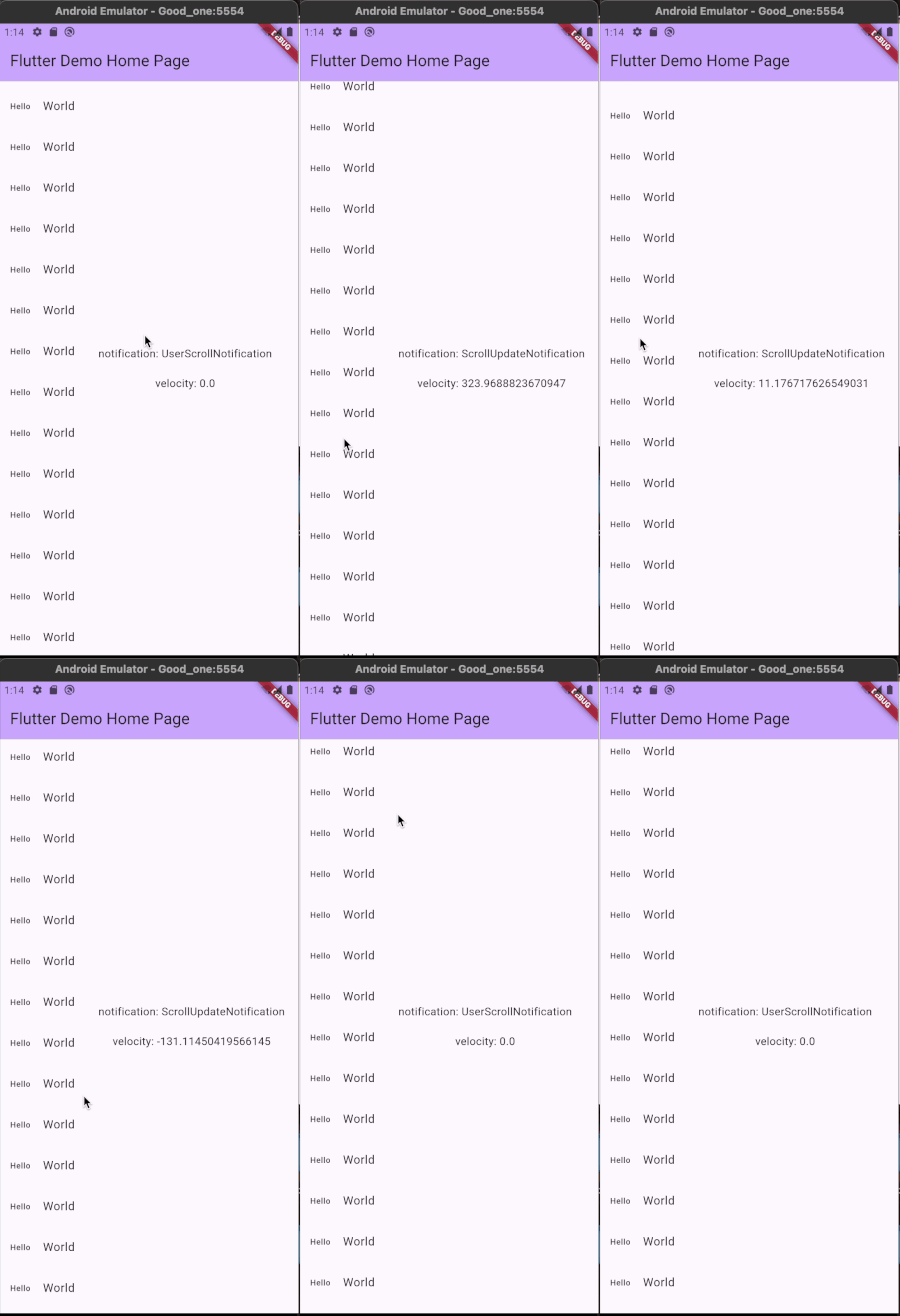
📸 Demo - gif removes frames so it looks junky on the gif
🧠 How It Works
The widget listens to ScrollNotifications emitted by scrollable widgets and computes velocity using:
- Scroll position delta (
pixels) - Time delta (microseconds)
- EMA smoothing for stability
The widget does not alter layout or scrolling behavior. It acts purely as a transparent observer in the widget tree.
🚀 Basic Usage
Wrap any scrollable widget with ScrollVelocityNotifier:
ScrollVelocityNotifier(
  onNotification: (notification, velocity) {
    debugPrint('Velocity: $velocity px/s');
    return false; // allow notification to bubble up
  },
  child: ListView.builder(
    itemCount: 50,
    itemBuilder: (context, index) {
      return ListTile(
        title: Text('Item $index'),
      );
    },
  ),
)
Further reading
📐 Velocity Semantics
- Positive velocity → scrolling down
- Negative velocity → scrolling up
- Zero velocity → stationary or ignored overscroll
- Smoothed output → ideal for UI reactions and animations
🌊 Overscroll Support
By default, velocity is reported as 0 during overscroll.
To include overscroll velocity (e.g. when using BouncingScrollPhysics):
ScrollVelocityNotifier(
  includeOversScroll: true,
  onNotification: (notification, velocity) {
    debugPrint('Overscroll velocity: $velocity');
    return false;
  },
  child: ListView(
    physics: const BouncingScrollPhysics(),
    children: const [
      SizedBox(height: 2000),
    ],
  ),
)
🎯 Use Case Examples
Hide / Show AppBar Based on Scroll Speed
double appBarOffset = 0;

ScrollVelocityNotifier(
  onNotification: (notification, velocity) {
    if (velocity > 800) {
      appBarOffset = -100;
    } else if (velocity < -800) {
      appBarOffset = 0;
    }
    return false;
  },
  child: CustomScrollView(
    slivers: [
      SliverAppBar(
        floating: true,
        expandedHeight: 100,
      ),
      SliverList(
        delegate: SliverChildBuilderDelegate(
          (context, index) => ListTile(title: Text('Item $index')),
          childCount: 50,
        ),
      ),
    ],
  ),
)
Trigger Animations Based on Scroll Velocity
ScrollVelocityNotifier(
  onNotification: (notification, velocity) {
    if (velocity.abs() > 1200) {
      debugPrint('Fast scroll detected');
    }
    return false;
  },
  child: ListView(
    children: List.generate(
      30,
      (i) => ListTile(title: Text('Row $i')),
    ),
  ),
)
🔌 StreamController Integration
ScrollVelocityNotifier can optionally emit scroll velocity updates into a
user-provided StreamController.
This allows scroll velocity data to be consumed outside the widget tree, for example by:
- BLoC / Cubit
- analytics systems
- animation coordinators
- logging or debugging tools
Basic Usage
final controller =
    StreamController<ScrollStreamNotification>.broadcast();

@override
void dispose() {
  controller.close();
  super.dispose();
}

ScrollVelocityNotifier(
  controller: controller,
  child: ListView.builder(
    itemCount: 50,
    itemBuilder: (context, index) {
      return ListTile(title: Text('Item $index'));
    },
  ),
);
🧠 Architectural Notes
- Implemented using
ProxyWidget+ProxyElement - No rebuilds are triggered
- No inherited state
- No frame callbacks
- Safe for high-frequency scroll updates
This makes it suitable for large dashboards and complex scroll hierarchies.
🧪 Testing
The velocity stream can be tested by driving scroll notifications and asserting expected velocity output:
expect(
  velocity.abs(),
  greaterThan(0),
);
🛠️ When to Use This Package
✔ Scroll-aware UI ✔ Velocity-driven animations ✔ Gesture-based visibility logic ✔ Overscroll-sensitive effects ✔ Performance-safe scroll observation
📄 License
MIT License
See LICENSE file for details.
🙌 Contributions
Issues and pull requests are welcome. If you find a bug or have a feature idea, feel free to open an issue.