
s_liquid_pull_to_refresh
A beautiful liquid/spring styled pull-to-refresh widget for Flutter with smooth, customizable animations.


SLiquidPullToRefresh is a drop-in replacement for Flutter's RefreshIndicator that provides a fluid, liquid-style animation. Perfect for adding a polished, modern feel to your scrollable content with ListView, CustomScrollView, and more.
📱 Demo
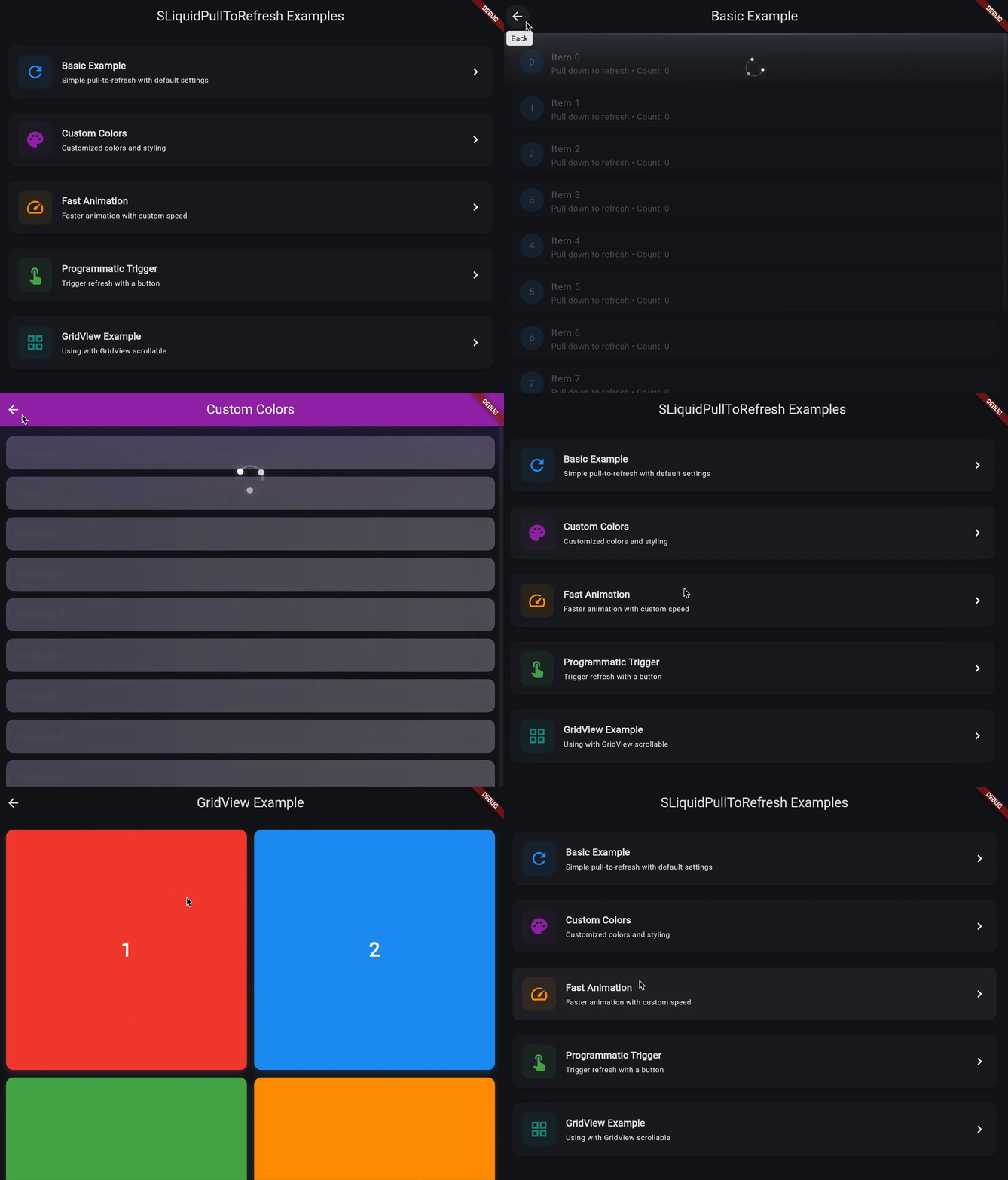
✨ Features
- Fluid Animations: Smooth liquid peak and spring effects when pulling and releasing
- Highly Customizable: Control height, animation speed, spring duration, and border width
- Color Theming: Customize foreground and background colors to match your app
- Flexible Behavior: Toggle child opacity transitions while pulling
- Progress Indication: Refined minimalist three-dot spinner with subtle connecting arc
- Programmatic Control: Trigger refresh programmatically using a
GlobalKey<SLiquidPullToRefreshState> - Zero Dependencies: Pure Flutter implementation with no external dependencies
- Material Design: Integrates seamlessly with Material Design themes
📦 Installation
Add to your app's pubspec.yaml (after publishing to pub.dev):
dependencies:
  s_liquid_pull_to_refresh: ^3.0.0
If using locally (not yet published), use a path reference:
dependencies:
  s_liquid_pull_to_refresh:
    path: ../s_liquid_pull_to_refresh
Run flutter pub get afterwards.
🚀 Quick Start
Wrap a scrollable in SLiquidPullToRefresh and implement onRefresh:
import 'package:flutter/material.dart';
import 'package:s_liquid_pull_to_refresh/s_liquid_pull_to_refresh.dart';

class Demo extends StatefulWidget {
  const Demo({super.key});
  @override
  State<Demo> createState() => _DemoState();
}

class _DemoState extends State<Demo> {
  final items = List.generate(20, (i) => i);
  int refreshCount = 0;

  Future<void> _handleRefresh() async {
    await Future.delayed(const Duration(seconds: 1));
    setState(() {
      refreshCount++;
      items.insert(0, refreshCount);
    });
  }

  @override
  Widget build(BuildContext context) {
    return SLiquidPullToRefresh(
      onRefresh: _handleRefresh,
      height: 120,
      animSpeedFactor: 1.2,
      borderWidth: 3,
      child: ListView.separated(
        physics: const AlwaysScrollableScrollPhysics(),
        padding: const EdgeInsets.symmetric(vertical: 12),
        itemCount: items.length,
        separatorBuilder: (_, __) => const Divider(height: 1),
        itemBuilder: (context, index) => ListTile(
          title: Text('Item ${items[index]}'),
        ),
      ),
    );
  }
}
See the full runnable example in example/lib/main.dart.
📑 API Reference
Properties
| Property | Type | Default | Description |
|---|---|---|---|
child |
Widget |
required | The scrollable widget to enable pull-to-refresh. Typically a ListView, GridView, or CustomScrollView. |
onRefresh |
Future<void> Function() |
required | Async callback invoked when the user pulls down and releases. Must return a Future that completes when refresh is done. |
height |
double? |
100.0 |
Height of the liquid animation area. Controls how far the liquid extends downward. |
springAnimationDurationInMilliseconds |
int |
1000 |
Duration (in milliseconds) of the spring animation sequence when releasing the pull. |
animSpeedFactor |
double |
1.0 |
Speed multiplier for dismissal animations. Must be ≥ 1.0. Higher values = faster animations. |
borderWidth |
double |
2.0 |
Stroke width of the circular progress indicator ring. |
showChildOpacityTransition |
bool |
true |
If true, fades the child content while pulling. If false, translates the child instead. |
color |
Color? |
Theme.colorScheme.secondars_liquid_pull_to_refresh |
Foreground color for the liquid and progress ring. |
backgroundColor |
Color? |
Colors.white |
Background color for the spinner (default white). |
triggerDistance |
double? |
null |
Customizable drag threshold distance to trigger refresh. |
onDragProgress |
void Function(double)? |
null |
Callback reporting drag progress from 0.0 to 1.0. |
Programmatic Refresh
You can trigger a refresh programmatically without user interaction using a GlobalKey<SLiquidPullToRefreshState>:
class MyRefreshWidget extends StatefulWidget {
  @override
  State<MyRefreshWidget> createState() => _MyRefreshWidgetState();
}
class _MyRefreshWidgetState extends State<MyRefreshWidget> {
  final _refreshKey = GlobalKey<SLiquidPullToRefreshState>();

  Future<void> _handleRefresh() async {
    // Your refresh logic
    await Future.delayed(const Duration(seconds: 2));
  }

  void _triggerRefresh() {
    // Programmatically trigger refresh
    _refreshKey.currentState?.show();
  }

  @override
  Widget build(BuildContext context) {
    return Column(
      children: [
        ElevatedButton(
          onPressed: _triggerRefresh,
          child: const Text('Refresh'),
        ),
        Expanded(
          child: SLiquidPullToRefresh(
            key: _refreshKey,
            onRefresh: _handleRefresh,
            child: ListView(...),
          ),
        #### Behavior Note (v1.0.0+)

        When using `currentState?.show()` the widget now enters the **refresh** state and invokes the `onRefresh` callback immediately (before the initial snap / spring animations complete). This improves responsiveness and makes programmatic refresh deterministic for tests. Previously the callback started only after the opening animations finished.

        ),
      ],
    );
  }
}
🎨 Customization Examples
Custom Colors
SLiquidPullToRefresh(
  onRefresh: _handleRefresh,
  color: Colors.deepPurple,
  backgroundColor: Colors.white, // spinner color (default: white)
  child: ListView(...),
)
Fast Animation
SLiquidPullToRefresh(
  onRefresh: _handleRefresh,
  animSpeedFactor: 2.0,
  springAnimationDurationInMilliseconds: 600,
  child: ListView(...),
)
Taller Indicator
SLiquidPullToRefresh(
  onRefresh: _handleRefresh,
  height: 200,
  borderWidth: 4.0,
  child: ListView(...),
)
Without Opacity Transition
SLiquidPullToRefresh(
  onRefresh: _handleRefresh,
  showChildOpacityTransition: false,
  child: ListView(...),
)
✅ Testing
The package includes comprehensive widget tests in test/s_liquid_pull_to_refresh_test.dart covering:
- Basic rendering and child display
- Programmatic refresh triggering
- Custom properties configuration
- Callback execution
- Integration with different scrollable widgets (ListView, CustomScrollView)
- Refresh completion handling
Run tests with:
flutter test
📄 License
MIT. See LICENSE file.
🔗 Repository & Issues
GitHub: https://github.com/SoundSliced/s_liquid_pull_to_refresh
Please file issues or feature requests on the tracker.
🤝 Contributing
Contributions are welcome! Please feel free to submit a Pull Request. For major changes, please open an issue first to discuss what s_liquid_pull_to_refreshou would like to change.
Guidelines
- Keep the widget dependency-free
- Maintain focus on pull-to-refresh UX
- Add tests for new features
- Update documentation as needed
- Follow Flutter best practices
📝 Changelog
See CHANGELOG.md for a detailed history of changes.
👥 Authors
- SoundSliced - GitHub
🙏 Acknowledgments
Inspired by various liquid-style pull-to-refresh implementations across mobile platforms, adapted for Flutter with customizable animations and modern Material Design integration.
Libraries
- s_liquid_pull_to_refresh
- s_liquid_pull_to_refresh package