
s_connectivity
A small Flutter utility package to detect Internet connectivity changes and show ready‑to‑use offline UI components.
This package exposes a simple connectivity listener (
SConnectivity) plus:
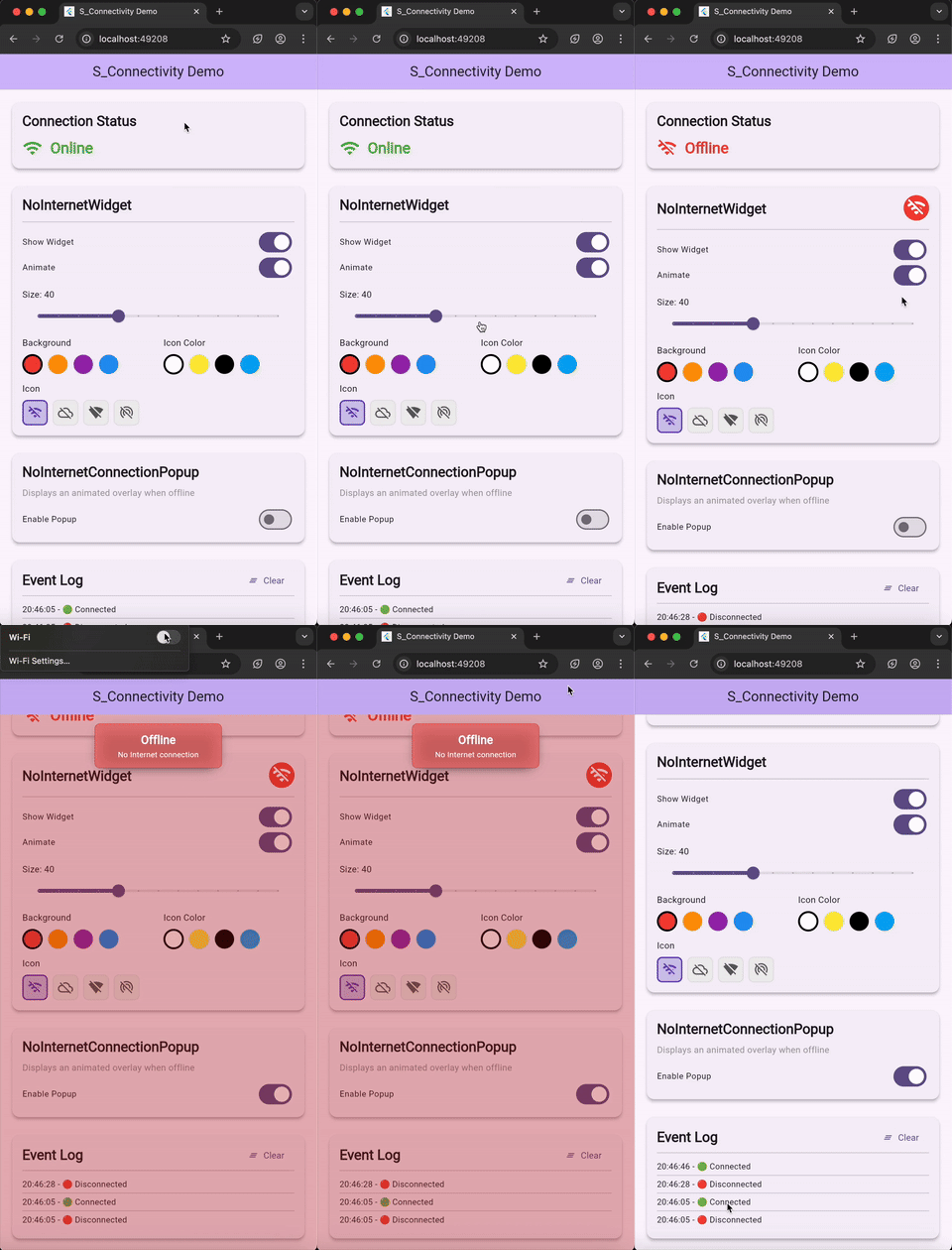
NoInternetWidget(small indicator widget)- Automatic snackbar connectivity warnings via the Modal snackbar system
Demo
Features
- Listen to Internet connectivity changes (connected / disconnected)
- Access the current state synchronously via
SConnectivity.isConnected - Subscribe via
SConnectivity.listenable(preferred) - Drop-in UI:
NoInternetWidget(customizable icon, colors, size, optional animation)- Auto-show/dismiss snackbar on connectivity changes via
showNoInternetSnackbar - Custom snackbar messages via
noInternetSnackbarMessage - Manual snackbar control via the
showNoInternetSnackbarsetter
SConnectivityOverlaywidget for zero-config Modal overlay setupSConnectivityOverlay.appBuilderfor directMaterialApp(builder: ...)integration- Includes an example app under
example/
Getting started
Add the dependency:
dependencies:
  s_connectivity: ^3.0.0
Then run flutter pub get.
⚠️ BREAKING CHANGES in v3.0.0:
AppInternetConnectivityclass has been renamed toSConnectivity— all call sites must be updated (e.g.AppInternetConnectivity.listenable→SConnectivity.listenable)Source file renamed from
s_connection.darttos_connectivity.dart— direct imports must be updated
toggleConnectivitySnackbar()is now private — use theshowNoInternetSnackbarsetter instead for manual snackbar controlSee CHANGELOG for full details
NoInternetConnectionPopupwidget has been removedConnectivity warnings now use the Modal snackbar system
Dependencies on
assorted_layout_widgetsandsizerhave been removedSee CHANGELOG for full details
Permissions
Android
Add the following permission to your android/app/src/main/AndroidManifest.xml:
<uses-permission android:name="android.permission.INTERNET" />
macOS
Add the following to your macOS .entitlements files:
<key>com.apple.security.network.client</key>
<true/>
For more information, see the Flutter networking documentation.
Usage
Import:
import 'package:s_connectivity/s_connectivity.dart';
Basic usage (listen + read current state)
Initialize once (for example, in your app bootstrap or first screen initState):
@override
void initState() {
  super.initState();
  SConnectivity.initialiseInternetConnectivityListener(
    // Optional
    showDebugLog: true,
    emitInitialStatus: true,
    onConnected: () {
      // Called when connectivity becomes available.
    },
    onDisconnected: () {
      // Called when connectivity is lost.
    },
    // Auto-show snackbar when offline
    // showNoInternetSnackbar: true,
    // noInternetSnackbarMessage: 'No internet connection',
  );
}
If you want callbacks to fire for the currently-known value right away (without doing a fresh probe), set emitInitialStatus: true.
Read current state anywhere:
final isOnline = SConnectivity.isConnected;
React to changes (preferred API):
ValueListenableBuilder<bool>(
  valueListenable: SConnectivity.listenable,
  builder: (context, isConnected, _) {
    return Text(isConnected ? 'Online' : 'Offline');
  },
)
Dispose when appropriate:
@override
void dispose() {
  SConnectivity.disposeInternetConnectivityListener();
  super.dispose();
}
Advanced usage
1) Hardened (re)initialization for Flutter Web hot restart
If you hit issues during web hot restart (stale listeners), you can reset everything before initializing:
await SConnectivity.hardReset();
await SConnectivity.initialiseInternetConnectivityListener(
  emitInitialStatus: true,
  showDebugLog: true,
  onConnected: () => debugPrint('Connected'),
  onDisconnected: () => debugPrint('Disconnected'),
);
2) Automatic snackbar on connectivity change
Enable the built-in snackbar that auto-shows when offline and dismisses when back online:
SConnectivity.initialiseInternetConnectivityListener(
  showNoInternetSnackbar: true,
  noInternetSnackbarMessage: 'You are offline', // optional custom message
);
To manually control the snackbar:
// Enable or disable the connectivity snackbar programmatically
SConnectivity.showNoInternetSnackbar = true;  // show
SConnectivity.showNoInternetSnackbar = false; // dismiss
3) Small offline indicator widget
Place NoInternetWidget in your AppBar, a toolbar, etc:
AppBar(
  title: const Text('My App'),
  actions: const [
    Padding(
      padding: EdgeInsets.only(right: 12),
      child: Center(
        child: NoInternetWidget(
          size: 28,
          shouldAnimate: true,
          shouldShowWhenNoInternet: true,
        ),
      ),
    ),
  ],
)
4) SConnectivityOverlay (New in v3.0.0)
A convenience wrapper that sets up the Modal overlay system automatically, so the "No Internet" snackbar works without you needing to know about or manually call Modal.appBuilder:
As a widget wrapper:
MaterialApp(
  builder: (context, child) => SConnectivityOverlay(
    child: child!,
  ),
  home: MyHomePage(),
)
As an appBuilder drop-in:
MaterialApp(
  builder: SConnectivityOverlay.appBuilder,
  home: MyHomePage(),
)
Note: Safe to use alongside an existing
Modal.appBuildercall — double-wrapping is prevented automatically thanks to the idempotentappBuilder.
Customize colors / icon:
const NoInternetWidget(
  size: 40,
  backgroundColor: Colors.red,
  iconColor: Colors.white,
  icon: Icons.wifi_off_rounded,
)
Notes
emitInitialStatus: truewill emit the currently known state immediately. It does not perform an actual network probe.- The example app demonstrates logging connectivity events and showing both UI components.
License
MIT
Libraries
- s_connectivity
- s_connectivity package