
rich_form_field
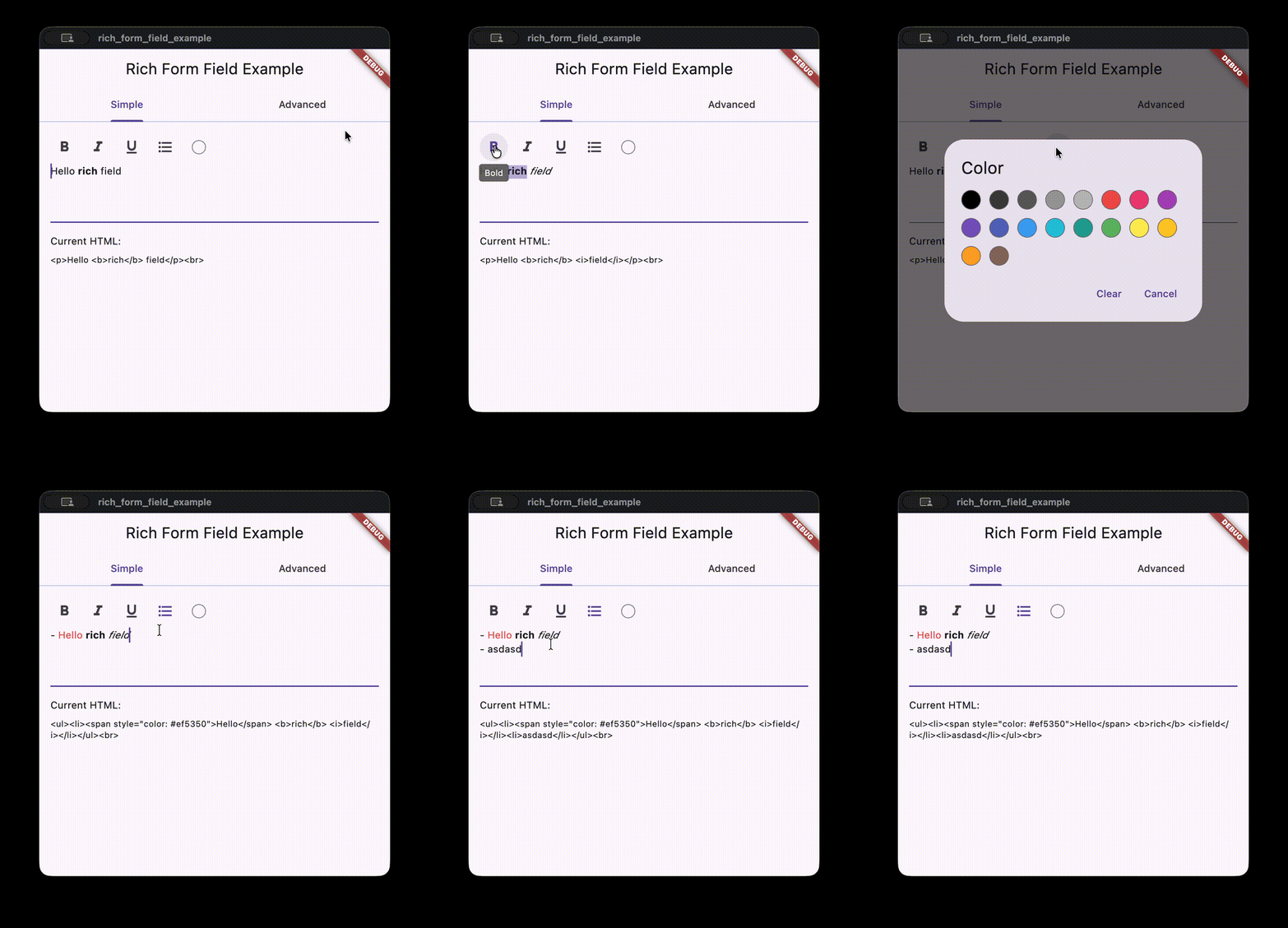
Rich text form field with a formatting toolbar, inline style ranges, and HTML codec output. Designed for simple rich text input in Flutter forms.
Features
HtmlRichTextFormFieldwith bold, italic, underline, list, and color tools.HtmlRichTextControllerthat tracks style ranges and produces HTML output.- Pluggable
RichTextCodecfor alternative save formats. - Optional auto-insert list markers when pressing Enter.
- HTML parsing backed by
package:htmland a simple tag subset.
Usage
HtmlRichTextFormField(
  autoInsertListMarkers: false,
  strings: const RichTextEditorStrings(
    bold: 'Bold',
    italic: 'Italic',
    underline: 'Underline',
    list: 'List',
    textColor: 'Color',
    clear: 'Clear',
    cancel: 'Cancel',
  ),
  onChanged: (html) {
    // Persist the HTML output.
  },
)
Reading HTML or raw text
final controller = HtmlRichTextController();

void _submit() {
  final html = controller.encoded;
  final rawText = controller.text;
  // Send html/rawText to your backend.
}

HtmlRichTextFormField(
  controller: controller,
  strings: const RichTextEditorStrings(
    bold: 'Bold',
    italic: 'Italic',
    underline: 'Underline',
    list: 'List',
    textColor: 'Color',
    clear: 'Clear',
    cancel: 'Cancel',
  ),
)
Read-only styled rendering
Use RichStyledText or RichSelectableStyledText to render exported editor data.
RichStyledText(
  encoded: '<p><b>Hello</b> <i>world</i></p>',
)

RichSelectableStyledText(
  encoded: '<ul><li>First</li><li>Second</li></ul>',
  listRenderMode: RichTextListRenderMode.bullets,
)
You can also pass pre-decoded values and custom style resolvers:
final codec = HtmlRichTextCodec(customStyles: const [
  RichTextCustomStyle(key: 'highlight', tag: 'mark', className: 'hl'),
]);

final result = codec.decode('<p><mark class="hl">Hi</mark></p>');

RichStyledText.fromResult(
  result: result,
  customStyleResolver: (key, base) {
    if (key == 'highlight') {
      return base.copyWith(fontWeight: FontWeight.w600);
    }
    return null;
  },
)
Advanced example
const customStyles = [
  RichTextCustomStyle(
    key: 'highlight',
    tag: 'mark',
    className: 'highlight',
    styleBuilder: _highlightStyle,
  ),
];

final controller = HtmlRichTextController(
  html: '<p>Hello <b>rich</b> field.</p>',
  codec: HtmlRichTextCodec(customStyles: customStyles),
  customStyles: customStyles,
);

HtmlRichTextFormField(
  controller: controller,
  customStyles: customStyles,
  toolbarTools: const [
    DefaultTool.bold,
    DefaultTool.italic,
    DefaultTool.color,
    DefaultTool.list,
    DefaultTool.underline,
  ],
  customTools: [
    RichTextCustomTool(
      id: 'highlight',
      iconBuilder: (context, isActive) {
        final color = isActive
            ? Theme.of(context).colorScheme.primary
            : Theme.of(context).iconTheme.color;
        return Icon(Icons.star, color: color);
      },
      tooltip: 'Highlight',
      onPressed: (controller) => controller.toggleCustomStyle('highlight'),
      isActive: (controller) => controller.isCustomStyleActive('highlight'),
    ),
  ],
  onPickColor: (context, currentColor) async {
    return showDialog<Color?>(
      context: context,
      builder: (context) => AlertDialog(
        title: const Text('Pick a color'),
        content: Wrap(
          spacing: 12,
          runSpacing: 12,
          children: [
            for (final color in [Colors.red, Colors.blue, Colors.green])
              InkWell(
                onTap: () => Navigator.of(context).pop(color),
                child: Container(
                  width: 28,
                  height: 28,
                  decoration: BoxDecoration(
                    color: color,
                    shape: BoxShape.circle,
                  ),
                ),
              ),
          ],
        ),
      ),
    );
  },
  strings: const RichTextEditorStrings(
    bold: 'Bold',
    italic: 'Italic',
    underline: 'Underline',
    list: 'List',
    textColor: 'Color',
    clear: 'Clear',
    cancel: 'Cancel',
  ),
)

TextStyle _highlightStyle(TextStyle base) {
  return base.copyWith(fontWeight: FontWeight.w600);
}
See the full example app in example/lib/main.dart.
Additional information
- Repository: github.com/Asion001/rich_form_field
- Issues: github.com/Asion001/rich_form_field/issues