
Puer Time Travel



A drop-in time-travel debugging extension for puer.
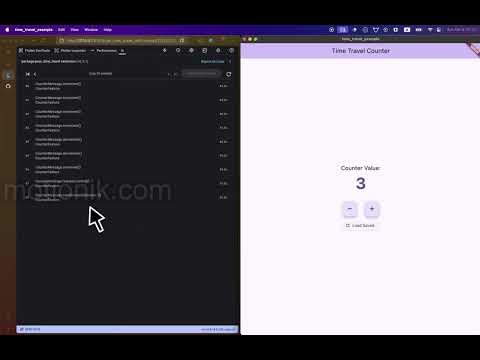
Record every message and state snapshot automatically. Step backward and forward through your app's history using a dedicated Flutter DevTools extension — no extra code required. Here is a video example of how it works (click image below):
Features
- Drop-in replacement — Swap
Feature(...)forTimeTravelFeature(...)and your entire message history is recorded automatically - State snapshots — Periodic full state snapshots enable efficient navigation to any point in the timeline
- DevTools extension — A dedicated
puer_time_traveltab appears in Flutter DevTools whenTimeTravelFeatureis in use - Step-by-step navigation — Go back, go forward, jump to start, jump to end, or click any event in the timeline
- Effects suppressed during travel — When navigating history, effects are not re-executed. Only state is replayed
- Zero UI-layer changes — The rest of your app sees a normal
Feature. Widgets, providers, and tests are completely unaware of time travel
Why time travel is powerful
Time travel debugging is more than just a cool feature — it fundamentally changes how you debug state-dependent issues.
Pure business logic = bug-free replay
Because puer enforces that your update function is pure (no side effects, deterministic), replaying a sequence of messages always produces the same states. This is impossible with imperative state management where async callbacks, timers, and network calls are mixed into business logic.
What this means for debugging:
- Reproduce any bug instantly — If a user reports "the app broke after I did X, Y, Z", you can replay exactly those messages and see the exact state transitions that led to the bug. No need to manually recreate the scenario.
- Step through complex flows — Multi-step workflows (checkout, authentication, form wizards) can be debugged by stepping backward through each state transition to find where logic diverged from expectations.
- Inspect exact state at any point — See the precise state values at the moment before a crash or incorrect UI render, without adding print statements or breakpoints.
Different from bloc_replay and similar tools
Tools like bloc_replay or redux-devtools record events, but they cannot guarantee correct replay if your business logic has side effects or depends on external state (current time, random numbers, HTTP responses captured in closures).
Puer's advantage:
- Effects are data, not execution — When you replay, effects are suppressed. The
updatefunction is pure, so replaying[MessageA, MessageB, MessageC]always produces the same state sequence, regardless of network conditions, timers, or randomness. - True determinism — Because
update(state, message)has no hidden dependencies, time travel shows you exactly what your business logic decided, isolated from the outside world.
Example of the difference:
// ❌ In imperative or impure architectures:
// Replaying "LoginRequested" might call the API again,
// return a different response, and produce a different state.

// ✅ In puer:
// Replaying "LoginRequested" returns a LoginEffect (data).
// The effect is suppressed during replay.
// The follow-up "LoginSucceeded" message (already in the timeline)
// updates the state deterministically — same input, same output, every time.
Built-in DevTools extension = zero setup
Unlike external time-travel tools that require custom instrumentation, browser extensions, or separate applications, puer's time travel is a first-class Flutter DevTools extension.
What this means:
- Works out of the box — Swap
FeatureforTimeTravelFeature, open DevTools, and thepuer_time_traveltab appears automatically. No configuration, no additional dependencies, no manual setup. - Native integration — Runs inside the same DevTools window as the widget inspector, performance profiler, and network monitor. No context switching between tools.
- Cross-platform — Works on every platform Flutter DevTools supports (desktop, web, mobile via USB debugging).
Quick start
1. Add the dependency
# pubspec.yaml
dependencies:
  puer_time_travel: ^1.0.0
Note: puer_time_travel re-exports the core puer package, so you only need this single dependency.
2. Replace Feature with TimeTravelFeature
The only change is the constructor — pass a unique name and use TimeTravelFeature instead of Feature:
import 'package:puer_time_travel/puer_time_travel.dart';

// Before:
final feature = Feature<CounterState, CounterMessage, CounterEffect>(
  initialState: CounterState.initial,
  update: counterUpdate,
  effectHandlers: [CounterEffectHandler(storage)],
  initialEffects: [const LoadCounter()],
);

// After:
final feature = TimeTravelFeature<CounterState, CounterMessage, CounterEffect>(
  name: 'CounterFeature',                          // unique name (required)
  initialState: CounterState.initial,
  update: counterUpdate,
  effectHandlers: [CounterEffectHandler(storage)],
  initialEffects: [const LoadCounter()],
);
TimeTravelFeature implements Feature, so the rest of your app — widgets, providers, tests — does not change at all.
3. Open DevTools
Run your app and open Flutter DevTools. A new tab called puer_time_travel will appear automatically.

DevTools extension
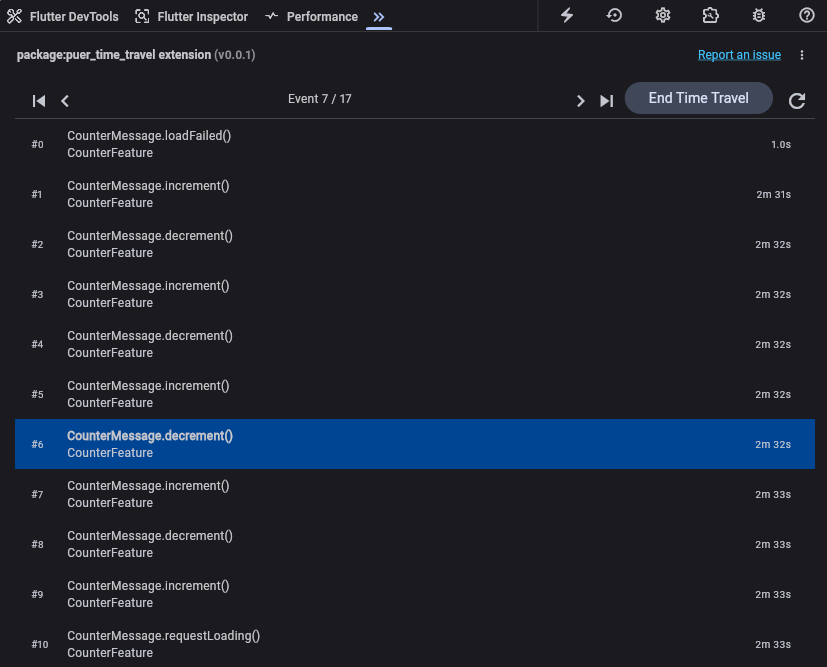
The DevTools extension provides a visual timeline of every message your features have processed, along with navigation controls to move through history.
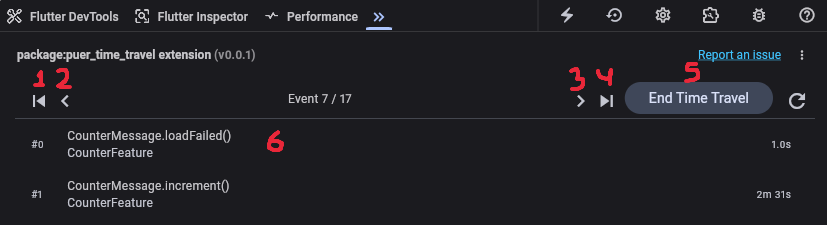
Navigation controls
| Control | Description |
|---|---|
| Skip to start | Jump to the initial state (before any messages) |
| Step back | Move one message backward in history |
| Step forward | Move one message forward in history |
| Skip to end | Jump to the latest state |
| End Time Travel | Exit time-travel mode and restore the current live state |
| Click any event | Jump directly to that point in the timeline |
When time-traveling, the app's UI updates to reflect the historical state at the selected point. Effects are suppressed — no HTTP calls, no storage writes, no side effects re-execute during navigation.
How it works
TimeTravelFeature wraps a regular Feature and intercepts every add(message) call:
- During normal operation: State updates, transitions emit, effects fire, and the message is recorded in the timeline. Periodic full state snapshots are saved for efficient navigation.
- During time travel: The controller finds the nearest earlier snapshot, restores it to all registered features, then replays messages up to the target index. State updates so the UI reflects the historical point, but effects are suppressed.
All features registered with the same TimeTravelController share a single unified timeline, so you can see cross-feature interactions in order.
API reference
TimeTravelFeature
A drop-in replacement for Feature that records message history.
TimeTravelFeature<State, Message, Effect>(
  name: 'MyFeature',              // Required. Unique identifier for this feature.
  initialState: myInitialState,   // Required. Same as Feature.
  update: myUpdate,               // Required. Same as Feature.
  effectHandlers: [handler],      // Optional. Same as Feature.
  initialEffects: [effect],       // Optional. Same as Feature.
  disposableEffects: [cleanup],   // Optional. Same as Feature.
  controller: myController,       // Optional. Defaults to TimeTravelController.global.
);
| Parameter | Type | Required | Default | Description |
|---|---|---|---|---|
name |
String |
yes | — | Unique name for this feature. Used as the key in the controller's timeline. |
initialState |
State |
yes | — | The initial state of the feature. |
update |
Update<State, Message, Effect> |
yes | — | Pure update function (State, Message) -> (State?, List<Effect>). |
effectHandlers |
List<EffectHandler<Effect, Message>> |
no | [] |
Effect handlers for side effects. |
initialEffects |
List<Effect> |
no | [] |
Effects to run on init(). |
disposableEffects |
List<Effect> |
no | [] |
Effects to run on dispose(). |
controller |
TimeTravelController? |
no | TimeTravelController.global |
The controller to register with. |
TimeTravelController
Manages the timeline, snapshots, and navigation state for all registered features.
// Use the global singleton (default):
TimeTravelController.global

// Or create a custom instance:
final controller = TimeTravelController(
  snapshotAtEach: 100,    // Take a full snapshot every N events (default: 100)
  timelineLimit: 1000,    // Max events to retain in memory (optional)
);
Navigation methods:
| Method | Description |
|---|---|
goBack() |
Step one event backward. Enters time-travel mode if not already traveling. |
goForward() |
Step one event forward. No-op if at the end. |
goToStart() |
Jump to the initial state (before any messages). |
goToEnd() |
Jump to the latest event in the timeline. |
goToIndex(int index) |
Jump to a specific event by index. |
endTimeTravel() |
Restore the final state and exit time-travel mode. |
Properties:
| Property | Type | Description |
|---|---|---|
state |
TimeTravelStateV2 |
Current timeline, snapshots, navigation state, and registered features. |
isTimeTraveling |
bool |
Whether time-travel mode is currently active. |
Debug-only usage
A typical setup enables time travel only in debug builds:
import 'package:flutter/foundation.dart';
import 'package:puer_time_travel/puer_time_travel.dart';

Feature<MyState, MyMsg, MyEffect> createMyFeature() {
  if (kDebugMode) {
    return TimeTravelFeature<MyState, MyMsg, MyEffect>(
      name: 'MyFeature',
      initialState: MyState.initial,
      update: myUpdate,
      effectHandlers: [MyEffectHandler()],
    );
  }

  return Feature<MyState, MyMsg, MyEffect>(
    initialState: MyState.initial,
    update: myUpdate,
    effectHandlers: [MyEffectHandler()],
  );
}
Since TimeTravelFeature implements Feature, the return type is the same. The rest of your app does not need to know which one is in use.
Full example
A complete working example is available in the repository:
The example builds a counter app with increment, decrement, and async loading. The feature is created as a TimeTravelFeature, and the DevTools extension is available automatically:
// lib/domain/counter_feature.dart
import 'package:puer_time_travel/puer_time_travel.dart';

typedef CounterFeature = Feature<CounterState, CounterMessage, CounterEffect>;

CounterFeature createCounterFeature({required CounterStorage storage}) =>
    TimeTravelFeature<CounterState, CounterMessage, CounterEffect>(
      name: 'CounterFeature',
      initialState: CounterState.initial,
      update: counterUpdate,
      effectHandlers: [CounterEffectHandler(storage)],
      initialEffects: [const CounterEffect.loadCounter()],
    );
The widget layer uses standard FeatureProvider and FeatureBuilder — no time-travel-specific code:
// lib/main.dart
final feature = createCounterFeature(storage: InMemoryCounterStorage());
await feature.init();

runApp(
  FeatureProvider.value(
    value: feature,
    child: const CounterApp(),
  ),
);
Packages
| Package | Pub | Description |
|---|---|---|
| puer |  |
Core TEA implementation with Feature, update, and effect handlers. Pure Dart foundation. |
| puer_flutter |  |
Flutter integration: FeatureProvider, FeatureBuilder, FeatureListener widgets. |
| puer_effect_handlers |  |
Composable wrappers for debouncing, sequential execution, and isolate offloading. |
| puer_test |  |
Testing utilities for concise update and handler tests. Add to dev_dependencies. |
| puer_time_travel | |
Time-travel debugging with DevTools extension. Use in debug builds to inspect history. |