
📸 Photo Opener
A Flutter package for a Telegram-style full-screen image viewer. Open images with smooth pinch-to-zoom, swipe navigation, thumbnails, and swipe-down-to-dismiss—ready to use with a single function call.
Supports: network URLs • local assets • device files • web (assets & network only)
✨ Features
- 🖼 Full-screen viewer — Immersive image viewing
- 🔍 Pinch to zoom — Smooth gestures with configurable min/max scale
- 📜 Gallery mode — Swipe between multiple images
- 👆 Swipe down to dismiss — Natural closing gesture (when not zoomed)
- 🖱 Tap to toggle UI — Show/hide header, footer, and thumbnails
- 🎨 Customizable — Colors, padding, close button, loader, error widget
- 📱 Platform support — Android, iOS, Web, Windows, macOS, Linux
📷 Preview
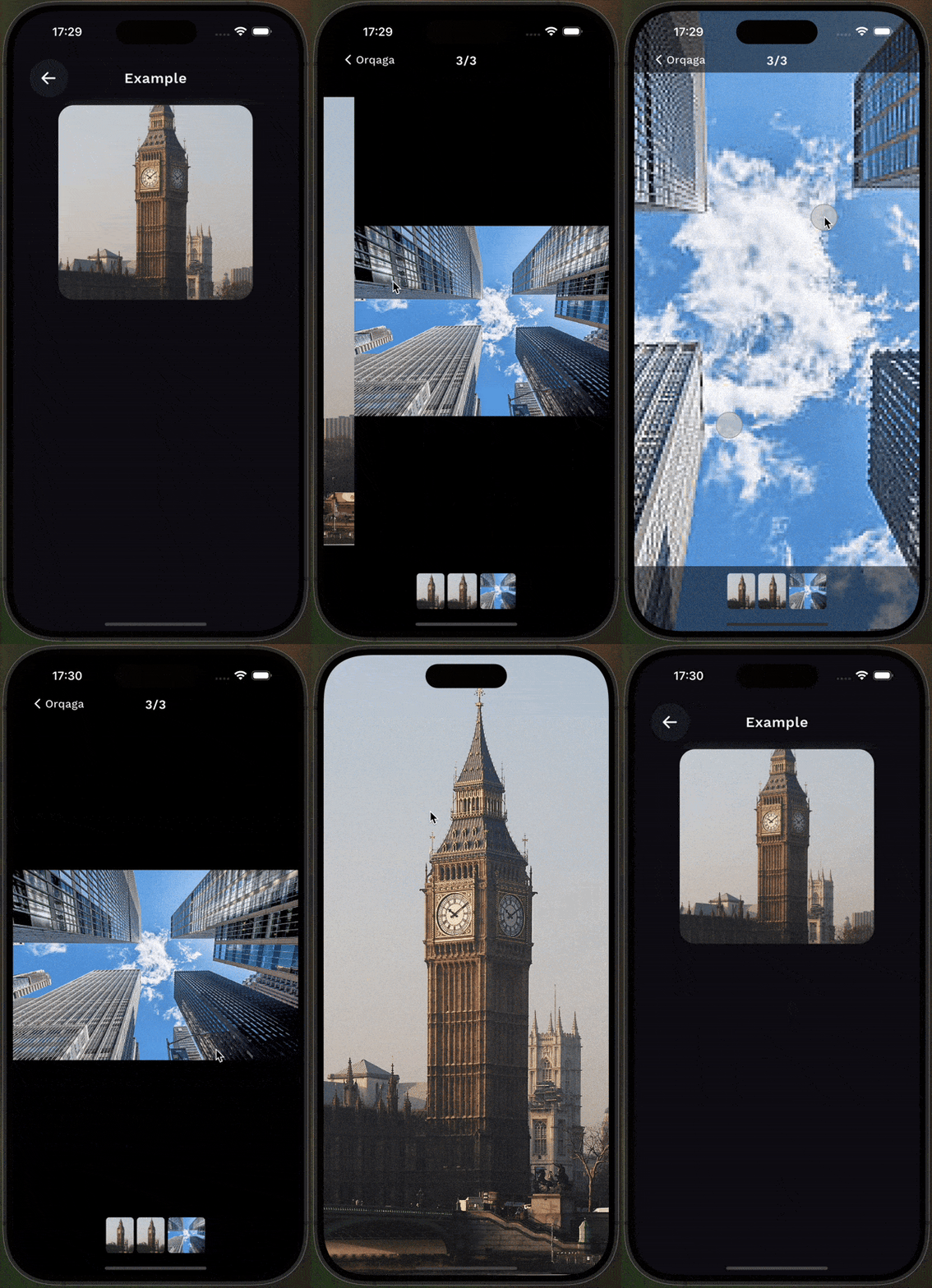
Run the example app to see the viewer in action.
🚀 Installation
Add to your pubspec.yaml:
dependencies:
  photo_opener: ^0.2.8
Or use:
flutter pub add photo_opener
📖 Quick Start
Minimal example—open a gallery with one line:
import 'package:flutter/material.dart';
import 'package:photo_opener/photo_opener.dart';

// Inside your widget (e.g. onTap of an image):
onOpenPhoto(
  context: context,
  images: [
    'https://picsum.photos/id/1/1024/768',
    'https://picsum.photos/id/2/1024/768',
  ],
  type: PhotoType.network,
);
📖 Full Example (Assets)
import 'package:flutter/material.dart';
import 'package:photo_opener/photo_opener.dart';

onOpenPhoto(
  context: context,
  images: [
    'assets/images/photo1.png',
    'assets/images/photo2.png',
    'assets/images/photo3.png',
  ],
  type: PhotoType.asset,
  initialIndex: 1,
  closeText: 'Back',
  minScale: 1,
  maxScale: 5,
);
🔐 Authorization (JWT / Bearer Token)
Pass headers for authenticated image URLs:
onOpenPhoto(
  context: context,
  images: imageUrls,
  type: PhotoType.network,
  httpHeaders: {
    'Authorization': 'Bearer your_token_here',
  },
);
⚠️ Error Handling
Show a custom widget when image loading fails (e.g. in thumbnails):
onOpenPhoto(
  context: context,
  images: imageUrls,
  type: PhotoType.network,
  errorWidget: (context, url, error) => Icon(
    Icons.broken_image,
    size: 32,
    color: Colors.white70,
  ),
);
📱 Platform Notes
| Platform | Network | Assets | Local Files |
|---|---|---|---|
| Android | ✅ | ✅ | ✅ |
| iOS | ✅ | ✅ | ✅ |
| Web | ✅ | ✅ | ❌ |
| Desktop | ✅ | ✅ | ✅ |
Web: Use PhotoType.network or PhotoType.asset. PhotoType.file is not supported on web.
📜 License
MIT License — use freely in your projects.