
Getting Started • Documentation • Example Apps • Issues • Blog


Flutter database for Dart-native objects and on-device vector management 💙
The ObjectBox Flutter database is a great choice for managing Dart objects in cross-platform and AI-driven applications. Its advanced vector search empowers on-device AI for a variety of applications, including RAG AI, generative AI, and similarity searches. Designed for high performance, the ObjectBox Flutter database is excellent for mobile and IoT devices, minimizing CPU, memory, and battery usage to enhance device efficiency and sustainability. As an offline-first solution, ObjectBox makes sure your app reliably works offline as well as online.
Build smarter apps with our easy-to-use native Dart API, and enjoy our seamless Data Sync, which provides data consistency across devices.
Features
🧠 Artificial Intelligence - superfast on-device vector search.
🏁 Super fast - 10X faster than SQLite - see the performance benchmarks.
🪂 ACID compliant - Atomic, Consistent, Isolated, Durable.
💻 Cross-platform - Android, iOS, macOS, Linux, Windows.
🌱 Scalable - grows with your app, handling millions of objects with ease.
🎯 NoSQL database - no rows or columns, only pure Dart objects.
🔗 Relations - object links / relationships are built-in.
💐 Queries - filter data as needed, even across relations.
📃 Schema migration - simply change your model, we handle the rest.
Oh, and there is one more thing...
😮 Data Sync - sync only when and where needed.
On this page
- Sneak peek
- Getting Started
- Flutter Database Performance Benchmarks
- Do you 💙 ObjectBox?
- FAQ
- See also
- License
Sneak peek - persist Dart objects with ObjectBox
ObjectBox provides a store with boxes to put objects into:
// Annotate a Dart class to create a Box
@Entity()
class Person {
  @Id()
  int id;
  String firstName;
  String lastName;

  Person({this.id = 0, required this.firstName, required this.lastName});
}

final Store store = await openStore(directory: 'person-db');
final box = store.box<Person>();

var person = Person(firstName: 'Joe', lastName: 'Green');
final id = box.put(person); // Create

person = box.get(id)!;      // Read

person.lastName = 'Black';
box.put(person);            // Update

box.remove(person.id);      // Delete

final query = box           // Query
    .query(Person_.firstName.equals('Joe') & Person_.lastName.startsWith('B'))
    .build();
final List<Person> people = query.find();
query.close();
Getting Started
Note
Prefer to look at example code? Check out our examples directory.
There are also some video tutorials, each featuring a different example app:
You can add the ObjectBox Dart SDK to
Flutter projects
To add ObjectBox to your Flutter project:
- Run these commands:
flutter pub add objectbox objectbox_flutter_libs:any
flutter pub add --dev build_runner objectbox_generator:any
Or to use ObjectBox Sync (requires access to the Sync feature) instead run:
flutter pub add objectbox objectbox_sync_flutter_libs:any
flutter pub add --dev build_runner objectbox_generator:any
Note
To run unit tests on your machine, download the latest ObjectBox database library for your system by running this script in your package directory in a bash shell (e.g. Git Bash on Windows):
bash <(curl -s https://raw.githubusercontent.com/objectbox/objectbox-dart/main/install.sh)
To get the variant for ObjectBox Sync, append the --sync argument to the above command.
- This should add lines like this to your
pubspec.yaml:
dependencies:
  objectbox: ^5.3.0
  objectbox_flutter_libs: any
  # If you run the command for ObjectBox Sync it should add instead:
  # objectbox_sync_flutter_libs: any

dev_dependencies:
  build_runner: ^2.4.11
  objectbox_generator: any
-
If you added the above lines manually, then install the packages with
flutter pub get. -
Your project can now use ObjectBox, continue by defining entity classes.
Note
For all iOS apps target iOS 15.0: in ios/Podfile change the platform and in the
ios/Runner.xcodeproj/poject.pbxproj file update IPHONEOS_DEPLOYMENT_TARGET (or open the Runner
workspace in Xcode and edit the build setting). In ios/Flutter/AppframeworkInfo.plist update
MinimumOSVersion to 15.0.
For all macOS apps target macOS 11.0: in macos/Podfile change the platform and in the
macos/Runner.xcodeproj/poject.pbxproj file update MACOSX_DEPLOYMENT_TARGET (or open the Runner
workspace in Xcode and edit the build setting).
For macOS apps using Sync, open macos/Runner.xcodeproj in Xcode and for the Runner target
under Signing & Capabilities in the App Sandbox sections, enable incoming and outgoing network
access.
Dart Native projects
To add ObjectBox to your Dart Native project:
- Run these commands:
dart pub add objectbox
dart pub add --dev build_runner objectbox_generator:any
- This should add lines like this to your
pubspec.yaml:
dependencies:
  objectbox: ^5.3.0

dev_dependencies:
  build_runner: ^2.4.11
  objectbox_generator: any
-
If you added the above lines manually, then install the packages with
dart pub get -
In your package directory, download the ObjectBox C library for your system (on Windows you can use "Git Bash"):
bash <(curl -s https://raw.githubusercontent.com/objectbox/objectbox-dart/main/install.sh)
Or to use ObjectBox Sync (requires access to the Sync feature) instead run:
bash <(curl -s https://raw.githubusercontent.com/objectbox/objectbox-dart/main/install.sh) --sync
Note
By default the library is downloaded into the lib subdirectory of the working directory.
It's not necessary to install the library system-wide. This also allows to use different versions
for different projects. See the notes on deploying below.
- Your project can now use ObjectBox, continue by defining entity classes.
Deploying Dart Native projects
Natively compiled Dart applications that use ObjectBox Dart require a reference to the
ObjectBox C library. Hence, the shared library file
downloaded with install.sh needs to be shipped with the executable.
The install.sh script downloads the library by default to the lib subdirectory of the working
directory. An executable using ObjectBox Dart looks for the library in this lib directory.
If it is not found there, it falls back to using system directories
(using Dart's DynamicLibrary.open):
- Windows: working directory and
%WINDIR%\system32. - macOS:
/usr/local/lib(and maybe others). - Linux:
/liband/usr/lib(again, possibly others).
Flutter Database Performance Benchmarks
We tested across the four main database operations, CRUD (create, read, update, delete). Each test was run multiple times and executed manually outside of the measured time. Data preparation and evaluation were also done outside of the measured time.
Here are the benchmarks for ObjectBox vs sqflite vs Hive (last updated 2021-09-11) 👇
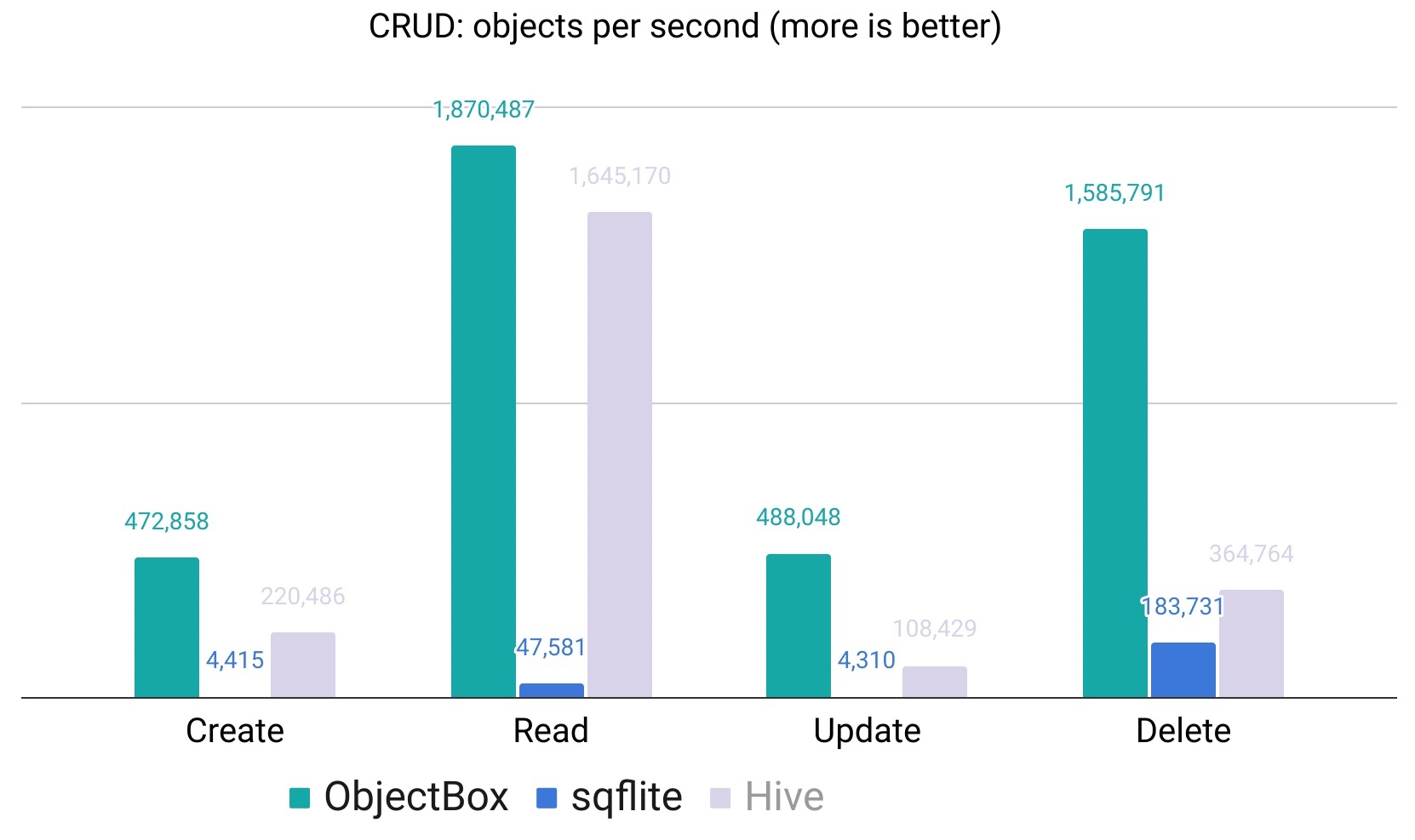
You can run these yourself using our objectbox-dart-performance Flutter benchmark app.
Do you 💙 ObjectBox?
We strive to bring joy to Flutter developers and appreciate any feedback --> Please fill in this 2-minute Anonymous Feedback Form.
We ❤️ you & are looking forward to your comments and ideas:
- Add GitHub issues
- Upvote issues you find important by adding the 👍 (thumbs up) reaction
- Fill in the anonymous feedback form to help us improve our products
- Get in touch with us
- ⭐ us on GitHub, if you like what you see or give us a 👍 on pub.dev
Thank you! 🙏
Keep in touch: For general news on ObjectBox, check our blog!
FAQ
See the FAQ and Troubleshooting pages.
See also
License
Copyright © 2019-2026 ObjectBox Ltd. <https://objectbox.io/>

Licensed under the Apache License, Version 2.0 (the "License");
you may not use this file except in compliance with the License.
You may obtain a copy of the License at

    http://www.apache.org/licenses/LICENSE-2.0

Unless required by applicable law or agreed to in writing, software
distributed under the License is distributed on an "AS IS" BASIS,
WITHOUT WARRANTIES OR CONDITIONS OF ANY KIND, either express or implied.
See the License for the specific language governing permissions and
limitations under the License.
Note that this license applies to the code in this repository only. See our website on details about all licenses for ObjectBox components.