
number_editing_controller


A Flutter TextEditingController that formats numbers, decimals, and currencies as the user types. Supports locale-aware grouping, decimal separators, currency symbols, and live option changes without recreating the controller.
Developed by nerdy.pro.
What does it do?
Drop a NumberEditingTextController into any TextField. The user sees formatted text ($1,234.56), and your code reads the raw numeric value via controller.number.
- Formats integers, decimals, and currencies as the user types
- Places grouping separators (
1,000,000) and decimal separators (3.14) based on locale - Positions currency symbols before or after the number depending on locale rules
- Extracts the underlying
num?value at any time - Supports negative numbers with an optional
allowNegativeflag - Allows custom separators for grouping and decimal characters
- Lets you change locale, currency, separators, and precision at runtime
Installation
flutter pub add number_editing_controller
Requires Flutter 3.19+ and Dart 3.3+.
Quick start
import 'package:number_editing_controller/number_editing_controller.dart';

// Create a currency controller
final controller = NumberEditingTextController.currency(
  currencyName: 'USD',
  locale: 'en',
);

// Use it in a TextField
TextField(
  controller: controller,
  keyboardType: TextInputType.numberWithOptions(decimal: true, signed: true),
)

// Read the value
final amount = controller.number; // e.g. 1234.56
Controller types
Integer
Formats whole numbers with grouping separators.
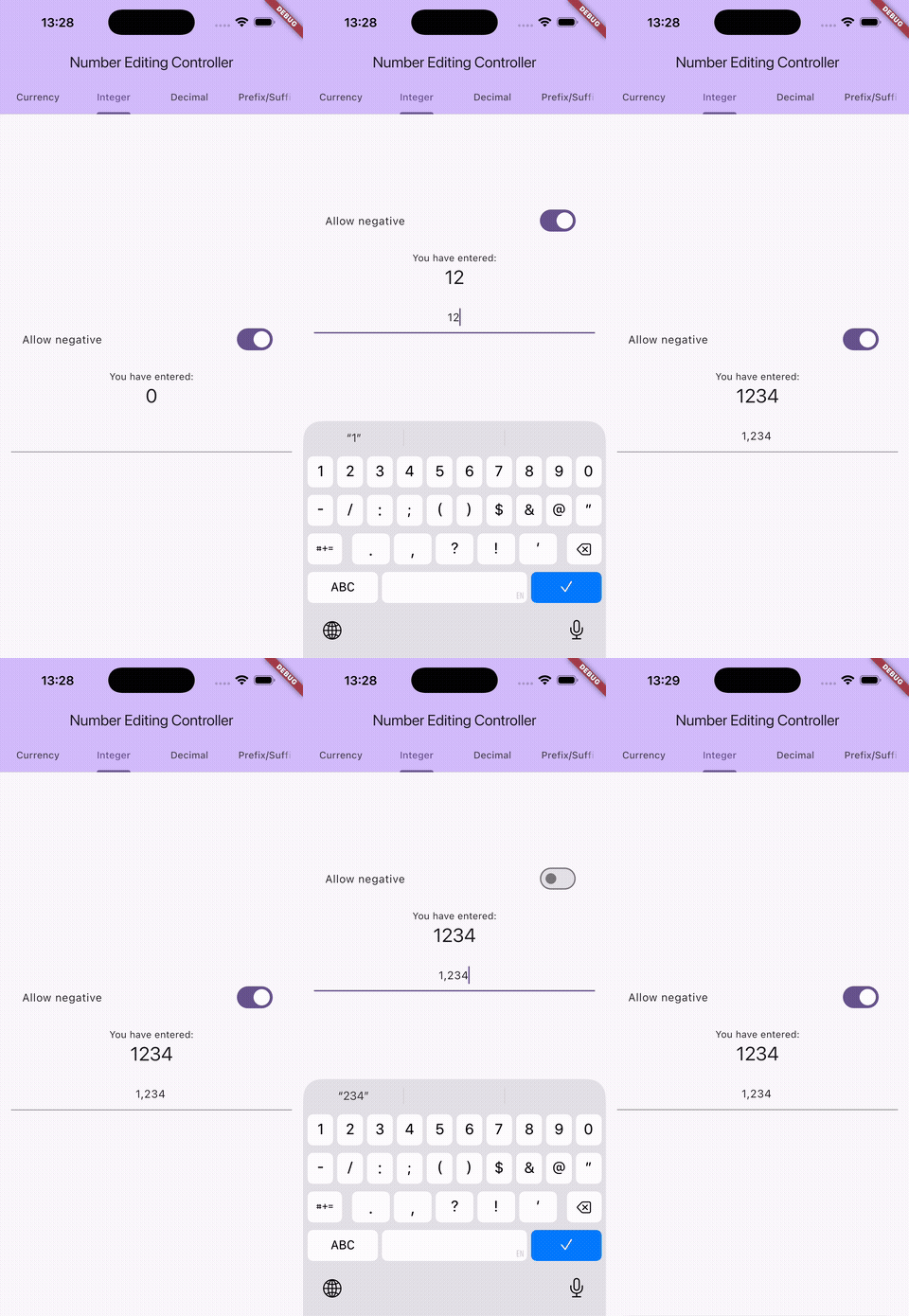
final controller = NumberEditingTextController.integer(locale: 'en');
// User types "1000000" -> displays "1,000,000"
Decimal
Formats numbers with a decimal part. Control minimum and maximum fraction digits.
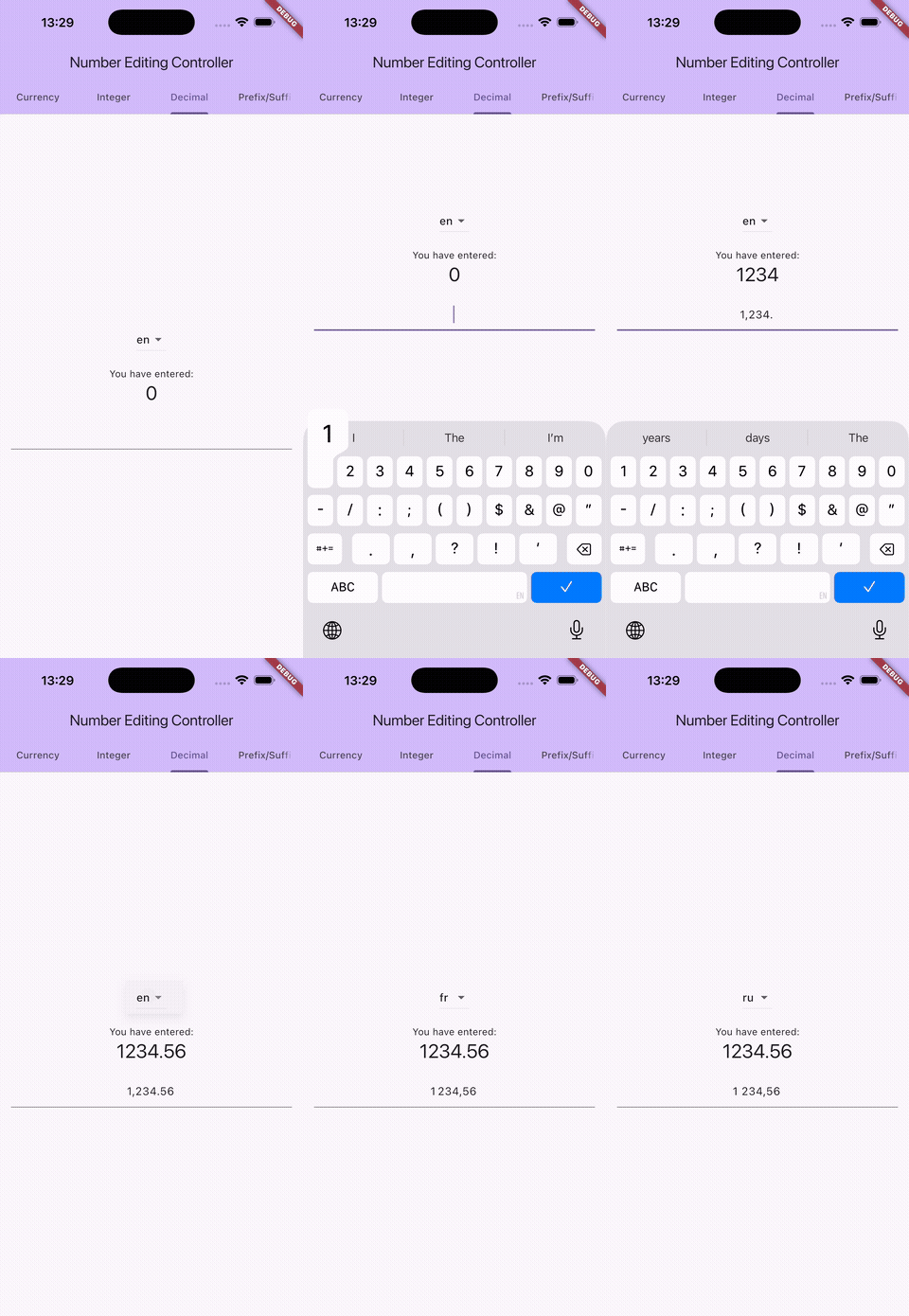
final controller = NumberEditingTextController.decimal(
  locale: 'en',
  minimalFractionDigits: 2,
  maximumFractionDigits: 4,
);
// User types "3.5" -> displays "3.50"
Currency
Formats monetary amounts with a currency symbol placed according to locale rules.
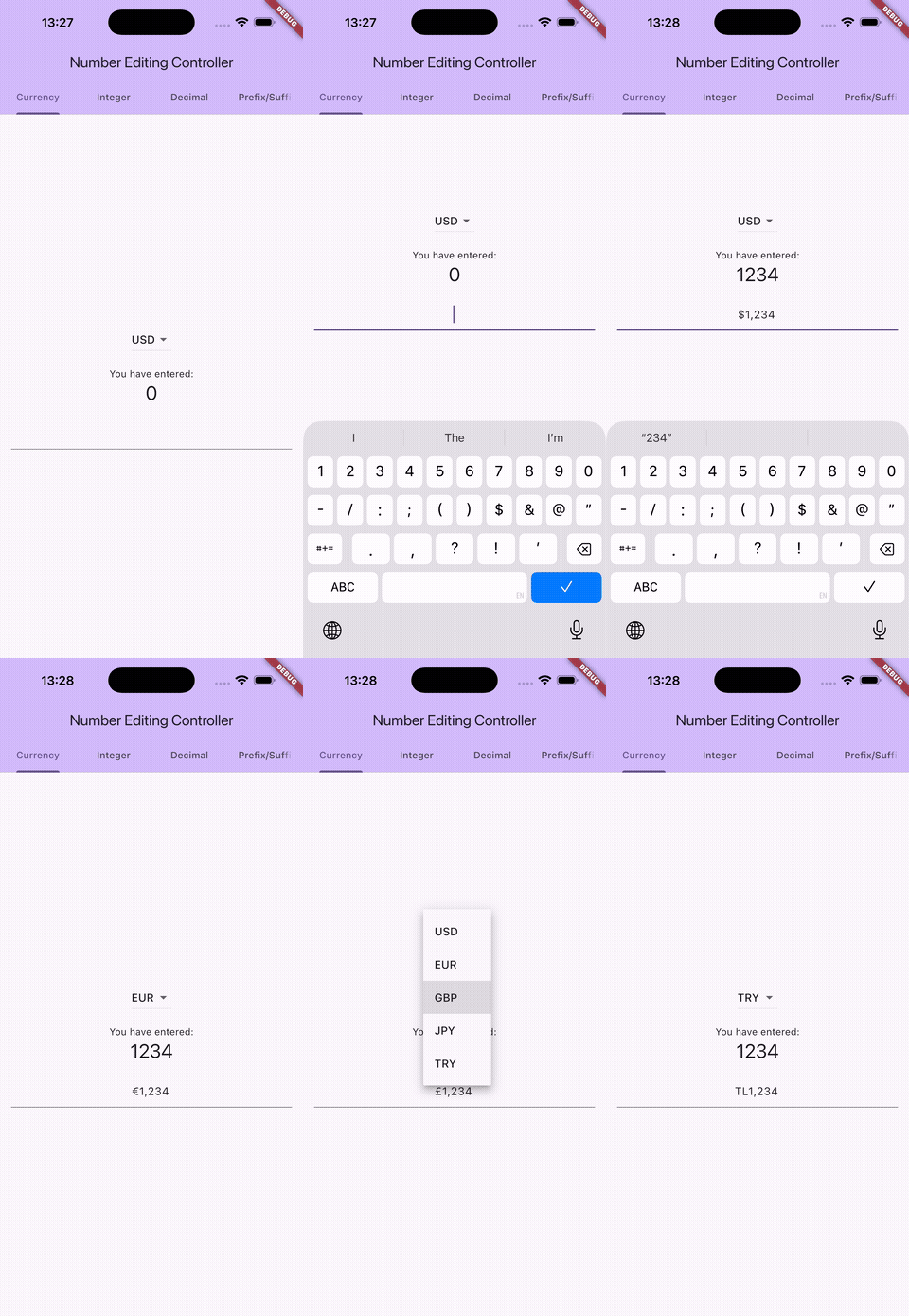
final controller = NumberEditingTextController.currency(
  currencyName: 'EUR',
  locale: 'de',
);
// controller.number = 1234.56 -> displays "1.234,56 €"
Configuration
Shared parameters
All controller types accept these parameters, both in the constructor and as mutable properties:
| Parameter | Type | Default | Description |
|---|---|---|---|
locale |
String? |
Current locale | Locale for formatting (e.g. 'en', 'de', 'ja'). |
groupSeparator |
String? |
From locale | Symbol used to group digits (e.g. , in 1,000). |
allowNegative |
bool |
true |
Whether to allow negative numbers. |
value |
num? |
null |
Initial numeric value (constructor only). |
Currency parameters
Available on CurrencyEditingController and NumberEditingTextController.currency():
| Parameter | Type | Default | Description |
|---|---|---|---|
currencyName |
String? |
From locale | ISO 4217 currency code (e.g. 'USD', 'EUR', 'JPY'). |
currencySymbol |
String? |
From currency code | Custom currency symbol (e.g. '$', '€', '₺'). |
decimalSeparator |
String? |
From locale | Symbol used to separate the decimal part. |
showCurrencySymbol |
bool |
true |
Whether to include the currency symbol in the formatted text. Set to false when displaying the symbol outside the text field. |
CurrencyEditingController also exposes these read-only properties:
| Property | Type | Description |
|---|---|---|
resolvedCurrencySymbol |
String |
The actual symbol used for formatting, resolved from currencySymbol or currencyName + locale. |
currencySymbolPosition |
CurrencySymbolPosition |
Whether the symbol is a .prefix or .suffix in the current locale. |
Decimal parameters
Available on DecimalEditingController and NumberEditingTextController.decimal():
| Parameter | Type | Default | Description |
|---|---|---|---|
minimalFractionDigits |
int? |
From locale pattern | Minimum number of decimal digits to display. |
maximumFractionDigits |
int? |
From locale pattern | Maximum number of decimal digits allowed. |
decimalSeparator |
String? |
From locale | Symbol used to separate the decimal part. |
Changing options at runtime
All formatting options are mutable. Change them at any time and the displayed text updates automatically. This is useful for currency pickers, locale switchers, or toggling negative input.
final controller = CurrencyEditingController(
  currencyName: 'USD',
  locale: 'en',
);

// User switches currency
controller.currencyName = 'EUR';   // "$1,234.56" -> "€1,234.56"

// User switches locale
controller.locale = 'de';          // "€1,234.56" -> "1.234,56 €"

// Disable negative input
controller.allowNegative = false;  // "-500" -> "500"

// Change group separator
controller.groupSeparator = ' ';   // "1.234" -> "1 234"
Using subclasses directly
The factory constructors (NumberEditingTextController.currency(), .decimal(), .integer()) return the appropriate subclass. You can also instantiate them directly to access type-specific setters:
final controller = CurrencyEditingController(
  currencyName: 'USD',
  locale: 'en',
);
controller.currencyName = 'GBP';  // Only available on CurrencyEditingController

final decimal = DecimalEditingController(
  locale: 'en',
  maximumFractionDigits: 4,
);
decimal.maximumFractionDigits = 2; // Only available on DecimalEditingController
Displaying the currency symbol outside the text field
Use showCurrencySymbol: false to hide the symbol from the formatted text, then display it as a prefix or suffix decoration on the TextField. The resolvedCurrencySymbol and currencySymbolPosition properties tell you what to display and where.
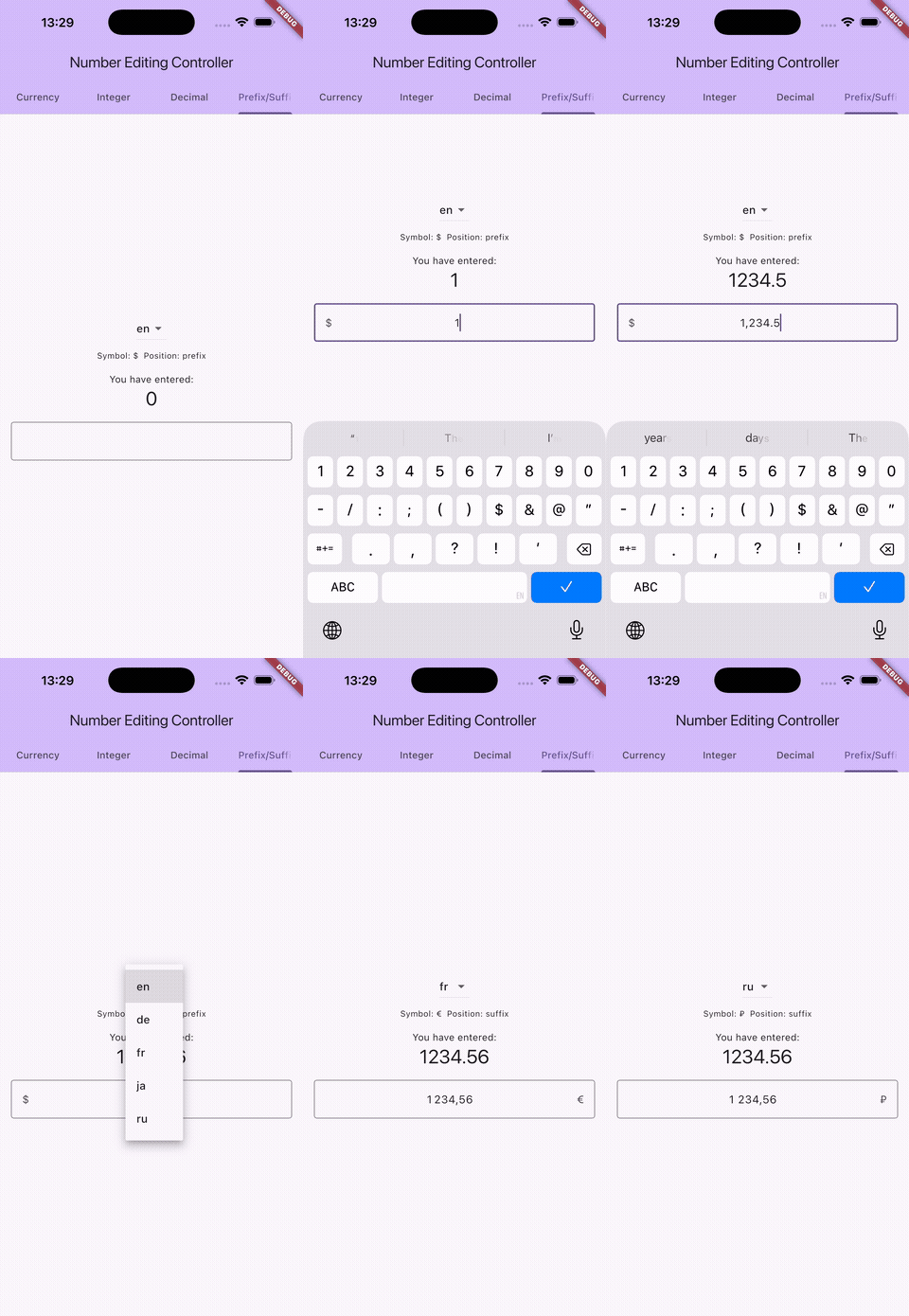
final controller = CurrencyEditingController(
  currencyName: 'USD',
  locale: 'en',
  showCurrencySymbol: false,
);

TextField(
  controller: controller,
  decoration: InputDecoration(
    prefixText: controller.currencySymbolPosition == CurrencySymbolPosition.prefix
        ? controller.resolvedCurrencySymbol
        : null,
    suffixText: controller.currencySymbolPosition == CurrencySymbolPosition.suffix
        ? controller.resolvedCurrencySymbol
        : null,
  ),
)
// User types "1234" -> field shows "$" as prefix + "1,234" as text
This is useful when you want the symbol to remain fixed and not shift as the user types, or when you need custom styling for the symbol.
Class hierarchy
| Class | Description |
|---|---|
NumberEditingTextController |
Interface. Use the factory constructors or program against this type. |
CurrencyEditingController |
Formats currency amounts. Mutable: currencyName, currencySymbol, decimalSeparator, showCurrencySymbol. Read-only: resolvedCurrencySymbol, currencySymbolPosition. |
DecimalEditingController |
Formats decimal numbers. Mutable: minimalFractionDigits, maximumFractionDigits, decimalSeparator. |
IntegerEditingController |
Formats integers. No type-specific options beyond the shared ones. |
Locale examples
| Locale | Type | Value | Formatted |
|---|---|---|---|
en |
Currency (USD) | 1234.56 |
$1,234.56 |
de |
Currency (EUR) | 1234.56 |
1.234,56 € |
fr |
Currency (EUR) | 1234.56 |
1 234,56 € |
ja |
Currency (JPY) | 1500 |
¥1,500 |
ru |
Currency (RUB) | 500 |
500 ₽ |
en |
Integer | 1234567 |
1,234,567 |
de |
Integer | 1234567 |
1.234.567 |
en |
Decimal (max 2) | 1234567.89 |
1,234,567.89 |
Known limitations
Number precision
The controller uses Dart's num type (int and double).
- Flutter web: JavaScript represents all numbers as 64-bit floats. Integers above
2^53 - 1(9,007,199,254,740,991) lose precision silently. This affects both typed input and programmatic values. - Floating-point rounding:
doubleprovides ~15-17 significant digits. Values like12345678901234.56will lose the fractional part. Standard IEEE 754 rounding artifacts apply (e.g.1.005.toStringAsFixed(2)produces"1.00"). - Native platforms: 64-bit integers support up to
2^63 - 1(~9.2 quintillion).
Grouping
The library uses a uniform group size derived from the locale's ICU format pattern (typically groups of 3). Variable-width grouping systems are not supported. This affects the Indian/South Asian numbering system (lakh/crore), where groups alternate between 2 and 3 digits. For example, 12,34,56,789 would render as 123,456,789 instead.
Decimal fraction digits
- Maximum of 20 fraction digits (Dart's
toStringAsFixedlimit). Values beyond 20 are clamped. minimalFractionDigitsmust not exceedmaximumFractionDigits. No runtime validation is performed; invalid combinations will cause errors.
Locale and formatting
- No RTL support: Arabic, Hebrew, and other right-to-left locales are not handled. Characters are inserted left-to-right.
- Single-character decimal separator: Multi-character decimal separators are not supported.
- No input length limit: Extremely long inputs may degrade formatting performance.
Runtime option changes
Changing formatting options (locale, currency, separators) at runtime reformats from the stored numeric value. Any partial typing state (e.g. a trailing decimal separator the user just entered) is discarded.
Disposing the controller
Like any TextEditingController, dispose of it when it is no longer needed:
@override
void dispose() {
  controller.dispose();
  super.dispose();
}
Example app
A working example app is available in the example directory. It demonstrates currency picker, locale switcher, negative toggle, and external currency symbol placement with prefix/suffix decoration.
Libraries
- number_editing_controller
- A TextEditingController that formats numbers, decimals, and currencies as you type with locale support.