
no_screenshot




A Flutter plugin to disable screenshots, block screen recording, detect screenshot events, detect screen recording, and show a custom image, blur, or solid color overlay in the app switcher on Android, iOS, macOS, Linux, Windows, and Web.
Features
| Feature | Android | iOS | macOS | Linux | Windows | Web |
|---|---|---|---|---|---|---|
| Disable screenshot & screen recording | ✅ | ✅ | ✅ | ⚠️ | ✅ | ⚠️ |
| Enable screenshot & screen recording | ✅ | ✅ | ✅ | ⚠️ | ✅ | ⚠️ |
| Toggle screenshot protection | ✅ | ✅ | ✅ | ⚠️ | ✅ | ⚠️ |
| Listen for screenshot events (stream) | ✅ | ✅ | ✅ | ✅ | ✅ | ⚠️ |
| Detect screen recording start/stop | ✅* | ✅ | ⚠️ | ⚠️ | ⚠️ | ❌ |
| Screenshot file path | ❌ | ❌ | ✅ | ✅ | ❌ | ❌ |
| Screenshot metadata (timestamp, source app) | ✅ | ✅ | ✅ | ✅ | ❌ | ❌ |
| Image overlay in app switcher / recents | ✅ | ✅ | ✅ | ⚠️ | ❌ | ⚠️ |
| Blur overlay in app switcher / recents | ✅ | ✅ | ✅ | ⚠️ | ❌ | ⚠️ |
| Color overlay in app switcher / recents | ✅ | ✅ | ✅ | ⚠️ | ❌ | ⚠️ |
| Granular callbacks | ✅ | ✅ | ✅ | ✅ | ✅ | ✅ |
| Declarative SecureWidget | ✅ | ✅ | ✅ | ✅ | ✅ | ✅ |
| Per-route protection policies | ✅ | ✅ | ✅ | ✅ | ✅ | ✅ |
| LTR & RTL language support | ✅ | ✅ | ✅ | ✅ | ✅ | ✅ |
* Android recording detection: Requires API 34+ (Android 14). Uses
Activity.ScreenCaptureCallbackwhich fires on recording start only — there is no "stop" callback. Graceful no-op on older devices.
⚠️ Linux limitations: Linux compositors (Wayland / X11) do not provide any application-level API to block screenshots or screen recording (there is no
FLAG_SECUREequivalent). Screenshot prevention, overlay modes (image, blur, color), and toggle features are state-tracked only — the state is persisted and reported via the stream, but the compositor cannot be instructed to hide window content. Screenshots and screen recordings will still succeed. Screenshot detection works reliably viaGFileMonitor(inotify). Screen recording detection is best-effort via/procprocess scanning.
⚠️ Linux rendering (Wayland): On systems using Wayland, Flutter may render a black screen due to a compositor bug. If you see a black screen when running on Linux, force the X11 backend:
GDK_BACKEND=x11 flutter run -d linuxFor release builds or desktop shortcuts, launch with
GDK_BACKEND=x11 ./your_app.
⚠️ macOS recording detection: Best-effort via
NSWorkspaceprocess monitoring for known recording apps (QuickTime Player, OBS, Loom, Kap, ffmpeg, etc.).
Windows: Screenshot prevention uses
SetWindowDisplayAffinity(WDA_EXCLUDEFROMCAPTURE). Screenshot detection viaAddClipboardFormatListener+ReadDirectoryChangesWmonitoring the user's Pictures folder. Screen recording detection via process scanning for known recording apps. Overlay modes (image, blur, color) are not supported — protection is on/off only.
⚠️ Web limitations: Browsers do not allow apps to prevent OS-level screenshots or screen recording. Web support is best-effort only — it blocks right-click context menus, intercepts the PrintScreen key, applies
user-select: noneCSS, and usesvisibilitychangeevents as a proxy for screenshot detection. Screenshots and screen recordings will still succeed. Screen recording detection is not available on web.
Note: State is automatically persisted via native SharedPreferences / UserDefaults. You do not need to track
didChangeAppLifecycleState.
Note:
screenshotPathis only available on macOS (via Spotlight /NSMetadataQuery) and Linux (viaGFileMonitor/ inotify). On Android and iOS the path is not accessible due to platform limitations — the field will contain a placeholder string. UsewasScreenshotTakento detect screenshot events on all platforms.
Installation
Add no_screenshot to your pubspec.yaml:
dependencies:
  no_screenshot: ^0.8.0
Then run:
flutter pub get
Quick Start
import 'package:no_screenshot/no_screenshot.dart';

final noScreenshot = NoScreenshot.instance;

// Disable screenshots & screen recording
await noScreenshot.screenshotOff();

// Re-enable screenshots & screen recording
await noScreenshot.screenshotOn();

// Toggle between enabled / disabled
await noScreenshot.toggleScreenshot();
Usage
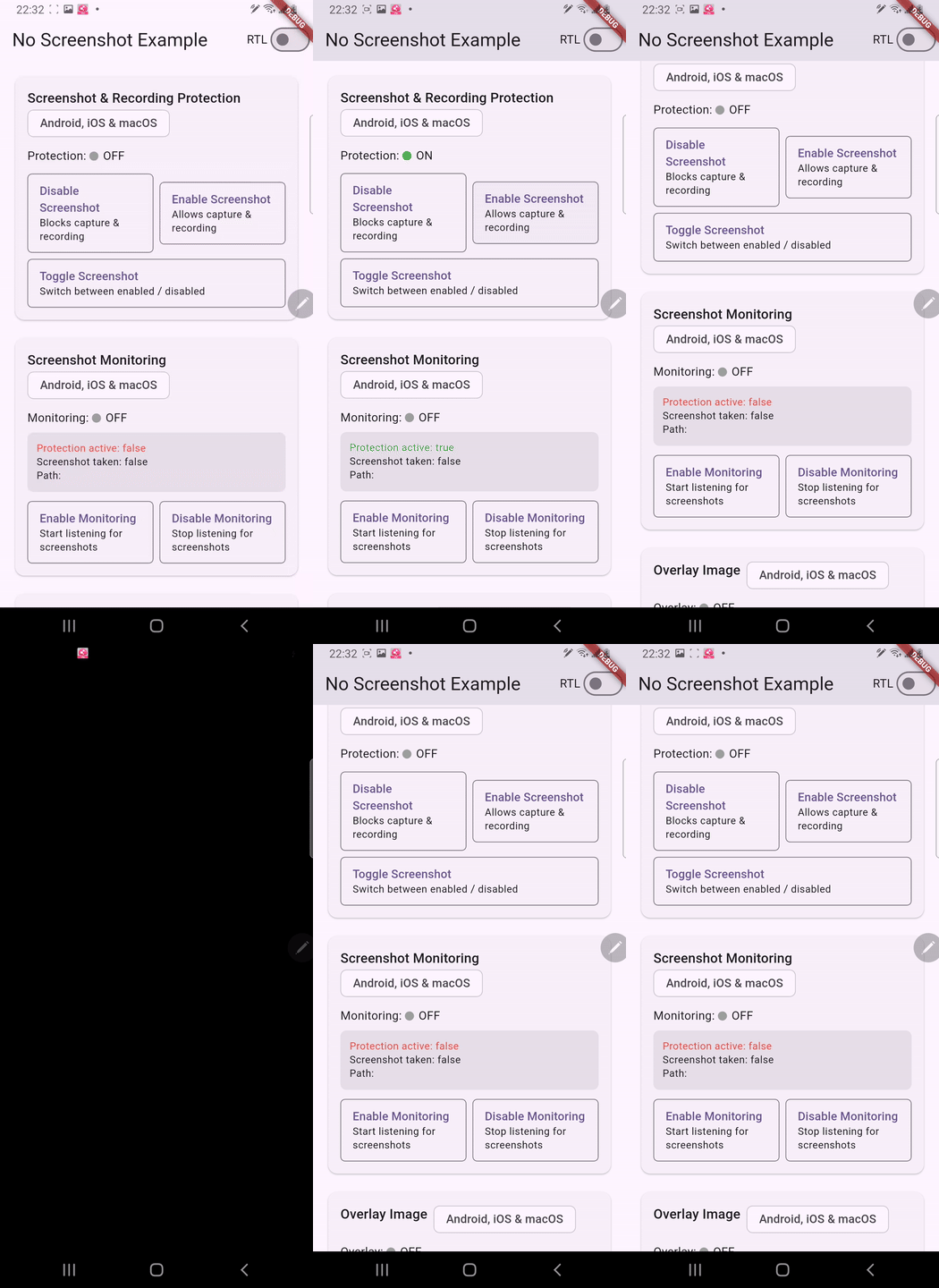
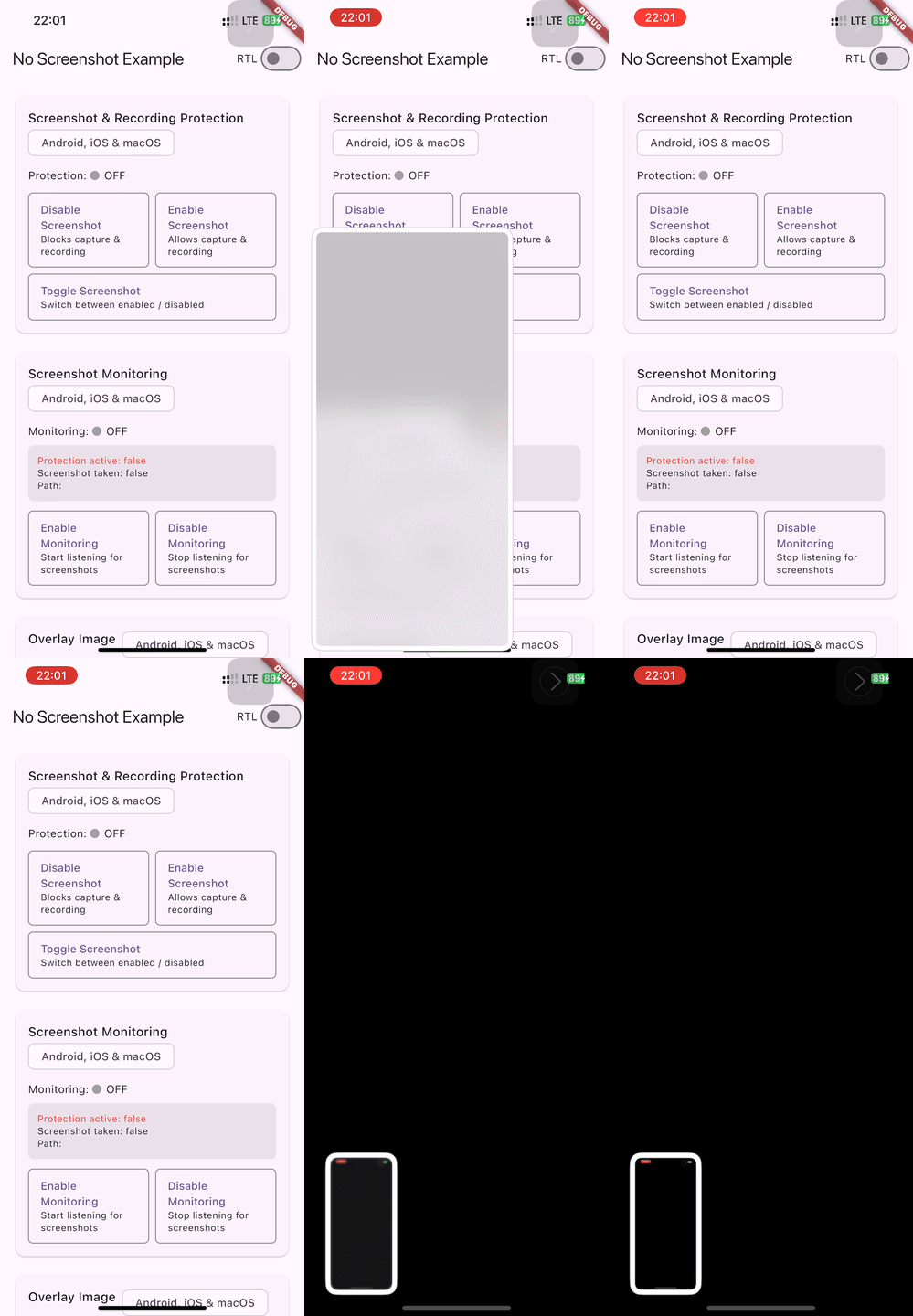
1. Screenshot & Screen Recording Protection
Block or allow screenshots and screen recording with a single method call.
final _noScreenshot = NoScreenshot.instance;

// Disable screenshots (returns true on success)
Future<void> disableScreenshot() async {
  final result = await _noScreenshot.screenshotOff();
  debugPrint('screenshotOff: $result');
}

// Enable screenshots (returns true on success)
Future<void> enableScreenshot() async {
  final result = await _noScreenshot.screenshotOn();
  debugPrint('screenshotOn: $result');
}

// Toggle the current state
Future<void> toggleScreenshot() async {
  final result = await _noScreenshot.toggleScreenshot();
  debugPrint('toggleScreenshot: $result');
}
Enable / Disable Screenshot
| Android | iOS |
|---|---|
 |
 |
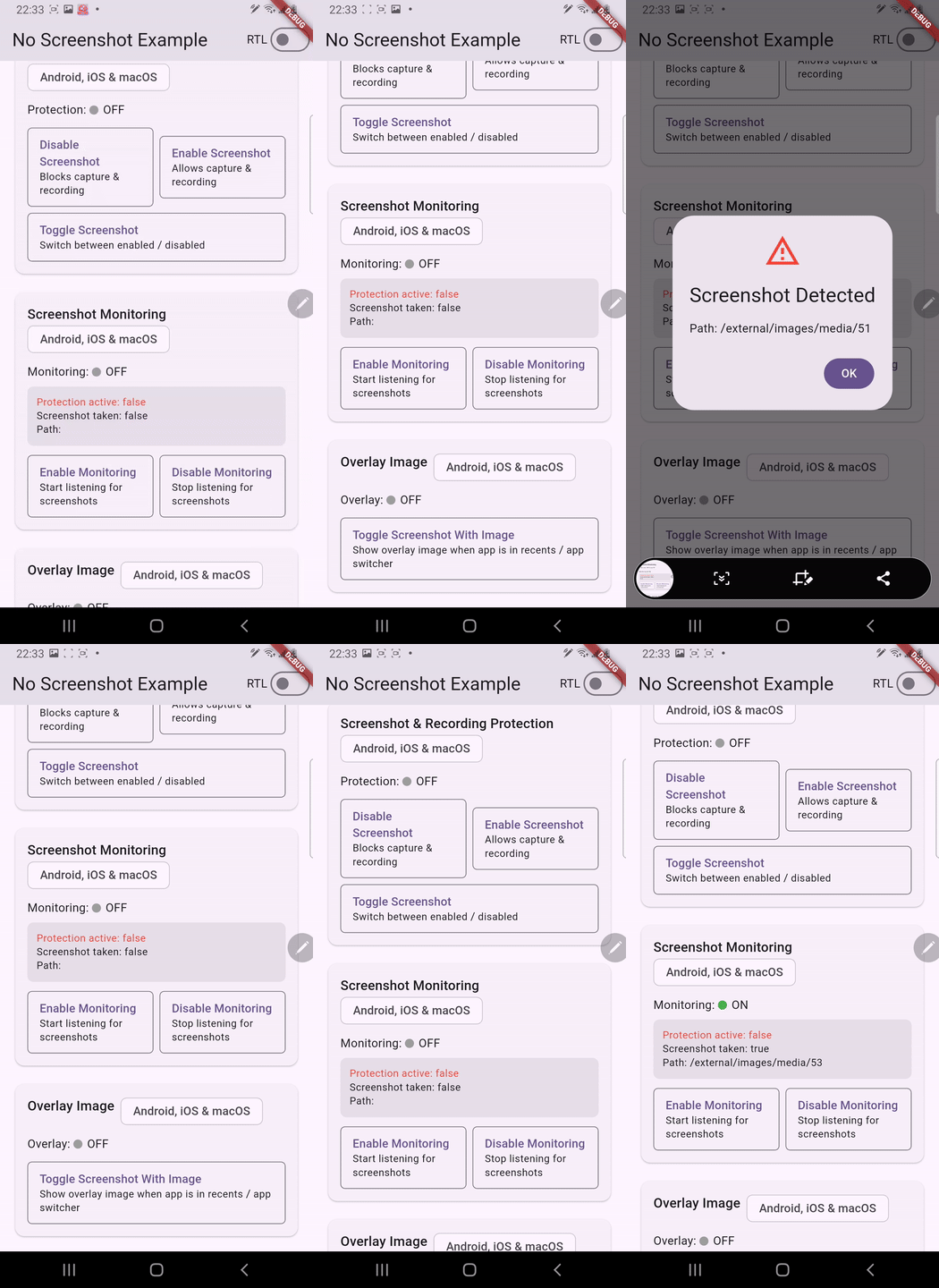
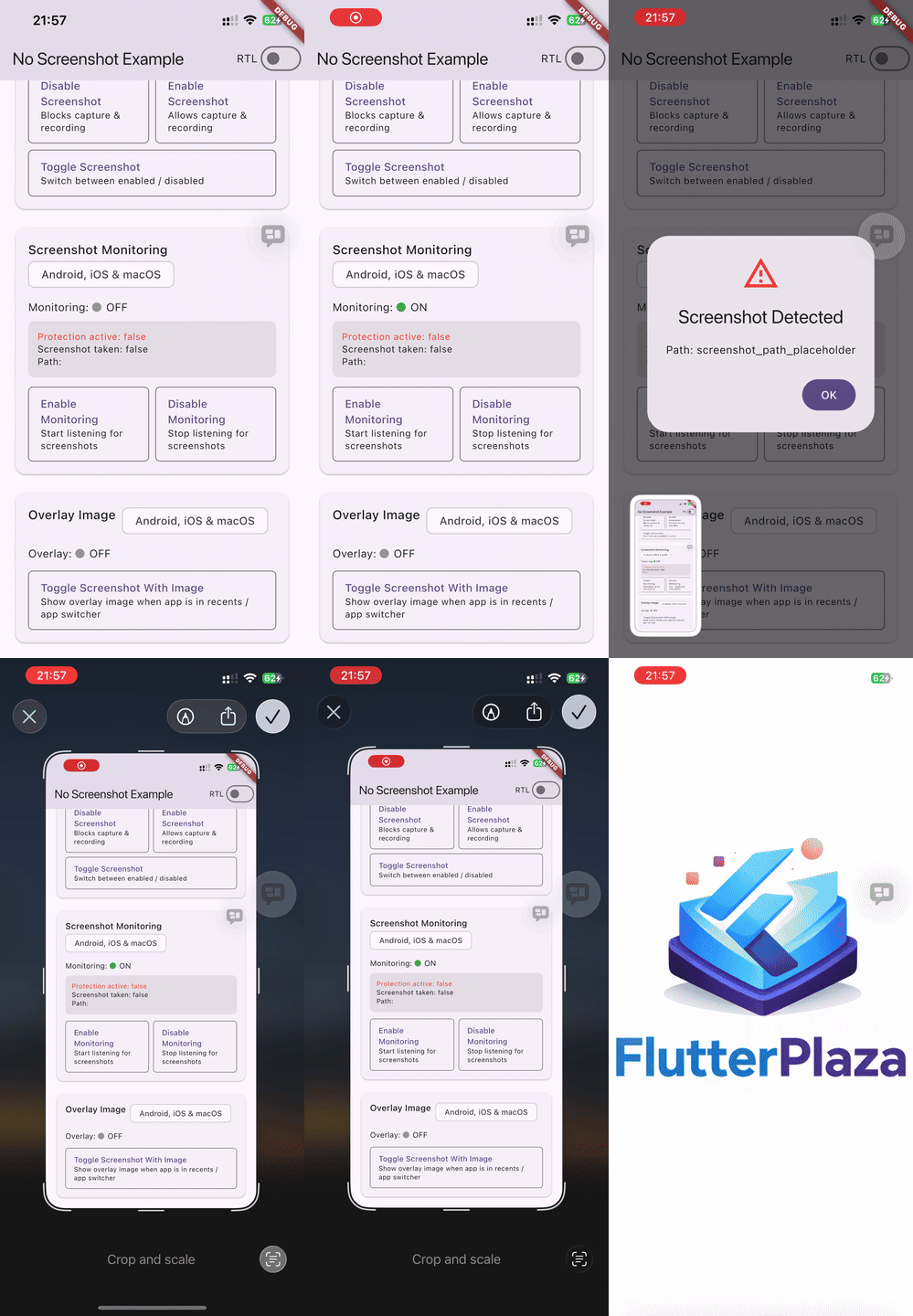
2. Screenshot Monitoring (Stream)
Listen for screenshot events in real time. Monitoring is off by default -- you must explicitly start it.
final _noScreenshot = NoScreenshot.instance;

// 1. Subscribe to the stream
_noScreenshot.screenshotStream.listen((snapshot) {
  debugPrint('Protection active: ${snapshot.isScreenshotProtectionOn}');
  debugPrint('Screenshot taken: ${snapshot.wasScreenshotTaken}');
  debugPrint('Path: ${snapshot.screenshotPath}');
});

// 2. Start monitoring
await _noScreenshot.startScreenshotListening();

// 3. Stop monitoring when no longer needed
await _noScreenshot.stopScreenshotListening();
The stream emits a ScreenshotSnapshot object:
| Property | Type | Description |
|---|---|---|
isScreenshotProtectionOn |
bool |
Whether screenshot protection is currently active |
wasScreenshotTaken |
bool |
Whether a screenshot was just captured |
screenshotPath |
String |
File path of the screenshot (macOS & Linux only — see note below) |
isScreenRecording |
bool |
Whether screen recording is currently active (requires recording monitoring) |
timestamp |
int |
Milliseconds since epoch when the event was detected (0 = unknown) |
sourceApp |
String |
Name of the app that triggered the event (empty = unknown) |
Screenshot path availability: The actual file path of a captured screenshot is only available on macOS (via Spotlight /
NSMetadataQuery) and Linux (viaGFileMonitor/ inotify). On Android and iOS, the operating system does not expose the screenshot file path to apps — the field will contain a placeholder string. Always usewasScreenshotTakento detect screenshot events reliably across all platforms.
| Android | iOS |
|---|---|
 |
 |
macOS Screenshot Monitoring
On macOS, screenshot monitoring uses three complementary detection methods — no special permissions required:
| Method | What it detects |
|---|---|
NSMetadataQuery (Spotlight) |
Screenshots saved to disk — provides the actual file path |
NSWorkspace process monitor |
screencaptureui process launch & termination — tracks the screenshot lifecycle |
| Pasteboard polling | Clipboard-only screenshots (Cmd+Ctrl+Shift+3/4) — detected when image data appears on the pasteboard while screencaptureui is active or recently exited |
Note: Pasteboard-based detection is scoped to the
screencaptureuiprocess window (running or terminated < 3 s ago) to avoid false positives from normal copy/paste. When "Show Floating Thumbnail" is disabled in macOS screenshot settings, thescreencaptureuiprocess does not launch; in that case only file-saved screenshots are detected viaNSMetadataQuery.
Linux Screenshot Monitoring
On Linux, screenshot monitoring uses GFileMonitor (inotify) to watch common screenshot directories for new files:
| Directory | Why |
|---|---|
~/Pictures/Screenshots/ |
Default location for GNOME Screenshot and many other tools |
~/Pictures/ |
Fallback — some tools save directly here |
| XDG pictures directory | Respects $XDG_PICTURES_DIR if it differs from ~/Pictures |
Detected screenshot tool naming patterns include: GNOME Screenshot, Spectacle (KDE), Flameshot, scrot, Shutter, maim, and any file containing "screenshot" in its name.
3. Screen Recording Monitoring
Detect when the screen is being recorded. Recording monitoring is off by default and independent of screenshot monitoring — you must explicitly start it.
final _noScreenshot = NoScreenshot.instance;

// 1. Subscribe to the stream (same stream as screenshot events)
_noScreenshot.screenshotStream.listen((snapshot) {
  if (snapshot.isScreenRecording) {
    debugPrint('Screen is being recorded!');
  }
});

// 2. Start recording monitoring
await _noScreenshot.startScreenRecordingListening();

// 3. Stop recording monitoring when no longer needed
await _noScreenshot.stopScreenRecordingListening();
Platform-specific behavior
| Platform | Mechanism | Start | Stop |
|---|---|---|---|
| iOS 11+ | UIScreen.capturedDidChangeNotification |
✅ | ✅ |
| Android 14+ (API 34) | Activity.ScreenCaptureCallback |
✅ | ❌* |
| Android < 14 | No reliable API (no-op) | — | — |
| macOS | NSWorkspace process polling (2s) |
✅ | ✅ |
| Linux | /proc process scanning (2s) |
✅ | ✅ |
| Windows | Process scanning for known recording apps | ✅ | ✅ |
| Web | Not available (no-op) | — | — |
* Android limitation:
ScreenCaptureCallback.onScreenCaptured()fires when recording starts but there is no "stop" callback.isScreenRecordingbecomestrueand staystrueuntilstopScreenRecordingListening()+startScreenRecordingListening()is called to reset.
macOS & Linux: Recording detection is best-effort — it polls for known recording application processes. Detected apps include QuickTime Player, OBS, Loom, Kap, ffmpeg, screencapture, simplescreenrecorder, kazam, peek, recordmydesktop, and vokoscreen.
4. Image Overlay (App Switcher / Recents)
Show a custom image when the app appears in the app switcher or recents screen. This prevents sensitive content from being visible in thumbnails.
final _noScreenshot = NoScreenshot.instance;

// Toggle the image overlay on/off (returns the new state)
Future<void> toggleOverlay() async {
  final isActive = await _noScreenshot.toggleScreenshotWithImage();
  debugPrint('Image overlay active: $isActive');
}
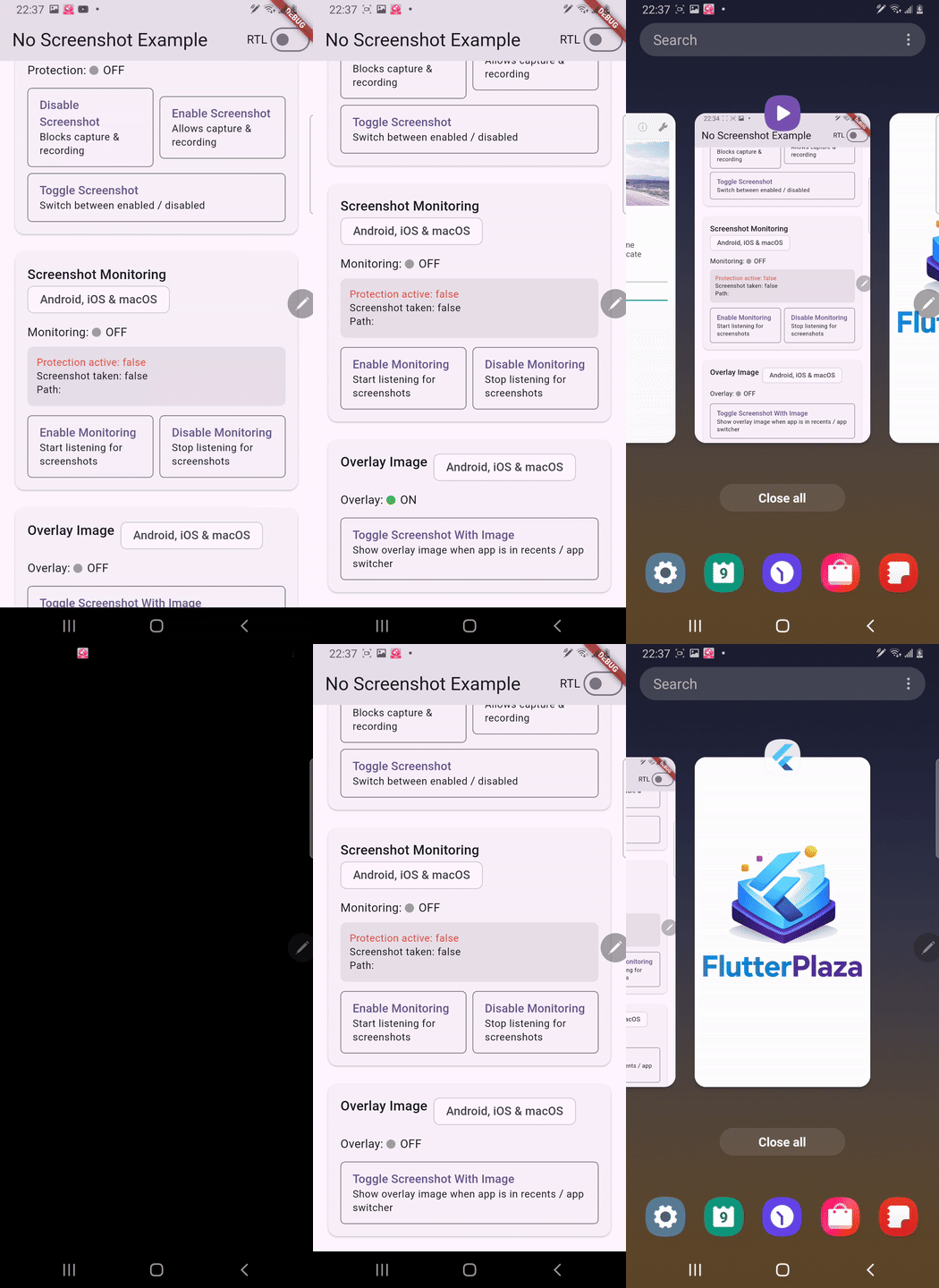
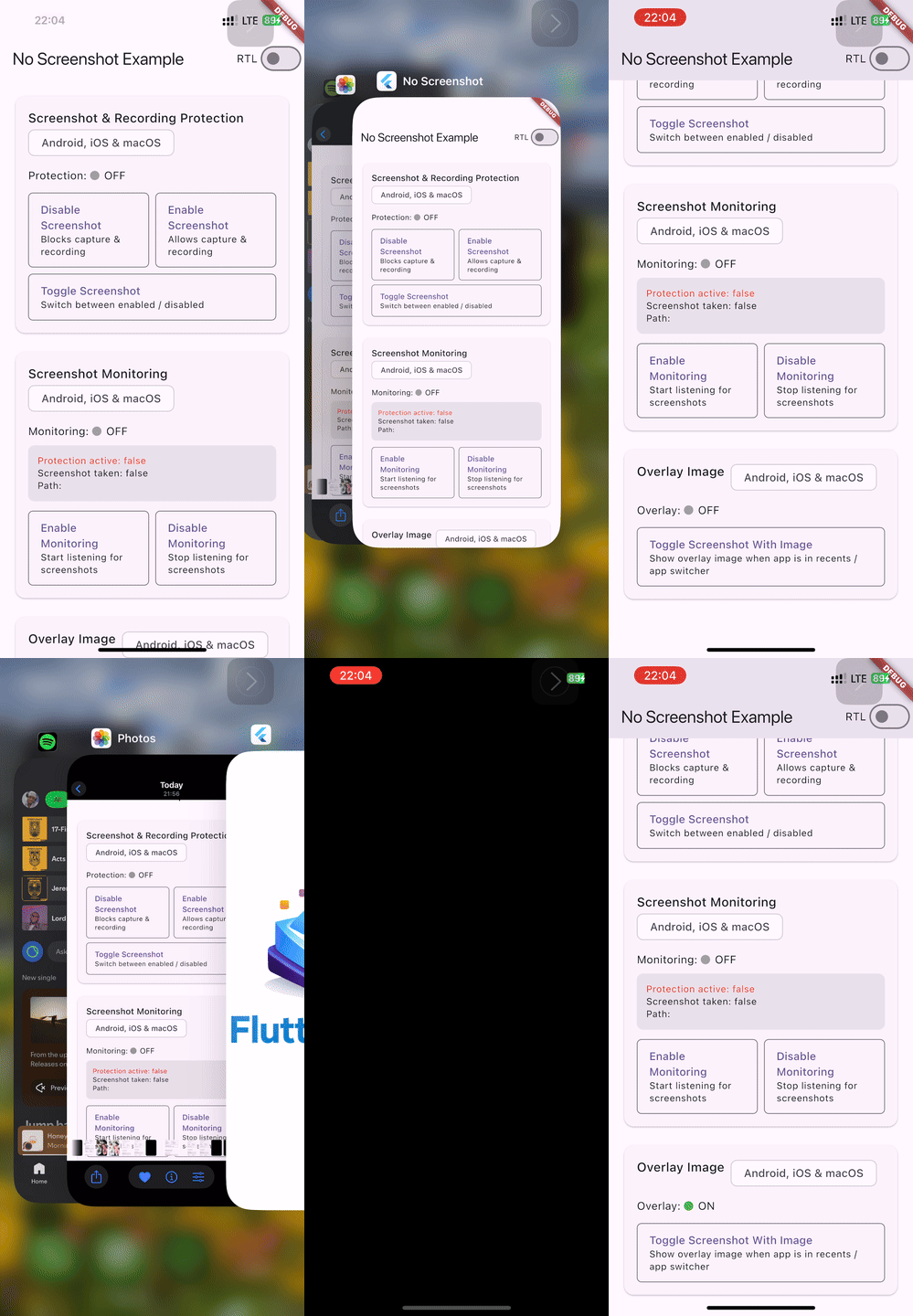
Setup: Place your overlay image in the platform-specific asset locations:
- Android:
android/app/src/main/res/drawable/image.png - iOS: Add an image named
imageto your asset catalog (Runner/Assets.xcassets/image.imageset/) - macOS: Add an image named
imageto your asset catalog (Runner/Assets.xcassets/image.imageset/) - Linux: Best-effort — the state is tracked but compositors control task switcher thumbnails
When enabled, the overlay image is shown whenever the app goes to the background or appears in the app switcher. Screenshot protection is also automatically activated.
| Android | iOS |
|---|---|
 |
 |
5. Blur Overlay (App Switcher / Recents)
Show a Gaussian blur of the current screen content when the app appears in the app switcher. Provides a more natural UX than a static image while still protecting sensitive content. No asset required.
final _noScreenshot = NoScreenshot.instance;

// Toggle the blur overlay on/off with default radius (30.0)
Future<void> toggleBlur() async {
  final isActive = await _noScreenshot.toggleScreenshotWithBlur();
  debugPrint('Blur overlay active: $isActive');
}

// Toggle with a custom blur radius
Future<void> toggleBlurCustom() async {
  final isActive = await _noScreenshot.toggleScreenshotWithBlur(blurRadius: 50.0);
  debugPrint('Blur overlay active: $isActive');
}
Mutual exclusivity: Blur, image, and color overlay modes are mutually exclusive — activating one automatically deactivates the others. This is enforced at the native level on all platforms.
Platform-specific blur implementation
| Platform | Mechanism |
|---|---|
| Android API 31+ | RenderEffect.createBlurEffect() — zero-copy GPU blur on decorView (configurable radius) |
| Android API 17–30 | RenderScript.ScriptIntrinsicBlur — bitmap capture + blur + ImageView overlay (configurable radius, max 25f) |
| Android API <17 | FLAG_SECURE alone (no blur, but app switcher preview is hidden) |
| iOS | UIVisualEffectView with UIBlurEffect(style: .regular) |
| macOS | NSVisualEffectView with .hudWindow material, .behindWindow blending |
| Linux | Best-effort — state tracked and persisted, compositors control task switcher thumbnails |
| Windows | Not supported — uses WDA_EXCLUDEFROMCAPTURE for prevention only |
| Web | Best-effort — enables JS deterrents (right-click block, PrintScreen intercept, user-select: none) |
6. Color Overlay (App Switcher / Recents)
Show a solid color when the app appears in the app switcher or recents screen. Useful when you want a branded or themed overlay instead of a blurred or image-based one. No asset required.
final _noScreenshot = NoScreenshot.instance;

// Toggle with default color (opaque black)
Future<void> toggleColor() async {
  final isActive = await _noScreenshot.toggleScreenshotWithColor();
  debugPrint('Color overlay active: $isActive');
}

// Toggle with a custom ARGB color (e.g. opaque blue)
Future<void> toggleColorCustom() async {
  final isActive = await _noScreenshot.toggleScreenshotWithColor(color: 0xFF2196F3);
  debugPrint('Color overlay active: $isActive');
}
Mutual exclusivity: Color, blur, and image overlay modes are mutually exclusive — activating one automatically deactivates the others. This is enforced at the native level on all platforms.
Platform-specific color overlay implementation
| Platform | Mechanism |
|---|---|
| Android | Solid View overlay with the specified ARGB color |
| iOS | UIView with the specified background color |
| macOS | NSView with the specified background color |
| Linux | Best-effort — state tracked and persisted, compositors control task switcher thumbnails |
| Windows | Not supported — uses WDA_EXCLUDEFROMCAPTURE for prevention only |
| Web | Best-effort — enables JS deterrents (right-click block, PrintScreen intercept, user-select: none) |
7. SecureWidget (Declarative Protection)
Wrap any subtree with SecureWidget to automatically enable protection on mount and disable on unmount. No imperative calls needed.
import 'package:no_screenshot/secure_widget.dart';
import 'package:no_screenshot/overlay_mode.dart';

// Protect a page with blur overlay
SecureWidget(
  mode: OverlayMode.blur,
  blurRadius: 50.0,
  child: MySecurePage(),
)

// Protect with full screenshot block
SecureWidget(
  mode: OverlayMode.secure,
  child: PaymentScreen(),
)

// Protect with solid color overlay
SecureWidget(
  mode: OverlayMode.color,
  color: 0xFF000000,
  child: ConfidentialScreen(),
)
Available modes: OverlayMode.none (no protection), OverlayMode.secure (default — blocks capture), OverlayMode.blur, OverlayMode.color, OverlayMode.image.
When the widget is removed from the tree, protection is automatically disabled.
8. Per-Route Protection Policies
Use SecureNavigatorObserver to apply different protection levels for different routes. Add it to your MaterialApp's navigatorObservers:
import 'package:no_screenshot/secure_navigator_observer.dart';
import 'package:no_screenshot/overlay_mode.dart';

MaterialApp(
  navigatorObservers: [
    SecureNavigatorObserver(
      policies: {
        '/payment': SecureRouteConfig(mode: OverlayMode.secure),
        '/profile': SecureRouteConfig(mode: OverlayMode.blur, blurRadius: 50.0),
        '/home': SecureRouteConfig(mode: OverlayMode.none),
        '/branded': SecureRouteConfig(mode: OverlayMode.color, color: 0xFF2196F3),
      },
      defaultConfig: SecureRouteConfig(mode: OverlayMode.none), // for unmapped routes
    ),
  ],
  routes: {
    '/home': (_) => HomePage(),
    '/payment': (_) => PaymentPage(),
    '/profile': (_) => ProfilePage(),
    '/branded': (_) => BrandedPage(),
  },
)
The observer automatically applies the correct policy when routes are pushed, popped, replaced, or removed. Routes not in the policies map use the defaultConfig.
9. Granular Callbacks
Instead of manually filtering the stream, register targeted callbacks for specific events:
final _noScreenshot = NoScreenshot.instance;

// Register callbacks
_noScreenshot.onScreenshotDetected = (snapshot) {
  debugPrint('Screenshot taken! Path: ${snapshot.screenshotPath}');
  debugPrint('Timestamp: ${snapshot.timestamp}');
  debugPrint('Source app: ${snapshot.sourceApp}');
};

_noScreenshot.onScreenRecordingStarted = (snapshot) {
  debugPrint('Screen recording started!');
};

_noScreenshot.onScreenRecordingStopped = (snapshot) {
  debugPrint('Screen recording stopped.');
};

// Start dispatching events (requires screenshot/recording listening to be active)
_noScreenshot.startCallbacks();

// Stop dispatching (keeps callback assignments)
_noScreenshot.stopCallbacks();

// Remove all callbacks and stop dispatching
_noScreenshot.removeAllCallbacks();
| Callback | Fires when |
|---|---|
onScreenshotDetected |
wasScreenshotTaken is true |
onScreenRecordingStarted |
isScreenRecording transitions from false to true |
onScreenRecordingStopped |
isScreenRecording transitions from true to false |
Note: Granular callbacks listen to
screenshotStreaminternally. You still need to callstartScreenshotListening()and/orstartScreenRecordingListening()to activate native monitoring.
macOS Demo
All features (screenshot protection, monitoring, and image overlay) on macOS:
| macOS |
|---|
 |
RTL Language Support
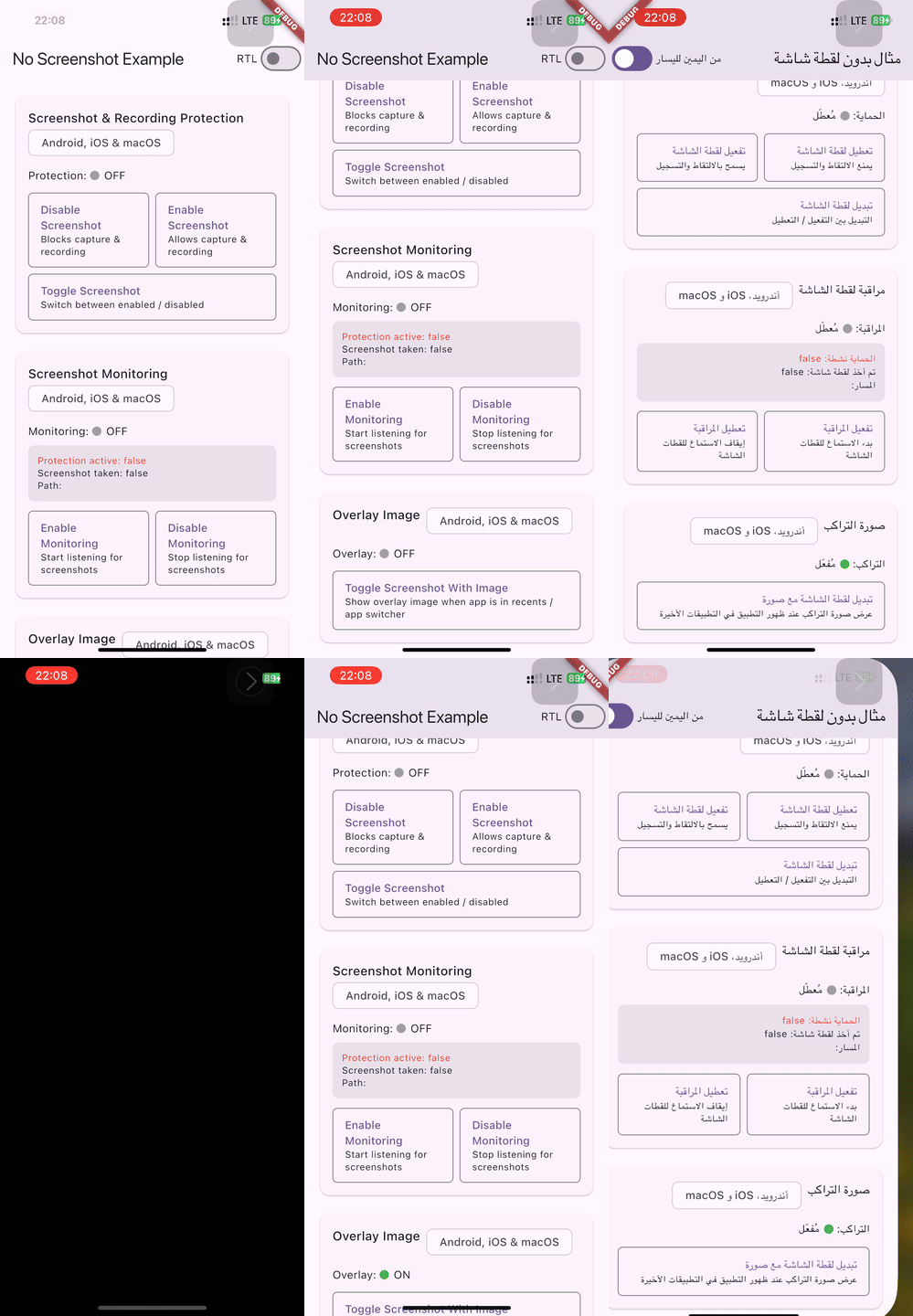
This plugin works correctly with both LTR (left-to-right) and RTL (right-to-left) languages such as Arabic and Hebrew. On iOS 26+, the internal screenshot prevention mechanism uses forceLeftToRight semantics to avoid a layout shift to the right when the device language is set to Arabic or another RTL language (see flutter/flutter#175523).
The example app includes an RTL toggle to verify correct behavior:
| RTL Support (iOS) |
|---|
 |
API Reference
| Method | Return Type | Description |
|---|---|---|
NoScreenshot.instance |
NoScreenshot |
Singleton instance of the plugin |
screenshotOff() |
Future<bool> |
Disable screenshots & screen recording |
screenshotOn() |
Future<bool> |
Enable screenshots & screen recording |
toggleScreenshot() |
Future<bool> |
Toggle screenshot protection on/off |
toggleScreenshotWithImage() |
Future<bool> |
Toggle image overlay mode (returns new state) |
toggleScreenshotWithBlur({double blurRadius = 30.0}) |
Future<bool> |
Toggle blur overlay mode with optional radius (returns new state) |
toggleScreenshotWithColor({int color = 0xFF000000}) |
Future<bool> |
Toggle solid color overlay mode with optional ARGB color (returns new state) |
startScreenshotListening() |
Future<void> |
Start monitoring for screenshot events |
stopScreenshotListening() |
Future<void> |
Stop monitoring for screenshot events |
startScreenRecordingListening() |
Future<void> |
Start monitoring for screen recording events |
stopScreenRecordingListening() |
Future<void> |
Stop monitoring for screen recording events |
screenshotWithImage() |
Future<bool> |
Always enable image overlay (idempotent) |
screenshotWithBlur({double blurRadius = 30.0}) |
Future<bool> |
Always enable blur overlay (idempotent) |
screenshotWithColor({int color = 0xFF000000}) |
Future<bool> |
Always enable color overlay (idempotent) |
screenshotStream |
Stream<ScreenshotSnapshot> |
Stream of screenshot and recording activity events |
| Granular Callbacks | ||
onScreenshotDetected |
ScreenshotEventCallback? |
Callback fired when a screenshot is detected |
onScreenRecordingStarted |
ScreenshotEventCallback? |
Callback fired when screen recording starts |
onScreenRecordingStopped |
ScreenshotEventCallback? |
Callback fired when screen recording stops |
startCallbacks() |
void |
Start dispatching events to registered callbacks |
stopCallbacks() |
void |
Stop dispatching events (keeps callback assignments) |
removeAllCallbacks() |
void |
Clear all callbacks and stop dispatching |
hasActiveCallbacks |
bool |
Whether callbacks are currently being dispatched |
| Widgets | ||
SecureWidget |
StatefulWidget |
Declarative protection — enables on mount, disables on unmount |
SecureNavigatorObserver |
NavigatorObserver |
Per-route protection policies via named route mapping |
SecureRouteConfig |
class | Configuration for a route's protection mode, blur radius, and color |
OverlayMode |
enum | none, secure, blur, color, image |
Contributors
Thanks to everyone who has contributed to this project!
 @fonkamloic |
 @zhangyuanyuan-bear |
 @BranislavKljaic96 |
 @qk7b |
 @T-moz |
 @ggiordan |
 @Musaddiq625 |
 @albertocappellina-intesys |
 @kefeh |
License
BSD 3-Clause License. See LICENSE for details.