
Mobile RAG Engine




Production-ready, fully local RAG (Retrieval-Augmented Generation) engine for Flutter.
Powered by a Rust core, it delivers lightning-fast vector search and embedding generation directly on the device. No servers, no API costs, no latency.
Memory note: The runtime is memory-optimized and avoids unnecessary copies in the Rust core, but the current text pipeline is not an end-to-end zero-copy Dart↔Rust transport. Large text payloads still cross the FFI boundary as strings in the current public API.
Why this package?
No Rust Installation Required
You do NOT need to install Rust, Cargo, or Android NDK.
This package includes pre-compiled binaries for iOS, Android, and macOS. Just pub add and run.
Performance
| Feature | Pure Dart | Mobile RAG Engine (Rust) |
|---|---|---|
| Tokenization | Slow | 10x Faster (HuggingFace tokenizers) |
| Vector Search | O(n) | O(log n) (HNSW Index) |
| Memory Usage | High | Optimized (copy-minimized Rust core) |
100% Offline & Private
Data never leaves the user's device. Perfect for privacy-focused apps (journals, secure chats, enterprise tools).
Features
End-to-End RAG Pipeline
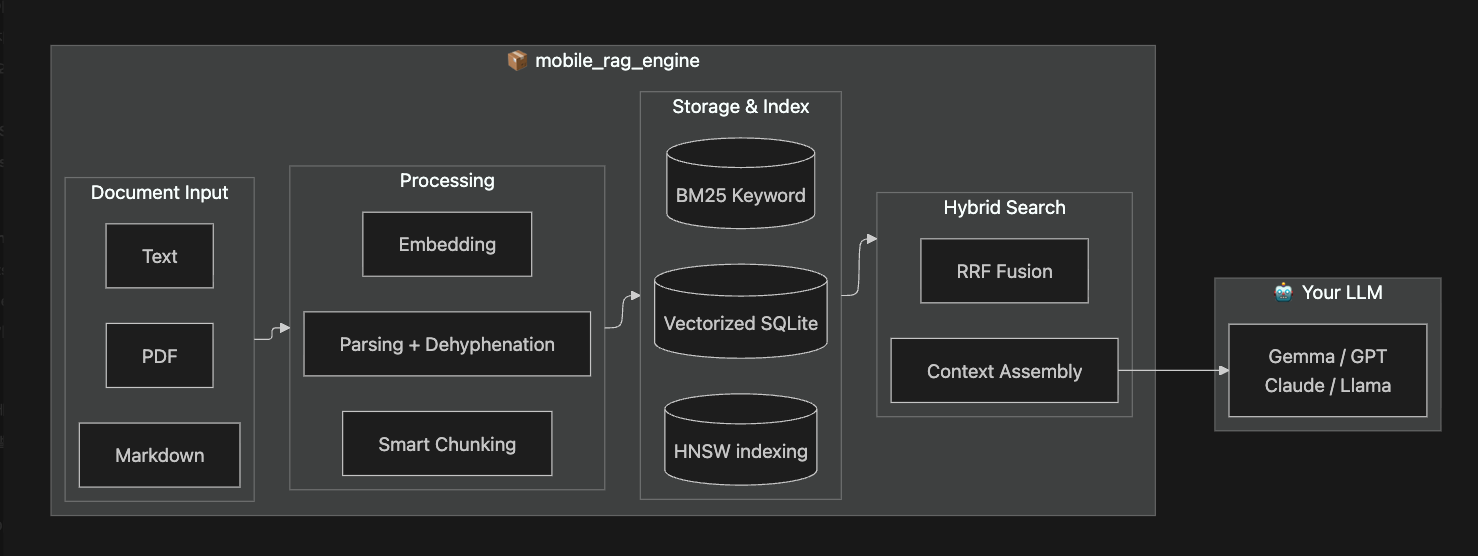
One package, complete pipeline. From any document format to LLM-ready context.
Key Features
| Category | Features |
|---|---|
| Document Input | PDF, DOCX, Markdown, Plain Text with smart dehyphenation |
| Chunking | Plain-text paragraph/line chunking with heading-aware split and tokenizer hard guard; Markdown structure-aware chunking with header-path metadata |
| Search | HNSW vector + BM25 keyword hybrid search with RRF fusion |
| Storage | SQLite persistence, HNSW Index persistence (fast startup), connection pooling, resumable indexing |
| Collections | Collection-scoped ingest/search/rebuild via inCollection('id') |
| Performance | Rust core, 10x faster tokenization, thread control, memory optimized |
| Context | Engine-tokenizer exact context budget, adjacent chunk expansion, single source mode |
Requirements
| Platform | Minimum Version |
|---|---|
| iOS | 13.0+ |
| Android | API 21+ (Android 5.0 Lollipop) |
| macOS | 10.15+ (Catalina) |
ONNX Runtime is bundled automatically via the
onnxruntimeplugin. No additional native setup required.
Installation
1. Add the dependency
dependencies:
  mobile_rag_engine:
2. Download Model Files
# Create assets folder
mkdir -p assets && cd assets

# Download all-MiniLM-L6-v2 model (INT8 quantized for ARM64, ~23MB)
curl -L -o model.onnx "https://huggingface.co/sentence-transformers/all-MiniLM-L6-v2/resolve/main/onnx/model_qint8_arm64.onnx"
curl -L -o tokenizer.json "https://huggingface.co/sentence-transformers/all-MiniLM-L6-v2/resolve/main/tokenizer.json"
Need multilingual (Korean, CJK, etc.)? See Model Setup Guide for BGE-m3 and other model options.
Quick Index
Features
- Adjacent Chunk Retrieval - Fetch surrounding context.
- Index Management - Stats, persistence, and recovery.
- Markdown Chunker - Structure-aware text splitting.
- Multi-Collection - Isolate ingest/search/rebuild by category.
- Prompt Compression - Reduce token usage.
- Search by Source - Filter results by document.
- Search Strategies - Tune ranking and retrieval.
Guides
- Quick Start - Setup in 5 minutes.
- Model Setup - Choosing and downloading models.
- Release Build - Bundle size optimization for production.
- Troubleshooting - Common fixes.
- FAQ - Frequently asked questions.
Testing
- Unit Testing - Mocking for isolated tests.
Initialize the engine once in your main() function:
Initialization Parameters
await MobileRag.initialize(
  tokenizerAsset: 'assets/tokenizer.json',
  modelAsset: 'assets/model.onnx',
  deferIndexWarmup: true,
);

// Before first search:
if (!MobileRag.instance.isIndexReady) {
  await MobileRag.instance.warmupFuture;
}
Then use it anywhere in your app:
class MySearchScreen extends StatelessWidget {
  Future<void> _search() async {
    // 2. Add Documents (auto-chunked & embedded)
    await MobileRag.instance.addDocument(
      'Flutter is a UI toolkit for building apps.',
    );
    await MobileRag.instance.addDocument(
      'Dart is the language used to build Flutter apps.',
    );
    // Indexing is automatic! (Debounced 500ms)
    // Optional: await MobileRag.instance.rebuildIndex(); // Call if you want it done NOW

    // 3. Search with LLM-ready context
    final result = await MobileRag.instance.search(
      'What is Flutter?',
      tokenBudget: 2000,
    );

    print(result.context.text); // Ready to send to LLM
  }
}
Multi-Collection (v1)
Use collection scopes when you want independent rebuild boundaries per category.
final business = MobileRag.instance.inCollection('business');
final travel = MobileRag.instance.inCollection('travel');

await business.addDocument('Quarterly planning memo...');
await travel.addDocument('Kyoto itinerary...');

if (!travel.isIndexReady) {
  await travel.warmupFuture;
}
final travelHits = await travel.searchHybrid('itinerary');
print(travelHits.length);
If you do not specify a collection, the engine uses the default __default__
collection for backward compatibility.
Advanced Usage: For fine-grained control, you can still use the low-level APIs (
initTokenizer,EmbeddingService,SourceRagService) directly. See the API Reference.
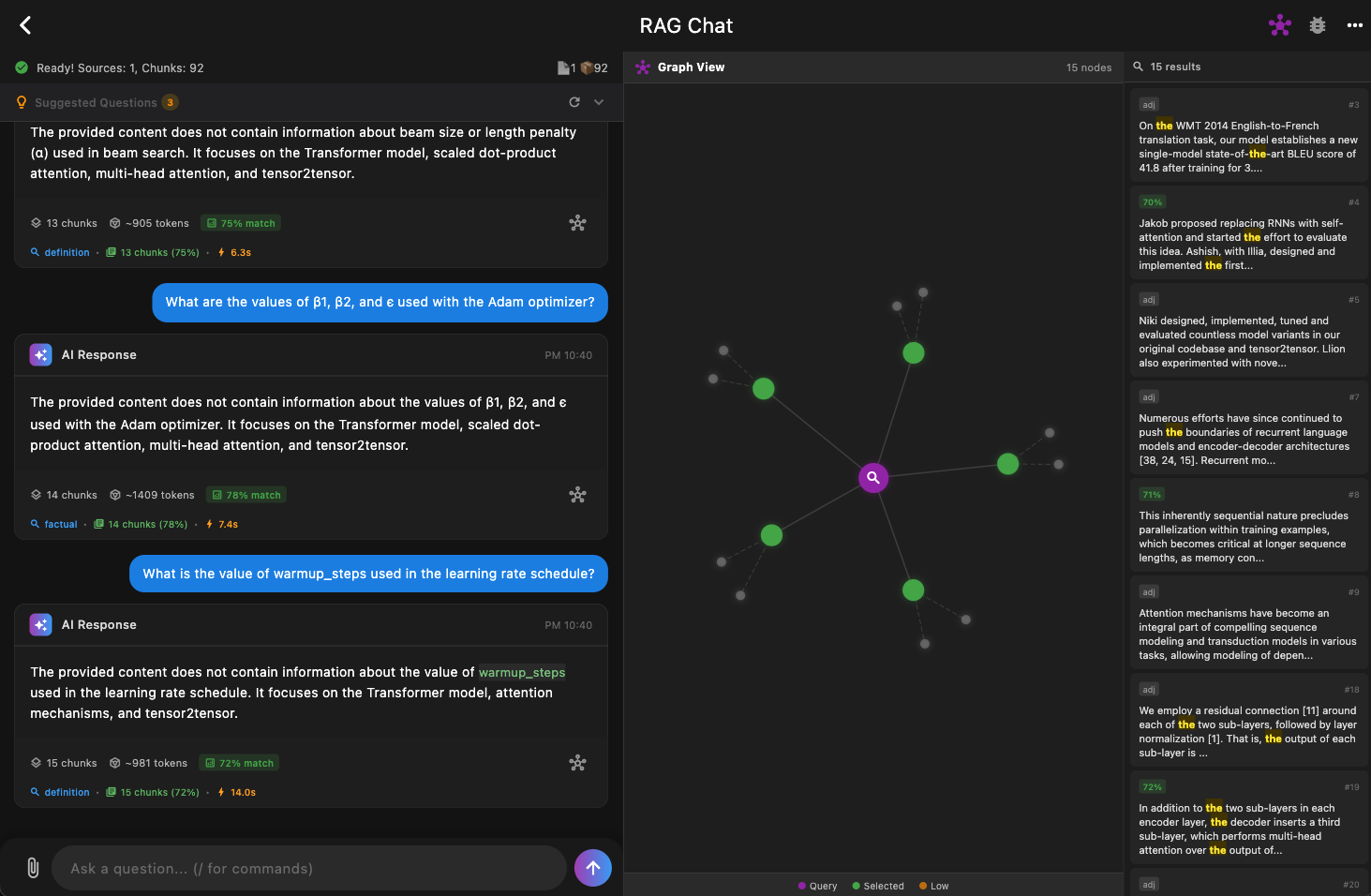
Sample App
Check out the example application using this package. This desktop app demonstrates full RAG pipeline integration with an LLM (Gemma 2B) running locally on-device.
Contributing
Bug reports, feature requests, and PRs are all welcome!
License
This project is licensed under the MIT License.
Libraries
- mobile_rag
- Main entry point for Mobile RAG Engine.
- mobile_rag_engine
- Mobile RAG Engine
- models/benchmark_models
- models/quality_test_models
- services/benchmark_service
- services/context_builder
- Context assembly for LLM prompts.
- services/document_parser
- Utility for extracting text from documents.
- services/embedding_service
- services/intent_parser
- Utility for parsing user intents using the RAG engine.
- services/prompt_compressor
- REFRAG-style prompt compression service.
- services/quality_test_service
- services/rag_config
- Configuration for RagEngine initialization.
- services/rag_engine
- Unified RAG engine with simplified initialization.
- services/source_rag_service
- High-level RAG service for managing sources and chunks.
- services/text_chunker
- Utility for splitting text into semantic chunks.
- utils/error_utils