
A Simple logger that does what a logger should do: send your input messages to a series of outputs.
Logger io
Usage
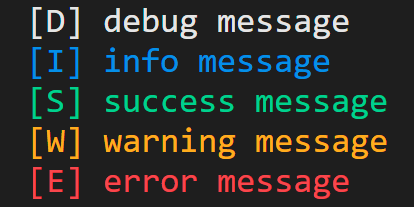
Simple
final logger = Logger();

logger.d('debug message');
logger.i('info message');
logger.s('success message');
logger.w('warning message');
logger.e('error', stackTrace: StackTrace.current);
Multiple outputs
final logger = Logger(
  outputs: [
    ConsoleOutput(),
    ExampleCrashlyticsOutput(),
  ],
);
Define your output
Just implement the output class. For example, below is an example crashlytics output.
class ExampleCrashlyticsOutput implements Output {
  final FirebaseCrashlytics _crashlytics;

  const ExampleCrashlyticsOutput(this._crashlytics);

  @override
  void log({
    required Object? message,
    required Level level,
    required StackTrace? stackTrace,
    required String context,
  }) {
    if (level.value >= Level.error.value) {
      _crashlytics.recordError(message, stackTrace ?? StackTrace.current);
    } else {
      _crashlytics.log(message.toString());
    }
  }
}
Change the rendering in the console
The code of console output is very simple, it just uses a formatter and sends the result string to the console. If you need to change the rendering, you can create your own formatter:
final logger = Logger(
  outputs: [
    ConsoleOutput(formatter: MyFormatter()),
  ],
);

class MyFormatter implements Formatter {
  // ...
}
If you wish to change the rendering, just build your own formatter.
Performance
It is faster than a library like logger because it does not use the stack trace for every log (only if specified). This results in faster logging when no stack trace is used.
Durations for logger_io, 20 debug log (5 times): (1 ms, 2 ms, 2 ms, 1 ms, 2 ms)
Duration for logger, 20 debug log (5 times): (15 ms, 16 ms, 16 ms, 16 ms, 13 ms)
How can I do X ?
The code of this library is simple, if you wonder how you can do something, chances are you'll find your answer by reading the source code.