
kalam_link
Official Dart and Flutter SDK for KalamDB.
Status: Beta. The API is usable today, but it is still evolving and may change between releases.
KalamDB is a SQL-first realtime database. The current Dart SDK focuses on the app-facing core: runtime init, authenticated queries, typed row access, live SQL subscriptions, connection lifecycle hooks, login/token refresh, and health checks.
→ kalamdb.org · Docs · Dart setup · Authentication · Subscriptions · GitHub
Features
- Runtime init with
KalamClient.init()for Flutter/Dart startup - SQL queries over HTTP with
$1,$2, ... parameter binding - Typed rows via
Map<String, KalamCellValue>accessors likeasString(),asInt(), andasFile() - Live subscriptions to any
SELECTquery over WebSocket - Authentication flows with
Auth.jwt,Auth.basic,Auth.none,login(),refreshToken(), andrefreshAuth() - Connection diagnostics with
ConnectionHandlers, keepalive control, and SDK logging hooks - Subscription inspection with
getSubscriptions()andSeqIdresume support
Installation
dependencies:
  kalam_link: ^0.4.1-beta.2
flutter pub add kalam_link
Get Started Fast
Before using the Dart SDK, you need a running KalamDB server.
Fastest path: Docker
The quickest local setup is the maintained Docker Compose flow:
curl -sSL https://raw.githubusercontent.com/jamals86/KalamDB/main/docker/run/single/docker-compose.yml -o docker-compose.yml
KALAMDB_JWT_SECRET="$(openssl rand -base64 32)" docker compose up -d
With the default single-node Docker setup:
- API endpoint:
http://localhost:8088 - Admin UI:
http://localhost:8088/ui
Docs:
- Docker deployment: https://kalamdb.org/docs/getting-started/docker
- Authentication and bootstrap: https://kalamdb.org/docs/getting-started/authentication
Other ways to run KalamDB
If you do not want Docker, use one of the documented local install paths:
- Quick start overview: https://kalamdb.org/docs/getting-started
- Run from source / local server workflow: https://kalamdb.org/docs/getting-started/configuration
- Download binaries: https://kalamdb.org/docs/getting-started/binaries
- CLI install script: https://kalamdb.org/docs/getting-started/cli
Typical local source setup uses:
- API endpoint:
http://localhost:8080 - Admin UI:
http://localhost:8080/ui - SQL Studio directly:
http://localhost:8080/ui/sql
First 5-minute flow
- Start KalamDB with Docker or a local binary.
- Complete bootstrap/login: https://kalamdb.org/docs/getting-started/authentication
- Open the Admin UI at
/uior/ui/sqlto verify the server is healthy. - Run the Dart example from this package:
dart run example/main.dart - Replace the example credentials and URL with your app's config, then connect with
KalamClient.connect(...).
View Data in the Admin UI
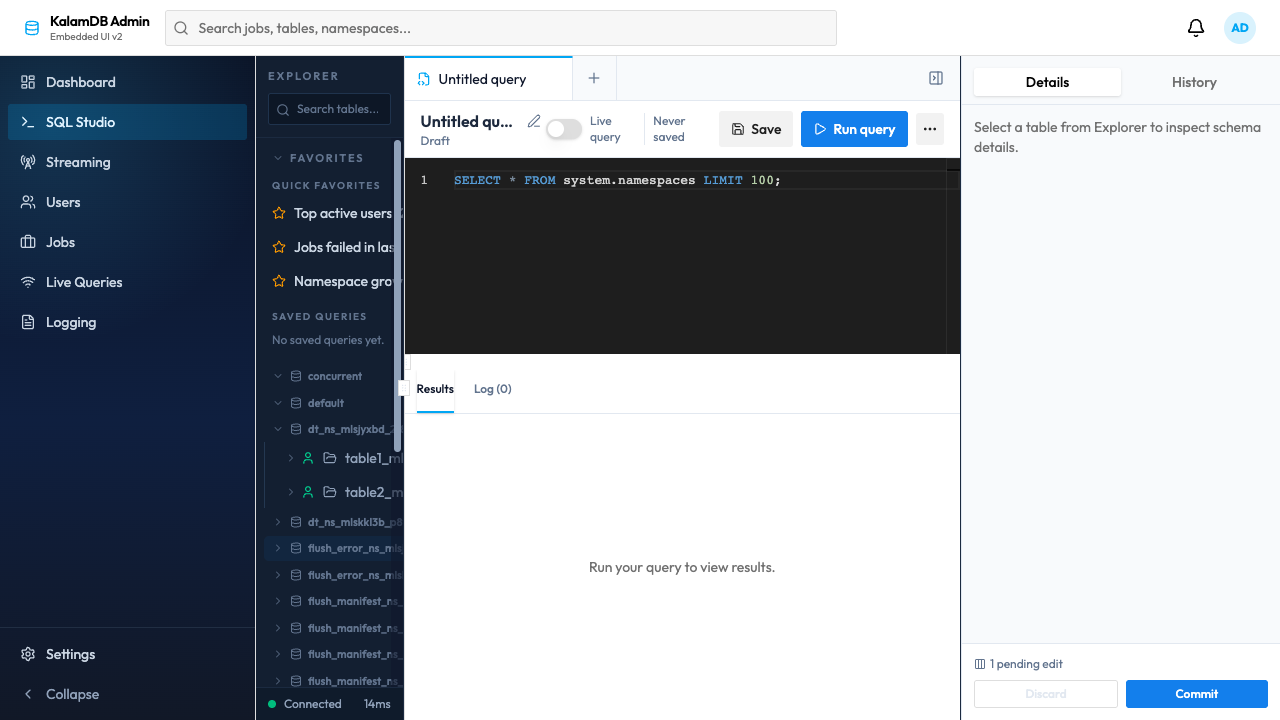
The built-in Admin UI is the fastest way to inspect data while developing with the Dart SDK.
- Admin UI guide: https://kalamdb.org/docs/getting-started/admin-ui
- SQL Studio directly:
http://localhost:8080/ui/sqlfor local source runs, orhttp://localhost:8088/ui/sqlfor the default Docker Compose setup
Use SQL Studio to:
- browse namespaces and tables
- run ad hoc SQL against the same server your Dart app is using
- inspect live query behavior, jobs, users, and logs from the browser
Example starter query in the UI:
SELECT * FROM system.namespaces LIMIT 100;
Admin UI preview:
Initialization
KalamClient.init() must be called once before any other SDK call.
void main() async {
  WidgetsFlutterBinding.ensureInitialized();
  await KalamClient.init();
  runApp(MyApp());
}
Only init() belongs before runApp(). Avoid awaiting KalamClient.connect() during app boot. Even with wsLazyConnect enabled by default, connect() can still do auth-related async work that delays first render.
Connecting
import 'package:kalam_link/kalam_link.dart';

final client = await KalamClient.connect(
  url: 'https://db.example.com',
  authProvider: () async {
    final token = await myApp.getOrRefreshJwt();
    return Auth.jwt(token);
  },
);
connect() options
| Parameter | Type | Default | Description |
|---|---|---|---|
url |
String |
required | Server base URL |
authProvider |
AuthProvider |
Auth.none() |
Credentials callback invoked during connect and reconnect |
disableCompression |
bool |
false |
Disable WebSocket gzip compression for local debugging |
wsLazyConnect |
bool |
true |
Defer WebSocket connect until the first subscribe() call |
timeout |
Duration |
30s |
HTTP request timeout |
maxRetries |
int |
3 |
Retry count for idempotent queries |
connectionHandlers |
ConnectionHandlers? |
null |
Connection lifecycle callbacks |
keepaliveInterval |
Duration? |
server default | WebSocket keepalive ping interval; use Duration.zero to disable |
logLevel |
Level? |
Level.warning |
Minimum SDK log level |
logListener |
LogListener? |
null |
Redirect SDK logs to your own sink |
authProviderMaxAttempts |
int |
3 |
Retry attempts for transient auth provider failures |
authProviderInitialBackoff |
Duration |
250ms |
Initial auth-provider retry backoff |
authProviderMaxBackoff |
Duration |
2s |
Maximum auth-provider retry backoff |
Authentication
authProvider is the primary auth API
The Dart SDK does not expose a separate auth: parameter on connect(). Provide credentials through authProvider.
final client = await KalamClient.connect(
  url: 'https://db.example.com',
  authProvider: () async => Auth.jwt(await myApp.getOrRefreshJwt()),
);
The callback may return:
Auth.jwt(token)for normal production authAuth.basic(username, password)when you want the SDK to exchange Basic credentials for a JWT before the first query or WebSocket connectionAuth.none()for local anonymous access
Re-resolve credentials on demand:
await client.refreshAuth();

Timer.periodic(
  const Duration(minutes: 55),
  (_) => client.refreshAuth(),
);
Basic login and token refresh
final bootstrap = await KalamClient.connect(
  url: serverUrl,
  authProvider: () async => Auth.none(),
);

final tokens = await bootstrap.login('alice', 'secret123');
await bootstrap.dispose();

final client = await KalamClient.connect(
  url: serverUrl,
  authProvider: () async => Auth.jwt(tokens.accessToken),
);
Refresh an expiring access token:
final fresh = await client.refreshToken(tokens.refreshToken!);
print(fresh.accessToken);
Executing Queries
final result = await client.query(
  r'SELECT id, title, done FROM tasks WHERE done = $1 ORDER BY id',
  params: [false],
);

if (!result.success) {
  throw StateError('Query failed: ${result.error}');
}

for (final row in result.rows) {
  print('${row['id']?.asInt()} ${row['title']?.asString()}');
}

final scoped = await client.query(
  'SELECT * FROM messages LIMIT 5',
  namespace: 'alice',
);
QueryResponse fields
| Field | Type | Description |
|---|---|---|
success |
bool |
Whether the query succeeded |
results |
List<QueryResult> |
Result sets, one per SQL statement |
rows |
List<Map<String, KalamCellValue>> |
Convenience accessor for the first result set |
columns |
List<SchemaField> |
Convenience accessor for the first result set schema |
tookMs |
double? |
Server execution time in milliseconds |
error |
ErrorDetail? |
Error details when success is false |
QueryResult fields
| Field | Type | Description |
|---|---|---|
columns |
List<SchemaField> |
Column metadata |
rows |
List<Map<String, KalamCellValue>> |
Typed rows keyed by column name |
rowCount |
int |
Rows affected or returned |
message |
String? |
Optional message for DDL / status responses |
Live Subscriptions
Subscribe to any SELECT query. The returned Stream<ChangeEvent> emits the initial snapshot plus live changes.
Live SQL must stay within the strict supported shape: SELECT ... FROM ... WHERE ....
Do not use ORDER BY or LIMIT inside subscribe() or materialized live-query SQL.
Use lastRows for rewind and apply ordering / capping in your app after rows arrive.
final stream = client.subscribe(
  'SELECT * FROM chat.messages WHERE room_id = $1',
  batchSize: 100,
  lastRows: 50,
  from: SeqId.zero(),
);

await for (final event in stream) {
  switch (event) {
    case AckEvent(:final subscriptionId, :final totalRows):
      print('Subscribed $subscriptionId with $totalRows snapshot rows');
    case InitialDataBatch(:final rows, :final hasMore):
      print('Snapshot batch ${rows.length}, hasMore=$hasMore');
    case InsertEvent(:final row):
      print('New row: ${row['id']?.asInt()}');
    case UpdateEvent(:final row, :final oldRow):
      print('Updated: $oldRow -> $row');
    case DeleteEvent(:final row):
      print('Deleted: $row');
    case SubscriptionError(:final code, :final message):
      print('Subscription error [$code]: $message');
  }
}
Cancel the subscription by cancelling the StreamSubscription:
final sub = stream.listen((_) {});
await sub.cancel();
subscribe() options
| Parameter | Type | Description |
|---|---|---|
sql |
String |
SQL query to watch |
batchSize |
int? |
Max rows per initial snapshot batch |
lastRows |
int? |
Include the last N rows before live changes begin |
from |
SeqId? |
Resume from a known sequence ID |
subscriptionId |
String? |
Custom subscription ID |
ChangeEvent variants
| Variant | Public fields |
|---|---|
AckEvent |
subscriptionId, totalRows, schema, batchNum, hasMore, status |
InitialDataBatch |
subscriptionId, rows, batchNum, hasMore, status |
InsertEvent |
subscriptionId, rows, row |
UpdateEvent |
subscriptionId, rows, oldRows, row, oldRow |
DeleteEvent |
subscriptionId, oldRows, row |
SubscriptionError |
subscriptionId, code, message |
Inspect active subscriptions and resume checkpoints:
final subs = await client.getSubscriptions();
for (final sub in subs) {
  print('${sub.id} lastSeqId=${sub.lastSeqId} closed=${sub.closed}');
}
Connection Lifecycle and Logging
final client = await KalamClient.connect(
  url: 'https://db.example.com',
  authProvider: () async => Auth.jwt(await getToken()),
  connectionHandlers: ConnectionHandlers(
    onConnect: () => print('connected'),
    onDisconnect: (reason) => print('disconnected: ${reason.message}'),
    onError: (error) => print('error: ${error.message}'),
    onReceive: (message) => print('[recv] $message'),
    onSend: (message) => print('[send] $message'),
  ),
  keepaliveInterval: const Duration(seconds: 5),
  logLevel: Level.debug,
);
Health and Diagnostics
final health = await client.healthCheck();
print('${health.status} - v${health.version} (api=${health.apiVersion})');
Initial server bootstrap is not currently part of the Dart SDK surface. Use the server CLI or the documented HTTP setup flow instead.
Disposing
Always dispose the client when done:
await client.dispose();
Flutter Integration
Recommended: initialize before render, connect after render
void main() async {
  runZonedGuarded(() async {
    WidgetsFlutterBinding.ensureInitialized();

    try {
      await KalamClient.init();
    } catch (_) {}

    runApp(const ProviderScope(child: MyApp()));
  }, (error, stack) {
    // app-level crash reporting
  });
}
Lazy client service:
class SyncService {
  Future<KalamClient>? _clientFuture;
  StreamSubscription<ChangeEvent>? _messagesSubscription;
  bool _isDisposed = false;

  Future<KalamClient> _getClient() => _clientFuture ??= _initClient();

  Future<KalamClient> _initClient() async {
    try {
      await KalamClient.init();
    } catch (_) {}

    return KalamClient.connect(
      url: AppConfig.kalamDbUrl,
      authProvider: _resolveAuth,
      keepaliveInterval: const Duration(seconds: 5),
      connectionHandlers: ConnectionHandlers(
        onConnect: () => print('connected'),
        onDisconnect: (reason) => print('disconnected: ${reason.message}'),
        onError: (error) => print('error: ${error.message}'),
      ),
    );
  }

  Future<Auth> _resolveAuth() async {
    final token = await myAuthService.getOrRefreshToken();
    return token == null ? Auth.none() : Auth.jwt(token);
  }

  Future<void> start(SeqId? lastSeenSeqId) async {
    if (_isDisposed) return;

    final client = await _getClient();
    _messagesSubscription ??= client
        .subscribe('SELECT * FROM messages', from: lastSeenSeqId)
        .listen(_handleEvent);
  }

  Future<void> stop() async {
    await _messagesSubscription?.cancel();
    _messagesSubscription = null;
  }

  Future<void> dispose() async {
    _isDisposed = true;
    await stop();
    if (_clientFuture != null) {
      final client = await _clientFuture!;
      await client.dispose();
    }
  }

  void _handleEvent(ChangeEvent event) {
    switch (event) {
      case InsertEvent(:final row):
        print('New row: $row');
      case UpdateEvent(:final row, :final oldRow):
        print('Updated: $oldRow -> $row');
      case DeleteEvent(:final row):
        print('Deleted: $row');
      case SubscriptionError(:final code, :final message):
        print('Error [$code]: $message');
      default:
        break;
    }
  }
}
Anti-pattern: blocking startup with connect()
void main() async {
  WidgetsFlutterBinding.ensureInitialized();
  await KalamClient.init();
  final client = await KalamClient.connect(url: 'https://db.example.com');
  runApp(MyApp(client: client));
}
Avoid this pattern. Build the UI first, then resolve auth and connect from a provider, service, or widget lifecycle hook.
Full API Reference
| Method | Description |
|---|---|
KalamClient.init() |
Initialize the Rust runtime once |
KalamClient.connect(...) |
Create a client handle and configure auth, logging, retries, and WebSocket behavior |
query(sql, {params, namespace}) |
Execute SQL over HTTP |
subscribe(sql, {batchSize, lastRows, from, subscriptionId}) |
Subscribe to live query changes |
login(username, password) |
Exchange Basic credentials for JWT tokens |
refreshToken(refreshToken) |
Refresh an access token |
refreshAuth(...) |
Re-run authProvider and update credentials in place |
healthCheck() |
Read server health/version metadata |
getSubscriptions() |
Inspect active subscriptions and resume checkpoints |
dispose() |
Release client resources |
License
Apache-2.0
Links
- Website: https://kalamdb.org
- Docs home: https://kalamdb.org/docs
- Dart setup: https://kalamdb.org/docs/sdk/dart/setup
- Dart authentication: https://kalamdb.org/docs/sdk/dart/auth
- Dart querying: https://kalamdb.org/docs/sdk/dart/querying
- Dart subscriptions: https://kalamdb.org/docs/sdk/dart/subscriptions
- Dart lifecycle: https://kalamdb.org/docs/sdk/dart/client-lifecycle
- Dart cell values: https://kalamdb.org/docs/sdk/dart/cell-values
- Dart health: https://kalamdb.org/docs/sdk/dart/health-setup
- WebSocket protocol: https://kalamdb.org/docs/api/websocket-protocol
- Live query architecture: https://kalamdb.org/docs/architecture/live-query
- Getting started auth: https://kalamdb.org/docs/getting-started/authentication
- GitHub: https://github.com/jamals86/KalamDB
Native performance on iOS and Android is powered by flutter_rust_bridge.
Libraries
- kalam_link
- KalamDB client SDK for Dart and Flutter.