

🔨 Frida query builder
Frida Query Builder is a lightweight Dart library designed to build basic SQLite queries in a clear and structured way, without code generators, without heavy ORMs, and without complex configurations.
Its goal is to provide a minimal abstraction layer that allows developers to create SELECT, INSERT, UPDATE, and DELETE statements using Dart classes and methods, while keeping full control over the generated SQL.
Frida is built for developers who:
- Want explicit and predictable SQL
- Do not need automatic migrations or generated models
- Prefer simplicity over feature-heavy ORMs
- Work with SQLite in local applications (Flutter or pure Dart)
Frida Query Builder does not try to hide SQL—instead, it makes it more readable, reusable, and safer, reducing common string-concatenation errors and improving code maintainability.
📦 Installation
Add frida_query_builder to your pubspec.yaml:
dependencies:
  frida_query_builder: ^1.2.0
Or install it via command line:
dart pub add frida_query_builder
🖌️ Syntax Styles
Frida provides two ways to build your queries:
- Direct Constructor: Use the class constructors directly. This is useful for passing pre-built lists of columns or criteria.
- Fluent API: Chained methods for a more readable and "Dart-like" experience.
🚀 Examples
Creating Tables (DDL)
final createUsers = Create(
  tableName: "users",
  columns: [
    ColumnInteger(
      name: "id",
      isPrimaryKey: true,
      isAutoIncrement: true,
    ),
    ColumnText(
      name: "name",
      isNotNull: true,
    ),
    ColumnInteger(
        name: "role_id",
        foreignKey: ForeignKey(
          referencedTable: "roles",
          referencedColumn: "id",
        ),
    ),
  ],
);

print(createUsers.build());

/* Output:
CREATE TABLE users(
  id INTEGER PRIMARY KEY AUTOINCREMENT,
  name TEXT NOT NULL,
  role_id INTEGER,
  FOREIGN KEY (role_id) REFERENCES roles (id)
);
*/
Modifying Tables (Alter)
// Add a new column
final addColumn = AddColumn(
  "users",
  ColumnText(name: "email", isNotNull: true),
);
print(addColumn.build());
// Output: ALTER TABLE users ADD COLUMN email TEXT NOT NULL;

// Rename a table
final renameTable = RenameTable("users", "cool_users");
print(renameTable.build());
// Output: ALTER TABLE users RENAME TO cool_users;
Inserting Data (DML)
final insertUser = Insert(
  into: "users",
  values: {
    "name": "Felipe",
    "email": "felipe@example.com"
  },
);

print(insertUser.build());
/* Output:
INSERT INTO users(name, email) VALUES('Felipe', 'felipe@example.com');
*/
Querying Data (Select)
Fluent API (Recommended)
final select = Select(from: "transactions")
  .setColumns([
    "transactions.id".field,
    "transactions.amount".field,
    "users.name".field.as("user_name"),
  ])
  .innerJoin("users", on: [
    Equals("transactions.user_id".field, "users.id".field)
  ])
  .where([
    GreaterThan("amount".field, 100),
    Or([
        Equals("status".field, "completed"),
        Like("reference".field, "PAY-%")
    ])
  ])
  .setLimit(10);

print(select.build());
Direct Constructor
final select = Select(
  from: "transactions",
  columns: [
    "transactions.id".field,
    "transactions.amount".field,
    "users.name".field.as("user_name"),
  ],
  joins: [
     Join(
        "users",
        type: JoinType.inner,
        criteria: [
           Equals("transactions.user_id".field, "users.id".field)
        ]
     )
  ],
  where: [
    GreaterThan("amount".field, 100),
    Or([
        Equals("status".field, "completed"),
        Like("reference".field, "PAY-%")
    ])
  ],
  limit: 10,
);

print(select.build());
/* Output (both styles): SELECT transactions.id, transactions.amount, users.name AS user_name FROM transactions INNER JOIN users ON transactions.user_id = users.id WHERE amount > 100 AND (status = 'completed' OR reference LIKE 'PAY-%') LIMIT 10; */
### Deleting Data

```dart
final delete = Delete(
  table: "users",
  criteria: [
    Equals("id".field, 123)
  ]
);

print(delete.build());
// Output: DELETE FROM users WHERE id = 123;
📖 Supported SQLite Functionalities
Data types
| Functionality | Supported |
|---|---|
| INTEGER | ✅ |
| REAL | ✅ |
| TEXT | ✅ |
| BLOB | ✅ |
Data definition
| Functionality | Supported |
|---|---|
| CREATE TABLE | ✅ |
| DROP TABLE | ✅ |
| ALTER TABLE (rename, add column) | ✅ |
| DROP COLUMN | ✅ |
| RENAME COLUMN | ✅ |
Data Manipulation
| Functionality | Supported |
|---|---|
| INSERT INTO (single row) | ✅ |
| INSERT INTO (multiple rows) | ✅ |
| UPDATE (with WHERE) | ✅ |
| DELETE (with WHERE) | ✅ |
Querying (SELECT)
| Functionality | Supported |
|---|---|
| SELECT (specific columns / *) | ✅ |
| DISTINCT | ✅ |
| WHERE conditions | ✅ |
| ORDER BY | ✅ |
| GROUP BY + HAVING | ✅ |
| LIMIT + OFFSET | ✅ |
| INNER JOIN | ✅ |
| LEFT JOIN | ✅ |
| FOREIGN KEY ON DELETE | ✅ |
| FOREIGN KEY ON UPDATE | ✅ |
| Subqueries (WHERE, FROM, SELECT) | ✅ |
| Aggregate functions (COUNT, SUM, AVG, MIN, MAX) | ✅ |
Constraints & Expr.
| Functionality | Supported |
|---|---|
| CHECK | ✅ |
| NOT NULL | ✅ |
| DEFAULT | ✅ |
| UNIQUE | ✅ |
| PRIMARY KEY | ✅ |
| FOREIGN KEY | ✅ |
| Arithmetic operators (+, -, *, /) | ✅ |
| Comparison operators (=, <>, <, <=, >, >=) | ✅ |
| AND | ✅ |
| OR | ✅ |
| NOT | ✅ |
| IN | ✅ |
| BETWEEN | ✅ |
| LIKE | ✅ |
Transactions
| Functionality | Supported |
|---|---|
| BEGIN TRANSACTION | ❌ |
| COMMIT | ❌ |
| ROLLBACK | ❌ |
| CREATE INDEX | ✅ |
| DROP INDEX | ✅ |
| Unique indexes | ❌ |
Advanced
| Functionality | Supported |
|---|---|
| WITH (CTE) | ❌ |
| Window functions | ❌ |
| Full-text search (FTS5) | ❌ |
| JSON functions | ❌ |
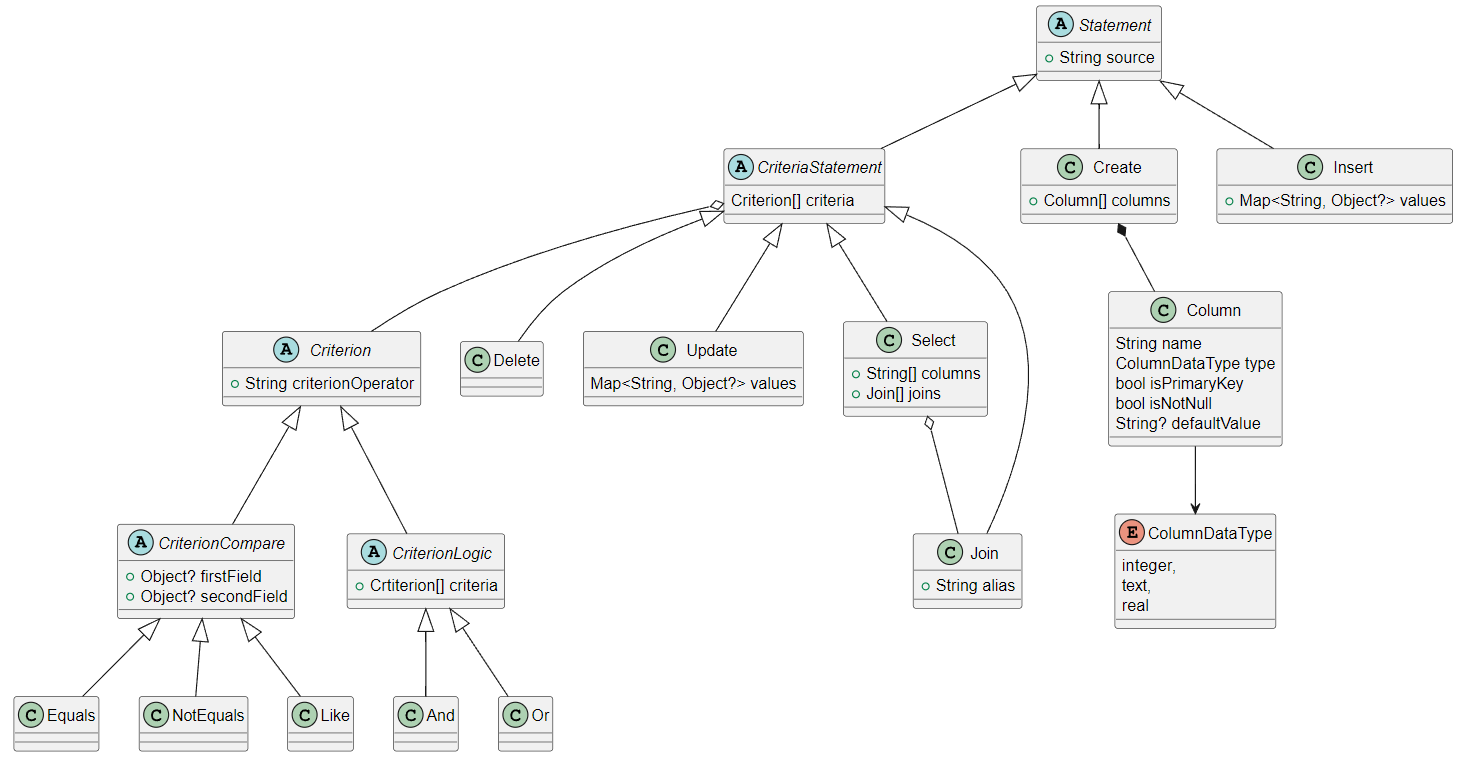
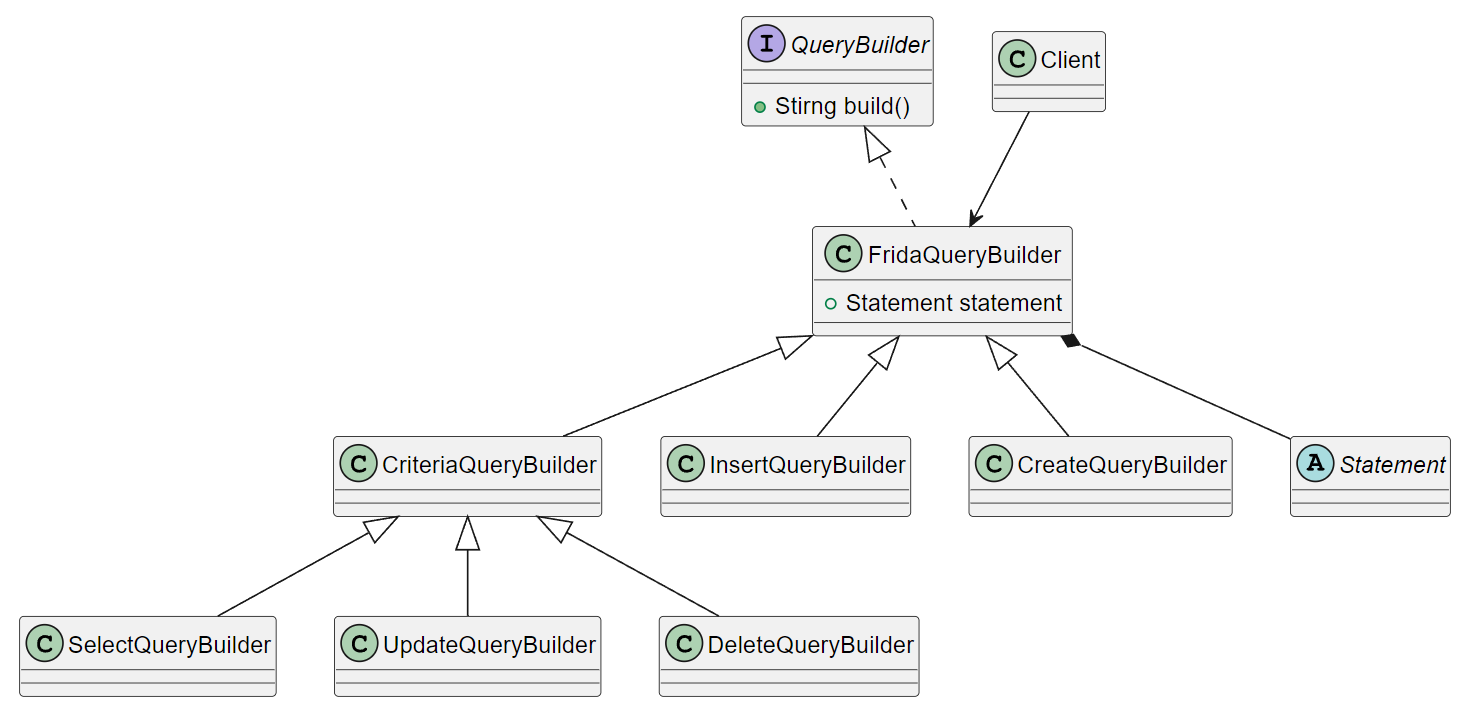
📄 UML Class Diagrams
Statements classes
Builders classes
Libraries
- frida_query_builder
- A fluent SQL query builder for Dart.