
Flutter UI Agent


Control your Flutter app with natural language. Let AI agents understand and interact with your UI.
What is Flutter UI Agent?
Flutter UI Agent lets users control your app using natural language instead of traditional UI interactions. Wrap your widgets with AiActionWidget and they become AI-controllable.
Example Commands:
"Change my bio to 'Flutter Developer'"
"Find red products and add them to cart"
"Navigate to settings and enable dark mode"
"Increment the counter 5 times"
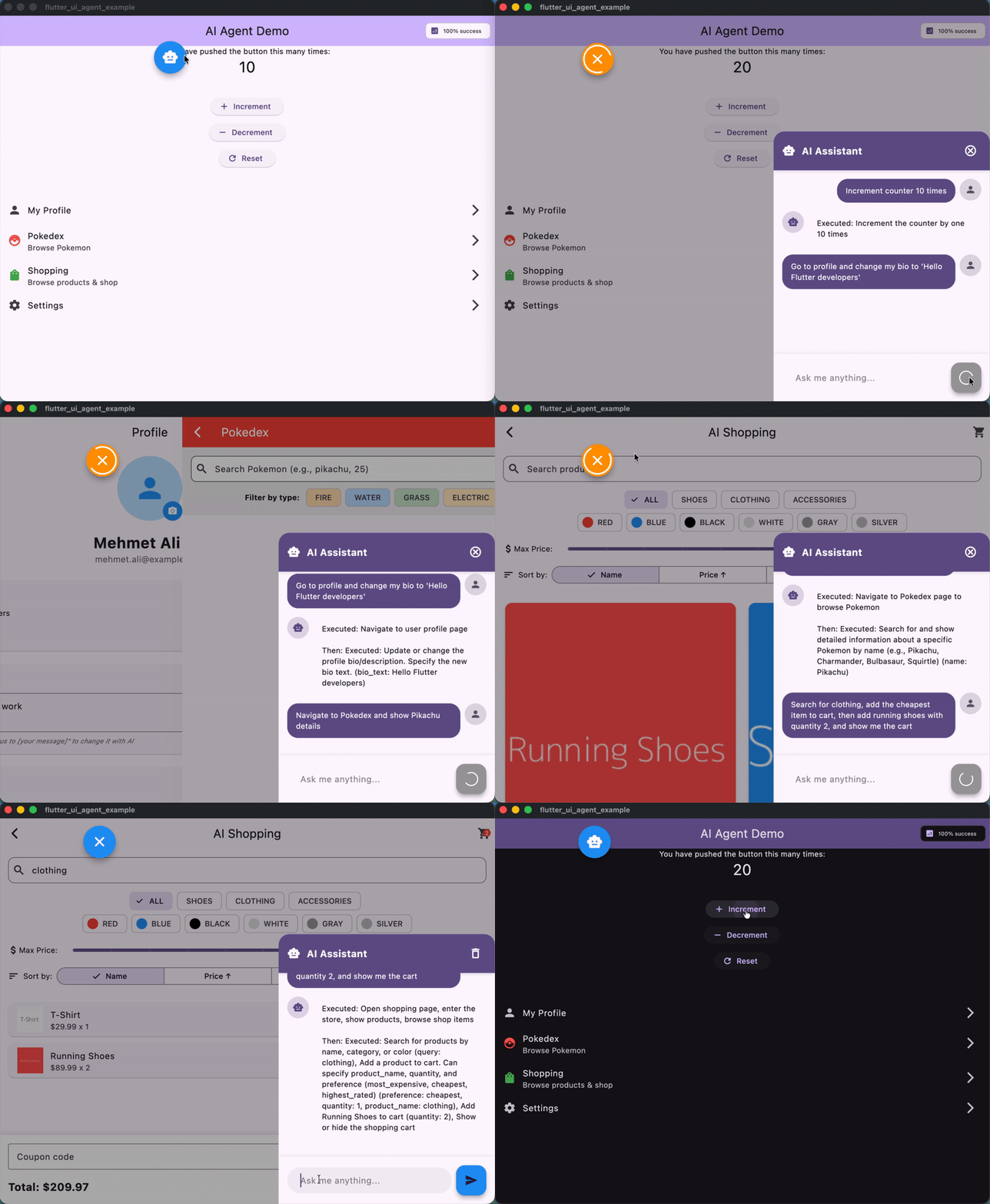
AI Agent controlling a Flutter app with natural language commands
✨ Features
- 🧠 LLM-Agnostic - Works with Gemini, HuggingFace, OpenAI, Claude, or any LLM
- 🎯 Dynamic Actions - Wrap any widget to make it AI-controllable
- 🧭 Enhanced Smart Navigation - Automatic page tracking with intelligent continuation after navigation for complex commands
- ⚡ Async Support - Handle navigation and async operations seamlessly
- 🔄 Multi-Step Commands - Execute complex action sequences
- 📊 Analytics - Track action usage and performance
- 🎨 Customizable - Flexible configuration and logging
🚀 Quick Start
1. Installation
dependencies:
  flutter_ui_agent: ^1.1.0
2. Create an LLM Provider
Implement the LlmProvider interface for your chosen LLM:
import 'package:flutter_ui_agent/flutter_ui_agent.dart';

class GeminiProvider implements LlmProvider {
  late String apiKey;
  late String modelName;

  @override
  Future<void> configure({required String apiKey, String? modelName}) async {
    this.apiKey = apiKey;
    this.modelName = modelName ?? 'gemini-2.0-flash-exp';
  }

  @override
  Future<LlmResponse> send({
    required String systemPrompt,
    required String userMessage,
    required List<Map<String, dynamic>> tools,
    required List<ConversationMessage> history,
  }) async {
    // Call your LLM API here with your chosen SDK
    // Return LlmResponse with functionCalls or text response
  }
}
LlmProvider Interface
The LlmProvider is an abstract interface that allows Flutter UI Agent to work with any LLM. It has two main methods:
-
configure({required String apiKey, String? modelName}): Optional setup method for providers that need API keys or model configuration. Called once during initialization. -
send(...): The core method that sends messages to your LLM. It receives:systemPrompt: System-level instructions for the AIuserMessage: The composed user message with context and available actionstools: List of function/tool definitions in JSON schema formathistory: Recent conversation messages for context
Returns an
LlmResponsecontaining either:text: Plain text response (for conversational replies)functionCalls: List ofLlmFunctionCallobjects representing actions to execute
See the example implementations for Gemini and HuggingFace providers.
3. Setup AgentService
void main() async {
  final agentService = AgentService();
  final llmProvider = GeminiProvider();

  await llmProvider.configure(
    apiKey: 'YOUR_API_KEY',
    modelName: 'gemini-2.0-flash-exp',
  );

  agentService.setLlmProvider(
    llmProvider,
    config: const AgentConfig(
      logLevel: AgentLogLevel.info,
      enableAnalytics: true,
      debugMode: true,
    ),
  );

  runApp(
    AgentHost(
      agentService: agentService,
      child: MyApp(),
    ),
  );
}
4. Make Widgets AI-Controllable
AiActionWidget(
  actionId: 'increment_counter',
  description: 'Increment the counter by 1',
  onExecute: () {
    setState(() => counter++);
  },
  child: ElevatedButton(
    onPressed: () => setState(() => counter++),
    child: Text('Increment'),
  ),
)
5. Add Navigation Tracking
MaterialApp(
  navigatorObservers: [
    AgentNavigatorObserver(agentService),
  ],
  // ...
)
6. Process User Commands
await agentService.processUserMessage('Increment the counter 5 times');
🎯 Example Prompts
Try these natural language commands in your app:
Simple Actions:
- "Increment counter 5 times"
- "Set counter to 100"
- "Reset counter"
Navigation + Actions:
- "Go to settings and enable dark mode"
- "Navigate to profile and change my bio to 'Flutter Developer'"
- "Open shopping page and search for shoes"
Multi-Step:
- "Set counter to 50, increment 10 times, then go to profile"
- "Go to settings, enable dark mode, then go to shopping"
Natural Language:
- "Can you increase the counter by 7?"
- "I want to see my profile"
- "Turn off notifications and update my status"
See the example app for a complete demo with shopping, profile, and settings pages.
⚠️ Important: Safety & Limitations
This package is experimental and should be used with caution in production environments.
Safety Guidelines
🚫 DO NOT use for sensitive operations without user confirmation:
- Payment processing (NO automatic payments)
- Financial transactions
- Data deletion
- Security-critical actions
✅ SAFE use cases:
- Generate summaries for user review
- Create draft content for approval
- Assist with form filling (with confirmation)
- Navigate and display information
- Filter and search data
Best Practice: For sensitive operations, use AI to prepare the action (e.g., calculate total, create order summary), then require explicit user confirmation before execution.
Example - Safe Payment Flow:
// ✅ GOOD: AI prepares, user confirms
AiActionWidget(
  actionId: 'prepare_checkout',
  description: 'Prepare checkout summary for user review',
  onExecuteWithParams: (params) {
    // AI calculates total, applies discounts, etc.
    showCheckoutSummary(); // User must tap "Confirm Payment" button
  },
)

// ❌ BAD: Direct payment automation
AiActionWidget(
  actionId: 'process_payment',  // NEVER DO THIS
  description: 'Process payment immediately',
  onExecute: () => processPayment(), // Dangerous!
)
📖 Core Concepts
AiActionWidget
Wraps any widget to make it AI-controllable:
// Simple action
AiActionWidget(
  actionId: 'like_post',
  description: 'Like the post',
  onExecute: () => likePost(),
  child: IconButton(icon: Icon(Icons.favorite)),
)

// Action with parameters
AiActionWidget(
  actionId: 'update_bio',
  description: 'Update user bio text',
  parameters: const [
    AgentActionParameter.string(
      name: 'bio_text',
      description: 'New bio value to save',
    ),
  ],
  onExecuteWithParams: (params) {
    final bio = params['bio_text'] as String;
    updateBio(bio);
  },
  child: TextField(),
)

// Action that can run multiple times per request (count parameter exposed)
AiActionWidget(
  actionId: 'tap_increment',
  description: 'Tap increment button',
  allowRepeats: true,
  onExecute: increment,
  child: IconButton(icon: Icon(Icons.exposure_plus_1)),
)

// Async action
AiActionWidget(
  actionId: 'navigate_settings',
  description: 'Navigate to settings page',
  onExecuteAsync: () async {
    Navigator.pushNamed(context, '/settings');
    await Future.delayed(Duration(milliseconds: 100));
  },
  child: ListTile(title: Text('Settings')),
)
AgentService
Central service managing AI actions:
// Process commands
await agentService.processUserMessage('your command');

// Cancel in-progress requests
agentService.cancelCurrentRequest();

// Access statistics
final stats = agentService.statistics;
print('API Calls: ${stats['apiCalls']}');
print('Success Rate: ${stats['successRate']}%');

// Get current page
print('Current page: ${agentService.currentPage}');

// Clear conversation history
agentService.clearHistory();
Navigation Tracking
Track page changes automatically:
MaterialApp(
  navigatorObservers: [
    AgentNavigatorObserver(agentService),
  ],
  onGenerateRoute: (settings) {
    // Your routing logic
  },
)
⚙️ Configuration
AgentConfig Options
AgentConfig(
  // Logging
  logLevel: AgentLogLevel.info,  // none, error, warning, info, verbose, debug
  useEmojis: true,
  logPrefix: '[FlutterUIAgent]',

  // Behavior
  enableRetry: true,
  maxRetries: 3,
  retryBackoffStrategy: RetryBackoffStrategy.exponential,
  retryBaseDelayMs: 1000,

  // History & Analytics
  enableHistory: true,
  maxHistoryLength: 10,
  enableAnalytics: true,
  onActionExecuted: (actionId, duration) {
    print('$actionId took ${duration.inMilliseconds}ms');
  },

  // Development
  debugMode: true,
  fallbackToMock: false,
)
Log Levels
| Level | Use Case | Output |
|---|---|---|
none |
Production (silent) | No logs |
error |
Production (errors only) | Errors only |
warning |
Production (important) | Errors + warnings |
info |
Default | Errors + warnings + info |
verbose |
Development | All above + verbose details |
debug |
Debugging | Everything including debug info |
🎯 Example App
Check out the example/ folder for a complete demo featuring:
- Counter Page - Simple increment/decrement actions
- Profile Page - Bio and status updates
- Data Browser - Search and filtering
- Shopping Page - Product browsing and cart management
- Settings Page - Theme and configuration changes
- Floating Chat UI - Natural language command interface
Run the example:
cd example
cp lib/app/config/app_config.dart.example lib/app/config/app_config.dart
# Add your API key to app_config.dart
flutter run
Try these commands in the example:
"Increment counter 3 times"
"Change my bio to 'Flutter enthusiast'"
"Find red products"
"Navigate to settings and enable dark mode"
"Add running shoes to cart"
🤖 Tested AI Models
These models have been tested and work well with Flutter UI Agent:
Gemini (Google)
modelName: 'gemini-2.0-flash-exp' // Fast, reliable
HuggingFace
modelName: 'Qwen/Qwen3-235B-A22B-Instruct-2507' // High quality, open-source
Bring Your Own
Implement LlmProvider for any LLM with function calling support (OpenAI GPT-4, Claude, etc.)
🛠️ Advanced Usage
Custom System Prompts
agentService.setSystemPrompt('''
You are a helpful assistant for a shopping app.
Focus on helping users find and purchase products.
Be concise and action-oriented.
''');
Mock Mode (Testing)
Test without API keys:
// Don't call setLlmProvider()
// AgentService will use keyword-based matching
await agentService.processUserMessage('increment counter');
Error Handling
try {
  await agentService.processUserMessage('your command');
} catch (e) {
  print('Command failed: $e');
  // Handle error
}
Dynamic Action Registration
// Actions are automatically registered when AiActionWidget builds
// Access all registered actions:
final actions = agentService.actions;
print('Available actions: ${actions.keys}');
📊 Analytics & Monitoring
Track Performance
AgentConfig(
  enableAnalytics: true,
  onActionExecuted: (actionId, duration) {
    analytics.logEvent(
      name: 'ai_action',
      parameters: {
        'action_id': actionId,
        'duration_ms': duration.inMilliseconds,
      },
    );
  },
)
View Statistics
final stats = agentService.statistics;
print('Total API calls: ${stats['apiCalls']}');
print('Failed calls: ${stats['failures']}');
print('Success rate: ${stats['successRate']}%');
🔒 Security Best Practices
1. Never Commit API Keys
// ✅ Good: Use environment variables or secure storage
apiKey: Platform.environment['GEMINI_API_KEY']

// ❌ Bad: Hardcoded in source
apiKey: 'actual-api-key-here'
2. Use .gitignore
**/app_config.dart
**/*.env
3. Validate AI Actions
Always validate and sanitize parameters before executing actions:
AiActionWidget(
  actionId: 'update_profile',
  parameters: const [
    AgentActionParameter.string(
      name: 'bio',
      description: 'New profile bio text',
    ),
  ],
  onExecuteWithParams: (params) {
    final bio = params['bio'] as String;

    // ✅ Validate input
    if (bio.length > 500) {
      throw Exception('Bio too long');
    }
    if (_containsProfanity(bio)) {
      throw Exception('Invalid content');
    }

    updateBio(bio);
  },
)
4. Require Confirmation for Sensitive Actions
Never allow AI to directly execute:
- Payments or purchases
- Account deletion
- Password changes
- Data exports
- Sharing private information
Instead, use a confirmation flow:
// AI prepares the action
AiActionWidget(
  actionId: 'prepare_delete_account',
  description: 'Show account deletion confirmation dialog',
  onExecute: () {
    showDialog(
      context: context,
      builder: (context) => AlertDialog(
        title: Text('Delete Account?'),
        content: Text('This action cannot be undone.'),
        actions: [
          TextButton(
            onPressed: () => Navigator.pop(context),
            child: Text('Cancel'),
          ),
          TextButton(
            onPressed: () {
              _actuallyDeleteAccount(); // User explicitly confirmed
              Navigator.pop(context);
            },
            child: Text('Delete'),
          ),
        ],
      ),
    );
  },
)
5. Rate Limiting
Implement rate limiting to prevent abuse:
// Limit AI requests per user/session
class RateLimiter {
  final _timestamps = <DateTime>[];
  final maxRequests = 10;
  final timeWindow = Duration(minutes: 1);

  bool allowRequest() {
    final now = DateTime.now();
    _timestamps.removeWhere(
      (t) => now.difference(t) > timeWindow,
    );

    if (_timestamps.length >= maxRequests) {
      return false; // Rate limit exceeded
    }

    _timestamps.add(now);
    return true;
  }
}
6. Log and Monitor
Track all AI actions for security auditing:
AgentConfig(
  enableAnalytics: true,
  onActionExecuted: (actionId, duration) {
    securityLog.record(
      action: actionId,
      timestamp: DateTime.now(),
      userId: currentUser.id,
      duration: duration,
    );
  },
)
🤝 Contributing
Contributions are welcome! Please feel free to submit a Pull Request.
- Fork the repository
- Create your feature branch (
git checkout -b feature/amazing-feature) - Commit your changes (
git commit -m 'Add amazing feature') - Push to the branch (
git push origin feature/amazing-feature) - Open a Pull Request
📄 License
This project is licensed under the MIT License - see the LICENSE file for details.
🔗 Links
💬 Support
- Issues: GitHub Issues
- Discussions: GitHub Discussions
Made with ❤️ for the Flutter community
Libraries
- flutter_ui_agent
- Flutter UI Agent - A revolutionary package that enables AI agents to understand and interact with your app's UI using natural language commands.