




Flutter package that help integrate your app with open source chat openchat.so
Features
- Use OpenChatTeam in your app
- Use your chatboot builded in OpenChat in your app
- Use only LLMProviders to generate text in your app.
Usage
OpenChat Team
To use the chat available in OpenChatTeam you just use FlutterOpenChatWidget passing OpenChatTeamLLM in llm param :
    FlutterOpenChatWidget(
        llm: OpenChatTeamLLM(),
      ),
    )
OpenChat Cloud
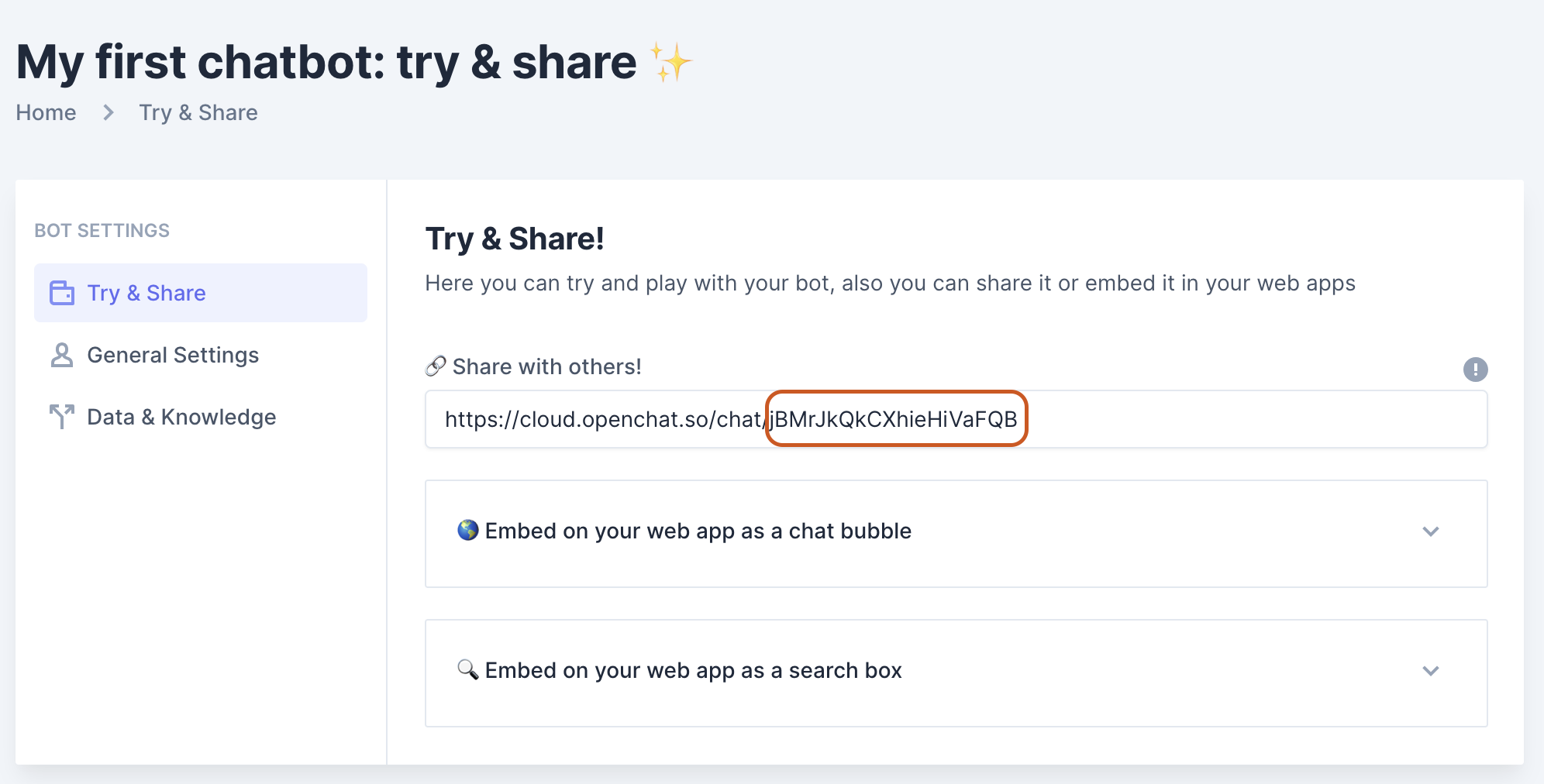
First you need create your chatboot in OpenChat Login, after that you just use FlutterOpenChatWidget passing OpenChatCloudLLM in llm param with yout chat token:
    FlutterOpenChatWidget(
        llm: OpenChatCloudLLM(token:'1RuzS7w5ceGaN6CiK0J7'),
      ),
    )
This token is available in this section:
Customization
This chat is entirely customizable take a look some params to do it:
    FlutterOpenChatWidget(
        llm: OpenChatTeamLLM(),
        assetBotAvatar: 'botAvatar.png', // You can pass the image asset to bot. It accept url image too.
        assetUserAvatar: 'userAvatar.png', // You can pass the image asset to user. It accept url image too.
        background: MyWidget(), // Here you can customize the chat background
        backgroundEmpty: MyWidget(), // Here you can customize the chat background when there is not messages.
        markdownConfig: MarkdownConfig(), // Here you can settings the markdown style od the bot saying.
      ),
    )
If you need recreate the input widget with your way just pass the inputBuilder:
    FlutterOpenChatWidget(
        llm: OpenChatTeamLLM(),
        inputBuilder: (OpenChatWidgetState state,ValueChanged<String> submit) {
          return MyInputWidget(state,submit);
        }
      ),
    )
If you need recreate the messages widget with your way just pass the msgBuilder:
    FlutterOpenChatWidget(
        llm: OpenChatTeamLLM(),
        msgBuilder: (BuildContext context, OpenChatItemMessageState state, VoidCallback tryAgain) {
          return MyMsgWidget(state,tryAgain);
        }
      ),
    )
Initial prompt
Yeah, It have support to it. Just init your widget passing the param initialPrompt:
    FlutterOpenChatWidget(
        llm: OpenChatTeamLLM(),
        initialPrompt: 'You are an AI software engineer...',
      ),
    )
Using oly the llm to build anything
You can use oly the llm calls to give a response and create anything. To it jus use OpenChatTeamLLM or OpenChatCloudLLM:
    final llm = OpenChatTeamLLM()
    llm.prompt('What is gravity?',onListen:(text){
        print(text);
    }).then((value){
        print(value);
    })
    final llm = OpenChatTeamLLM()
    llm.chat([
         ChatMessage.assistant('bla bla bla'),
         ChatMessage.user('Ok, thank you!'),
    ],onListen:(text){
        print(text);
    }).then((value){
        print(value);
    })
    final llm = OpenChatCloudLLM()
    llm.prompt('Do you can support me about your product?',onListen:(text){
        print(text);
    }).then((value){
        print(value);
    })