
flutter_flutter_multi_dialogss
A Flutter package providing multiple Material Design and Cupertino (iOS) dialogs with easy-to-use APIs, including loading dialogs, alert dialogs, list dialogs, action sheets, and customizable dialogs.



Features
- 🎨 Multiple Material Design dialog types
- 🍎 Full Cupertino (iOS) dialog support
- 🔄 Adaptive dialogs - Automatically use Cupertino on iOS and Material on Android
- ⚡ Easy-to-use APIs similar to Flutter's built-in dialogs
- 🔧 Highly customizable
- 📱 Null-safety support
- 🎯 Modern Flutter widgets (ElevatedButton, TextButton, CupertinoButton)
- 🚀 Compatible with Flutter 3.x
- 🎭 Material 3 adaptive styling support
Screenshots
🔄 Adaptive Dialogs
Automatically adapt to the platform (iOS → Cupertino, Android → Material)
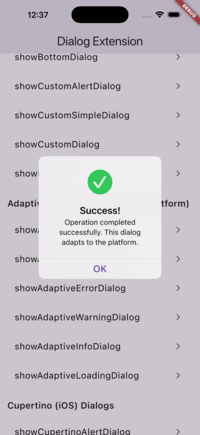
Adaptive Success |
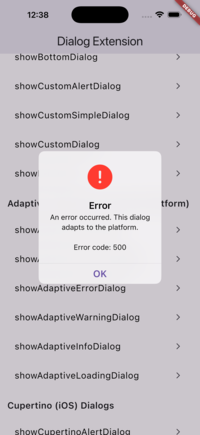
Adaptive Error |
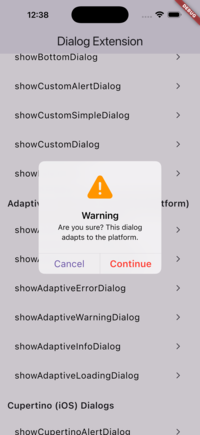
Adaptive Warning |
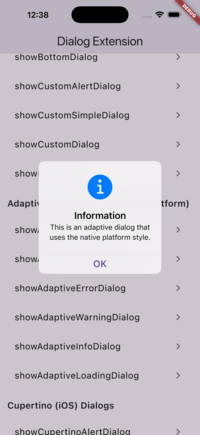
Adaptive Info |
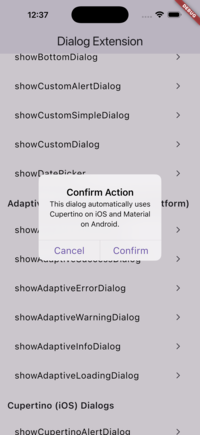
Adaptive Alert |
⚡ Preset Dialogs
Pre-configured dialogs for common use cases (Success, Error, Warning, Info)
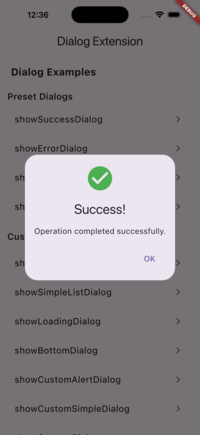
Success Dialog |
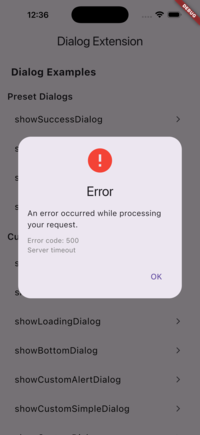
Error Dialog |
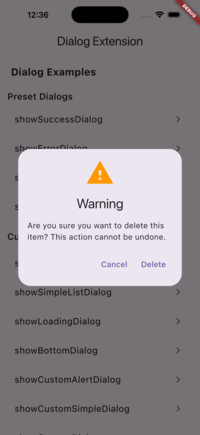
Warning Dialog |
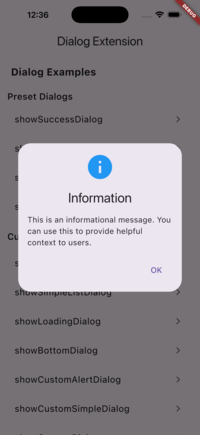
Info Dialog |
Getting Started
Add this to your package's pubspec.yaml file:
dependencies:
  flutter_multi_dialogs: ^0.2.0
Then import it in your Dart code:
import 'package:flutter_multi_dialogs/flutter_multi_dialogs.dart';
Usage Examples
Adaptive Dialogs (Recommended - Auto-detect Platform)
The adaptive dialogs automatically use Cupertino on iOS and Material on Android, giving you native look and feel on each platform with a single API.
Adaptive Success Dialog
showAdaptiveSuccessDialog(
  context: context,
  title: 'Success!',
  message: 'Operation completed successfully.',
  onConfirm: () => Navigator.pop(context),
);
Adaptive Error Dialog
showAdaptiveErrorDialog(
  context: context,
  title: 'Error',
  message: 'An error occurred.',
  onConfirm: () => Navigator.pop(context),
);
Adaptive Alert Dialog
showAdaptiveAlertDialog(
  context: context,
  title: 'Confirm',
  content: 'Are you sure?',
  actions: [
    TextButton(
      onPressed: () => Navigator.pop(context),
      child: const Text('OK'),
    ),
  ],
);
Preset Dialogs (Material Design)
Success Dialog
showSuccessDialog(
  context: context,
  title: 'Success!',
  message: 'Operation completed successfully.',
  onConfirm: () => Navigator.pop(context),
);
Error Dialog
showErrorDialog(
  context: context,
  title: 'Error',
  message: 'An error occurred while processing your request.',
  error: 'Error code: 500', // Optional error details
  onConfirm: () => Navigator.pop(context),
);
Warning Dialog
showWarningDialog(
  context: context,
  title: 'Warning',
  message: 'Are you sure you want to continue?',
  confirmText: 'Continue',
  cancelText: 'Cancel',
  onConfirm: () {
    Navigator.pop(context);
    // Proceed with action
  },
  onCancel: () => Navigator.pop(context),
);
Info Dialog
showInfoDialog(
  context: context,
  title: 'Information',
  message: 'This is an informational message.',
  onConfirm: () => Navigator.pop(context),
);
Custom Dialogs
1. Loading Dialog
Display a loading dialog with customizable orientation and message:
ElevatedButton(
  style: ElevatedButton.styleFrom(
    elevation: 10,
  ),
  child: const Text("Show Loading Dialog"),
  onPressed: () {
    showLoadingDialog(
      context: context,
      direction: Direction(
        message: "Loading...",
        messageStyle: const TextStyle(fontSize: 16),
        orientations: Orientations.Horizontal,
        width: 120,
        height: 120,
      ),
    );
  },
),
2. Alert Dialog
Extended AlertDialog with more customization options:
ElevatedButton(
  style: ElevatedButton.styleFrom(
    elevation: 10,
  ),
  child: const Text("Show Alert Dialog"),
  onPressed: () {
    showAlertDialog(
      context: context,
      title: const Text("Title"),
      content: const Text("This is the content"),
      semanticLabel: "AlertDialog Extension",
      actions: <Widget>[
        TextButton(
          child: const Text("Confirm"),
          onPressed: () {
            Navigator.of(context).pop();
          },
        ),
        TextButton(
          child: const Text("Cancel"),
          onPressed: () {
            Navigator.of(context).pop();
          },
        ),
      ],
    );
  },
),
3. Bottom Dialog
Display a dialog from the bottom of the screen (see example folder for implementation):
ElevatedButton(
  style: ElevatedButton.styleFrom(
    elevation: 10,
  ),
  child: const Text("Show Bottom Dialog"),
  onPressed: () {
    showBottomDialog(
      context: context,
      title: const Text("Title"),
      content: Container(child: const Text("Content")),
      isScrollControlled: true,
      backgroundColor: Colors.deepOrange,
      actions: <Widget>[
        TextButton(
          child: const Text("Confirm"),
          onPressed: () {
            Navigator.pop(context);
          },
        ),
        TextButton(
          child: const Text("Cancel"),
          onPressed: () {
            Navigator.pop(context);
          },
        ),
      ],
    );
  },
),
4. Custom Alert Dialog
Create a custom alert dialog with a builder pattern:
ElevatedButton(
  style: ElevatedButton.styleFrom(
    elevation: 10,
  ),
  child: const Text("Show Custom Alert Dialog"),
  onPressed: () {
    showCustomAlertDialog(
      context: context,
      dialogBuilder: DialogBuilder(
        simpleBuilder: SimpleBuilder(
          title: const Text("Title"),
          content: SingleChildScrollView(
            child: ListBody(
              children: <Widget>[
                for (var item in items)
                  InkWell(
                    child: Text(item),
                    onTap: () {
                      debugPrint('Tapped item: $item');
                    },
                  ),
              ],
            ),
          ),
        ),
      ),
      confirmWidget: const Text("Confirm"),
      cancelWidget: const Text("Cancel"),
      onConfirmCallBack: () {
        Navigator.pop(context);
      },
      onCancelCallBack: () {
        Navigator.pop(context);
      },
    );
  },
),
5. Custom Simple Dialog
Display a simple dialog with custom children:
ElevatedButton(
  style: ElevatedButton.styleFrom(
    elevation: 10,
  ),
  child: const Text("Show Custom Simple Dialog"),
  onPressed: () {
    showCustomSimpleDialog(
      context: context,
      simpleBuilder: const SimpleBuilder(),
      children: <Widget>[
        const Text("Custom SimpleDialog"),
      ],
    );
  },
),
6. Simple List Dialog
Display a list dialog with item callbacks:
ElevatedButton(
  style: ElevatedButton.styleFrom(
    elevation: 10,
  ),
  child: const Text("Show Simple List Dialog"),
  onPressed: () {
    showSimpleListDialog(
      context: context,
      simpleBuilder: const SimpleBuilder(),
      children: <Widget>[
        for (var item in items) Text(item),
      ],
      onItemCallBack: (index) {
        debugPrint('Selected item: ${items[index]}');
      },
    );
  },
),
7. Custom Dialog
Create a fully customizable dialog with gravity control:
ElevatedButton(
  style: ElevatedButton.styleFrom(
    elevation: 10,
  ),
  child: const Text("Show Custom Dialog"),
  onPressed: () {
    showCustomDialog(
      context: context,
      gravity: 0, // -1 (top) to 1 (bottom), 0 is center
      child: const Text("Custom Dialog"),
    );
  },
),
Note: The gravity parameter controls the vertical position from -1 (top) to 1 (bottom), with 0 being the center.
Cupertino (iOS) Dialogs
Cupertino Alert Dialog
Display an iOS-style alert dialog:
showCupertinoAlertDialog(
  context: context,
  title: 'Confirm Action',
  content: 'Are you sure you want to proceed?',
  actions: [
    CupertinoDialogAction(
      onPressed: () => Navigator.pop(context),
      child: const Text('Cancel'),
    ),
    CupertinoDialogAction(
      isDefaultAction: true,
      onPressed: () => Navigator.pop(context),
      child: const Text('Confirm'),
    ),
  ],
);
Cupertino Action Sheet
Display an iOS-style action sheet (slides up from bottom):
showCupertinoActionSheet(
  context: context,
  title: 'Choose an Option',
  message: 'Select one of the following options',
  actions: [
    CupertinoActionSheetAction(
      onPressed: () {
        Navigator.pop(context);
        // Handle action
      },
      child: const Text('Option 1'),
    ),
    CupertinoActionSheetAction(
      onPressed: () {
        Navigator.pop(context);
        // Handle action
      },
      child: const Text('Option 2'),
    ),
  ],
  cancelButton: CupertinoActionSheetAction(
    onPressed: () => Navigator.pop(context),
    child: const Text('Cancel'),
  ),
);
Cupertino Loading Dialog
Display an iOS-style loading dialog:
showCupertinoLoadingDialog(
  context: context,
  direction: const Direction(
    message: 'Loading...',
    orientations: Orientations.Horizontal,
  ),
);
Cupertino Preset Dialogs
Success Dialog
showCupertinoSuccessDialog(
  context: context,
  title: 'Success!',
  message: 'Operation completed successfully.',
  onConfirm: () => Navigator.pop(context),
);
Error Dialog
showCupertinoErrorDialog(
  context: context,
  title: 'Error',
  message: 'An error occurred.',
  error: 'Error code: 500', // Optional
  onConfirm: () => Navigator.pop(context),
);
Warning Dialog
showCupertinoWarningDialog(
  context: context,
  title: 'Warning',
  message: 'Are you sure you want to continue?',
  confirmText: 'Continue',
  cancelText: 'Cancel',
  onConfirm: () {
    Navigator.pop(context);
    // Proceed with action
  },
  onCancel: () => Navigator.pop(context),
);
Info Dialog
showCupertinoInfoDialog(
  context: context,
  title: 'Information',
  message: 'This is an informational message.',
  onConfirm: () => Navigator.pop(context),
);
API Reference
Preset Functions (Recommended for common use cases)
showSuccessDialog()- Display a success dialog with check iconshowErrorDialog()- Display an error dialog with error iconshowWarningDialog()- Display a warning dialog with warning iconshowInfoDialog()- Display an info dialog with info icon
Custom Functions
showLoadingDialog()- Display a loading dialogshowAlertDialog()- Display an extended alert dialogshowIconAlertDialog()- Display an alert dialog with iconshowCustomAlertDialog()- Display a custom alert dialog with buildershowCustomSimpleDialog()- Display a custom simple dialogshowSimpleListDialog()- Display a list dialog with callbacksshowCustomDialog()- Display a fully customizable dialog
Classes
LoadingDialog- Loading dialog widgetCustomDialog- Customizable dialog widgetCustomAlertDialog- Custom alert dialog widgetCustomSimpleDialog- Custom simple dialog widgetSimpleListDialog- List dialog widgetDirection- Configuration for loading dialog orientationDialogBuilder- Builder for custom alert dialogsSimpleBuilder- Builder for simple dialogs
Customization
If you want to customize the dialogs further, you can override showCustomDialog or showCustomAlertDialog to create your own implementations.
Requirements
- Flutter SDK: >=2.17.0 <4.0.0
- Dart: >=2.17.0 <4.0.0
Contributing
Contributions are welcome! If you have suggestions or find issues, please feel free to open an issue or submit a pull request.
License
Copyright 2025 EmD-228
Licensed under the Apache License, Version 2.0 (the "License"); you may not use this file except in compliance with the License. You may obtain a copy of the License at
http://www.apache.org/licenses/LICENSE-2.0
Unless required by applicable law or agreed to in writing, software distributed under the License is distributed on an "AS IS" BASIS, WITHOUT WARRANTIES OR CONDITIONS OF ANY KIND, either express or implied. See the License for the specific language governing permissions and limitations under the License.
Libraries
- flutter_multi_dialogs
- Multiple Dialog - A Flutter package providing multiple Material Design and Cupertino dialogs with easy-to-use APIs