
Flutter Magnifier Lens
A highly customizable magnifying glass widget for Flutter. It uses Fragment Shaders to provide realistic optical effects including spherical distortion, magnification, and chromatic aberration.
Features
- Realistic Optical Effects: Adjustable magnification, spherical distortion, and chromatic aberration via high-performance Impeller/OpenGL custom shaders.
- Dynamic Interaction: Effortlessly integrates with gesture detectors, allowing users to move and pinch-to-zoom the lens across the screen.
- Highly Customizable: Easily modify lens radius, borders, and drop shadows to match your app's UI.
- Image Overlays: Support for custom decorative PNG overlay layers on top of the lens disc.
- High Performance: Built for Flutter 3.41+ using synchronous pixel decoding (
decodeImageFromPixelsSync) and single-pass shader rendering.
Demo
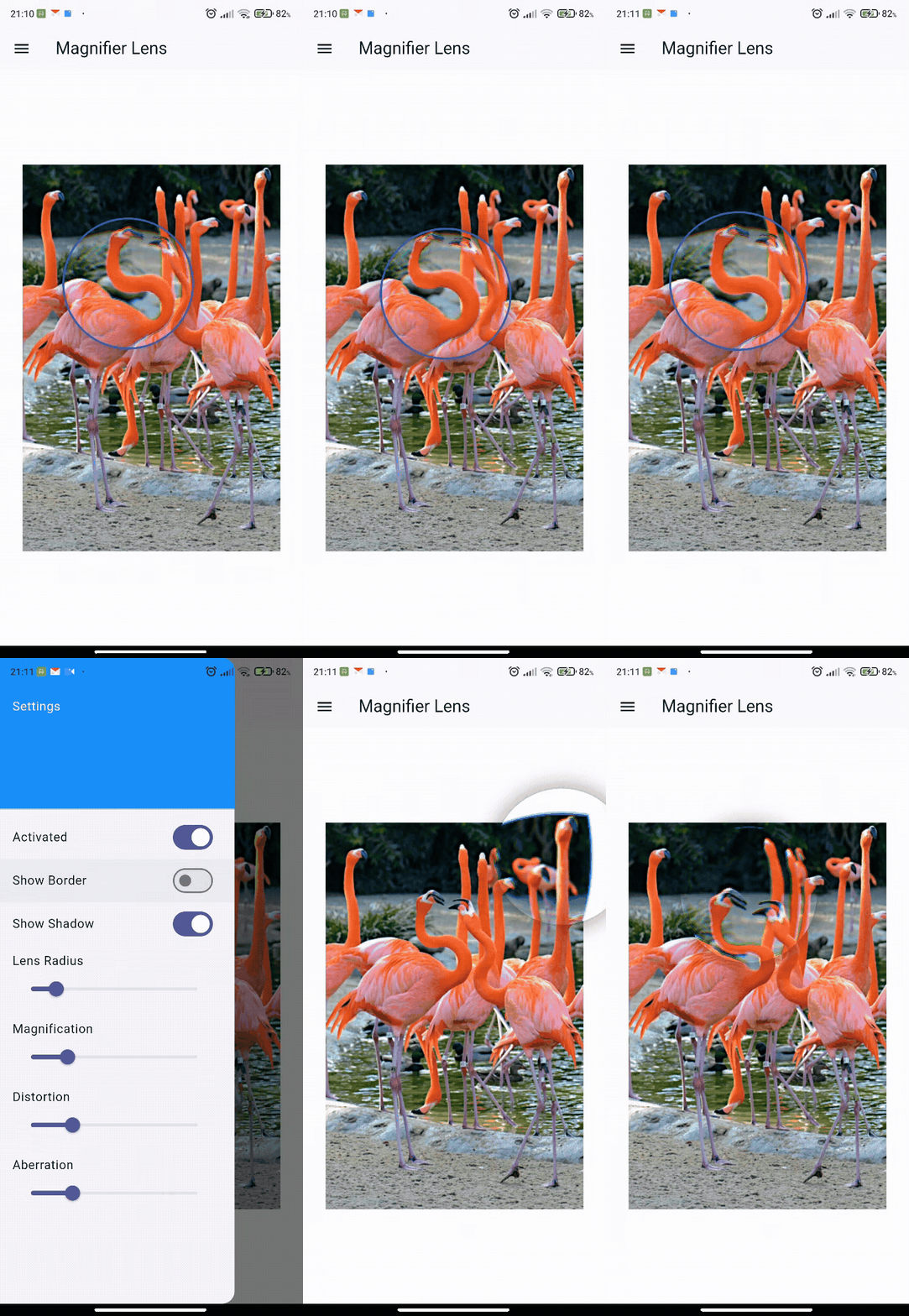
Getting started
Add the package to your pubspec.yaml:
dependencies:
  flutter_magnifier_lens: ^1.0.3
Usage
To use the MagnifierLens, you must wrap the content you wish to magnify with a RepaintBoundary and assign it a GlobalKey. Pass that same key to the contentKey property of the MagnifierLens.
Here is a simple example that implements a draggable and pinch-to-zoom magnifier:
import 'package:flutter/material.dart';
import 'package:flutter_magnifier_lens/flutter_magnifier_lens.dart';

class MagnifierExample extends StatefulWidget {
  @override
  _MagnifierExampleState createState() => _MagnifierExampleState();
}

class _MagnifierExampleState extends State<MagnifierExample> {
  final GlobalKey _contentKey = GlobalKey();

  Offset _lensPosition = const Offset(200, 200);
  double _lensRadius = 100.0;
  double _baseLensRadius = 100.0;
  double _magnification = 1.5;

  @override
  Widget build(BuildContext context) {
    return GestureDetector(
      // Allow moving the lens and scaling it via pinch-to-zoom
      onScaleStart: (details) {
        _baseLensRadius = _lensRadius;
      },
      onScaleUpdate: (details) {
        setState(() {
          _lensPosition += details.focalPointDelta;
          if (details.scale != 1.0) {
            _lensRadius = (_baseLensRadius * details.scale).clamp(50.0, 300.0);
            _magnification = 1.0 + (_lensRadius / 200.0); // Adjust zoom dynamically
          }
        });
      },
      child: MagnifierLens(
        contentKey: _contentKey,
        lensPosition: _lensPosition,
        lensRadius: _lensRadius,
        distortion: 0.5,
        magnification: _magnification,
        aberration: 0.05,
        showBorder: true,
        borderColor: Colors.blueAccent,
        borderWidth: 3.0,
        showShadow: true,
        shadowColor: Colors.black45,
        shadowBlurRadius: 15.0,
        child: RepaintBoundary(
          key: _contentKey,
          child: Container(
            color: Colors.white,
            alignment: Alignment.center,
            child: Image.network(
              'https://flutter.github.io/assets-for-api-docs/assets/widgets/flamingos.jpg',
            ),
          ),
        ),
      ),
    );
  }
}
Properties
| Property | Type | Default | Description |
|---|---|---|---|
child |
Widget |
required | The widget hierarchy containing the content to be displayed and magnified. |
contentKey |
GlobalKey |
required | A key attached to the RepaintBoundary inside the child representing the captured background. |
activated |
bool |
true |
Whether the lens effect is currently active and visible. |
lensPosition |
Offset |
Offset(200, 200) |
The screen coordinate representing the center of the magnifier. |
lensRadius |
double |
100.0 |
The radius of the magnifying lens disc. |
distortion |
double |
0.5 |
The amount of spherical distortion applied toward the edges. |
magnification |
double |
1.5 |
The base zoom factor of the lens. |
aberration |
double |
0.05 |
The strength of the RGB chromatic aberration split. |
showBorder |
bool |
true |
Whether to draw a border outline around the lens disc. |
borderColor |
Color |
Colors.white |
The color of the lens border. |
borderWidth |
double |
3.0 |
The thickness of the lens border. |
showShadow |
bool |
true |
Drops an outer shadow beneath the lens. |
shadowColor |
Color |
Colors.black45 |
Color of the lens shadow. |
shadowBlurRadius |
double |
15.0 |
Outer blur radius of the shadow to give depth. |
overlayImage |
ui.Image? |
null |
A dynamic layer to draw on top of the lens, such as gloss or reflections. |
Example
Check out the example directory for a complete example app that demonstrates all features.
Contributing
Contributions are welcome! Please feel free to submit a Pull Request.
License
This project is licensed under the MIT License - see the LICENSE file for details.