
🍞 Flutter Easy Messages
A powerful, elegant, and highly customizable Flutter package for displaying toast notifications and snackbars. Built for both simple notifications and complex enterprise scenarios like API error handling, file operations, and request tracking.






✨ Features Overview
🎯 Core Features
- 🍞 Toast Notifications - Overlay-based notifications with smooth animations and multiple styling options
- 📱 Responsive Snackbars - Automatic sizing that adapts to mobile, tablet, and desktop screens
- 🎨 Message Types - 4 pre-styled message types: Error, Success, Info, Warning
- 📍 9 Position Options - Complete positioning flexibility: top/center/bottom with left/center/right alignment
- ⚡ Smooth Animations - Customizable entry, exit, and pulse animations with preset speeds
- 🔄 Queue & Replace Modes - Control how multiple messages are handled (queue sequentially or replace)
- 📲 Full Responsiveness - Automatic layout adjustments for all screen sizes and orientations
- ♿ Accessibility - Screen reader integration with semantic labels for inclusive apps
- 🎯 Smart Config - Global defaults with per-message overrides for maximum flexibility
🚀 Advanced Features (Enterprise-Ready)
- 🔘 Action Buttons - Add interactive retry, cancel, or custom buttons to toasts
- 📋 Expandable Error Details - Display detailed error information that users can expand on demand
- ⏳ Persistent Toasts - Long-running operation toasts that don't auto-dismiss
- 👆 Dismissible Toasts - User-controlled dismissal with intuitive tap-to-close gesture
- 🆔 Request ID Tracking - Track and manage toasts by request ID for API correlation
- 📞 Lifecycle Callbacks - React to toast lifecycle events (onShown, onDismissed)
- 📝 Custom Text Styling - Full control over font size, weight, family, and alignment
- 🌐 Context-Free Toasts - Show toasts anywhere in your app without BuildContext
- 🎯 Deduplication - Built-in prevention of duplicate messages
🎬 Demo
Message Types & Colors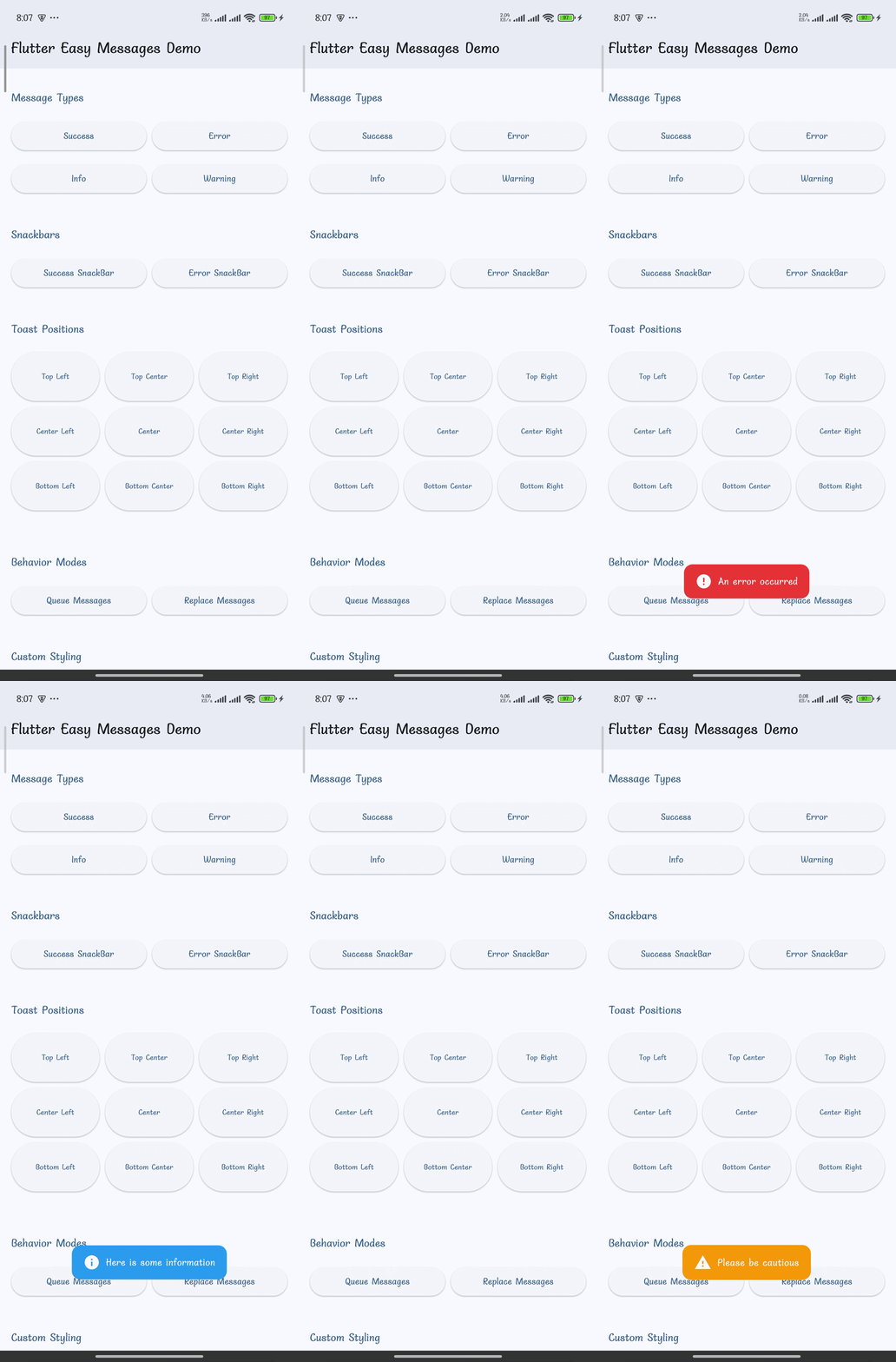
|
Snackbars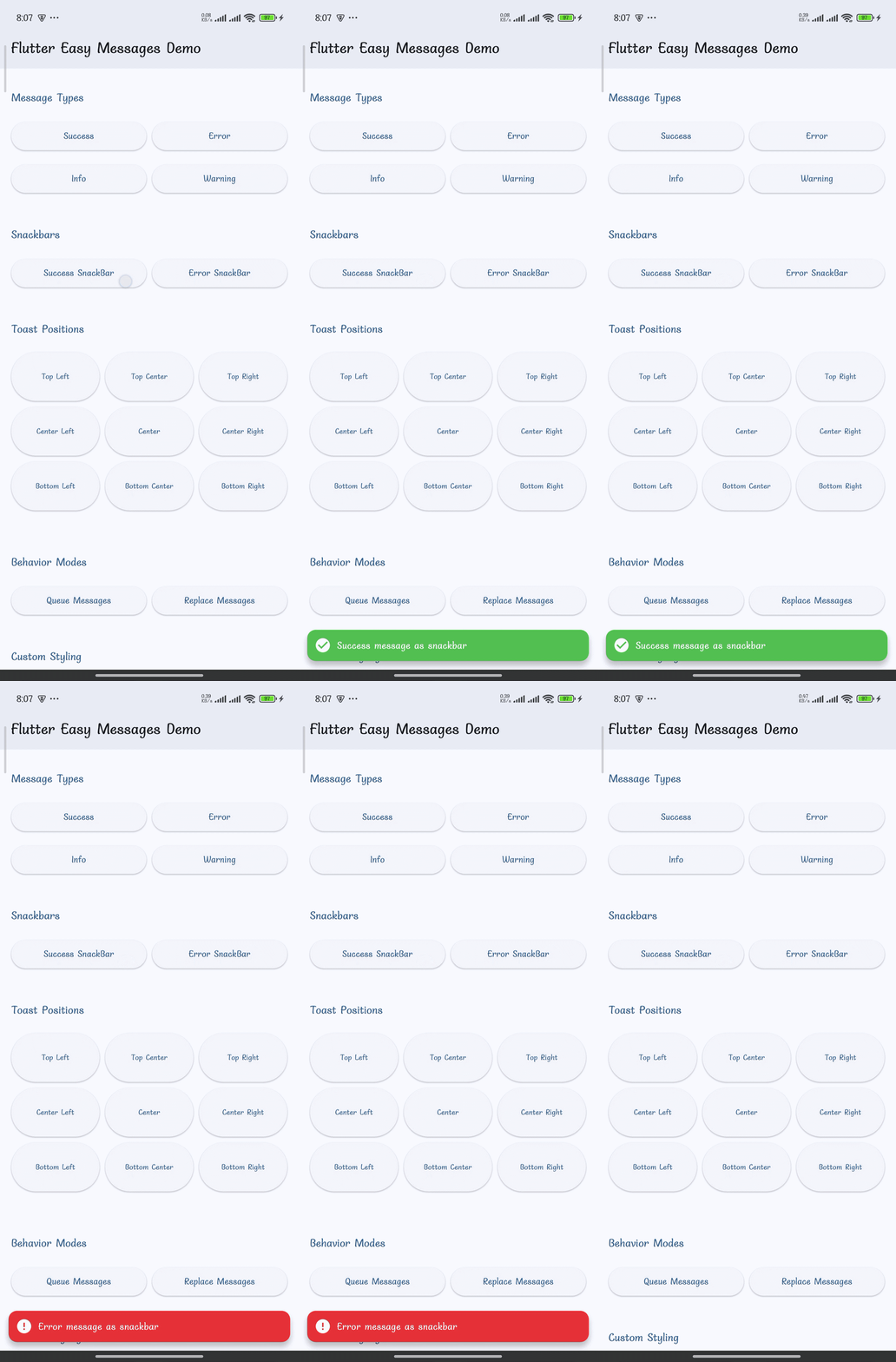
|
Toast Positions (9 Options)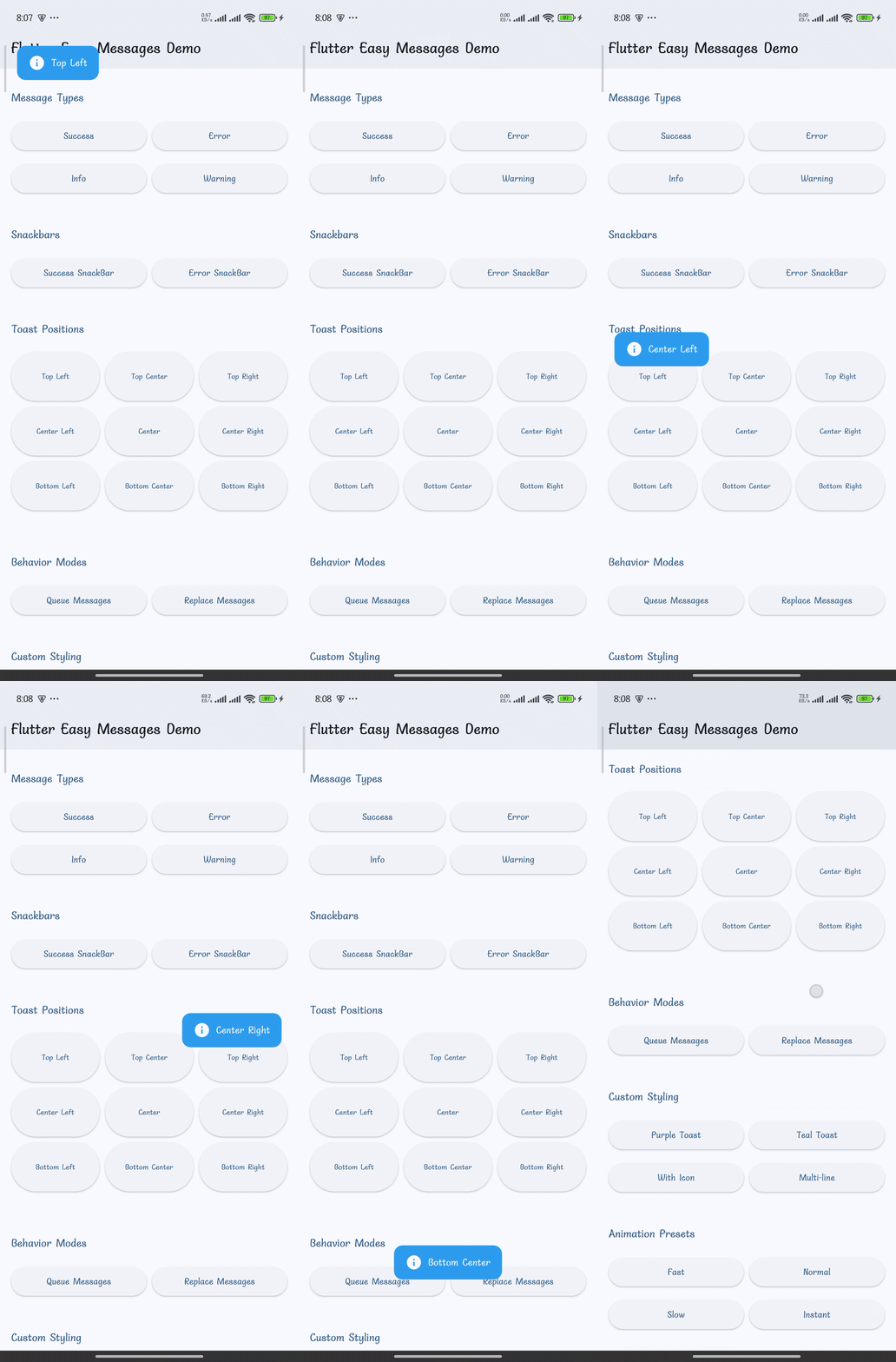
|
Custom Styling & Icons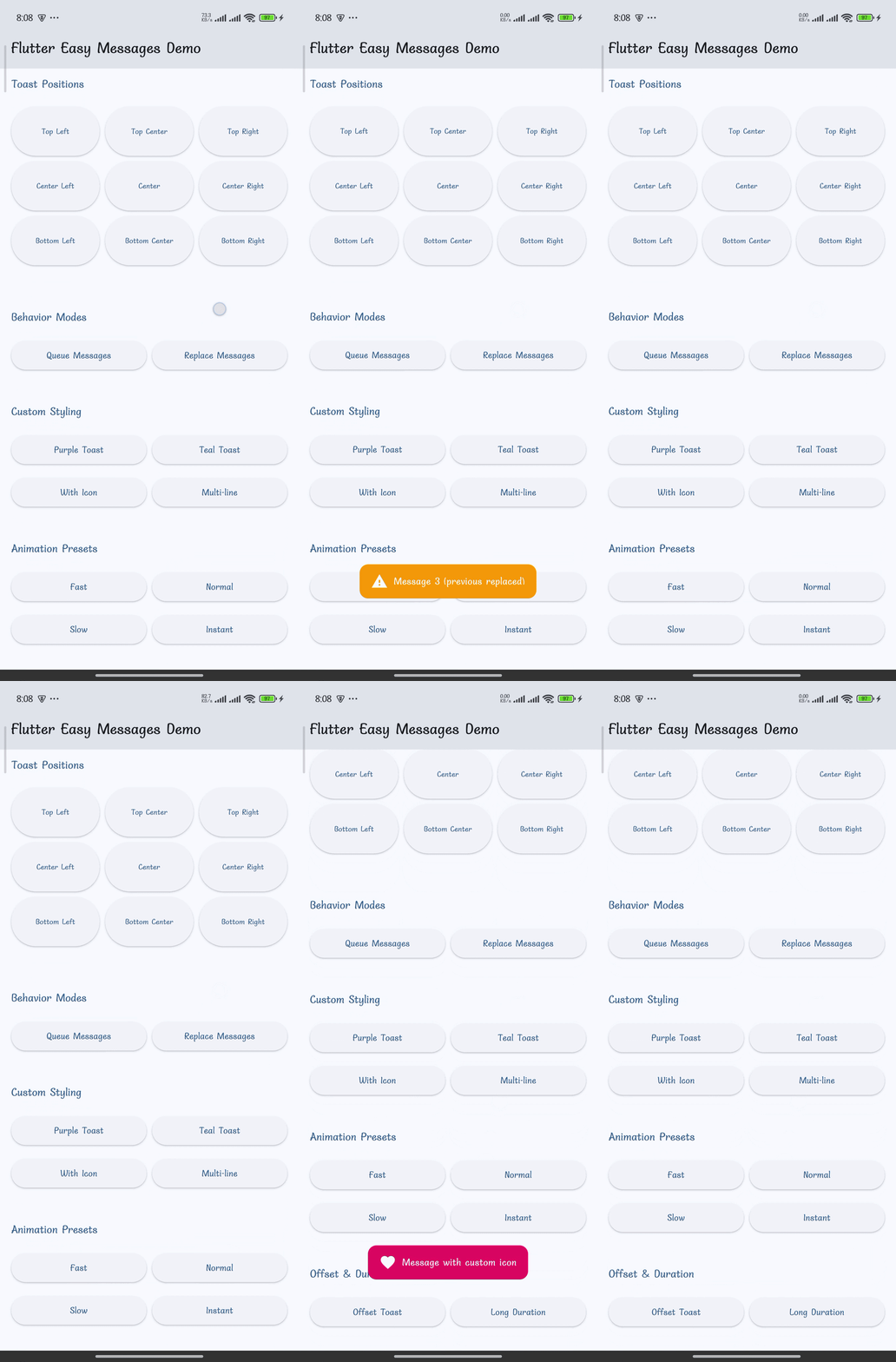
|
Animations & Durations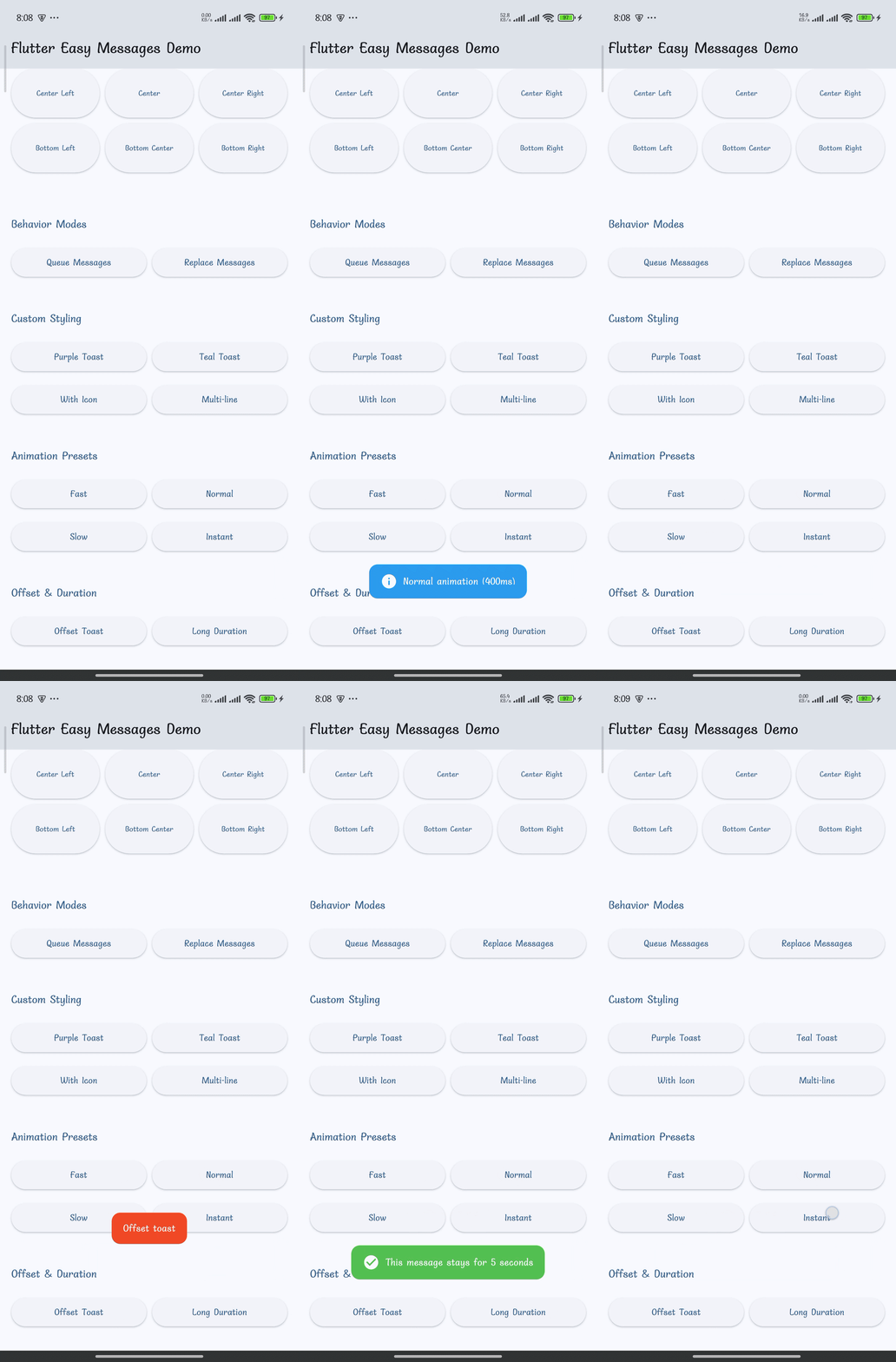
|
🚀 Quick Start (2 Steps!)
Step 1: Add to Dependencies
# pubspec.yaml
dependencies:
  flutter_easy_messages: ^0.1.0
Then run:
flutter pub get
Step 2: Use It!
import 'package:flutter_easy_messages/flutter_easy_messages.dart';

// Inside a widget with BuildContext
showAppToast(
  'Success!',
  context: context,
  messageType: MessageType.success,
);
That's it! 🎉 No complex setup or configuration needed to get started.
📖 Complete Usage Guide
🍞 Basic Toast Notifications
Using Message Types
// Success Toast - Green with checkmark
showAppToast(
  'Operation completed successfully!',
  context: context,
  messageType: MessageType.success,
);

// Error Toast - Red with error icon
showAppToast(
  'Something went wrong',
  context: context,
  messageType: MessageType.error,
);

// Info Toast - Blue with info icon
showAppToast(
  'Here is some useful information',
  context: context,
  messageType: MessageType.info,
);

// Warning Toast - Orange with warning icon
showAppToast(
  'Please be careful with this action',
  context: context,
  messageType: MessageType.warning,
);
Custom Styling
showAppToast(
  'Custom styled notification',
  context: context,
  backgroundColor: Colors.purple,
  duration: Duration(seconds: 3),
  position: MessagePosition.topCenter,
  borderRadius: 20,
  icon: Icon(Icons.favorite, color: Colors.white),
  fontSize: 16,
  fontWeight: FontWeight.bold,
  fontFamily: 'Roboto',
  maxLines: 2,
  offset: Offset(0, 10),
);
Position Your Toasts (9 Options)
// Top positions
MessagePosition.topLeft        // ↖️  Top-left corner
MessagePosition.topCenter      // ⬆️  Top center
MessagePosition.topRight       // ↗️  Top-right corner

// Center positions (vertically centered)
MessagePosition.centerLeft     // ⬅️  Center-left
MessagePosition.center         // ⭕ Center screen
MessagePosition.centerRight    // ➡️  Center-right

// Bottom positions
MessagePosition.bottomLeft     // ↙️  Bottom-left corner
MessagePosition.bottomCenter   // ⬇️  Bottom center (default)
MessagePosition.bottomRight    // ↘️  Bottom-right corner
Real example:
showAppToast(
  'Important notification',
  context: context,
  messageType: MessageType.info,
  position: MessagePosition.topRight,
  duration: Duration(seconds: 4),
);
Managing Multiple Messages
// Replace Mode (default) - Only one toast visible at a time
for (int i = 1; i <= 3; i++) {
  showAppToast(
    'Message $i',
    context: context,
    behavior: MessageBehavior.replace,
  );
}
// Result: Only 'Message 3' is shown

// Queue Mode - Messages shown sequentially
for (int i = 1; i <= 3; i++) {
  showAppToast(
    'Message $i',
    context: context,
    behavior: MessageBehavior.queue,
  );
}
// Result: All 3 messages shown in order
📋 Snackbars
// Simple snackbar notification
showAppSnackBar(
  'This is a snackbar message',
  context: context,
  messageType: MessageType.success,
);

// Snackbar with custom styling
showAppSnackBar(
  'Customized snackbar',
  context: context,
  messageType: MessageType.info,
  duration: Duration(seconds: 4),
  fontSize: 16,
  fontWeight: FontWeight.w600,
);
🌐 Context-Free Toasts (No BuildContext Needed!)
Perfect for showing toasts from services, utilities, and API calls without needing a BuildContext.
Setup (One-Time in main.dart)
import 'package:flutter_easy_messages/flutter_easy_messages.dart';

void main() {
  // Create a navigator key
  final navigatorKey = GlobalKey<NavigatorState>();

  // Set the navigator key FIRST
  EasyMessageConfig.setNavigatorKey(navigatorKey);

  // Optional: Configure global defaults
  EasyMessageConfig.configure(
    toastDuration: Duration(seconds: 2),
    borderRadius: 12,
    toastPosition: MessagePosition.bottomCenter,
    enablePulse: true,
  );

  runApp(MyApp(navigatorKey: navigatorKey));
}

class MyApp extends StatelessWidget {
  final GlobalKey<NavigatorState> navigatorKey;

  const MyApp({required this.navigatorKey, super.key});

  @override
  Widget build(BuildContext context) {
    return MaterialApp(
      navigatorKey: navigatorKey,  // ← Pass the same key
      home: HomeScreen(),
    );
  }
}
Usage (Show Toasts Anywhere!)
// No context required!
showAppToast('Welcome back!', messageType: MessageType.success);

// In services
class AuthService {
  void logout() {
    showAppToast('Logged out successfully', messageType: MessageType.info);
  }
}

// In utility functions
void handleError(String error) {
  showAppToast(error, messageType: MessageType.error);
}

// In API calls
Future<void> fetchData() async {
  try {
    final data = await api.getData();
  } catch (e) {
    showAppToast('Failed to load data', messageType: MessageType.error);
  }
}
🎯 Advanced Features (Enterprise-Grade)
🔘 Action Buttons - Add Interactivity
Add retry, cancel, or custom action buttons to your toasts.
showAppToast(
  'Failed to upload document.pdf',
  context: context,
  messageType: MessageType.error,
  duration: Duration(seconds: 10),
  actions: [
    ToastAction(
      label: 'Retry',
      color: Colors.green,
      textColor: Colors.white,
      onPressed: () {
        retryUpload();
      },
    ),
    ToastAction(
      label: 'Cancel',
      color: Colors.red,
      textColor: Colors.white,
      onPressed: () {
        cancelOperation();
      },
    ),
  ],
);
📋 Error Details - Expandable Information
Display detailed error information that users can expand when needed.
showAppToast(
  '❌ API Request Failed',
  context: context,
  messageType: MessageType.error,
  duration: Duration(seconds: 8),
  errorDetails:
      'Status Code: 500\n'
      'Endpoint: /api/v1/upload\n'
      'Error: Internal Server Error\n'
      'Request ID: REQ-123456789',
);
User sees: ❌ API Request Failed [Show details]
Tapping reveals full error information.
⏳ Persistent Toasts - For Long Operations
Perfect for upload, download, or processing notifications that shouldn't auto-dismiss.
showAppToast(
  '⏳ Processing PDF file...',
  context: context,
  messageType: MessageType.info,
  isPersistent: true,        // Won't auto-dismiss
  dismissible: true,          // User can tap to close
  duration: Duration(seconds: 999),
  requestId: 'processing_pdf_001',
  onShown: () {
    // Called when toast appears
    startProcessing();
  },
  onDismissed: () {
    // Called when dismissed
    cleanup();
  },
);

// Later: Programmatically clear the toast
ToastManager.clearByRequestId('processing_pdf_001');
👆 Dismissible Toasts
Enable users to close notifications with a tap.
showAppToast(
  '👆 Tap anywhere on this toast to close it',
  context: context,
  messageType: MessageType.warning,
  dismissible: true,
  duration: Duration(seconds: 5),
);
🆔 Request ID Tracking
Track and manage toasts by request ID—ideal for API request correlation and preventing duplicates.
// Show toast for a specific request
showAppToast(
  'Processing order...',
  context: context,
  messageType: MessageType.info,
  isPersistent: true,
  requestId: 'order_checkout_001',
);

// Check how many toasts exist for this request
int count = ToastManager.getToastCountByRequestId('order_checkout_001');

// Clear all toasts for this request
await ToastManager.clearByRequestId('order_checkout_001');

// Clear everything
await ToastManager.clearAll();
📞 Lifecycle Callbacks
React to toast events—perfect for analytics, logging, and state management.
showAppToast(
  'Processing...',
  context: context,
  messageType: MessageType.info,
  isPersistent: true,
  onShown: () {
    // Called when toast appears on screen
    analytics.logEvent('notification_shown', {'message': 'Processing'});
    startTimer();
  },
  onDismissed: () {
    // Called when toast is dismissed
    analytics.logEvent('notification_dismissed', {'message': 'Processing'});
    stopTimer();
    refreshUI();
  },
);
⚙️ Global Configuration
Configure default behavior once in your main() function:
void main() {
  EasyMessageConfig.configure(
    toastDuration: Duration(seconds: 2),
    snackBarDuration: Duration(seconds: 3),
    toastEntryAnimationDuration: Duration(milliseconds: 400),
    toastExitAnimationDuration: Duration(milliseconds: 300),
    borderRadius: 12,
    toastPosition: MessagePosition.bottomCenter,
    toastBehavior: MessageBehavior.replace,
    enablePulse: true,
  );

  runApp(MyApp());
}
Animation Presets
Use built-in animation presets for consistent animations:
// Fast animations (200ms)
EasyMessageConfig.configure(
  toastEntryAnimationDuration: AnimationPresets.fast.entry,
  toastExitAnimationDuration: AnimationPresets.fast.exit,
);

// Normal animations (400ms) - default
EasyMessageConfig.configure(
  toastEntryAnimationDuration: AnimationPresets.normal.entry,
  toastExitAnimationDuration: AnimationPresets.normal.exit,
);

// Slow animations (600ms)
EasyMessageConfig.configure(
  toastEntryAnimationDuration: AnimationPresets.slow.entry,
  toastExitAnimationDuration: AnimationPresets.slow.exit,
);
💡 Real-World Examples
API Error Handling with Retry
Future<void> uploadFile(File file) async {
  try {
    showAppToast(
      '⏳ Uploading ${file.name}...',
      context: context,
      messageType: MessageType.info,
      isPersistent: true,
      requestId: 'upload_${file.hashCode}',
    );

    await api.uploadFile(file);
    await ToastManager.clearByRequestId('upload_${file.hashCode}');

    showAppToast(
      '✅ Upload complete!',
      context: context,
      messageType: MessageType.success,
    );
  } catch (e) {
    showAppToast(
      '❌ Upload failed',
      context: context,
      messageType: MessageType.error,
      duration: Duration(seconds: 10),
      actions: [
        ToastAction(
          label: 'Retry',
          color: Colors.green,
          onPressed: () => uploadFile(file),
        ),
      ],
    );
  }
}
Form Validation
void validateForm(Map<String, String> data) {
  if (data['email']?.isEmpty ?? true) {
    showAppToast(
      'Email is required',
      context: context,
      messageType: MessageType.error,
    );
    return;
  }
  submitForm(data);
}
🧠 Best Practices
✅ Do's
- ✓ Keep messages short (1-2 lines)
- ✓ Use appropriate message types
- ✓ Test on multiple screen sizes
- ✓ Use context-free toasts in services
- ✓ Use request IDs for long operations
❌ Don'ts
- ✗ Spam users with multiple toasts
- ✗ Keep toasts visible too long
- ✗ Use complex layouts
- ✗ Reconfigure globally too frequently
🆘 Troubleshooting
| Issue | Solution |
|---|---|
| Toasts not showing | Set navigator key via EasyMessageConfig.setNavigatorKey() |
| Choppy animations | Try AnimationPresets.fast or run in release mode |
| Message stacking | Use MessageBehavior.replace (default) |
📊 Quality & Testing
- ✅ 30/30 tests passing (100%)
- ✅ 0 code analysis issues
- ✅ Full null safety
- ✅ 90%+ documentation coverage
- ✅ Flutter 1.17.0+
- ✅ Dart 3.11.1+
📱 Responsive Design
Automatic layout adjustment for all screen sizes:
📱 Mobile      📱 Tablet       🖥️ Desktop
(<600px)       (600-1024px)    (>1024px)
All toasts adapt to screen width, height, and safe areas.
📁 Project Structure
flutter_easy_messages/
├── lib/
│   ├── flutter_easy_messages.dart
│   └── src/
│       ├── toast_helper.dart
│       ├── toast_manager.dart
│       ├── message_config.dart
│       ├── message_type.dart
│       ├── message_position.dart
│       ├── message_behavior.dart
│       └── ... (other modules)
├── test/
│   └── flutter_easy_messages_test.dart
├── example/
│   └── ... (demo app)
└── pubspec.yaml
🤝 Contributing
Contributions are welcome! Please:
- Report issues on GitHub
- Submit pull requests with improvements
- Help improve documentation
📄 License
MIT License - see LICENSE file for details
📚 Resources
- Example App - Complete demo with 25+ examples
- GitHub - Source code
- Pub.dev - Package registry
Made with ❤️ for the Flutter community
⭐ Star on GitHub if you find this helpful!
Libraries
- flutter_easy_messages
- A Flutter package for easy toast and snackbar messages.