
Flutter Document Capture
A Flutter FFI plugin for real-time document capture preprocessing. Uses OpenCV for image processing on mobile devices (Edge AI) to optimize input quality for downstream OCR and layout detection.
Features
- Document Detection - OpenCV-based corner detection using Canny + findContours
- Quality Assessment - Blur, brightness, and stability scoring
- Perspective Correction - Transform skewed documents to rectangular
- Image Enhancement - Multiple enhancement modes for OCR optimization
- Auto-capture Trigger - Automatic capture when quality thresholds are met
Screenshot
A/B Test Comparison

Preprocessing Results
| Processed OFF | Processed ON |
|---|---|
 |
 |
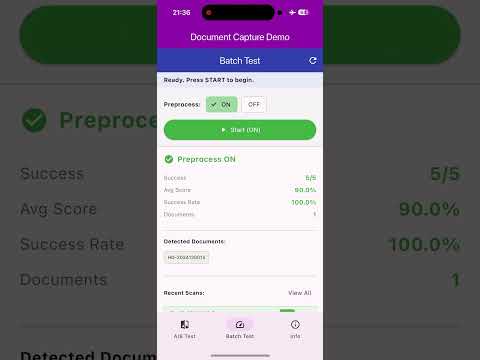
Demo Video
Batch test comparing preprocessing ON vs OFF:
Processing Flow
1. Camera Preview
       |
       v
2. Real-time Frame Analysis (analyzeFrame)
   - Document corner detection
   - Quality assessment (blur, brightness, stability)
       |
       v
3. Auto-capture when quality thresholds met (captureReady = true)
       |
       v
4. Perspective Correction + Image Enhancement (enhanceImageWithGuideFrame)
       |
       v
5. Layout Detection + OCR (flutter_ocr_kit)
       |
       v
6. Display Recognition Results
Example App Setup
The example app requires a layout detection model for OCR:
- Download pp_doclayout_l.onnx (123 MB)
- Place it in
example/assets/ - Run the example app
Why Use This Package?
| Benefit | Description |
|---|---|
| Higher Accuracy | Preprocessing improves OCR recognition rate |
| Better Stability | Multi-frame buffering selects the best result |
| Faster Valid Results | Reduces time to obtain valid recognition |
Note: Single-frame processing time is not faster (due to preprocessing + multi-frame buffer), but overall time to get valid results is reduced.
Installation
Add to your pubspec.yaml:
dependencies:
  flutter_document_capture:
    git:
      url: https://github.com/robert008/flutter_document_capture.git
Usage
Basic Setup
import 'package:flutter_document_capture/flutter_document_capture.dart';

// Initialize engine
final engine = DocumentCaptureEngine();

// Analyze frame quality
final analysis = engine.analyzeFrame(
  imageBytes,
  width,
  height,
  format: 2, // RGB
);

// Check if ready for capture
if (analysis.captureReady) {
  // Capture and enhance
  final result = engine.enhanceImageWithGuideFrame(
    imageBytes,
    width,
    height,
    guideLeft,
    guideTop,
    guideRight,
    guideBottom,
    enhanceMode: EnhanceMode.contrastStretch,
  );
}

// Cleanup
engine.dispose();
Enhancement Modes
enum EnhanceMode {
  none,              // No enhancement
  whitenBg,          // Background whitening
  contrastStretch,   // Contrast stretching (recommended)
  adaptiveBinarize,  // Adaptive binarization
  sauvola,           // Sauvola binarization
}
Frame Analysis Result
class FrameAnalysisResult {
  bool documentFound;      // Document corners detected
  bool tableFound;         // Table region detected
  bool textRegionFound;    // Text regions detected
  double blurScore;        // 0.0 - 1.0 (higher = sharper)
  double brightnessScore;  // 0.0 - 1.0
  double stabilityScore;   // 0.0 - 1.0
  double cornerConfidence; // 0.0 - 1.0
  bool captureReady;       // All thresholds met
  List<double> corners;    // 8 values: [x0,y0,x1,y1,x2,y2,x3,y3]
}
Requirements
- Flutter 3.0+
- iOS 12.0+ / Android API 21+
- OpenCV (bundled)
Related Projects
- flutter_ocr_kit - OCR + Layout Detection
Author
Robert Chuang
- Email: figo007007@gmail.com
- LinkedIn: https://www.linkedin.com/in/robert-chuang-88090932b
License
MIT License - see LICENSE for details.