
flutter_compile


A CLI + IDE extensions for Flutter contributors and power users. Manage multiple Flutter SDK versions, automate contributor environment setup, and wrap the engine build/run/test cycle into simple commands.
IDE Extensions
VS Code Extension
Install from the VS Code Marketplace or search Flutter Compile in the Extensions panel.
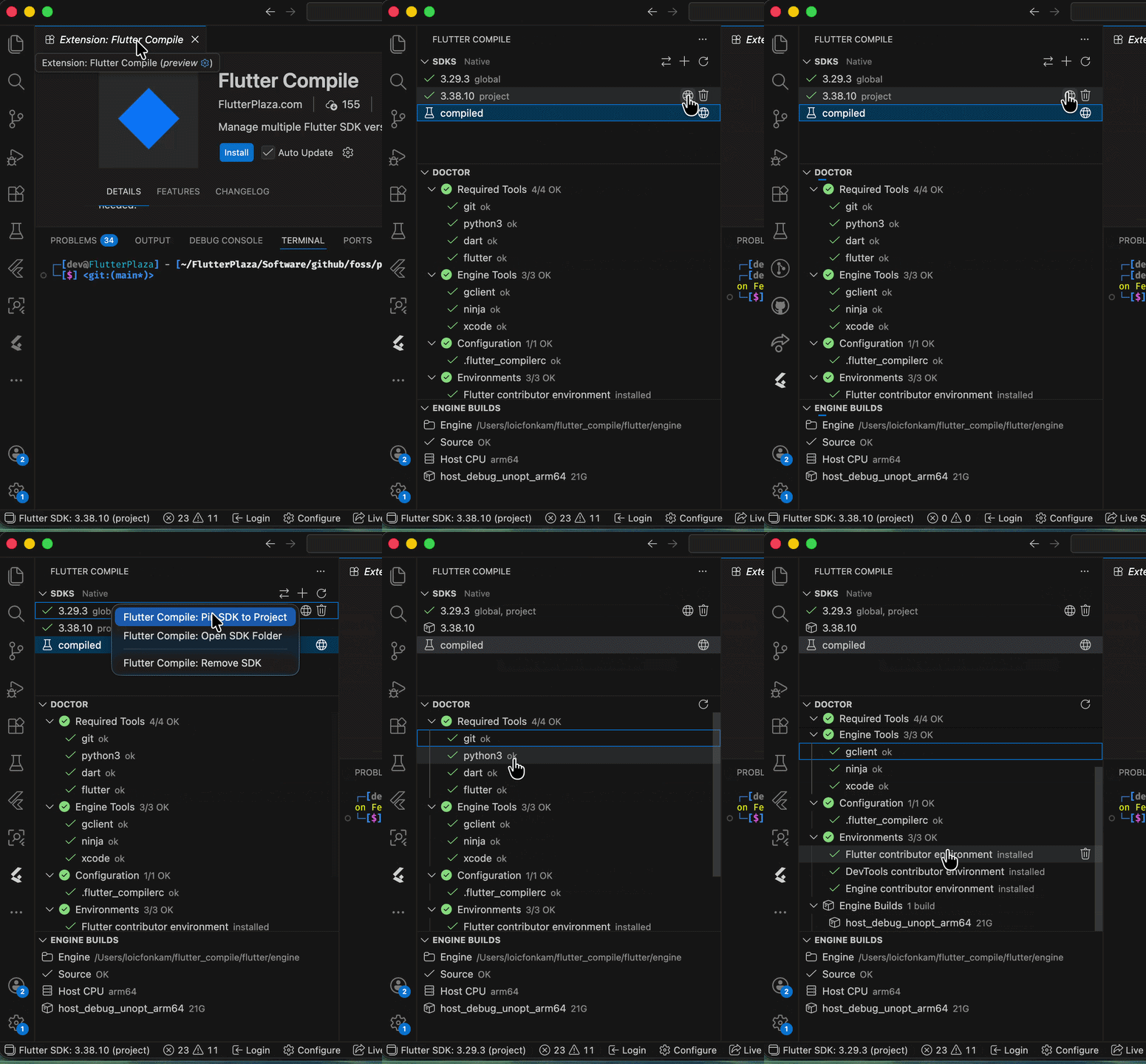
- Browse, install, switch, pin, and remove Flutter SDKs from the sidebar
- Toggle between Native and FVM SDK backends with one click
- Doctor diagnostics with install/fix actions for failing checks
- Engine Builds view for contributors compiling the Flutter engine
- Status bar with active SDK version — click to switch
- Auto-updates
dart.flutterSdkPathon SDK switch
See the full VS Code Extension README for details.
IntelliJ / Android Studio Plugin
Install from the JetBrains Marketplace or search Flutter Compile in Settings > Plugins.
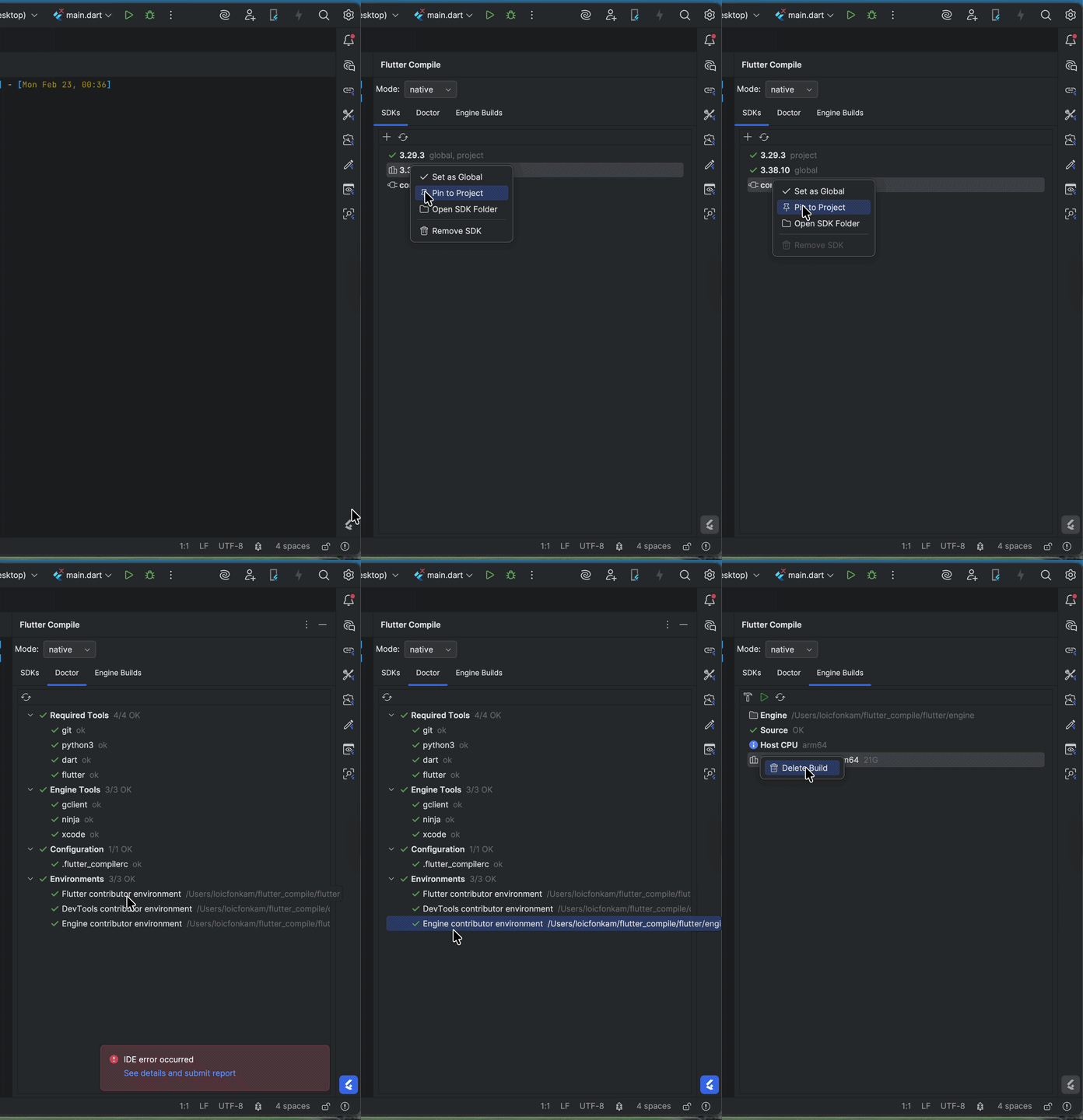
- Tool window with SDKs, Doctor, and Engine Builds tabs
- Mode dropdown to switch between Native and FVM backends
- Toolbar combo box for instant SDK switching
- Right-click context menu: Set Global, Pin to Project, Open Folder, Remove
- File watcher for
.flutter-versionchanges - Auto-updates Flutter SDK path in project settings
See the full IntelliJ Plugin README for details.
Getting Started (CLI)
dart pub global activate flutter_compile
Both flutter_compile and the shorter fcp alias are available:
fcp sdk list          # same as flutter_compile sdk list
fcp doctor            # same as flutter_compile doctor
Requirements: macOS, Linux, or Windows; git, python3. On Windows, Visual Studio with C++ workload is required for engine builds.
Quick Reference
| Command | Alias | Description |
|---|---|---|
sdk install <ver> |
Install a Flutter SDK by version or channel | |
sdk list |
sdk ls |
List installed SDKs with global/project markers |
sdk global [ver] |
Set or show the global default SDK | |
sdk use [ver] |
Pin or show per-project SDK (.flutter-version) |
|
sdk exec <cmd> |
Run a command through the resolved SDK | |
sdk remove <ver> |
Delete an installed SDK | |
install flutter |
i flutter |
Set up Flutter contributor environment |
install engine |
i engine |
Set up engine build environment (requires install flutter first) |
install devtools |
i devtools |
Set up DevTools contributor environment |
uninstall <env> |
delete |
Remove a contributor environment |
sync |
sy |
Sync all contributor environments with upstream |
build engine |
b engine |
Compile the Flutter engine (GN + ninja) |
run |
r |
Run a Flutter app with a locally-built engine |
test |
t |
Run tests with a locally-built engine |
clean |
c |
List or delete engine build outputs |
status |
st |
Show engine configuration and builds |
config |
cf |
Read/write ~/.flutter_compilerc settings |
doctor |
dr |
Health-check tools, config, and environments |
daemon |
JSON-RPC 2.0 server for IDE communication | |
ui |
Interactive terminal UI dashboard | |
update |
up |
Self-update to latest pub version |
SDK Management
Install and manage multiple Flutter SDK versions side-by-side. Each SDK gets its own isolated PUB_CACHE.
fcp sdk install 3.24.0          # specific version
fcp sdk install stable           # channel
fcp sdk global 3.24.0            # set global default
fcp sdk use 3.24.0               # pin to current project
fcp sdk exec flutter doctor      # run through resolved SDK
fcp sdk remove 3.19.0            # delete an SDK
Resolution order for sdk exec: project .flutter-version first, then global default.
Contributor Environment Setup
One-command setup for Flutter framework, DevTools, and engine contributor environments.
fcp install flutter              # clone flutter/flutter, set up remotes
fcp install engine               # depot_tools + gclient sync (requires install flutter first)
fcp install engine --force       # force gclient sync for dirty repos
fcp install devtools             # clone flutter/devtools, configure PATH
fcp sync                         # sync all environments with upstream
fcp sync engine --force          # force sync with --reset
Engine Workflow
fcp build engine                              # host, debug, unoptimized
fcp build engine -p android -m release        # android release
fcp run                                       # run app with local engine
fcp test                                      # test with local engine
fcp clean                                     # list builds with sizes
fcp status                                    # engine config overview
Daemon & Terminal UI
fcp daemon     # JSON-RPC 2.0 server for IDE extensions (stdin/stdout)
fcp ui         # interactive terminal dashboard (SDKs, Doctor, Builds)
The daemon supports sdk.list, sdk.global.get/set, doctor, config.*, status, and sdk.changed/config.changed notifications.
JSON Output
fcp sdk list --json
fcp doctor --json
fcp config list --json
fcp status --json
Shell Completions
fcp completion install    # install tab completions for your shell
fcp completion uninstall  # remove completions
Running Tests
dart test
Libraries
- flutter_compile
- flutter_compile, A Dart CLI to simplify the setting up your framework development environment, which describes and automates the steps you need to configure your computer to work on Flutter's Framework