
Flutter Chen Updater
A powerful Flutter in-app update plugin that supports Android app store redirection, APK automatic download and installation, plus iOS App Store redirection.
✨ Features
- ✅ Cross-platform Support: Android app store redirection / APK auto-update, iOS App Store redirection
- ✅ Smart Download: Support for resumable downloads, file verification, multiple fallback options
- ✅ Permission Management: Automatic handling of Android installation permissions and storage permissions
- ✅ Force Update: Support for optional and mandatory update modes
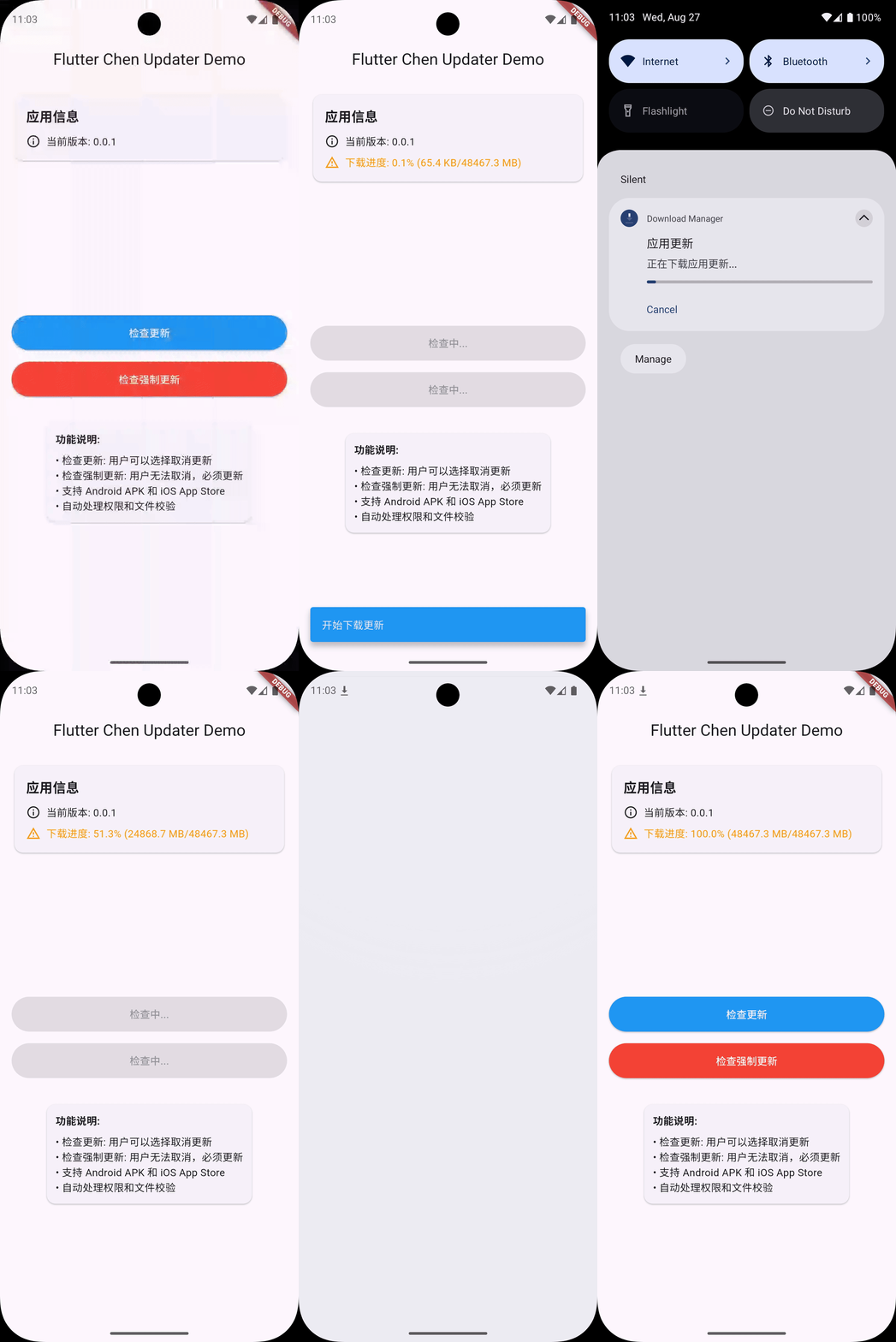
- ✅ Progress Monitoring: Real-time download progress callbacks
- ✅ File Verification: MD5 file integrity validation
- ✅ Lifecycle Management: Smart handling of app foreground/background switching
- ✅ Custom UI: Support for custom update dialogs
Preview
📦 Installation
Add the dependency to your pubspec.yaml file:
dependencies:
  flutter_chen_updater: ^1.0.0
Then run:
flutter pub get
⚙️ Permission Configuration
Android
Add necessary permissions in android/app/src/main/AndroidManifest.xml:
<!-- Internet permission -->
<uses-permission android:name="android.permission.INTERNET" />

<!-- Storage permissions (Android 9 and below) -->
<uses-permission android:name="android.permission.WRITE_EXTERNAL_STORAGE"
    android:maxSdkVersion="28" />
<uses-permission android:name="android.permission.READ_EXTERNAL_STORAGE"
    android:maxSdkVersion="28" />

<!-- Install permission -->
<uses-permission android:name="android.permission.REQUEST_INSTALL_PACKAGES" />

<!-- Network state permission -->
<uses-permission android:name="android.permission.ACCESS_NETWORK_STATE" />
🚀 Basic Usage
1. Simple Update Check
import 'package:flutter_chen_updater/flutter_chen_updater.dart';

void checkForUpdate() {
  final updateInfo = UpdateInfo(
    version: '1.1.0',
    downloadUrl: 'https://example.com/app-v1.1.0.apk',
    androidMarketUrl: 'market://details?id=com.example.app',
    iosUrl: 'https://apps.apple.com/app/id123456789',
    description: '1. Fixed known issues\n2. Improved user experience\n3. Added new features',
    isForceUpdate: false,
  );

  Updater.checkAndUpdate(
    context,
    updateInfo,
    onAlreadyLatest: () => print('Already latest version'),
    onConfirm: () => print('User confirmed update'),
    onCancel: () => print('User cancelled update'),
  );
}
2. Update with Progress Monitoring
void checkForUpdateWithProgress() {
  final updateInfo = UpdateInfo(
    version: '1.1.0',
    downloadUrl: 'https://example.com/app-v1.1.0.apk',
    description: 'Update description',
    fileHash: 'abc123def456', // Optional: MD5 file verification
    hashAlgorithm: 'md5',
    fileSize: 15 * 1024 * 1024, // 15MB
  );

  Updater.checkAndUpdate(
    context,
    updateInfo,
    onProgress: (progress) {
      print('Download progress: ${(progress.progress * 100).toStringAsFixed(1)}%');
      print('Downloaded: ${progress.downloaded} / ${progress.total}');
    },
    onConfirm: () => print('Started download update'),
  );
}
3. Force Update Example
void forceUpdate() {
  final updateInfo = UpdateInfo(
    version: '2.1.0',
    description: 'Important security update, please upgrade immediately',
    downloadUrl: 'https://example.com/app-v2.1.0.apk',
    isForceUpdate: true, // Force update, user cannot cancel
  );

  Updater.checkAndUpdate(context, updateInfo);
}
3.1 Prefer Android App Store Update
If androidMarketUrl is provided, the plugin opens the Android app store directly. If the store link cannot be opened, the update is treated as failed. If you want APK installation, provide only downloadUrl.
void updateWithAndroidMarket() {
  final updateInfo = UpdateInfo(
    version: '2.1.0',
    androidMarketUrl: 'market://details?id=com.example.app',
    description: 'Open the Android app store directly',
  );

  Updater.checkAndUpdate(context, updateInfo);
}
4. Custom Dialog
4.1 Using dialogBuilder for Customization
Future<bool> customDialog(BuildContext context, UpdateInfo updateInfo) {
  return showDialog<bool>(
    context: context,
    barrierDismissible: !updateInfo.isForceUpdate,
    builder: (context) => AlertDialog(
      title: Text('New Version ${updateInfo.version} Available'),
      content: Column(
        mainAxisSize: MainAxisSize.min,
        crossAxisAlignment: CrossAxisAlignment.start,
        children: [
          Text(updateInfo.description),
          if (updateInfo.fileSize != null)
            Padding(
              padding: const EdgeInsets.only(top: 8.0),
              child: Text('Size: ${(updateInfo.fileSize! / 1024 / 1024).toStringAsFixed(1)}MB'),
            ),
        ],
      ),
      actions: [
        if (!updateInfo.isForceUpdate)
          TextButton(
            onPressed: () => Navigator.pop(context, false),
            child: const Text('Later'),
          ),
        ElevatedButton(
          onPressed: () => Navigator.pop(context, true),
          child: const Text('Update Now'),
        ),
      ],
    ),
  ) ?? false;
}

void checkWithCustomDialog() {
  final updateInfo = UpdateInfo(
    version: '1.1.0',
    downloadUrl: 'https://example.com/app.apk',
    description: 'Important update description',
  );

  Updater.checkAndUpdate(
    context,
    updateInfo,
    dialogBuilder: customDialog,
  );
}
4.2 Using UpdateDialog for Flexible Configuration
void checkWithFlexibleDialog() {
  final updateInfo = UpdateInfo(
    version: '1.2.0',
    downloadUrl: 'https://example.com/app.apk',
    description: '• Fixed important security vulnerabilities\n• Optimized startup speed\n• Added night mode',
    fileSize: 25 * 1024 * 1024, // 25MB
  );

  showDialog<bool>(
    context: context,
    barrierDismissible: !updateInfo.isForceUpdate,
    builder: (context) => UpdateDialog(
      updateInfo: updateInfo,
      // Custom title
      title: Container(
        padding: const EdgeInsets.all(16),
        decoration: BoxDecoration(
          gradient: LinearGradient(
            colors: [Colors.blue, Colors.purple],
          ),
        ),
        child: Row(
          children: [
            Icon(Icons.system_update, color: Colors.white),
            const SizedBox(width: 8),
            Text(
              'Important Update V${updateInfo.version}',
              style: const TextStyle(
                color: Colors.white,
                fontWeight: FontWeight.bold,
              ),
            ),
          ],
        ),
      ),
      // Custom content
      content: Column(
        mainAxisSize: MainAxisSize.min,
        crossAxisAlignment: CrossAxisAlignment.start,
        children: [
          Container(
            padding: const EdgeInsets.all(16),
            child: Column(
              crossAxisAlignment: CrossAxisAlignment.start,
              children: [
                Text(
                  'Update Content',
                  style: Theme.of(context).textTheme.titleMedium?.copyWith(
                    fontWeight: FontWeight.bold,
                  ),
                ),
                const SizedBox(height: 8),
                Text(updateInfo.description),
                const SizedBox(height: 12),
                if (updateInfo.fileSize != null)
                  Container(
                    padding: const EdgeInsets.symmetric(
                      horizontal: 12,
                      vertical: 6,
                    ),
                    decoration: BoxDecoration(
                      color: Colors.grey.shade100,
                      borderRadius: BorderRadius.circular(16),
                    ),
                    child: Text(
                      'Package size: ${(updateInfo.fileSize! / 1024 / 1024).toStringAsFixed(1)}MB',
                      style: Theme.of(context).textTheme.bodySmall,
                    ),
                  ),
              ],
            ),
          ),
        ],
      ),
      // Custom footer
      footer: Container(
        padding: const EdgeInsets.all(16),
        child: Row(
          children: [
            if (!updateInfo.isForceUpdate) ...[
              Expanded(
                child: OutlinedButton(
                  onPressed: () => Navigator.pop(context, false),
                  child: const Text('Remind Later'),
                ),
              ),
              const SizedBox(width: 12),
            ],
            Expanded(
              flex: updateInfo.isForceUpdate ? 1 : 1,
              child: ElevatedButton.icon(
                onPressed: () => Navigator.pop(context, true),
                icon: const Icon(Icons.download),
                label: const Text('Update Now'),
              ),
            ),
          ],
        ),
      ),
    ),
  );
}
5. Download Only Function
void downloadOnly() {
  final updateInfo = UpdateInfo(
    version: '1.1.0',
    downloadUrl: 'https://example.com/app.apk',
    description: 'Update package',
  );

  Updater.download(updateInfo).listen((progress) {
    if (progress.isCompleted && progress.filePath != null) {
      print('Download completed: ${progress.filePath}');
      // Install later
      Updater.installApk(
        progress.filePath!,
        onSuccess: () => print('Installation successful'),
        onError: (error) => print('Installation failed: $error'),
      );
    } else if (progress.isFailed) {
      print('Download failed: ${progress.error}');
    }
  });
}
6. Version Comparison
The plugin supports comparing both version numbers and build numbers (Flutter standard format):
void checkVersionUpdate() {
  // Pure version number comparison
  final needUpdate1 = Updater.needUpdate('1.0.0', '1.1.0');
  print('Need update: $needUpdate1'); // true

  // Version with build number comparison
  final needUpdate2 = Updater.needUpdate('1.0.0+1', '1.0.0+2');
  print('Need update: $needUpdate2'); // true (same version, build number increased)

  // Mixed comparison (one has build number, one doesn't)
  final needUpdate3 = Updater.needUpdate('1.0.0+100', '1.0.1');
  print('Need update: $needUpdate3'); // true (version number increased)
}
Version Comparison Rules:
- Version number takes priority (e.g., 1.2.3)
- If version numbers are the same, compare build numbers
- Format:
version+buildNumber(e.g.,1.0.0+100) - The plugin automatically retrieves the current app's version+buildNumber from native code
📚 API Documentation
UpdateInfo Class
Update information configuration class:
class UpdateInfo {
  final String version;           // New version number (required)
  final String? downloadUrl;      // Android APK download link
  final String? androidMarketUrl; // Android app store link (optional)
  final String? iosUrl;          // iOS App Store link
  final String description;       // Update description (required)
  final bool isForceUpdate;      // Whether to force update
  final String? fileHash;        // File hash value (optional)
  final String? hashAlgorithm;   // Hash algorithm (default: 'md5')
  final int? fileSize;           // File size (bytes)
  final Map<String, dynamic>? extra; // Extra data
}
Updater Class
Main updater class:
Static Methods
checkAndUpdate()- Check and update applicationdownload()- Pure download method (no auto-installation)installApk()- Install APK fileneedUpdate()- Version comparisoncancelDownload()- Cancel downloaddispose()- Clean up resources
DownloadProgress Class
Download progress information:
class DownloadProgress {
  final int downloaded;          // Downloaded bytes
  final int total;              // Total bytes
  final double progress;        // Progress (0.0 - 1.0)
  final DownloadStatus status;  // Download status
  final String? error;          // Error message
  final String? filePath;       // File path
}
DownloadStatus Enum
enum DownloadStatus {
  idle,         // Idle
  downloading,  // Downloading
  paused,       // Paused
  completed,    // Completed
  failed,       // Failed
  cancelled,    // Cancelled
  installing    // Installing
}
🔧 Advanced Features
File Verification
The plugin supports MD5 file integrity verification:
final updateInfo = UpdateInfo(
  version: '1.1.0',
  downloadUrl: 'https://example.com/app.apk',
  description: 'Security update',
  fileHash: 'a1b2c3d4e5f6...',
  hashAlgorithm: 'md5',
);
Permission Handling
The plugin automatically handles the following permissions:
- Storage permission (Android 9 and below)
- Installation permission (Android 8+)
- Network permission
For missing permissions, the plugin will:
- Automatically request permissions
- Guide users to system settings page
- Monitor app lifecycle and auto-retry
Lifecycle Management
The plugin intelligently handles app foreground/background switching:
- Auto-retry installation when user returns from permission settings
- Keep background download tasks active
- Auto-cleanup resources when app exits
💡 Error Handling
The plugin provides comprehensive error handling mechanisms:
Updater.checkAndUpdate(
  context,
  updateInfo,
  onProgress: (progress) {
    if (progress.isFailed) {
      // Handle download failure
      showDialog(
        context: context,
        builder: (_) => AlertDialog(
          title: const Text('Download Failed'),
          content: Text(progress.error ?? 'Unknown error'),
          actions: [
            TextButton(
              onPressed: () => Navigator.pop(context),
              child: const Text('OK'),
            ),
          ],
        ),
      );
    }
  },
);
🚦 Best Practices
- Version Check: Recommend checking for updates on app startup
- Network Check: Check network status before checking for updates
- User Experience: Avoid showing update prompts during critical operations
- Resource Cleanup: Call
Updater.dispose()when app exits - Error Logging: Log error information during update process for debugging
❓ FAQ
Q: What to do if Android installation fails?
A: Check if "Install unknown apps" permission is granted. The plugin will automatically guide users to settings.
Q: What to do if download speed is slow?
A: The plugin uses Android system download manager and HTTP fallback options to ensure optimal download experience.
Q: How to support incremental updates?
A: Current version doesn't support incremental updates. Recommend using file verification to ensure integrity.
Q: How does iOS implement automatic updates?
A: iOS can only redirect to App Store due to system restrictions, cannot implement APK-style automatic updates.
Q: If androidMarketUrl is configured but invalid, will the plugin fall back automatically?
A: No. The plugin will treat the update as failed. If you want APK installation, configure downloadUrl alone instead of mixing both modes.
⚠️ Important Notes
-
Android Permissions:
- Android 6.0+ requires runtime storage permission requests
- Android 8.0+ requires permission to install from unknown sources
- Android 10+ uses scoped storage, no storage permission needed
-
File Security:
- Recommend using HTTPS download links
- Strongly recommend setting fileHash for file integrity verification
- Downloaded APK files will be automatically validated
-
User Experience:
- Avoid showing update prompts during important user operations
- Use force updates cautiously, only for security updates
- Provide clear update descriptions and file size information
📄 License
MIT License