
Flutter Ads SDK - By Voyant Networks
Platform-independent Flutter Ads SDK for Web, Desktop, and Mobile apps.
Monetize Flutter apps with full control using smart ad routing, transparent ad delivery, and developer-first infrastructure.
No hidden logic. No forced layouts. No automatic refresh cycles.
⚠️ Deprecation Notice
Versions <1.0.0 are deprecated and no longer supported.
Please upgrade to >=1.0.0.
🌐 Links
- 🚀 Docs: https://flutterads.com/docs
- 🌐 Platform: https://flutterads.com
- 🔑 Dashboard: https://console.voyantnetworks.com
- 🏢 Voyant Networks: https://voyantnetworks.com
✨ Features
- Flutter Ads SDK for Web, Android, iOS, Windows, macOS, Linux
- Smart ad routing (geo, device, time-based)
- Fully customizable native ad UI
- Transparent impression and click tracking
- No hidden logic or forced optimization
- Developer-controlled ad lifecycle
Table of Contents
- Why Flutter Ads Exists
- Core Principles
- Initialization
- Fetching Ads
- App Registration & Production Approval
- Supported Ad Formats
- Theming & UI Integration
- Rendering Ads
- Development Mode (Test Ads)
- Privacy & Data Model
- Platform Support
- License
Why Flutter Ads Exists
Most advertising SDKs prioritize automation and internal optimization. Flutter Ads prioritizes developer ownership — predictable monetization, explicit control over ad lifecycle, and fixed revenue structure. It works consistently across all Flutter platforms: Android, iOS, Web, Windows, macOS, and Linux.
Platform Support
Flutter Ads works everywhere Flutter runs.
Supported platforms:
- Android
- iOS
- Web
- Windows
- macOS
- Linux
Ad behavior, rendering logic, and monetization flow remain consistent across platforms.
No platform-specific integrations are required.
📦 Installation
dependencies:
  flutter_ads_sdk: ^1.0.0
📩 Support & Contact
Have questions or need production approval?
- SDK / Integration Support: sdk@voyantnetworks.com
- General Support: support@voyantnetworks.com
Core Principles
Developer-Controlled Lifecycle
Ads are requested, rendered, and refreshed only when you decide.
Fixed 25% Platform Fee
Revenue share is flat and predefined — no dynamic cuts or silent changes.
Transparent Event Flow
Impressions and clicks are explicitly triggered — no hidden polling or background refresh loops.
Native UI Integration
Ads respect your layout and theming system instead of imposing external styles.
Cross-Platform Consistency
Monetization behaves the same wherever Flutter runs.
Initialization
Initialize the SDK before running your application.
void main() async {
  WidgetsFlutterBinding.ensureInitialized();

  await FlutterAds.instance.ensureInitialized(
    appId: 'YOUR_APP_ID',
    apiKey: 'YOUR_API_KEY',
    sdkSecret: 'YOUR_SDK_SECRET',
  );

  runApp(const MyApp());
}
Optional: Enable Auto Fetch Context
If you want the SDK to automatically request more ads when supply is low, enable auto fetch once inside your app:
@override
Widget build(BuildContext context) {
  FlutterAds.instance.enableAutoFetch(context);

  return MaterialApp(
    home: const HomePage(),
  );
}
When auto fetch is enabled:
- The SDK stores device and layout context.
- Ads are automatically requested when inventory is near exhaustion.
- Future fetch operations do not require passing
BuildContext.
If auto fetch is not enabled, BuildContext must be provided manually when calling ensureAdsAvailable.
Fetching Ads
Ads must be explicitly requested by the developer.
FlutterAds.instance.ensureAdsAvailable(
  adType: AdType.native,
  context: context, // Required only if enableAutoFetch() has NOT been called
);
If enableAutoFetch(context) has been enabled earlier,
passing BuildContext is no longer required for future fetch calls.
You may request ads:
- Inside
initState - On scroll triggers
- On lifecycle events
- On demand before rendering a placement
Flutter Ads internally throttles excessive requests and prevents unnecessary refetching when sufficient inventory is already available.
Important: Visibility Best Practice
Ensure only one visible placement per ad format is on screen at a time.
Displaying multiple ads of the same format simultaneously (for example, multiple Mini Native ads fully visible in a feed) may result in:
- Impression throttling
- Impression rejection
- Reduced monetization efficiency
Design your layout so that only a single instance of each ad format is fully visible within the viewport at any given moment.
App Registration & Production Approval
To use Flutter Ads in production, follow the approval workflow below.
1️⃣ Register Your Application
Create your application at:
https://console.voyantnetworks.com
2️⃣ Generate API Credentials
After registering your app, generate:
appIdapiKeysdkSecret
Your application will initially be in Pending Approval status.
You may integrate and test the SDK during this stage.
3️⃣ Integrate Credentials
Add the generated credentials inside your Flutter application:
await FlutterAds.instance.ensureInitialized(
  appId: 'YOUR_APP_ID',
  apiKey: 'YOUR_API_KEY',
  sdkSecret: 'YOUR_SDK_SECRET',
);
4️⃣ Publish Your App
Release your application to its respective platform:
- Google Play Store
- Apple App Store
- Web (Production URL)
- Desktop distribution (Windows / macOS / Linux)
5️⃣ Request Production Enablement
After your app is publicly available, contact:
Include:
- App name
- Store URL
- Registered App ID
Once reviewed and approved, your application will be moved to Production Mode.
Supported Ad Formats
Flutter Ads supports multiple UI-integrated ad formats designed to fit naturally within your application layout.
enum AdType {
    miniNative,
    native,
    nativeFullscreen,
    rewarding,
    videoEmbedded,
}
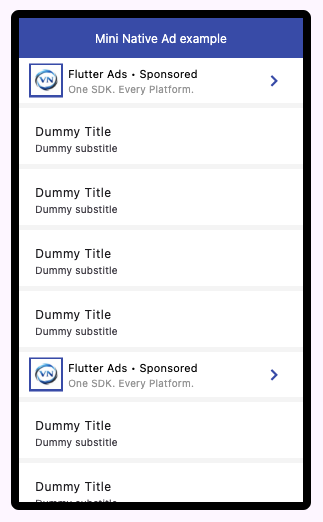
Mini Native
Lightweight, inline ad component for list-based or feed-based layouts.
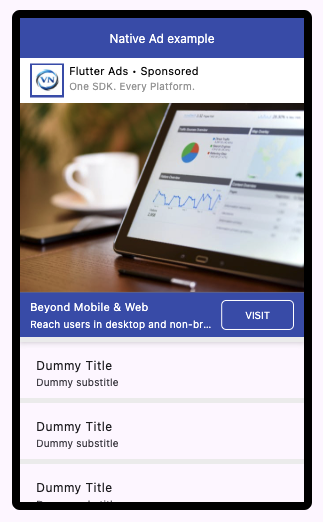
Native
Expanded native ad layout with media support and full theming control.
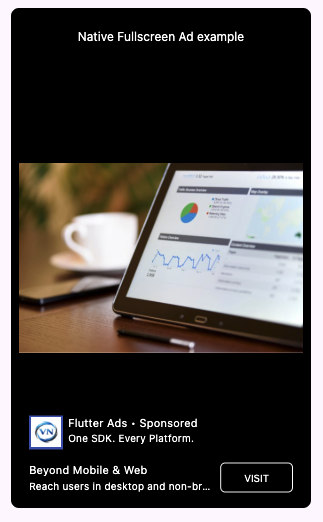
Native Fullscreen
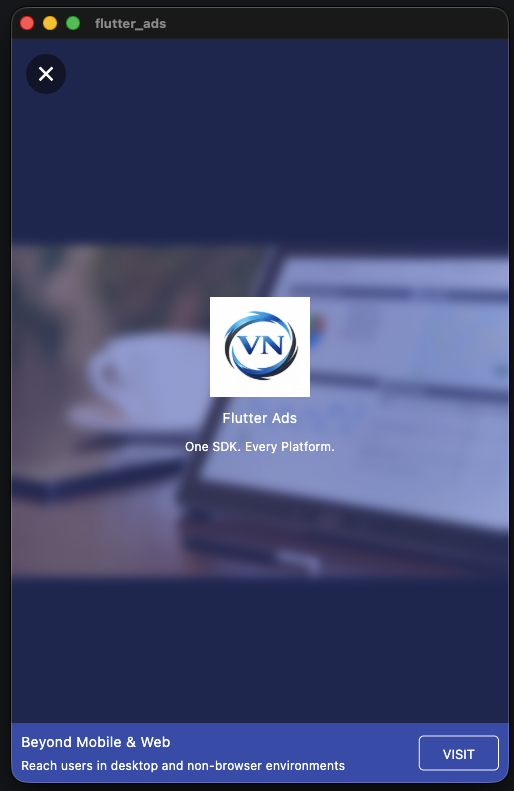
Immersive ad experience designed for high-visibility placements.
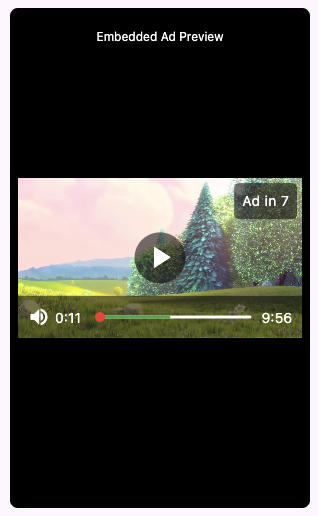
Video Embedded
Inline video player with integrated ad delivery.
Rewarding
User-initiated full-screen ad format designed for optional rewards.
Theming & UI Integration
All Flutter ad formats are fully themeable and integrate directly into your Flutter layout.
No external UI is injected, and no layout constraints are enforced.
You control:
- Typography
- Colors
- Media sizing
- Action button styling
- Layout placement
Each format exposes its own styling model.
Media Sizing
Flutter Ads provides flexible height constraint models to control how media (image, video, carousel) scales within your layout.
// Media expands to fill available vertical space within parent constraints.
// Best for feed layouts or flexible containers.
ExpandedHeightConstraint();

// Media height is locked to an exact pixel value.
// Use when you need strict layout consistency.
FixedHeightConstraint(400);

// Media can shrink based on aspect ratio,
// but will never exceed the provided maximum height.
// Ideal for responsive layouts with upper bounds.
MaxHeightConstraint(400);
Mini Native
Compact, feed-friendly ad that blends seamlessly into list items or lightweight content rows.
MiniNativeAdStylingModel(
    logoSize: 30,
    elevation: 0,
    tileStyle: AdListTileStyle(
      tileHeight: 45,
      tileTitleAlignment: MainAxisAlignment.center,
      tileElementsAlignment: CrossAxisAlignment.center,
      tileColor: Colors.white,
      titleTextStyle: const TextStyle(color: Colors.black, fontSize: 11),
      subtitleTextStyle: const TextStyle(color: Colors.grey, fontSize: 10),
    ),
    actionButtonColor: Theme.of(context).primaryColor,
)
Native
Flexible content-style ad with media, description, and CTA designed for full layout integration.
NativeAdStylingModel(
    logoSize: 30,
    logoBackgroundColor: Theme.of(context).primaryColor,
    descriptionStyle: const TextStyle(color: Colors.black, fontSize: 12),
    actionStyle: const TextStyle(color: Colors.white, fontSize: 10),
    headerTileStyle: AdListTileStyle(
      tileHeight: 45,
      tileTitleAlignment: MainAxisAlignment.start,
      tileElementsAlignment: CrossAxisAlignment.center,
      tileColor: Colors.white,
      titleTextStyle: const TextStyle(color: Colors.black, fontSize: 11),
      subtitleTextStyle: const TextStyle(color: Colors.grey, fontSize: 10),
    ),
    footerTileStyle: AdListTileStyle(
      tileHeight: 45,
      tileTitleAlignment: MainAxisAlignment.spaceEvenly,
      tileElementsAlignment: CrossAxisAlignment.center,
      tileColor: Colors.indigo,
      titleTextStyle: const TextStyle(color: Colors.white, fontSize: 11),
      subtitleTextStyle: const TextStyle(color: Colors.white, fontSize: 10),
    ),
)
Native Fullscreen
Immersive, edge-to-edge format optimized for high-visibility placements and rich media.
NativeFullScreenAdStylingModel(
    logoSize: 30,
    headerTileStyle: AdListTileStyle(
      tileHeight: 45,
      tileTitleAlignment: MainAxisAlignment.start,
      tileElementsAlignment: CrossAxisAlignment.center,
      tileColor: Colors.transparent,
      titleTextStyle: TextStyle(color: Colors.white, fontSize: 11),
      subtitleTextStyle: TextStyle(color: Colors.white, fontSize: 10),
    ),
    footerTileStyle: AdListTileStyle(
      tileHeight: 45,
      tileTitleAlignment: MainAxisAlignment.spaceEvenly,
      tileElementsAlignment: CrossAxisAlignment.center,
      tileColor: Colors.transparent,
      titleTextStyle: TextStyle(color: Colors.white, fontSize: 11),
      subtitleTextStyle: TextStyle(color: Colors.white, fontSize: 10),
    ),
    descriptionStyle: TextStyle(
      color: Colors.white,
      fontSize: 10,
      fontWeight: FontWeight.normal,
    ),
    actionStyle: TextStyle(color: Colors.white, fontSize: 10),
)
Rewarding
User-initiated ad format that grants rewards after successful completion.
 RewardingAdStylingModel(
      headerTitleStyle: TextStyle(
        color: Colors.white,
        fontSize: 14,
      ),
      headerSubtitleStyle: TextStyle(
        color: Colors.white,
        fontSize: 12,
      ),
      footerTileStyle: AdListTileStyle(
        tileTitleAlignment: MainAxisAlignment.spaceEvenly,
        tileElementsAlignment: CrossAxisAlignment.center,
        tileColor: Colors.indigo,
        titleTextStyle: TextStyle(
          color: Colors.white,
          fontSize: 14,
        ),
        subtitleTextStyle: TextStyle(
          color: Colors.white,
          fontSize: 12,
        ),
      ),
      descriptionStyle: TextStyle(
        color: Colors.white,
        fontSize: 14,
        fontWeight: FontWeight.normal,
      ),
      actionStyle: TextStyle(color: Colors.white, fontSize: 13),
)
Video Embedded
In-stream video ad integrated directly inside your video playback experience.
VideoEmbeddedAdStylingModel(
    logoSize: 30,
    actionStyle: TextStyle(color: Colors.white, fontSize: 10),
    footerTileStyle: AdListTileStyle(
      tileHeight: 45,
      tileTitleAlignment: MainAxisAlignment.spaceEvenly,
      tileElementsAlignment: CrossAxisAlignment.center,
      tileColor: Colors.black.withValues(alpha: 0.1),
      titleTextStyle: TextStyle(color: Colors.white, fontSize: 11),
      subtitleTextStyle: TextStyle(color: Colors.white, fontSize: 10),
    ),
    overlayColor: Colors.black.withValues(alpha: 0.1),
    onOverlayColor: Colors.white,
)
Rendering Ads
Ads are rendered explicitly using widget calls.
Flutter Ads never auto-inserts placements — you decide where ads appear in your layout.
Mini Native
// Always returns a widget.
// If an ad is available it renders it,
// otherwise the provided placeholder is shown.
FlutterAds.instance.getMiniNativeAdWidget(
  placeholderWidget: const SizedBox(height: 60),
  testMode: true,
  styling: MiniNativeAdStylingModel(),
);

// Returns a widget only if an ad is available.
// If no ad exists, returns null — allowing you
// to conditionally render or skip placement.
FlutterAds.instance.maybeGetMiniNativeAdWidget(
  placeholderWidget: const SizedBox(height: 60),
  testMode: true,
  styling: MiniNativeAdStylingModel(),
);
Native
// Always returns a widget.
// If an ad is available it renders it,
// otherwise the provided placeholder is shown.
FlutterAds.instance.getNativeAdWidget(
  placeholderWidget: const SizedBox(height: 60),
  testMode: true,
  heightConstraint: MaxHeightConstraint(400),
  styling: NativeAdStylingModel(),
);

// Returns a widget only if an ad is available.
// If no ad exists, returns null — allowing you
// to conditionally render or skip placement.
FlutterAds.instance.maybeGetNativeAdWidget(
  placeholderWidget: const SizedBox(height: 60),
  testMode: true,
  heightConstraint: MaxHeightConstraint(400),
  styling: NativeAdStylingModel(),
);
Native Fullscreen
// Always returns a widget.
// If an ad is available it renders it,
// otherwise the provided placeholder is shown.
FlutterAds.instance.getNativeFullScreenAdWidget(
  placeholderWidget: const SizedBox.shrink(),
  testMode: true,
  styling: NativeFullScreenAdStylingModel(),
);

// Returns a widget only if an ad is available.
// If no ad exists, returns null — allowing you
// to conditionally render or skip placement.
FlutterAds.instance.maybeGetNativeFullScreenAdWidget(
  placeholderWidget: const SizedBox.shrink(),
  testMode: true,
  styling: NativeFullScreenAdStylingModel(),
);
Rewarding
Rewarding ads are explicitly shown using navigation.
await FlutterAds.instance.showRewardingAd(
  context: context,
  testMode: true,
  styling: RewardingAdStylingModel(),
  onSuccess: () {
    // reward user
  },
  onFailure: () {
    // ad dismissed or failed
  },
);
Video Embedded
A cross-platform video player with built-in ad slots.
Ads are inserted at fixed time intervals while maintaining full playback control.
// Creates a video player that automatically inserts ads
// at configured time intervals during playback.
FlutterAds.instance.getVideoPlayerWithEmbeddedAdsWidget(
  videoUrl,
  testMode: true,
  heightConstraint: MaxHeightConstraint(400),
);
Development Mode (Test Ads)
Flutter provides a built-in demo system for development and UI testing.
No network calls are made when using test ads.
1️⃣ Populate Demo Ads
Call this once during development (for example in initState):
// Fills all ad formats with prebuilt demo data.
// No server connection is required.
FlutterAdsDummyDataHelper.fillDemoAds();
2️⃣ Enable Test Mode When Rendering
Pass testMode: true when requesting widgets.
FlutterAds.instance.getMiniNativeAdWidget(
  placeholderWidget: const SizedBox(height: 60),
  testMode: true,
);
When testMode is enabled:
- Ads are served from local demo data
- No impressions are sent to the server
- No production revenue logic is triggered
- Safe for UI development and layout testing
Important
Do not enable testMode in production builds.
Privacy & Data Model
Flutter Ads is designed to minimize data collection by default.
No personal identity information is collected or stored.
What Is NOT Collected
- No emails
- No phone numbers
- No contact lists
- No precise location
- No cross-app tracking
- No behavioral profiling
Flutter Ads does not build user identity graphs or track users across applications.
What Is Used (Non-Personal Signals Only)
To serve ads and prevent abuse, the SDK may use:
- App identifier
- Platform (Android, iOS, Web, macOS, Windows, Linux)
- Device type (mobile, tablet, desktop)
- Anonymous SDK-generated device ID (app-scoped)
- Optional age group or gender (only if provided by the developer)
All signals are non-personal and scoped to the application using the SDK.
🔍 Keywords
flutter ads sdk, flutter monetization, ads sdk for flutter, mobile ads sdk, web ads sdk, native ads flutter, developer monetization sdk
License
MIT License © 2026 Voyant Networks
Usage is permitted only for authorized applications with valid credentials
(appId, apiKey, and sdkSecret) issued by Voyant Networks.
Applications must be registered at: https://console.voyantnetworks.com
Unauthorized redistribution, modification, reverse engineering, or resale of the SDK is strictly prohibited.
Libraries
- flutter_ads_sdk
- Flutter Ads SDK