
Extrawest UI Kit







Flutter package that provides Extrawest UI Kit based on Material 3 UI components
DEMO
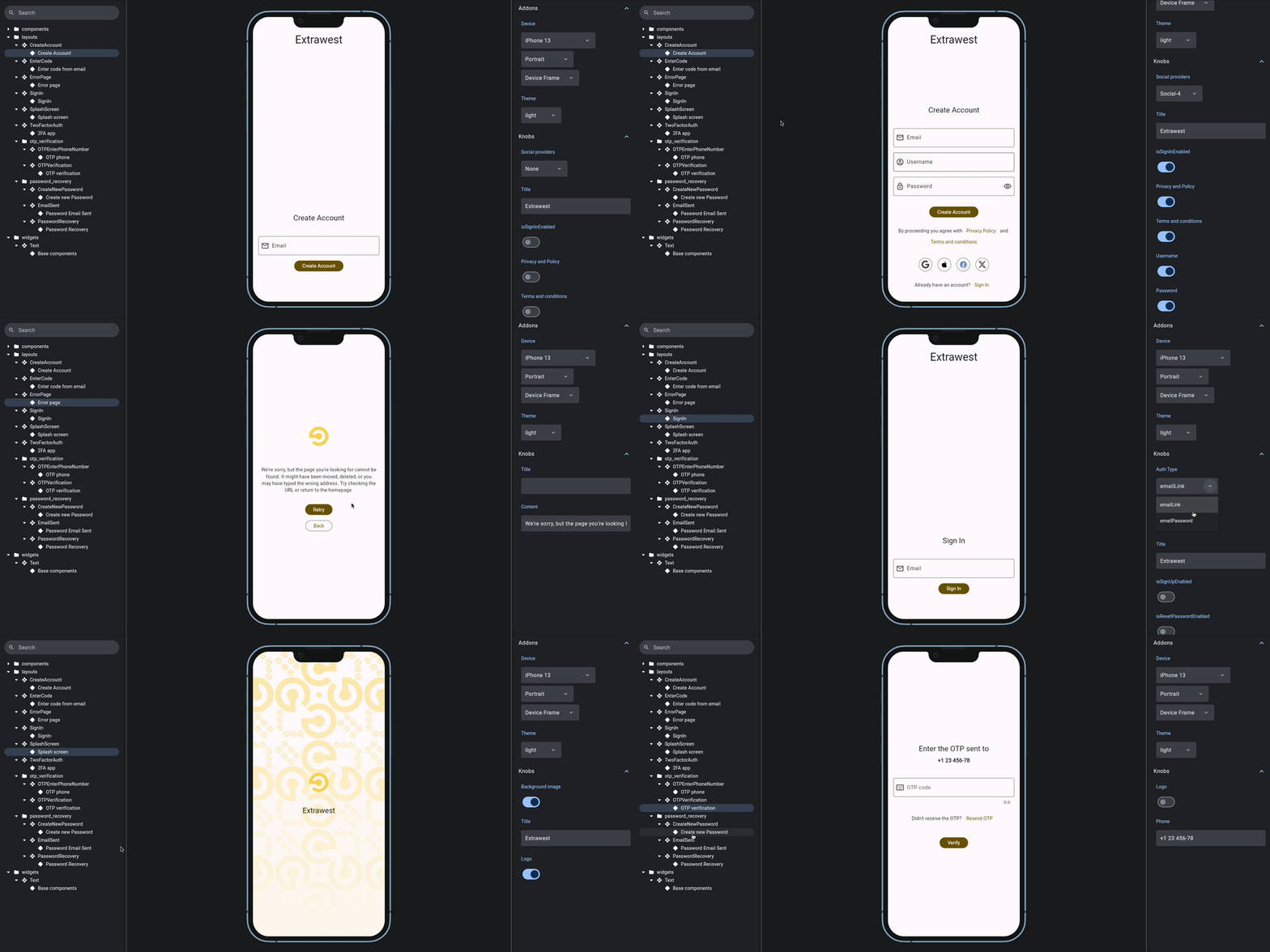
Features
- Extawest UI Components based on Material 3
- Buttons (
Elevated,Filled,Text,Outlined,Icon) - Text Fields (Email, Password, Custom)
- Texts widgets with different Material 3 styles
- Buttons (
- Ready to use Layouts with ability to change components dynamically.
- Sign In layout with components: Email, Password inputs, Password recovery section, etc.
- Create Account layout with textfields validation
- Password recovery: Send link to email, Open email, Create new password
- OTP verification: Enter phone number, Enter OTP code
- 2FA app
- Splash screen with components: logo, title, background
- Error page with components: logo, title, content, retry and back buttons
The advantage of these layouts is that they come with built-in components having default parameters, which also can be customized to fit the application's requirements.
Usage
There are 2 approaches you can use package's components:
- Using ready Layouts with specifying needed parameters(or use default ones)
- Using components separately to your own goals.
Available Customizable Components:
- EWBaseButton
// FilledButton - factory constructor approach
EWBaseButton.filled(onPressed: () {}, title: 'Sign In'),

// OutlinedButton - passing parameter approach
EWBaseButton(buttonType: Filled(), onPressed: () {}, title: 'Sign In'),
- EWBaseTextFormField
// Use base textfield with custom configuration
EWTextField(
    controller: controller,
    autoValidateMode: AutovalidateMode.always,
    keyboardType: TextInputType.phone,
    prefixIcon: const Icon(Icons.add),
    errorText: 'Error',
    cursorColor: Colors.red,
    suffixIcon: const Text('Clear'),
),
- Inputs based on EWBaseTextFormField:
EmailInput,PasswordInput
// Inputs
EmailInput(
    controller: emailController,
    hintText: 'Email Address'
    validator: (value) {
        if (value == null && value.isEmpty)
            return 'Invalid email';
        }
        return null;
    },
),
- Social Auth Provider buttons:
Google,Apple,Facebook,X
// Use Social button
AppleButton(
    showTitle: false,
    onTap: () {
    // add tap handler here
    },
),
- Text widgets with various Material 3 scales (
titleLarge,labelMedium,labelSmalletc) Access TextStyle from BuildContext context and pass TextScale as a positional argument
Text(
    'Sign In',
    style: context.textStyle(TextScale.titleLarge),
),
You can also specify other default TextStyle parameters
Text(
    'Sign In',
    style: context.textStyle(
      TextScale.titleLarge,
      fontStyle: FontStyle.italic,
      color: Colors.black
    ),
),
- Logo
Logo(
  title: title,
  asset: 'path/to/asset',
),
Available customizable layouts
SignInCreateAccountPasswordRecoveryEmailSentCreateNewPasswordOTPEnterPhoneNumberOTPVerificationTwoFactorAuthSplashScreenErrorPage
Layout usage
SignIn
import 'package:extrawest_ui_kit/extrawest_ui_kit.dart';
import 'package:extrawest_ui_kit_app/common/screens/sign_up.dart';
import 'package:flutter/material.dart';

class HomeScreen extends StatefulWidget {
  const HomeScreen({Key? key}) : super(key: key);

  @override
  State<HomeScreen> createState() => _HomeScreenState();
}

class _HomeScreenState extends State<HomeScreen> {
  final TextEditingController _emailController = TextEditingController();
  final TextEditingController _passwordController = TextEditingController();

  @override
  void dispose() {
    _emailController.dispose();
    _passwordController.dispose();
    super.dispose();
  }

  @override
  Widget build(BuildContext context) {
    return SignIn(
      emailController: _emailController,
      passwordController: _passwordController,
      useSafeArea: true,
      authType: AuthType.emailPassword,
      title: 'Test',
      isSignUpEnabled: true,
      isResetPasswordEnabled: true,
      isGuestEnabled: true,
      onCreateAccountTap: () => Navigator.push(
        context,
        MaterialPageRoute(
          builder: (context) => const SignUpScreen(),
        ),
      ),
      onSignInTap: () => ScaffoldMessenger.of(context).showSnackBar(
        const SnackBar(
          duration: Duration(seconds: 2),
          content: Text('Sign In Attempt'),
        ),
      ),
      onSignInAsGuestTap: () => ScaffoldMessenger.of(context).showSnackBar(
        const SnackBar(
          duration: Duration(seconds: 2),
          content: Text('Sign In as Guest Tap'),
        ),
      ),
      onPasswordRecoveryTap: () => ScaffoldMessenger.of(context).showSnackBar(
        const SnackBar(
          duration: Duration(seconds: 2),
          content: Text('Password recovery'),
        ),
      ),
      socialAuthProviders: [
        SocialAuthProviderElement(
          socialAuthProvider: SocialAuthProvider.facebook,
          onTap: () {
            ScaffoldMessenger.of(context).showSnackBar(
              const SnackBar(
                content: Text('Facebook login'),
              ),
            );
          },
        ),
        SocialAuthProviderElement(
          socialAuthProvider: SocialAuthProvider.google,
          onTap: () {
            ScaffoldMessenger.of(context).showSnackBar(
              const SnackBar(
                content: Text('Google login'),
              ),
            );
          },
        ),
        SocialAuthProviderElement(
          socialAuthProvider: SocialAuthProvider.x,
          onTap: () {
            ScaffoldMessenger.of(context).showSnackBar(
              const SnackBar(
                content: Text('X login'),
              ),
            );
          },
        ),
        SocialAuthProviderElement(
          socialAuthProvider: SocialAuthProvider.appleId,
          onTap: () {
            ScaffoldMessenger.of(context).showSnackBar(
              const SnackBar(
                content: Text('Apple login'),
              ),
            );
          },
        ),
      ],
    );
  }
}
OTPEnterPhoneNumber
  OTPEnterPhoneNumber(
      controller: TextEditingController(),
      logo: Image.asset('path/to/asset'),
      onSendPressed: () {
        // add logic here
      },
    );
ErrorPage
  ErrorPage(
      logo: Image.asset('path/to/asset'),
      title: 'Title',
      contentText: 'Enter content text here', // If not provided, default content will be used
      onRetryPressed: () {
        // add Retry button press handler here
      },
      onBackPressed: () {
        // add Retry button press handler here
      },
    );
Roadmap
Next version planned layouts and components:
Contact uslayoutTerms of Conditionslayout
Feedback
Please file Extrawest UI Kit specific issues, bugs, or feature requests in our issue tracker.
Contributing
- Fork it!
- Create your feature branch:
git checkout -b new-cool-tip - Commit your changes:
git commit -am 'Added new tip' - Push to the branch:
git push origin new-cool-tip - Submit a pull request.
LICENSE
BSD-3-Clause
Libraries
- components/sign_in/auth_type
- components/sign_in/widgets/email_input
- components/sign_in/widgets/password_input
- components/sign_in/widgets/username_input
- components/widgets/ew_text_field
- components/widgets/logo
- components/widgets/text_widgets/text_scales
- consts
- extrawest_ui_kit
- layouts/2fa_auth
- layouts/create_account
- layouts/enter_code
- layouts/error_page
- layouts/layout_wrapper
- layouts/otp_verification/otp_enter_phone
- layouts/otp_verification/otp_verification
- layouts/password_recovery/create_new_password
- layouts/password_recovery/email_sent
- layouts/password_recovery/password_recovery
- layouts/sign_in
- layouts/sign_in_layout
- layouts/splash_screen
- theme
- utils/form_validation/create_account_form_state
- utils/form_validation/email_validation
- utils/form_validation/password_validation