
Colorfull
Colorfull was created to solve a major limitation in popular design systems like Tailwind and Material Design: their woefully limited color palettes. There is no quick and easy way to access a large range of colors directly, making it difficult to build themes and design systems with true creative freedom.
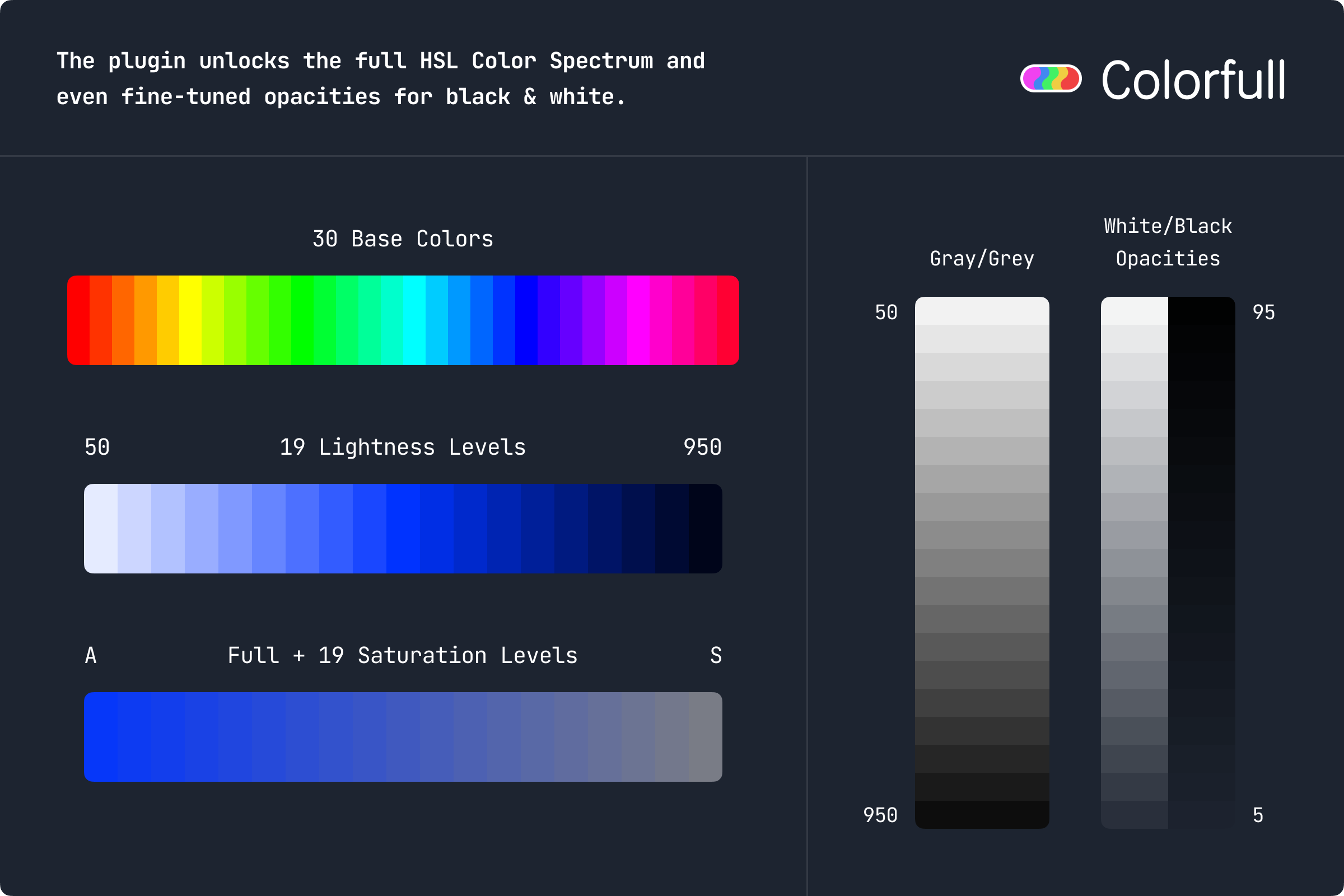
Colorfull solves this by giving Flutter developers direct, instant access to the full palette of 11,041 colors derived from the HSL color wheel — covering 29 base hues × 20 saturation levels × 19 lightness levels + 19 shades of grey + black and white. Every color is exposed as a global constant for fast, type-safe access — making it easy to build beautiful, consistent UIs with complete flexibility.
View Demo
To see a live showcase of all available color palettes, please have a look at the Colorfull Demo.
Features
- 🌈 11,041 Colors: Every possible combination of 29 base hues, 20 saturation levels, and 19 lightness levels + 19 shades of grey + black and white.
- 🔎 Global Constants: All colors are available as named Dart constants — no need to calculate or convert.
- 🎨 Consistent Naming: Colors are organized and named for easy lookup and autocompletion.
- ⚡️ Zero Dependencies: Pure Dart/Flutter, no external dependencies.
- 🖼️ Perfect for Design Systems: Build beautiful, consistent UIs with fine-grained color control.
- 🌳 Highly Tree-Shakeable: Only the colors you use are included in your final app build, keeping your app size minimal.
- ✏️ Color Variants: Get lighter, darker, saturated and desaturated variants of any color using built-in extension methods.
Usage
Color Palette
Import the package and use any color constant.
import 'package:colorfull/colorfull.dart';

// Example: Use a vivid indigo color
Container(
  color: indigo650, // Or any other color constant
  padding: const EdgeInsets.all(16.0),
  child: Text('Hello Colorfull!', style: TextStyle(color: white)),
);

// Example: Use a specific hue, saturation, and lightness
Text('Dodger Blue A-300', style: TextStyle(color: dodgerBlueA300));
All colors are available as constants like limeGreen, pumpkinOrange150, redA400, cyanQ750, etc. See the API reference on pub.dev for the full list.
Color Extensions
The library also provides helpful extensions for working with colors:
// Use the ColorUtils extension methods:
final rgba = redK400.getRGBA(); // (r: 199, g: 107, b: 107, a: 255) Tuple
final hex = amberH600.getHex(); // '#A38B29' String
final faded = blueP350 * 0.5;   // Color (Blue P-350) with 50% opacity
Color Variants
Every Color supports built-in variant methods. You can derive lighter, darker, saturated, and desaturated variants of any color directly.
- Access shade variants using the
[]operator (for examplecolor[300],color[700]). Shades must be multiples of 50 in the range 50–950. - Get lighter or darker variants using getters like
.lighter100,.lighter200,.darker150,.darker300. - Get more or less saturated variants using getters like
.sat50,.sat200,.desat100,.desat250. - Use
.contrastColorto get a contrasting shade for readable text on top of a color. - Use
.disabledColorto get a desaturated variant suitable for disabled UI states.
Example:
import 'package:colorfull/colorfull.dart';

void getExampleContainer() {
  final brand = Color(0xFF0066CC);
  return Container(
    decoration: BoxDecoration(
      color: brand.lighter100,  // 10% lighter variant
      borderRadius: BorderRadius.circular(8.0),
      border: Border.all(color: brand.darker150, width: 2.0), // 15% darker variant
    ),
    padding: const EdgeInsets.all(12),
    child: Text('Brand', style: TextStyle(color: brand[900])), // dark shade variant
  );
}
How The System Works
List Of 29 Base Colors/Hues
reddeepOrangepumpkinOrangeorangeamberyellowlimelimeGreenbrightGreenneonGreengreenlightGreenspringGreensportsGreenaquamarinecyanskyBluedodgerBluecornflowerBlueroyalBluebluedeepBlueindigovioletpurplefuschiamagentapinkrose
Additional Popular Swatches Based On Single Saturation Variant
brown(50% Saturation Variant of Pumpkin Orange -pumpkinOrangeJxx)slate(10% Saturation Variant of Cornflower Blue -cornflowerBlueRxx)
Lightness
The lightness levels are number coded from 50 (lightest) to 950 (darkest). If you have used palettes like Material Colors or Tailwind Colors before, this should be familiar to you.
Saturation
There is no letter for a 100% saturated color. Starting from 95%, the saturation levels are letter coded from A (95% saturated) to S (5% saturation).
Additional Information
- Documentation: Full API reference is available on pub.dev. Use the sidebar to browse all color constants.
- Color/Feature Requests: Have a color/feature request or any other issue? Please feel free to reach out via GitHub Issues.