
bezier_kit

bezier_kit is a comprehensive Bezier Path library written in Dart.
About
bezier_kit has been manually converted from the original
BezierKit in Swift.
It's based on the fork of BezierKit ref 11a87c26
from June 28 of 2022 (version 0.15.0).
Features
xConstructs linear (line segment), quadratic, and cubic Bézier curvesxDetermines positions, derivatives, and normals along curvesxLengths of curves via Legendre-Gauss quadraturexIntersects curves and computes cubic curve self-intersection to any degree of accuracyxDetermines bounding boxes, extrema,xLocates nearest on-curve location to pointxto any degree of accuracyxSplits curves into subcurvesxOffsets and outlines curves
Installation
Dart
dart pub add dart_lapack
Flutter
flutter pub add dart_lapack
Usage
Constructing & Drawing Curves
bezier_kit supports cubic Bezier curves (CubicCurve) and quadratic Bezier
curves (QuadraticCurve) as well as line segments (LineSegment) each of which
adopts the BezierCurve protocol that encompasses most API functionality.
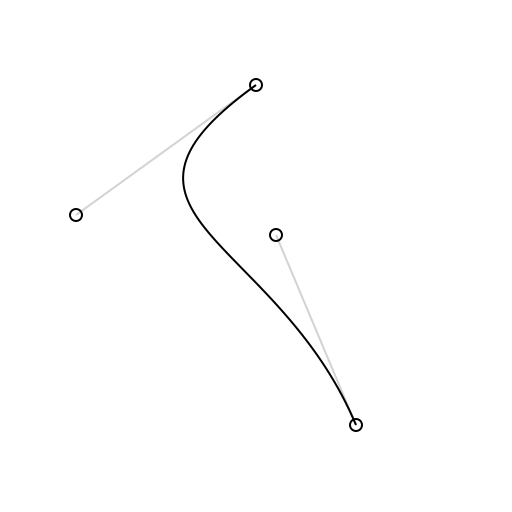
import 'package:bezier_kit/bezier_kit.dart';

final curve = CubicCurve(
  p0: Point(x: 100, y: 25),
  p1: Point(x: 10, y: 90),
  p2: Point(x: 110, y: 100),
  p3: Point(x: 150, y: 195),
);

final canvas: Canvas = ...        // your graphics context here
final draw = Draw(canvas);
draw.drawSkeleton(curve: curve);  // draws visual representation of curve control points
draw.drawCurve(curve: curve);     // draws the curve itself
Intersecting Curves
The intersections(with curve: BezierCurve) -> [Intersection] method determines each intersection between self and curve as an array of Intersection objects. Each intersection has two fields: t1 represents the t-value for self at the intersection while t2 represents the t-value for curve at the intersection. You can use the ponit(at:) method on either of the curves to calculate the coordinates of the intersection by passing in the corresponding t-value for the curve.
Cubic curves may self-intersect which can be determined by calling the selfIntersections() method.
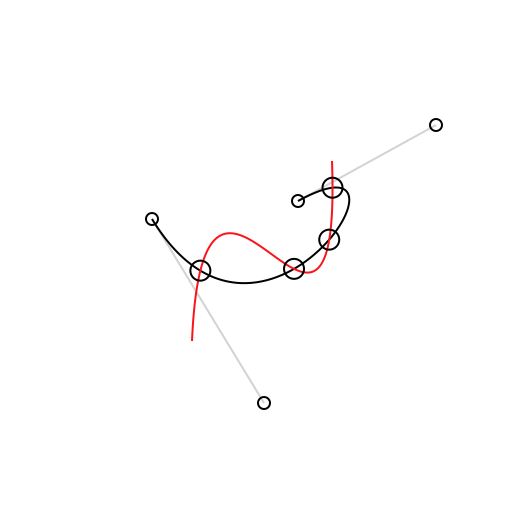
final intersections = curve1.intersectionsWithCurve(curve2);
final points = intersections.map((i) => curve1.point(at: i.t1));

draw.drawCurve(curve: curve1);
draw.drawCurve(curve: curve2);
for (final p in points) {
  draw.drawPoint(origin: p);
}
Splitting Curves
The split(from:, to:) method produces a subcurve over a given range of t-values. The split(at:) method can be used to produce a left subcurve and right subcurve created by splitting across a single t-value.
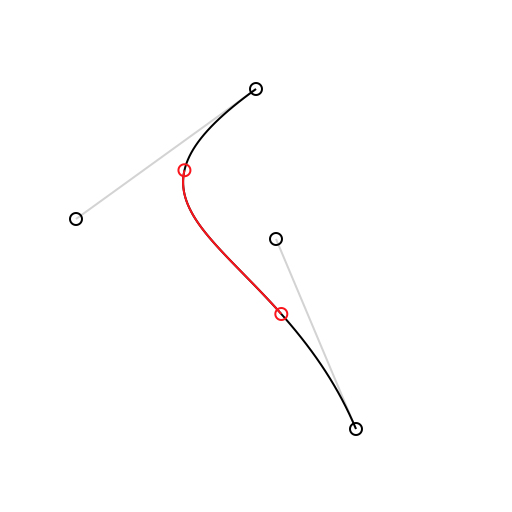
draw.setColor(color: Draw.lightGrey);
draw.drawSkeleton(curve: curve);
draw.drawCurve(curve: curve);
final subcurve = curve.split(from: 0.25, to: 0.75); // or try (leftCurve, rightCurve) = curve.split(at:)
draw.setColor(color: Draw.red);
draw.drawCurve(curve: subcurve);
draw.drawCircle(center: curve.point(at: 0.25), radius: 3);
draw.drawCircle(center: curve.point(at: 0.75), radius: 3);
Determining Bounding Boxes
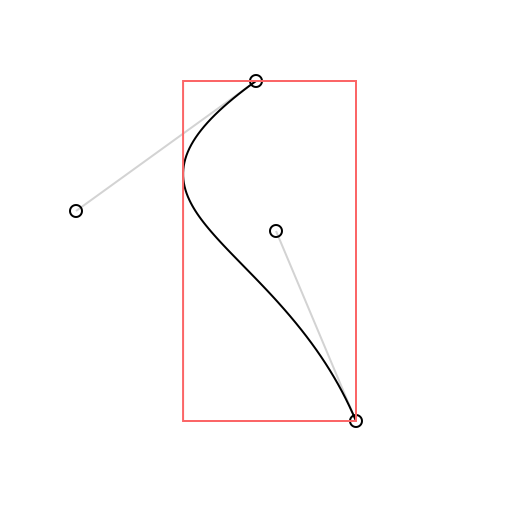
final boundingBox = curve.boundingBox;
draw.drawSkeleton(context, curve: curve);
draw.drawCurve(context, curve: curve);
draw.setColor(context, color: Draw.pinkish);
draw.drawBoundingBox(context, boundingBox: curve.boundingBox);
More
bezier_kit is a powerful library with a lot of functionality. For the time
being the best way to see what it offers is to build the example Flutter app and
check out each of the provided demos.
Testing
bezier_kit includes the entire test suite from the original sources converted
from Swift to Dart.
To run the test suite do:
dart test
License
bezier_kit is released under the MIT license. See LICENSE for details.