
best_form_validator


🎬 Demo
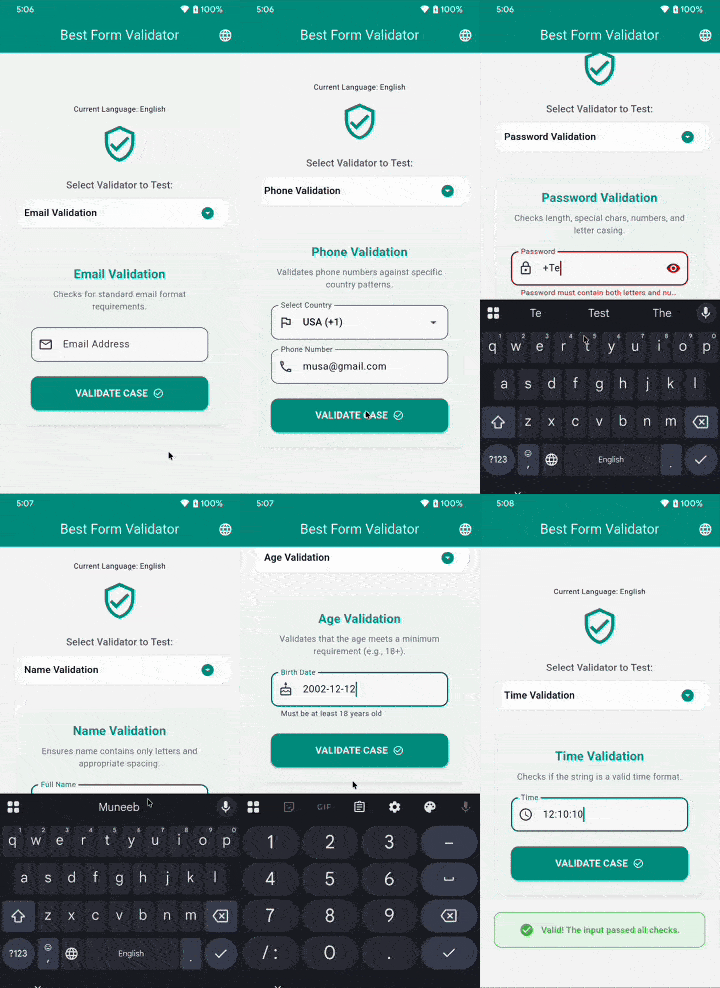
A high-performance form validation package that specializes in international phone number validation and complex regex patterns.
✨ Instant, Context-Less, & Zero-Initialization:
No BuildContext required. No async app startup delays. Use it directly inside your TextFormField out of the box.
Why use best_form_validator?
| Feature | Standard Flutter Validation | best_form_validator |
|---|---|---|
| Phone Regex | Write your own Regex | Built-in 50+ Countries 🌍 |
| Async Hassle | Custom State Logic | 🚀 Zero-Init (Synchronous) |
| Translations | Manual if-else |
Built-in 25+ Languages |
| Complexity | Messy if (val == null) return 'error' |
MultiValidator().required().build() |
| Financials | External Packages | Native Luhn / IBAN checks 💳 |
Features
✅ Zero-Initialization - Synchronous and immediate.
✅ MultiValidator Chaining - Clean functional API.
✅ Phone Number Validation - 50+ countries with PhoneInputFormatter.
✅ Email & Password Stringency - Advanced regex and 0-5 Strength scoring.
✅ Financial Checks - Credit Card (Luhn Algorithm) & EU IBAN Validation.
✅ Localization Support - Built-in support for 25+ languages.
Getting Started
Installation
dependencies:
  best_form_validator: ^1.1.4
Then run:
flutter pub get
🚀 Quickstart
It works instantly. No initialization required!
import 'package:best_form_validator/best_form_validator.dart';

TextFormField(
  validator: (value) => Validators.validateEmail(value),
  // ...
);
Localization Setup
To enable localized error messages, add the FormLocalizations.delegate to your MaterialApp and set the locale in the builder.
import 'package:flutter_localizations/flutter_localizations.dart';
import 'package:best_form_validator/best_form_validator.dart';

class MyApp extends StatelessWidget {
  @override
  Widget build(BuildContext context) {
    return MaterialApp(
      // ... other properties
      localizationsDelegates: [
        GlobalMaterialLocalizations.delegate,
        GlobalWidgetsLocalizations.delegate,
        GlobalCupertinoLocalizations.delegate,
        FormLocalizations.delegate, // Add this delegate
      ],
      supportedLocales: [
        Locale('en'), Locale('es'), Locale('fr'), Locale('de'),
        Locale('ar'), Locale('ur'), Locale('hi'), Locale('zh'),
        // ... and many more
      ],
      // Important: Update validator locale when app locale changes
      builder: (context, child) {
        final locale = Localizations.localeOf(context);
        Validators.setLocale(locale);
        return child!;
      },
      home: HomePage(),
    );
  }
}
Usage
Email Validation
Validates email addresses using standard email format rules.
import 'package:best_form_validator/best_form_validator.dart';

// Basic usage
String? error = Validators.validateEmail('user@example.com');
if (error != null) {
  print(error); // null if valid
}

// With custom error messages
String? error = Validators.validateEmail(
  'invalid-email',
  requiredError: 'Please enter your email',
  invalidError: 'Please enter a valid email address',
);
In a TextFormField:
TextFormField(
  decoration: InputDecoration(labelText: 'Email'),
  validator: (value) => Validators.validateEmail(value),
  keyboardType: TextInputType.emailAddress,
)
Phone Number Validation
Validates phone numbers based on country-specific formats. Supports 50+ countries.
import 'package:best_form_validator/best_form_validator.dart';

// Validate US phone number
String? error = Validators.validatePhone('+12025551234', 'US');

// Validate UK phone number
String? error = Validators.validatePhone('+447911123456', 'UK');

// Validate Pakistan phone number
String? error = Validators.validatePhone('+923001234567', 'PK');
Supported Countries:
US, CA, UK, FR, DE, IN, AU, BR, CN, JP, MX, RU, ZA, NG, EG, KE, GH, SA, AE, IT, ES, SE, NO, FI, DK, NL, BE, CH, AT, PT, GR, TR, IR, PK, BD, LK, TH, MY, SG, ID, PH, VN, KR, HK, TW, NZ, AF, AL, DZ, AR, AZ, BH
In a TextFormField:
TextFormField(
  decoration: InputDecoration(
    labelText: 'Phone Number',
    hintText: '+1234567890',
  ),
  validator: (value) => Validators.validatePhone(value, 'US'),
  keyboardType: TextInputType.phone,
)
Password Validation
Flexible password validation with multiple configurable criteria.
import 'package:best_form_validator/best_form_validator.dart';

// Basic validation (minimum 6 characters)
String? error = Validators.validatePassword('mypassword');

// Advanced validation with all criteria
String? error = Validators.validatePassword(
  'MyP@ssw0rd',
  checkLength: true,           // Check minimum length
  minLength: 8,                // Minimum 8 characters
  checkNumberAndLetter: true,  // Must contain letters and numbers
  checkSpecialCharacter: true, // Must contain special characters
  checkLowerCase: true,        // Must contain lowercase letters
  checkUpperCase: true,        // Must contain uppercase letters
);
Password Requirements:
- ✅ Minimum length (configurable, default: 6)
- ✅ Contains both letters and numbers
- ✅ Contains special characters (!@#$%^&*(),.?":{}|<>)
- ✅ Contains lowercase letters
- ✅ Contains uppercase letters
- ✅ No spaces allowed
In a TextFormField:
TextFormField(
  decoration: InputDecoration(labelText: 'Password'),
  obscureText: true,
  validator: (value) => Validators.validatePassword(
    value,
    checkLength: true,
    minLength: 8,
    checkNumberAndLetter: true,
    checkSpecialCharacter: true,
    checkLowerCase: true,
    checkUpperCase: true,
  ),
)
Name Validation
Validates names to ensure proper formatting without special characters or numbers.
import 'package:best_form_validator/best_form_validator.dart';

// Basic usage
String? error = Validators.validateName('John Doe'); // null (valid)
String? error = Validators.validateName('John123');  // Invalid

// With custom error messages
String? error = Validators.validateName(
  'John Doe',
  requiredError: 'Please enter your name',
  invalidError: 'Name can only contain letters',
);
Name Rules:
- ✅ Only alphabetic characters allowed
- ✅ Spaces allowed between names
- ❌ No leading or trailing spaces
- ❌ No multiple consecutive spaces
- ❌ No special characters or numbers
In a TextFormField:
TextFormField(
  decoration: InputDecoration(labelText: 'Full Name'),
  validator: (value) => Validators.validateName(value),
  keyboardType: TextInputType.name,
)
Age Validation
Validates age from DateTime or string input with configurable minimum age requirement.
import 'package:best_form_validator/best_form_validator.dart';

// Validate with DateTime
DateTime birthDate = DateTime(2000, 1, 15);
String? error = Validators.validateAge(birthDate, 18); // Minimum 18 years

// Validate with string (yyyy-MM-dd format)
String? error = Validators.validateAge('2000-01-15', 18);

// With custom error messages
String? error = Validators.validateAge(
  '2010-01-15',
  18,
  requiredError: 'Please enter your birth date',
  invalidError: 'You must be at least 18 years old',
);
In a TextFormField:
TextFormField(
  decoration: InputDecoration(
    labelText: 'Birth Date',
    hintText: 'yyyy-MM-dd',
  ),
  validator: (value) => Validators.validateAge(value, 18),
  keyboardType: TextInputType.datetime,
)
Date Validation
Validates date strings can be properly parsed.
import 'package:best_form_validator/best_form_validator.dart';

String? error = Validators.validateDate('2024-01-15'); // null (valid)
String? error = Validators.validateDate('invalid');    // Error

// With custom error messages
String? error = Validators.validateDate(
  '2024-01-15',
  requiredError: 'Please select a date',
  invalidError: 'Please enter a valid date',
);
Time Validation
Validates time format strings.
import 'package:best_form_validator/best_form_validator.dart';

String? error = Validators.validateTime('14:30:00'); // null (valid)
String? error = Validators.validateTime('25:00:00'); // Error

// With custom error messages
String? error = Validators.validateTime(
  '14:30:00',
  requiredError: 'Please select a time',
  invalidError: 'Please enter a valid time',
);
Complete Form Example
Here's a complete example of a registration form using all validators:
import 'package:flutter/material.dart';
import 'package:best_form_validator/best_form_validator.dart';

class RegistrationForm extends StatefulWidget {
  @override
  _RegistrationFormState createState() => _RegistrationFormState();
}

class _RegistrationFormState extends State<RegistrationForm> {
  final _formKey = GlobalKey<FormState>();
  final _nameController = TextEditingController();
  final _emailController = TextEditingController();
  final _phoneController = TextEditingController();
  final _passwordController = TextEditingController();
  final _birthDateController = TextEditingController();

  @override
  void dispose() {
    _nameController.dispose();
    _emailController.dispose();
    _phoneController.dispose();
    _passwordController.dispose();
    _birthDateController.dispose();
    super.dispose();
  }

  void _submitForm() {
    if (_formKey.currentState!.validate()) {
      // Form is valid, proceed with registration
      ScaffoldMessenger.of(context).showSnackBar(
        SnackBar(content: Text('Registration Successful!')),
      );
    }
  }

  @override
  Widget build(BuildContext context) {
    return Scaffold(
      appBar: AppBar(title: Text('Registration')),
      body: Form(
        key: _formKey,
        child: ListView(
          padding: EdgeInsets.all(16),
          children: [
            // Name Field
            TextFormField(
              controller: _nameController,
              decoration: InputDecoration(
                labelText: 'Full Name',
                border: OutlineInputBorder(),
              ),
              validator: (value) => Validators.validateName(
                value,
                requiredError: 'Please enter your name',
                invalidError: 'Name can only contain letters',
              ),
              keyboardType: TextInputType.name,
            ),
            SizedBox(height: 16),

            // Email Field
            TextFormField(
              controller: _emailController,
              decoration: InputDecoration(
                labelText: 'Email',
                border: OutlineInputBorder(),
              ),
              validator: (value) => Validators.validateEmail(
                value,
                requiredError: 'Please enter your email',
                invalidError: 'Please enter a valid email',
              ),
              keyboardType: TextInputType.emailAddress,
            ),
            SizedBox(height: 16),

            // Phone Field
            TextFormField(
              controller: _phoneController,
              decoration: InputDecoration(
                labelText: 'Phone Number',
                hintText: '+1234567890',
                border: OutlineInputBorder(),
              ),
              validator: (value) => Validators.validatePhone(value, 'US'),
              keyboardType: TextInputType.phone,
            ),
            SizedBox(height: 16),

            // Password Field
            TextFormField(
              controller: _passwordController,
              decoration: InputDecoration(
                labelText: 'Password',
                border: OutlineInputBorder(),
                helperText: 'Min 8 chars, uppercase, lowercase, number, special char',
              ),
              obscureText: true,
              validator: (value) => Validators.validatePassword(
                value,
                checkLength: true,
                minLength: 8,
                checkNumberAndLetter: true,
                checkSpecialCharacter: true,
                checkLowerCase: true,
                checkUpperCase: true,
              ),
            ),
            SizedBox(height: 16),

            // Birth Date Field
            TextFormField(
              controller: _birthDateController,
              decoration: InputDecoration(
                labelText: 'Birth Date',
                hintText: 'yyyy-MM-dd',
                border: OutlineInputBorder(),
              ),
              validator: (value) => Validators.validateAge(
                value,
                18,
                invalidError: 'You must be at least 18 years old',
              ),
              keyboardType: TextInputType.datetime,
            ),
            SizedBox(height: 24),

            // Submit Button
            ElevatedButton(
              onPressed: _submitForm,
              child: Padding(
                padding: EdgeInsets.all(16),
                child: Text('Register', style: TextStyle(fontSize: 16)),
              ),
            ),
          ],
        ),
      ),
    );
  }
}
API Reference
Validators Class
The main class providing all validation methods.
Methods
| Method | Parameters | Returns | Description |
|---|---|---|---|
validateEmail |
String? value, {String? requiredError, String? invalidError} |
String? |
Validates email format |
validatePhone |
String? value, String isoCode |
String? |
Validates phone number for specific country |
validatePassword |
String? value, {bool? checkLength, int minLength, bool? checkNumberAndLetter, bool? checkSpecialCharacter, bool? checkLowerCase, bool? checkUpperCase} |
String? |
Validates password with configurable criteria |
validateName |
String? value, {String? requiredError, String? invalidError} |
String? |
Validates name format |
validateAge |
dynamic value, int minimumAge, {String? requiredError, String? invalidError} |
String? |
Validates age meets minimum requirement |
validateDate |
String? value, {String? requiredError, String? invalidError} |
String? |
Validates date format |
validateTime |
String? value, {String? requiredError, String? invalidError} |
String? |
Validates time format |
loadPhoneRegex |
None | Future<void> |
Loads phone validation patterns (call at app startup) |
setLocale |
Locale locale |
void |
Sets the global locale for validation messages |
Error Messages
All validators return null if validation passes, or a String error message if validation fails.
Default Error Messages
- Email: "Email is required" / "Enter a valid email"
- Phone: "Phone number is required" / "Enter a valid phone number for {country}"
- Password: Various messages based on failed criteria
- Name: "Name is required" / "Name is invalid"
- Age: "Invalid date format" / "Age must be at least {minimumAge} years old"
- Date: "Date is required" / "Enter a valid date"
- Time: "Time is required" / "Enter a valid time"
All error messages can be customized using the optional parameters.
Platform Support
- ✅ Android
- ✅ iOS
- ✅ Web
- ✅ Windows
- ✅ macOS
- ✅ Linux
Requirements
- Dart SDK: >=3.0.0 <4.0.0
- Flutter: >=3.0.0
Dependencies
intl: ^0.20.2- For date formatting and parsing
Contributing
Contributions are welcome! Please feel free to submit a Pull Request.
- Fork the repository
- Create your feature branch (
git checkout -b feature/AmazingFeature) - Commit your changes (
git commit -m 'Add some AmazingFeature') - Push to the branch (
git push origin feature/AmazingFeature) - Open a Pull Request
Issues and Feedback
Please file issues, bugs, or feature requests in our issue tracker.
License
This project is licensed under the MIT License - see the LICENSE file for details.
Author
GreeLogix
- GitHub: @greelogix
- Repository: best_form_validator
Changelog
See CHANGELOG.md for a detailed list of changes.
Additional Resources
❤️ Maintained By
GreenLogix — Flutter, Laravel & AI Development Agency
🌐 https://greelogix.com
📩 hello@greelogix.com
Need custom Flutter development, package customization, or enterprise integrations? We’d love to help.
📦 Other Open-Source Flutter Packages by GreenLogix
If you find Launchify useful for launching URLs and deep links, you may also benefit from these Flutter packages:
🔹 Quick Popup Manager
Smart popup, dialog, and overlay management for Flutter apps.
👉 https://pub.dev/packages/quick_popup_manager
🔹 Smart Form Toolkit
Advanced Flutter form toolkit with ready-to-use widgets, validation, and flexible field customization.
👉 https://pub.dev/packages/smart_form_toolkit
🔹 Safe JSON Mapper
Type-safe JSON parsing and mapping utilities for Flutter.
👉 https://pub.dev/packages/safe_json_mapper
🔹 Best Form Validator
A robust Flutter form validation library with ready-to-use validators and easy integration.
👉 https://pub.dev/packages/best_form_validator
🔹 Flutter Telescope
Advanced Flutter debugging, logging, and app insights toolkit.
👉 https://pub.dev/packages/flutter_telescope
⭐ If Launchify helped you, consider exploring our other packages for faster, safer, and more productive Flutter development.
Libraries
- best_form_validator
- A comprehensive Flutter package for form validation.