
asystant_ai
An embeddable Flutter assistant with local application tools, explicit permissions, genUI cards and reactive_notifier state. Use the same chat in a section, bottom sheet, end drawer or full screen on mobile, web and desktop.
Install
flutter pub add asystant_ai
Create your assistant
import 'package:asystant_ai/asystant_ai.dart';

class WorkspaceAssistant extends AsystantAI {
  WorkspaceAssistant() : super(name: 'Workspace assistant');

  @override
  List<AsystantTool> get tools => const [];

  @override
  List<AsystantSystemPrompt> get systemPrompts => const [
    AsystantSystemPrompt(
      id: 'workspace',
      content: 'Help inside this workspace. Use local tools for actions.',
    ),
  ];
}
Then call assistant.init once with a provider: where the answers come from. init only stores the configuration; the chat connects when it is first shown. Tools, system prompts, per-request context, attachments, the model picker, permissions and cards work the same with every provider.
| Provider | When to use it | What it needs | Platforms |
|---|---|---|---|
OpenRouterProvider |
Direct OpenRouter inference | A credential source: a local key or a short-lived key issued through your authenticated server | Mobile, web, desktop |
ClaudeCodeProvider |
A local desktop app for someone who has Claude Code | The claude CLI installed and signed in (claude once in a terminal); no key, no backend |
macOS, Linux, Windows |
assistant.init(
  provider: OpenRouterProvider(
    credentials: fetchAiCredential,
    identity: () => session.userId,
    sessionChanges: session.changes,
    appName: 'Workspace',
  ),
  models: const [
    AsystantModelOption(id: 'openai/gpt-oss-120b', label: 'Precise'),
    AsystantModelOption(id: 'openai/gpt-oss-20b', label: 'Fast'),
  ],
  builtInTools: const [
    PresentationTool(kind: AssistantCardKind.summary),
    PresentationTool(kind: AssistantCardKind.selection),
  ],
);
fetchAiCredential (an OpenRouterCredentialSource, returning Result<OpenRouterCredential, AssistantFailure>) and session belong to the host app. The source can obtain a short-lived provider credential from any authenticated server; map that server's response to OpenRouterCredential in the app. Never compile a provider master key into a release build. models are the choices shown next to the send button; the first one permitted is the default. Pass models: const [] to let the credential or provider decide. Add optional factory tools through builtInTools. See connection modes and the integration guide.
With Claude Code there is nothing to authenticate:
assistant.init(provider: const ClaudeCodeProvider(defaultModel: 'sonnet'));

// A settings screen's "Test connection", without spending an inference.
final status = await const ClaudeCodeProvider().verify();
init(transport: ...) remains for an AssistantTransport of your own, such as a test double or a proxy; pass either a provider or a transport.
To reject text attachments that appear to contain credentials, pass attachments: const AsystantAttachmentPolicy(rejectLikelySecrets: true) to assistant.init. The library checks every file as it enters the chat, including files supplied by a custom picker or attachFile, and shows a localized error. This optional check covers readable text files; it cannot inspect secrets inside images, PDFs or encoded data.
Connection modes
Manual API key on this device. Pass a host provider and opt in to AsystantProviderSettings. The chat menu then offers local OpenAI, OpenRouter, Gemini, Claude API, or another HTTPS OpenAI-compatible endpoint and an explicit model ID. The person enters the key in the library-owned settings sheet; the key is kept in device secure storage under an account-specific namespace, separate from conversation history. Limit availableKinds or set showInChatMenu: false when an app must not offer local providers.
assistant.init(
  provider: OpenRouterProvider(credentials: fetchServerCredential),
  providerSettings: AsystantProviderSettings(
    namespace: 'my-app:$accountId',
    availableKinds: const [
      AsystantProviderKind.backend,
      AsystantProviderKind.openRouter,
      AsystantProviderKind.openAi,
      AsystantProviderKind.compatible,
    ],
  ),
);
Authentication through your server. Authenticate the app user using your own account system. Supply identity and sessionChanges to the provider, and implement a credential callback that calls your authenticated API. That API should authorize the user and return a provider credential scoped to that user, allowed models, budget and a short validity window. The callback maps the response to OpenRouterCredential(apiKey:, allowedModels:, expiresAt:, refreshAfter:). The SDK refreshes it when needed and sends it directly to the configured provider. Keep permanent provider credentials on the server. If a provider cannot issue a safe client credential, keep inference on your server and supply a custom AssistantTransport instead of returning the server's master key to the device. See the provider-neutral server contract.
The manual settings mode and server mode can coexist. Omitting providerSettings uses only the host provider. OpenAICompatibleProvider accepts the same credential callback for an HTTPS Chat Completions endpoint.
Embed the chat
Private values requested by a tool
A local tool may request any number of fields after its approval. The chat shows an inline card; entered values are held only by the card and returned to that tool. Neither the model nor the saved conversation receives them. The tool must keep its own credential storage secure.
final values = await context.requestPrivateInput('Sign in to DEV', const [
  PrivateInputField(name: 'password', label: 'Password', kind: PrivateInputKind.password),
  PrivateInputField(name: 'code', label: 'Authenticator code', kind: PrivateInputKind.totp),
]);
if (values == null) return Err(const AssistantFailure(.canceled));
// Use values in the local API call; never place them in a ToolOutcome.
This feature is enabled by default. Set enableInlinePrivateInput: false in assistant.init to hide it for a host app; context.supportsPrivateInput lets a tool provide its own fallback. Cancelling the turn closes the card. Tool output is withheld from the model after the card is used.
Private values in chat
Prefix a one-line secret with $, for example Configura la API key $una-key-importante en DEV. The SDK replaces the value with a random [secret:…] reference before creating a chat message, saving the conversation or calling the model. Declare the destination field with ToolField(..., acceptsSecret: true). The model can pass that reference as the complete value of that field; the SDK rejects references in other fields. After the tool preview and any required approval, the SDK resolves it in memory only for tool.execute. Tool results, cards, progress and errors are withheld or scrubbed before entering the conversation or model context. A secret reference expires when the assistant is disposed, the identity changes, or the conversation is deleted; after an app restart, send the secret again. Secret values are never persisted by this feature. The host tool remains responsible for storing the credential in secure storage when its action is approved.
Set AsystantChat(enablePrivateValueAttachment: true) to show an optional key icon beside file attachment. The same option is available on AsystantButton, AsystantPanel and AsystantPhoneSheet; it is off by default. The key icon opens a safe-area bottom sheet for an API key, token, URL, password or other private value. The field is obscured by default. The SDK keeps the raw value out of the draft and inserts only a labeled reference at the cursor; send the message with enough context for the assistant to choose the destination tool. The $value text method remains available regardless of the option. The built-in prompt tells the model to suggest the key icon when present, or the $ marker otherwise.
Values may contain letters, digits, _, -, ., /, +, =, :, and @ (at least four characters). A $ in ordinary text should be separated when it is not a secret. For calls that use a secret, the SDK hides the tool's arbitrary output and images from the model and chat, showing only a generic success or failure status. This protects text marked with $; attachments, host context, provider logs and secrets entered without the marker are outside this mechanism.
AsystantButton(assistant: assistant); // A sheet on phones, a side panel on tablets and desktops.

AsystantChat(
  assistant: assistant,
  strings: const AsystantStrings(spanish: false),
); // Mount inside a bounded section, drawer or full-screen Scaffold.
The host owns the assistant instance: closing the panel preserves the conversation. Call assistant.dispose() when its owner ends. When the provider reports a different identity, pending permissions are invalidated, the conversation is cleared and the chat offers to connect again. When another user signs in, dispose the assistant and create a new one.
Conversation history uses memory unless the host supplies conversationStore to assistant.init. AsystantJsonConversationStore adapts a persistent string key/value store with readValue, writeValue and removeValue callbacks. It saves the active conversation as messages arrive, reopens it after restart, and keeps each provider identity in a separate scope. Pass a stable account identity (and environment, if applicable) to OpenRouterProvider.identity; otherwise the default identity is only local and cannot separate accounts. Existing in-memory conversations cannot be recovered after the process has ended.
Tools and permissions
Implement AsystantTool or TypedAsystantTool<T>. Return a ToolDefinition, a read-only preview and an execution result. Tools execute inside the host app, never on a server. Confirmation is required by default; read-only tools can explicitly opt out. Use requiresSelection for user choices and isAvailable to control registration.
For argument-aware permissions, implement AsystantActionPolicyProvider.actionPolicy(arguments) on a tool or override AsystantAI.actionPolicyFor(tool, arguments) centrally. The integrating app assigns an AsystantSensitivityLevel to each invocation. The library determines whether approval is needed and draws its name and color on approval cards and activity rows:
| Level | Display | Execution |
|---|---|---|
none |
Nulo | Immediate |
low |
Bajo | Immediate |
medium |
Medio | Ask for approval |
high |
Alto | Ask for approval |
admin |
Admin | Ask for approval; reserved for host administrator endpoints |
class DeleteRecordTool extends TypedAsystantTool<DeleteRecordInput>
    implements AsystantActionPolicyProvider {
  // Other TypedAsystantTool members omitted.
  @override
  AsystantActionPolicy actionPolicy(ToolArguments arguments) =>
      const AsystantActionPolicy(level: AsystantSensitivityLevel.high);
}
AsystantActionPolicy.requiresApproval is derived from the level. allowSessionApproval: false makes the person approve every invocation; the default true offers Approve all for this session on approval cards. That choice stays in memory and resets on reconfiguration or a signed-in identity change. Tools requiring selection still wait for the person's selection. Unclassified tools retain their existing requiresConfirmation behavior: true maps to medium, false to none. Backend authorization remains the host's responsibility.
The code uses English level identifiers. The chat localizes level labels for display; activity rows show a compact colored ticket icon beside the action with the full label available on long press and to screen readers. The context percentage sits in the header action row; tap it for token details.
For an approved operation that needs a password or one-time code, call showAsystantSecretPrompt(context, title: 'Account · DEV', fieldNames: ['password']) inside the host tool after approval. Pass the returned value directly to the API and keep it out of tool arguments, previews, model results and conversation snapshots. A null result means the person canceled the dialog.
ToolContext exposes cancellation, selected values, an idempotency key and reportProgress(fraction, label: ...): a long tool reports how far it has come, the running AssistantStep shows it (progress, progressLabel, throttled so the chat is not rebuilt on every report), and cancel() makes isCanceled true for the tool while it runs, so it can stop its own work; the step ends as canceled. Your repository must still enforce authorization and protect asynchronous writes against duplicate effects. The SDK does not claim to reverse completed actions.
To let the assistant answer from your own documents, index them in an AsystantKnowledge and pass KnowledgeSearchTool(knowledge: knowledge) in builtInTools. The search is local and lexical (BM25, Spanish and English), needs no service or embeddings model and returns only the matching passages. See Local knowledge (RAG).
Cards support summary, entity, selection, permission and result presentations. The chat shows ordered tool steps, progress and error icons, and an action that changes from Send to Stop. Theme colors follow the host; use AsystantTheme for metrics and subclass AsystantStrings for custom wording or languages. English and Spanish are included.
Native presentations
Register read-only AsystantPresentation objects on your AsystantAI subclass:
@override
List<AsystantPresentation> get presentations => const [
  AsystantChoicesPresentation(),
  TicketPresentation(),
];
Each presentation has a stable id (its model-visible tool name), description and fields. Implement validate to reject unsuitable arguments, preview for the tool step, present to resolve trusted JSON-compatible data, and build to display its widget. isAvailable can hide the tool when its data source is unavailable; it is checked again before execution. The chat registers these tools automatically and restores the presentation ID and data with conversation history. matchesLegacy and buildLegacy can render older generic cards after a migration. Unknown presentation IDs fall back to the normal card. Keep writes in separate tools with explicit confirmation; presentations only read and display data.
Backend and models
The package does not include a hosted API, provider credentials or inference credits. Your app may use a local key, obtain a scoped client credential through its own authenticated server, or send inference through a custom server transport. See connection modes and this repository's security policy.
To add another provider to the SDK, see Adding a provider. Provider availability and usage terms must be checked before enabling a model.
Example
example/lib/main.dart runs without credentials, with a real local read-only tool. On a desktop with Claude Code signed in, flutter run -d macos --dart-define=CLAUDE_CODE=true answers through ClaudeCodeProvider; otherwise a simulated transport answers, so it runs anywhere. The repository also includes a complete host app, Botánica, whose assistant uses OpenRouterProvider, local tools, context prompts and host-owned card content.
License
MIT. See LICENSE.
Deferred startup
init() only stores configuration. It does not evaluate application tool getters,
request a credential, or contact the provider. AsystantChat starts setup after its first
frame, only when mounted; a launcher button alone does not initialize the assistant.
Do not await assistant readiness before runApp() or host authentication.
For a custom chat UI, call ensureInitialized() when that UI opens. Concurrent calls
share initialization. Draw it from assistant.conversation, a
ReactiveNotifierViewModel<ChatViewModel, ChatState>: ChatState holds the entries,
the steps of the running turn, the streamed text, the pending permission and the
failure, and ChatViewModel exposes send, cancel, approve and
openConversation. See Local tools for
ToolOutcome.endsTurn, summary, data and per-request tool availability. Network failures remain inside the assistant UI and do not
prevent the host app from starting.
Network I/O uses asynchronous Dart APIs. An isolate is unnecessary for this work and would not support application tools holding UI or service references. Keep tool registration cheap; move any genuinely CPU-intensive application computation to an isolate inside that tool. Startup has no dependency on the assistant's network latency; this is not a claim of literally zero CPU cost.
Migration from 0.1.0: remove await before init(). Only headless clients and tests
that immediately send messages should explicitly await ensureInitialized().
Local provider and primary model
An app can opt in to the library's provider settings while retaining its existing signed-in backend provider as the default:
assistant.init(
  provider: OpenRouterProvider(credentials: backendCredential, identity: currentUserId),
  providerSettings: AsystantProviderSettings(namespace: 'my-app:$accountId'),
);
When AsystantChat uses the menu header, AI settings appears in that menu.
The owner can enter an OpenAI/GPT, OpenRouter, Gemini, Claude API, or other HTTPS
OpenAI-compatible API key, an explicit primary model ID, and a base URL for a
custom provider. The key is stored separately in device secure storage; it is
not added to the chat or sent to the model as a message. A saved key is never
displayed. Use a stable, account-specific namespace; the host must not reuse
one namespace across people. Claude Code CLI login is a separate desktop
provider, not a mobile API key. See provider settings.
Apps can pass showInChatMenu: false to hide that entry, or availableKinds
to limit the provider choices. Composer actions and file rules are configurable;
see composer controls.
Language and host translations
All library UI defaults to English, regardless of the device locale. The host can provide any language by subclassing AsystantStrings and overriding its labels and formatted messages. Register those classes by language (fr) or region (pt-BR) when selecting a locale; a region match takes priority, then the language match. The built-in Spanish labels remain available when no host translation for es is registered, and unknown locales fall back to English.
class AppAssistantStrings extends AsystantStrings {
  AppAssistantStrings(this.l10n);
  final AppLocalizations l10n;

  @override
  String get newConversation => l10n.newConversation;
  @override
  String get deleteConversation => l10n.deleteConversation;
  @override
  String get providerSettingsTitle => l10n.aiProviderTitle;
  @override
  String failureMessage(AssistantFailure failure) => l10n.aiFailure;
}

AsystantChat(
  assistant: assistant,
  strings: AsystantStrings.forLocale(
    Localizations.localeOf(context),
    translations: {
      Localizations.localeOf(context).toLanguageTag(): AppAssistantStrings(l10n),
    },
  ),
);
For a fixed registry, use entries such as 'fr': FrenchAssistantStrings() and 'pt-BR': BrazilianPortugueseAssistantStrings(). Override every getter or method you need translated; inherited labels use the English default. Rebuild with a new strings value when the host changes language. The same strings argument is available on AsystantButton, AsystantPanel, and AsystantPhoneSheet. The optional AsystantDashboardWelcome exposes its copy through constructor parameters. Model-generated answers and host-defined tool/card text are owned by the host, not translated by the SDK.
Reports and prompt customization
Application personality is supplied through AsystantAI.systemPrompts; scoped
context can be added with additionalSystemPrompts during init(), and what the app
knows right now through contextPrompts(). Every provider places the SDK's baseline
safety guidance first. See the
integration guide.
Cards now support typed bar and line charts, with accessible labels, units and source notes. These are English Flutter golden renders using example data:

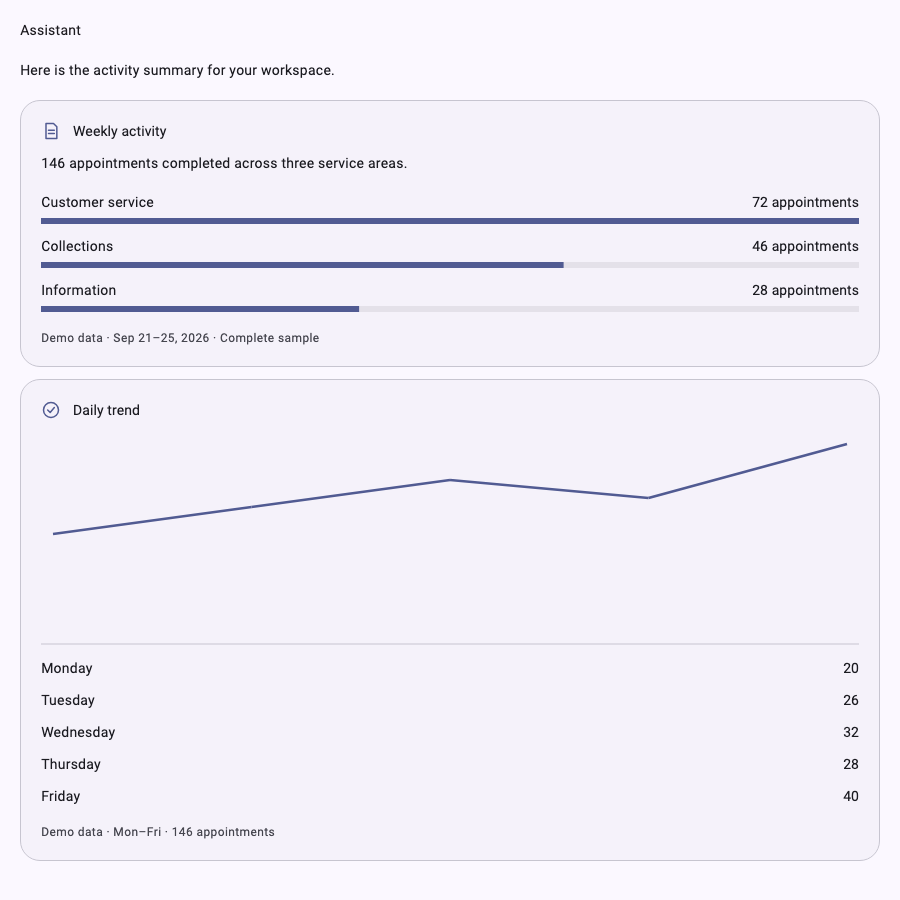
See model experience and verification for owner-reported GPT-OSS 20B/120B results and the boundary of automated testing.
Links and copying
Completed messages and card bodies support named Markdown links and bare HTTP(S) URLs. Tap a link to open it, drag to select and copy on desktop, or long press and choose Copy on mobile. Card and chart text participates in the same selection; automatic scrolling pauses while text is selected. Streamed text stays lightweight until the message completes.
Use onOpenLink on AsystantChat or AsystantButton to provide a host navigation
callback returning FutureOr<bool>. Return true when handled or false for
localized feedback inside the chat. Both default and custom navigation accept
credential-free HTTP(S) URLs only. Model-supplied images render alternative text
without automatically loading external resources. See the
link integration guide.
Libraries
- asystant_ai
- Embeddable Flutter chat and local tools over any AsystantProvider (OpenRouter, Claude Code, ...). Re-exports asystant_core, so every provider the core package ships is available from this import.